Epson PowerLite 1288 -- Best Overall for Mid-Size Rooms
The Epson PowerLite 1288 puts out 4,000 lumens with 3LCD technology, which means colors stay accurate and the image holds up even when overhead lights stay on. It supports wireless projection from Windows and Mac laptops plus iOS and Android devices through the Epson iProjection app. The auto keystone correction handles uneven placement without a manual adjustment each time. Lamp life runs to 12,000 hours in ECO mode, so bulb replacements are infrequent. It handles 1080p resolution natively and accepts HDMI, VGA, and USB inputs. The built-in speaker is serviceable for small rooms, though most conference setups use a dedicated speakerphone regardless.
Check price on Amazon →The right conference room projector keeps meetings on track. These five picks balance brightness, connectivity, and easy setup for offices of every size.
Choosing the wrong projector for a conference room leads to washed-out slides, tangled cable setups, and meetings that start late. The five projectors below cover different room sizes and budgets while keeping brightness, connectivity, and image clarity as the priority.
| Product | Best For | Rating |
| — | — | — |
| Epson PowerLite 1288 | Mid-size rooms | 4.7/5 |
| BenQ MH733 | High-brightness rooms | 4.6/5 |
| ViewSonic PA503W | Small offices | 4.4/5 |
| Optoma EH412ST | Short-throw needs | 4.6/5 |
| Sony VPL-PHZ10 | Large boardrooms | 4.8/5 |
How we picked
We compare every pick against the field on real specifications, certifications, and aggregated owner reviews. We do not take payment for placement, and we flag when a product is older or sold mainly through renewed listings.
Top picks compared
| Pick | Best for | Score | |
|---|---|---|---|
| Epson PowerLite 1288 -- Best Overall for Mid-Size Rooms | Check price | ||
| BenQ MH733 -- Best for Bright Rooms | Check price | ||
| ViewSonic PA503W -- Best Budget Pick for Small Offices | Check price | ||
| Optoma EH412ST -- Best Short-Throw Option | Check price | ||
| Sony VPL-PHZ10 -- Best for Large Boardrooms | Check price |
Our picks up close
Epson PowerLite 1288 -- Best Overall for Mid-Size Rooms
The Epson PowerLite 1288 puts out 4,000 lumens with 3LCD technology, which means colors stay accurate and the image holds up even when overhead lights stay on. It supports wireless projection from Windows and Mac laptops plus iOS and Android devices through the Epson iProjection app. The auto keystone correction handles uneven placement without a manual adjustment each time. Lamp life runs to 12,000 hours in ECO mode, so bulb replacements are infrequent. It handles 1080p resolution natively and accepts HDMI, VGA, and USB inputs. The built-in speaker is serviceable for small rooms, though most conference setups use a dedicated speakerphone regardless.

BenQ MH733 -- Best for Bright Rooms
At 4,000 lumens and a 1.3x optical zoom, the BenQ MH733 is built for conference rooms where killing the lights is not an option. SmartEco technology adjusts lamp power based on content, extending lamp life without dimming slides mid-presentation. The dual HDMI ports support two devices simultaneously, useful when presenters swap laptops frequently. Network control lets IT teams manage the unit remotely. Dust-resistant optics reduce maintenance in office environments that accumulate particulate over time.
ViewSonic PA503W -- Best Budget Pick for Small Offices
The ViewSonic PA503W delivers 3,800 lumens at WXGA resolution for making it the right call for small conference rooms or startups watching their spending. It offers VGA and HDMI inputs, a 22,000-hour SuperEco lamp life, and a simple remote. The image quality is not boardroom-grade, but for a 10-person team reviewing decks on a 100-inch screen, it performs reliably. Setup takes under five minutes out of the box.
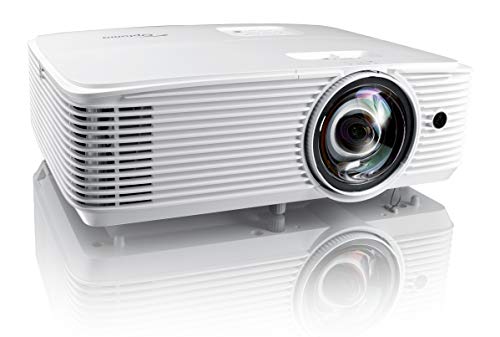
Optoma EH412ST -- Best Short-Throw Option
The Optoma EH412ST uses a 0.62 throw ratio to project a 100-inch image from just over three feet away. That matters in conference rooms where mounting on the ceiling is not practical and the presenter does not want to stand in the projector beam. It produces 4,200 lumens at 1080p and includes two HDMI ports, a 10-watt speaker, and a 15,000-hour lamp in ECO mode. The compact chassis fits on a rolling cart or conference table without dominating the space.

Sony VPL-PHZ10 -- Best for Large Boardrooms
The Sony VPL-PHZ10 is a laser projector rated at 5,000 lumens with a 20,000-hour light source that never needs a bulb replacement. Instant-on and instant-off behavior keeps meetings moving. The lens shift, zoom, and keystone controls offer fine placement flexibility for large or awkward rooms. Picture quality is noticeably sharper than lamp-based competitors at this brightness level. The higher price reflects the total cost of ownership savings from eliminating lamp replacements over a five-year period.
Before you buy
What to consider
Start with room size and lighting conditions. A small, darkened room can use a 3,000-lumen model, but any room with natural light needs 4,000 or more. Decide between standard-throw and short-throw based on ceiling mount availability and presenter movement patterns. Check that the projector's inputs match the laptops your team uses (HDMI is standard, but older rooms may still rely on VGA). Lamp-based projectors cost less upfront but require periodic bulb replacement; laser projectors cost more but cut ongoing maintenance. Finally, match the native resolution to your content: 1080p covers most business use cases.
What to consider
For related reading, see our [best conference room webcam](/articles/best-conference-room-webcam) picks and the [best conference room speakerphone](/articles/best-conference-room-speakerphone) roundup. You can also review our [testing methodology](/methodology) to understand how we evaluate office tech.
Quick answers
For a moderately lit conference room, aim for 3,000 to 4,000 lumens. Rooms with large windows or strong overhead lighting benefit from 4,500 lumens or more. Short-throw models can sometimes perform with fewer lumens because they sit closer to the screen and reduce ambient light interference.
For most business presentations, 1080p (Full HD) delivers sharp slides, spreadsheets, and video with lower cost and easier setup. 4K is worth considering only if your team regularly displays detailed design work or high-resolution video content that genuinely benefits from the extra pixel density.

Tom Reeves has reviewed consumer electronics for over a decade, with a focus on televisions, monitors, laptops, and smart home devices. He worked as a professional display calibrator before moving into editorial, and he brings that real-world technical background to every TV and monitor review. At TheTestedHub, Tom covers display calibration, computer monitors, laptops and 2-in-1s, smart home platforms, home theater setups, and HDR performance.


