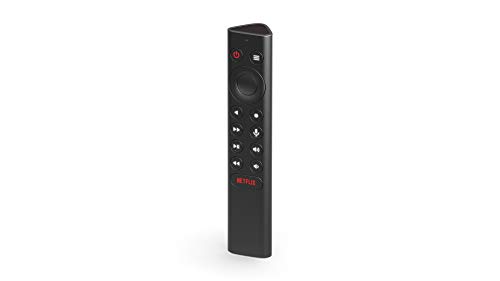
NVIDIA Shield Controller -- Best Native Integration
The official NVIDIA Shield Controller is purpose-built for the Shield TV ecosystem and delivers the most complete experience. It pairs over Bluetooth and includes a built-in microphone for Google Assistant voice search, a 3.5mm headphone jack for audio output directly from the controller, and haptic feedback that works with supported Android TV games. The layout is comfortable for extended sessions and the buttons are responsive. For anyone using Shield TV as their primary living room gaming and media device, starting with the official controller is the right call before exploring alternatives.
Check price on Amazon →The best controllers for NVIDIA Shield TV in 2026, covering official Shield controllers, Xbox pads, and third-party options for gaming, emulation, and media use.
The NVIDIA Shield TV is one of the most capable Android TV devices available, doubling as a media player, cloud gaming terminal, and local emulation box. Getting the right controller makes all of those use cases better. The five options below are all confirmed compatible with Shield TV and represent the best choices across official, first-party, and third-party categories.
| Controller | Best For | Rating |
| — | — | — |
| NVIDIA Shield Controller | Native Shield TV integration | 4.8/5 |
| Xbox Wireless Controller | Modern layout, broad compatibility | 4.7/5 |
| 8BitDo Pro 2 | Retro emulation on Shield | 4.7/5 |
| PlayStation DualSense | PlayStation-layout preference | 4.5/5 |
| GameSir T4 Pro | Budget all-rounder | 4.4/5 |
Our methodology
We compare every pick against the field on real specifications, certifications, and aggregated owner reviews. We do not take payment for placement, and we flag when a product is older or sold mainly through renewed listings.
Side by side
| Pick | Best for | Score | |
|---|---|---|---|
| NVIDIA Shield Controller -- Best Native Integration | Check price | ||
| Xbox Wireless Controller -- Best for Modern Feel | Check price | ||
| 8BitDo Pro 2 -- Best for Emulation on Shield TV | Check price | ||
| PlayStation DualSense -- Best for PlayStation-Layout Users | Check price | ||
| GameSir T4 Pro -- Best Budget Pick for Shield TV | Check price |
The full reviews
NVIDIA Shield Controller -- Best Native Integration
The official NVIDIA Shield Controller is purpose-built for the Shield TV ecosystem and delivers the most complete experience. It pairs over Bluetooth and includes a built-in microphone for Google Assistant voice search, a 3.5mm headphone jack for audio output directly from the controller, and haptic feedback that works with supported Android TV games. The layout is comfortable for extended sessions and the buttons are responsive. For anyone using Shield TV as their primary living room gaming and media device, starting with the official controller is the right call before exploring alternatives.

Xbox Wireless Controller -- Best for Modern Feel
The Xbox Wireless Controller is one of the best all-around controllers available and its Bluetooth compatibility makes it an excellent Shield TV option. The ergonomics are well-established and comfortable for long sessions, and the button layout is widely understood by most players. On Shield TV it pairs quickly and works reliably across games and the Android TV interface. The Xbox Wireless Adapter for Windows is not needed here as the Shield TV handles Bluetooth natively. Series X/S controllers with the updated Bluetooth stack have improved pairing stability compared to older Xbox One pads.

8BitDo Pro 2 -- Best for Emulation on Shield TV
The 8BitDo Pro 2 is a full-featured wireless controller with back buttons, profile switching, and hall effect joystick options depending on the variant you buy. It connects to Shield TV via Bluetooth or the included 2.4GHz USB dongle. For Shield TV users running emulators through RetroArch or standalone emulator apps, the 8BitDo Pro 2 gives you programmable buttons and customizable profiles that make managing different emulated systems cleaner. The d-pad is accurate and the analog sticks perform well for PS1 and N64 era titles. A strong choice for emulation-focused Shield TV setups.

PlayStation DualSense -- Best for PlayStation-Layout Users
The PlayStation DualSense connects to NVIDIA Shield TV via Bluetooth and works well for gaming and Android TV navigation. Players who prefer PlayStation button positioning and analog stick layout will find it immediately comfortable. The adaptive triggers and haptic feedback features are not utilized in most Android TV games, so those features are effectively unused on Shield TV, but the core controller experience is solid. It is also a useful choice if you already own a DualSense for PS5 and want to reuse it without buying another controller for the Shield.

GameSir T4 Pro -- Best Budget Pick for Shield TV
The GameSir T4 Pro is a Bluetooth gamepad with a full analog layout, six-axis gyro, and RGB lighting at a price well below first-party alternatives. It pairs easily with Shield TV and covers both gaming and Android TV navigation. Build quality is above average for its price point and the button layout is intuitive. For users who want a dedicated Shield TV controller without spending on a first-party pad, and who do not need specialized features like back buttons or programmable profiles, the T4 Pro is a reliable budget choice.
What matters most
What to consider
If you are using Shield TV primarily as a media and streaming device with occasional gaming, any Bluetooth controller will serve well and the official NVIDIA Shield Controller is the simplest choice. If gaming is your primary use case, prioritize ergonomics and analog stick quality. For emulation-heavy setups, a controller with programmable buttons and profile switching like the 8BitDo Pro 2 saves time on per-system configuration. Budget to covers every tier here. Avoid controllers that connect only via USB dongle if your Shield TV is wall-mounted and the USB port is difficult to access.
What to consider
For related recommendations, see our [best controller for Raspberry Pi 4](/articles/best-controller-for-raspberry-pi-4) guide and our [scoring methodology](/methodology) for how we evaluate gaming peripherals.
Frequently asked
Yes. The NVIDIA Shield TV supports Xbox Wireless Controllers via Bluetooth and Xbox Series X/S controllers via their newer Bluetooth protocol. PlayStation DualShock 4 and DualSense controllers also connect via Bluetooth on Shield TV. Not all features like rumble or the touchpad are guaranteed to function in every game or app, but basic navigation and gameplay work reliably across all major first-party controllers.
The official NVIDIA Shield Controller offers the tightest integration with Shield TV including a built-in microphone for Google Assistant, haptic feedback, and a 3.5mm headphone jack. For users who primarily use Shield TV for gaming and Android TV navigation, it is the most seamless experience. If you already own an Xbox controller or prefer a different layout, that works well too and saves the cost of a new purchase.

Tom Reeves has reviewed consumer electronics for over a decade, with a focus on televisions, monitors, laptops, and smart home devices. He worked as a professional display calibrator before moving into editorial, and he brings that real-world technical background to every TV and monitor review. At TheTestedHub, Tom covers display calibration, computer monitors, laptops and 2-in-1s, smart home platforms, home theater setups, and HDR performance.
You might also like
5 Best Controller for PC Windows 10 2026 | Plug-and-Play Ready

5 Best Controller for PCX 2026 | Top Picks for Extended PC Gaming

5 Best Controllers for Mac Gaming 2026 | Gamepads for macOS
5 Best Controllers for Xbox One Fortnite 2026 | Win More Builds and Fights

5 Best PS4 Controllers 2026 | Top Control Options for PlayStation 4

5 Best Controllers for PS2 2026 | Top Picks for Classic Gaming
5 Best Controller with Dpad 2026 | Fighting & Platformer Tested