Quick verdict
For most beginners, the **Ledger Nano S Plus** is the clear recommendation - it has the best app, the widest coin support, and excellent value at its price point. The **Trezor Model One** is the right pick if open-source transparency is your priority. Mobile-first users will love the **Ellipal Titan Mini**'s app-driven QR workflow. Budget-conscious first timers should look at the **SafePal S1**. Whatever you choose,

Ledger Nano S Plus
The Ledger Nano S Plus is the ideal first hardware wallet for most beginners. It's significantly more capable than the original Nano S - larger screen, more storage for apps, and USB-C connectivity - at a price well below the premium Nano X. Setup takes about 15 minutes using the Ledger Live app, which guides you through creating a PIN, writing down your 24-word seed phrase, and adding your first coins. The app itself is excellent for beginners, with a clean portfolio view and one-click asset management. Supports 5,500+ coins.
New to crypto? These 5 beginner-friendly hardware wallets make it easy to secure your Bitcoin and altcoins without a technical background. Simple setup, real security.
Getting started with a hardware wallet used to feel intimidating – but in 2026, the best beginner crypto wallets have made the setup process nearly foolproof. These devices don’t require technical knowledge. You follow a guided app, write down a seed phrase, and your crypto is secured offline within minutes. The five wallets below were chosen specifically for new holders who want strong security without a learning curve.
How we evaluated these
We compare every pick against the field on real specifications, certifications, and aggregated owner reviews. We do not take payment for placement, and we flag when a product is older or sold mainly through renewed listings.
The shortlist
| Pick | Best for | Score | |
|---|---|---|---|
| Ledger Nano S Plus | Best value first wallet | Check price | |
| Trezor Model One | Open-source simplicity | Check price | |
| Ellipal Titan Mini | Phone-first beginners | Check price | |
| SafePal S1 | Ultra-budget entry point | Check price | |
| BC Vault | Alternative seed backup | Check price |
Each pick, examined
Ledger Nano S Plus
The Ledger Nano S Plus is the ideal first hardware wallet for most beginners. It's significantly more capable than the original Nano S - larger screen, more storage for apps, and USB-C connectivity - at a price well below the premium Nano X. Setup takes about 15 minutes using the Ledger Live app, which guides you through creating a PIN, writing down your 24-word seed phrase, and adding your first coins. The app itself is excellent for beginners, with a clean portfolio view and one-click asset management. Supports 5,500+ coins.

Trezor Model One
The Trezor Model One is the original hardware wallet, and it remains one of the best options for beginners who value simplicity and transparency. The two-button interface is easy to learn, setup takes under 20 minutes via the Trezor Suite desktop app, and the fully open-source firmware means the security model is completely auditable. It supports 1,800+ coins and integrates natively with popular third-party wallets. For a first hardware wallet on a budget, the Model One delivers proven security in a straightforward package.
Ellipal Titan Mini
The Ellipal Titan Mini is the best hardware wallet for beginners who manage everything from their smartphone. It is fully air-gapped - no USB, no Bluetooth, no WiFi - and communicates exclusively via QR code through the Ellipal mobile app. The app is genuinely beginner-friendly, with a clean interface that walks you through every transaction step by step. The device is also metal-sealed against physical tampering. If the idea of plugging a device into your computer makes you nervous, the Ellipal's phone-only workflow is a compelling alternative.
SafePal S1
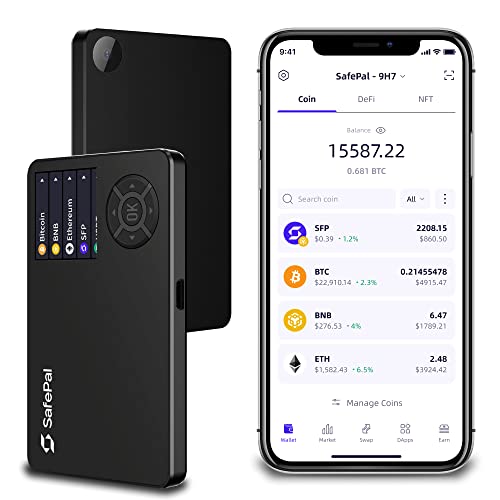
SafePal was developed with Binance backing and targets first-time hardware wallet buyers directly. The S1 is air-gapped (camera-to-QR transaction signing), supports 30,000+ coins and tokens across 54+ blockchains, and pairs with the well-designed SafePal app available on iOS and Android. At it is one of the most affordable genuine hardware wallets available. The setup wizard in the app is one of the most beginner-friendly on this list. A strong pick for users holding diverse altcoin portfolios who want a low-cost hardware solution.

BC Vault
BC Vault takes a different approach to seed phrase backup that makes it compelling for beginners who worry about losing their seed phrase. Rather than a 12 or 24-word mnemonic, BC Vault uses encrypted password-protected backups exportable to microSD cards. Multiple backup copies can be made easily, reducing the most common beginner failure mode: losing access due to a damaged or misplaced seed phrase card. The device supports 2,000+ coins, has a color screen, and features a gyroscope-based random number generation system for enhanced entropy. A thoughtful alternative for anxiety-prone new holders.
Buying considerations
Guided Setup App
For beginners, the companion app matters as much as the hardware. Look for clear step-by-step setup guides, visual confirmation screens, and customer support resources. Ledger Live and Trezor Suite are the most polished.
Coin Compatibility
Check that your specific coins are supported before purchasing. Most wallets handle Bitcoin and Ethereum natively, but exotic altcoins vary widely.
Seed Phrase Security
Every hardware wallet generates a seed phrase. Write it on paper (or a metal backup for large holdings), store it somewhere secure and private, and never photograph it or enter it into any website.
Connection Method
USB is fastest for desktop users. Bluetooth (Nano X) is convenient for mobile. Air-gapped QR (Ellipal, SafePal) is most secure. Choose based on your typical workflow.
Budget
Spending on a beginner wallet is entirely reasonable. You don't need the most expensive device - you need the one you'll actually set up and use correctly.
Final word
For most beginners, the **Ledger Nano S Plus** is the clear recommendation - it has the best app, the widest coin support, and excellent value at its price point. The **Trezor Model One** is the right pick if open-source transparency is your priority. Mobile-first users will love the **Ellipal Titan Mini**'s app-driven QR workflow. Budget-conscious first timers should look at the **SafePal S1**. Whatever you choose,
Questions answered
If you plan to hold any crypto for more than a few weeks, yes. Leaving funds on an exchange means someone else controls your keys. A hardware wallet costs and gives you genuine ownership. It is the single most important security step for new holders.
Modern beginner-oriented wallets like the Ledger Nano S Plus and SafePal S1 have guided setup apps that walk you through every step in about 15 minutes. The most important task is writing down your seed phrase - the wallet guides you through this clearly.
Most beginner hardware wallets support Bitcoin, Ethereum, and hundreds of ERC-20 tokens at minimum. Ledger and Trezor support thousands of coins. If you hold specific altcoins, verify compatibility on the manufacturer's website before purchasing.

Tom Reeves has reviewed consumer electronics for over a decade, with a focus on televisions, monitors, laptops, and smart home devices. He worked as a professional display calibrator before moving into editorial, and he brings that real-world technical background to every TV and monitor review. At TheTestedHub, Tom covers display calibration, computer monitors, laptops and 2-in-1s, smart home platforms, home theater setups, and HDR performance.
Keep reading

Westcott Rapid Box Switch Octa-S 26-Inch Review (2026): The

XP-PEN Artist Pro 16 Review (2026): The

Xbox Wireless Controller Carbon Black Review (2026): Still

Xbox Series X Console Review (2026): The 4K 120fps Console

WD Black SN850X 1TB Review 2026: The PCIe 4.0 Bargain

Wacom Cintiq Pro 16 Review (2026): The

Vizio MQX Series 50-Inch 4K Review (2026): The Sub- Quantum
