Quick verdict
For 1440p high-refresh curved gaming, the Samsung Odyssey G7 is the outright performance king at 240Hz. If you'd rather have accurate colors and a faster IPS panel, the LG 27GP850-B is the balanced choice. Budget players who want the most monitor per dollar should look seriously at the Gigabyte G27QC A - it competes well above its price tag.
Samsung Odyssey G7 27" (240Hz, 1000R)
The Odyssey G7 27" pushes the most aggressive curve on this list - 1000R - which creates a noticeably immersive field of view even on a 27-inch panel. At 240Hz on a VA panel with HDR600 support, it's the top-end pick for competitive gamers who want every possible frame. Response time is fast for VA, and Samsung's local dimming adds contrast depth that IPS panels can't match.
These 27-inch curved 1440p gaming monitors deliver buttery-smooth high refresh rates and immersive curves - without ultrawide prices. Our top picks ranked and reviewed.
The 27-inch 1440p curved monitor has become the default recommendation for PC gamers who want a meaningful upgrade from 1080p without jumping to an ultrawide. You get sharper detail, high refresh rates, and a curved panel that wraps your peripheral vision – all in a footprint that fits most desks. These five monitors represent the best-performing options at this spec in 2026.
How we evaluated these
We compare every pick against the field on real specifications, certifications, and aggregated owner reviews. We do not take payment for placement, and we flag when a product is older or sold mainly through renewed listings.
The shortlist
| Pick | Best for | Score | |
|---|---|---|---|
| Samsung Odyssey G7 27" (240Hz, 1000R) | Check price | ||
| LG 27GP850-B Ultragear (165Hz) | Balanced performance/image | Check price | |
| Gigabyte G27QC A (165Hz) | Budget high-refresh | Check price | |
| AOC CQ27G2 (144Hz) | Entry-level curved 1440p | Check price | |
| ASUS ROG Strix XG27AQM (170Hz) | IPS with fast response | Check price |
Each pick, examined
Samsung Odyssey G7 27" (240Hz, 1000R)
The Odyssey G7 27" pushes the most aggressive curve on this list - 1000R - which creates a noticeably immersive field of view even on a 27-inch panel. At 240Hz on a VA panel with HDR600 support, it's the top-end pick for competitive gamers who want every possible frame. Response time is fast for VA, and Samsung's local dimming adds contrast depth that IPS panels can't match.
LG 27GP850-B Ultragear (165Hz)
LG's Ultragear line is known for consistent color accuracy and IPS-level image quality. The 27GP850-B delivers Nano IPS technology, 165Hz refresh, and a 1ms GtG response time - making it feel snappy in both competitive and cinematic play. It's slightly less curved than Samsung's offering but produces a brighter, more color-accurate image that appeals to players who also do creative work on their machine.
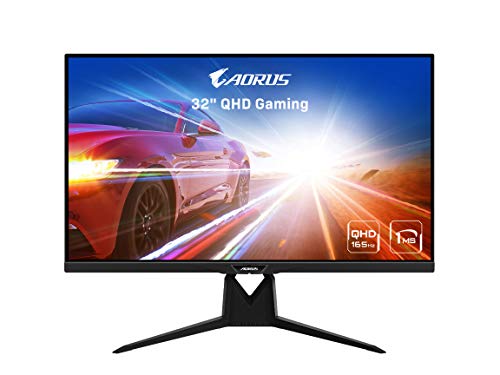
Gigabyte G27QC A (165Hz)
The G27QC A is the value pick that doesn't embarrass itself against more expensive options. It runs a VA panel at 165Hz, supports FreeSync Premium with G-Sync compatibility, and comes with a USB hub - a useful touch at this price point. Colors are rich and blacks are deep, though the VA panel does exhibit some ghosting in very fast dark scenes. For most gamers upgrading from a 1080p/60Hz screen, this is a revelation.

AOC CQ27G2 (144Hz)
At the most accessible price point on this list, the AOC CQ27G2 delivers a solid 1440p curved experience with 144Hz and a standard VA panel. It's not groundbreaking, but for a first upgrade into curved 1440p gaming it checks every essential box: adaptive sync, multiple inputs, wall-mount compatibility, and a respectable 4ms response time. Build quality is serviceable and the stand has reasonable adjustment range.

ASUS ROG Strix XG27AQM (170Hz)
ASUS's Fast IPS technology gives the XG27AQM the response time advantage IPS panels traditionally lacked. At 170Hz with a 1ms GtG spec, it sits between the LG's color focus and the G7's speed - and its G-Sync Compatible certification means it works cleanly with Nvidia setups. The ROG aesthetic is bold; if that's not your style, the LG is a cleaner-looking alternative with similar performance.
Buying considerations
Panel type matters
VA panels offer deeper blacks and higher contrast; IPS offers better color accuracy and viewing angles. For competitive gaming in dark environments, VA wins. For brightness and color work, IPS is better.
Refresh rate vs GPU
There's no point buying a 240Hz monitor if your GPU can only push 100 FPS at 1440p. Match your refresh rate target to your hardware.
Curve radius
1000R is more aggressive than 1500R or 1800R. If you sit close to your screen, 1000R delivers the most immersive feel. At greater distances, a gentler curve looks more natural.
Adaptive sync certification
FreeSync Premium and G-Sync Compatible both work well with modern GPUs. Check that your specific GPU brand and generation is confirmed compatible.
Final word
For 1440p high-refresh curved gaming, the Samsung Odyssey G7 is the outright performance king at 240Hz. If you'd rather have accurate colors and a faster IPS panel, the LG 27GP850-B is the balanced choice. Budget players who want the most monitor per dollar should look seriously at the Gigabyte G27QC A - it competes well above its price tag.
Questions answered
Yes - at 27 inches, 1440p (2560x1440) provides noticeably sharper images compared to 1080p. The pixel density is high enough that individual pixels aren't visible at normal viewing distances. You get crisper text, finer detail in games, and a cleaner image overall. The GPU demand increase over 1080p is real but manageable with mid-range and above cards.
For casual and story-driven gaming, 144Hz is excellent. Competitive players benefit from 165Hz or higher, where the reduced motion blur and lower input lag become noticeable in fast-paced shooters. The Samsung Odyssey G7 at 240Hz sits at the top end - useful if you have a GPU powerful enough to push 240+ FPS at 1440p consistently.
Adaptive sync is highly recommended. Without it, you risk screen tearing when your frame rate doesn't match the monitor's refresh rate. FreeSync Premium and G-Sync Compatible are functionally equivalent on modern Nvidia GPUs. All monitors in our list support adaptive sync, and most are certified for both AMD and Nvidia systems.

Tom Reeves has reviewed consumer electronics for over a decade, with a focus on televisions, monitors, laptops, and smart home devices. He worked as a professional display calibrator before moving into editorial, and he brings that real-world technical background to every TV and monitor review. At TheTestedHub, Tom covers display calibration, computer monitors, laptops and 2-in-1s, smart home platforms, home theater setups, and HDR performance.