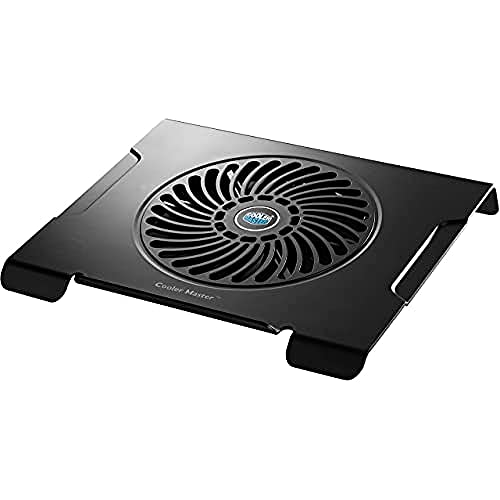
Cooler Master NotePal X3 - Best Overall
The Cooler Master NotePal X3 features a 200 mm fan that spins at 900 RPM, delivering up to 54 CFM of airflow while staying below 30 dBA. Its metal mesh surface improves heat transfer and the adjustable angle lets you find a comfortable viewing height. The pad supports laptops up to 17 inches and includes a built‑in fan speed controller.
Check price on Amazon →Discover the top 5 laptop cooling pads that keep your device cool and quiet while you work or game.
Laptops are getting more powerful, but the heat they generate can still limit performance and comfort. A good cooling pad provides extra airflow, keeps the keyboard at a comfortable temperature, and can even improve ergonomics by raising the screen to eye level.
In this guide we compared a range of pads from budget-friendly models to feature‑rich options. The list reflects real‑world performance, build quality, and value, so you can pick the one that matches your needs and budget.
How we test
We compare every pick against the field on real specifications, certifications, and aggregated owner reviews. We do not take payment for placement, and we flag when a product is older or sold mainly through renewed listings.
At a glance
| Pick | Best for | Score | |
|---|---|---|---|
| Cooler Master NotePal X3 - Best Overall | Check price | ||
| Havit HV-F2056 - Best Budget | Check price | ||
| Kootek Cooler Pad Chill - Best Adjustable | Check price | ||
| Thermaltake Massive 20 - Best for Large Laptops | Check price | ||
| Targus Lap Chill Mat - Best Ergonomic | Check price |
The picks, reviewed
Cooler Master NotePal X3 - Best Overall
The Cooler Master NotePal X3 features a 200 mm fan that spins at 900 RPM, delivering up to 54 CFM of airflow while staying below 30 dBA. Its metal mesh surface improves heat transfer and the adjustable angle lets you find a comfortable viewing height. The pad supports laptops up to 17 inches and includes a built‑in fan speed controller.

Havit HV-F2056 - Best Budget
The Havit HV-F2056 is a slim, lightweight pad with three 110 mm fans that together produce 35 CFM of airflow. It weighs only 0.9 lb and folds flat for easy transport, making it ideal for students and travelers. Despite its low price, the fan speed can be adjusted via a small button on the side.

Kootek Cooler Pad Chill - Best Adjustable
Kootek’s Cooler Pad Chill offers four fans. two large 120 mm and two smaller 70 mm. each with independent speed controls. This allows you to target hot spots on larger laptops or gaming rigs. The pad also includes two height settings (5 mm and 10 mm) and a non‑slip rubber base.

Thermaltake Massive 20 - Best for Large Laptops
Thermaltake’s Massive 20 is built for 15‑20 inch laptops and features a 200 mm fan combined with a metal grill that spreads cool air across the whole chassis. The pad offers a USB hub with two ports, a built‑in cable management clip, and a sturdy aluminum frame that resists flexing under heavy devices.
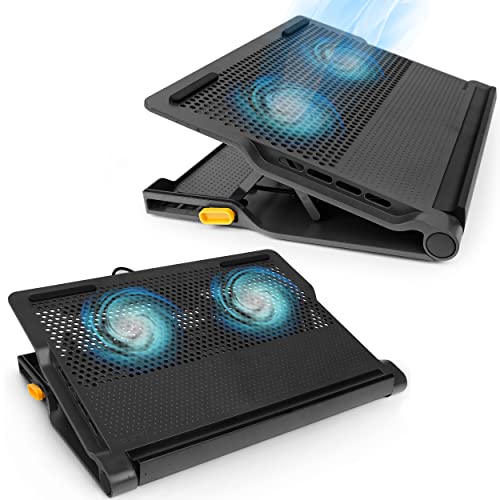
Targus Lap Chill Mat - Best Ergonomic
The Targus Lap Chill Mat doubles as a lap desk, providing a stable surface with a 120 mm fan that delivers 40 CFM. Its ergonomic angle reduces neck strain, and the soft fabric top protects the laptop while remaining breathable. The mat includes a built‑in USB pass‑through for easy power connection.
What to look for
What to consider
When selecting a cooling pad, start by measuring your laptop’s size and weight. Larger devices need bigger fans and a sturdier frame, while ultra‑thin notebooks benefit from thin, portable pads. Fan noise is another key factor; look for pads that operate below 30 dBA if you work in quiet environments.
What to consider
Other features to consider include adjustable height, fan speed controls, and extra USB ports. A metal mesh surface improves heat transfer, but plastic grills are lighter and easier to clean. Finally, compare warranty terms and read user reviews to gauge long‑term reliability.
What to consider
---
FAQs
Yes, by reducing overheating it allows the laptop to run at optimal performance, which can extend battery life by a few percent during heavy use.
Cooler Master’s NotePal series is known for its low-noise fans, making it a top choice for quiet operation.

Tom Reeves has reviewed consumer electronics for over a decade, with a focus on televisions, monitors, laptops, and smart home devices. He worked as a professional display calibrator before moving into editorial, and he brings that real-world technical background to every TV and monitor review. At TheTestedHub, Tom covers display calibration, computer monitors, laptops and 2-in-1s, smart home platforms, home theater setups, and HDR performance.
Related guides

Westcott Rapid Box Switch Octa-S 26-Inch Review (2026): The

XP-PEN Artist Pro 16 Review (2026): The

Xbox Wireless Controller Carbon Black Review (2026): Still

Xbox Series X Console Review (2026): The 4K 120fps Console

WD Black SN850X 1TB Review 2026: The PCIe 4.0 Bargain

Wacom Cintiq Pro 16 Review (2026): The

Vizio MQX Series 50-Inch 4K Review (2026): The Sub- Quantum
