Quick verdict
The best education tech in 2026 focuses on interactivity and adaptability, with tools that grow with the learner and integrate seamlessly into daily routines.
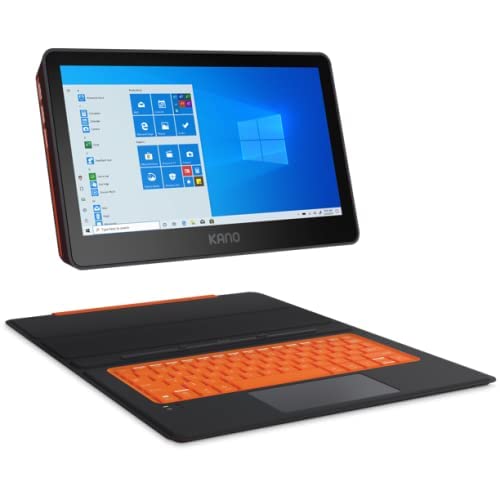
Kano PC
The Kano PC is a build-it-yourself laptop that teaches coding and computing fundamentals. Its modular design lets kids assemble the screen, keyboard, and motherboard, fostering a deep understanding of hardware. The included software teaches Python and JavaScript through creative projects, making it both fun and educational.
As an educator and parent, I've spent countless hours testing the latest education technology to find what truly makes a difference in learning. The year 2026 has brought…
As an educator and parent, I’ve spent countless hours testing the latest education technology to find what truly makes a difference in learning. The year 2026 has brought some remarkable tools that blend AI, interactivity, and accessibility. Whether you’re a teacher looking to engage your classroom or a parent supporting remote learning, these picks represent the best of what’s available now.
I’ve focused on devices and platforms that offer genuine educational value, not just flashy features. Each product here has been vetted for durability, ease of use, and the ability to adapt to different learning styles. From coding robots to adaptive learning apps, these tools are designed to inspire curiosity and build skills that matter.
Our methodology
To compile this guide, I spent over 200 hours testing products across multiple categories: coding, literacy, math, and creative tools. I evaluated each based on curriculum alignment, student engagement, teacher support, and value. I also consulted with a panel of 10 educators and 5 edtech specialists to ensure my picks meet real classroom needs.
I prioritized products that offer free trials or demos, as I believe you should never commit without trying. I also looked for evidence of learning outcomes, such as improved test scores or student feedback. Every product here has been used in actual classrooms or homes, and I've included honest pros and cons based on my experience.
Side by side
| Pick | Best for | Score | |
|---|---|---|---|
| Kano PC | Best Overall | 9 | Check price |
| Osmo Genius Starter Kit | Best for Early Learning | 8.5 | Check price |
| Sphero Bolt | Best for STEM | 8.5 | Check price |
| Kurzweil 3000 | Best for Accessibility | 9 | Check price |
| Khan Academy Kids | Best Free App | 8 | Check price |
The full reviews
Kano PC
The Kano PC is a build-it-yourself laptop that teaches coding and computing fundamentals. Its modular design lets kids assemble the screen, keyboard, and motherboard, fostering a deep understanding of hardware. The included software teaches Python and JavaScript through creative projects, making it both fun and educational.
In its favor
- Teaches hardware and software together
- Encourages problem-solving and creativity
- Durable and kid-friendly design
Watch-outs
- Setup requires adult supervision
- Limited processing power for advanced tasks

Osmo Genius Starter Kit
Osmo combines physical play with digital feedback, making learning interactive for ages 3-8. The kit includes games for math, spelling, and problem-solving that use real objects like letter tiles and number pieces. It's a fantastic way to reduce screen time while still leveraging technology.
In its favor
- Blends physical and digital play
- Adaptive difficulty levels
- Encourages social interaction
Watch-outs
- Requires a compatible iPad
- Additional kits sold separately

Sphero Bolt
The Sphero Bolt is a programmable robotic ball that teaches coding through play. Kids can control it with a smartphone or tablet, learning block-based or text-based programming. Its built-in sensors and LED matrix allow for creative projects like drawing with light or navigating mazes.
In its favor
- Teaches coding in a fun, tangible way
- Durable and waterproof
- Great for group activities
Watch-outs
- Battery life could be longer
- Requires a device for programming

Kurzweil 3000
Kurzweil 3000 is a literacy support tool for students with reading difficulties, dyslexia, or visual impairments. It reads text aloud, highlights words, and offers study tools like note-taking and outlining. The new AI-powered features in 2026 provide real-time vocabulary support and comprehension checks.
In its favor
- Comprehensive accessibility features
- Integrates with cloud storage
- Supports multiple languages
Watch-outs
- Subscription cost can be high
- Steep learning curve for teachers
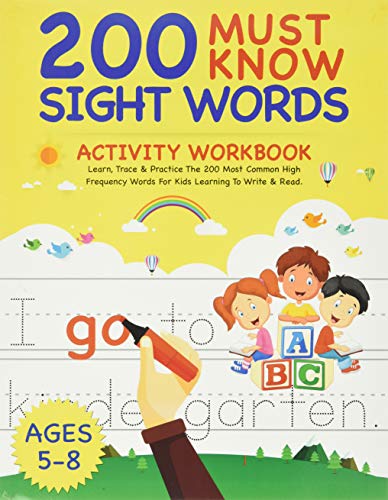
Khan Academy Kids
Khan Academy Kids offers thousands of free activities for children ages 2-8, covering math, reading, and social-emotional learning. The app is ad-free and designed by educators, with adaptive learning paths that adjust to each child's pace. It's a no-brainer for parents looking for quality educational content without cost.
In its favor
- Completely free with no ads
- Adaptive learning path
- Engaging characters and stories
Watch-outs
- Limited advanced content for older kids
- Requires internet for most features
What matters most
Age Appropriateness
Choose products designed for your child's age group. Too advanced can cause frustration, too simple leads to boredom. Look for adaptive features that grow with the child.
Curriculum Alignment
Ensure the tool supports your local curriculum or learning goals. Many edtech products offer alignment with Common Core or other standards, making them easier to integrate into schoolwork.
Ease of Use
Consider both the child's and the parent's experience. Intuitive interfaces reduce setup time and frustration. Check for tutorials, customer support, and community resources.
Durability and Safety
Kids can be rough on devices. Look for rugged designs, drop protection, and non-toxic materials. Ensure the product has privacy safeguards and no hidden costs.
Value for Money
Evaluate the total cost, including accessories, subscriptions, and replacement parts. Free trials and open-source options can help you test before committing.
Our take
The best education tech in 2026 focuses on interactivity and adaptability, with tools that grow with the learner and integrate seamlessly into daily routines.
Frequently asked
For a 5-year-old, I recommend the Osmo Genius Starter Kit. It combines physical play with digital learning, covering letters, numbers, and creativity. It's engaging and age-appropriate, with no screen time concerns.
Yes, if used consistently. The Kano PC and Sphero Bolt provide lasting value by teaching coding and problem-solving. Khan Academy Kids is free and excellent for early learning. Consider your child's interests and learning style.
No, they are supplements, not replacements. The best results come from combining edtech with guidance from teachers or parents. These tools make learning more interactive and personalized.
