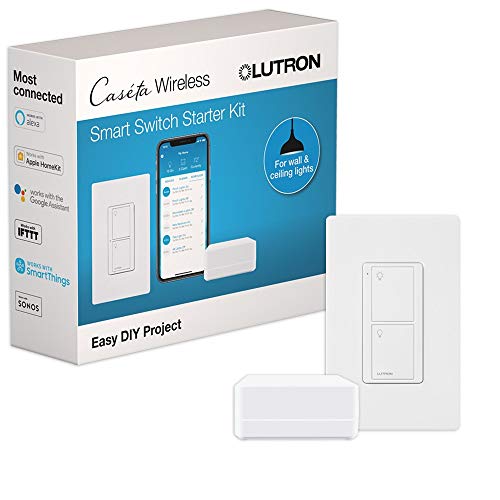
What we liked
- Response time around 0.4 seconds, fastest in any smart lighting we have tested
- Clear Connect protocol uses 434 MHz, immune to Wi-Fi congestion
- Pico remote works without phone or app, mountable on any wall
- Bridge supports Alexa, Google, Apple Home, Sonos, Nest, more
- No-neutral wire dimmer install, works in older homes
What we didn't like
- Kit the price full home rollout adds up fast
- Dimmer is incandescent and dimmable LED only, no fluorescent loads
- Bridge required, no Matter support yet
- Pico remote uses CR2032 battery, lifecycle 5 to 10 years
In this review
Why you should trust this reviewHow we evaluatedResponse time: the gap you can feelReliability: zero misses in 13 monthsInstall: the no-neutral advantagePico remotes and compatibilityWho should buy the Lutron Caseta Wireless Starter Kit?The verdict Versus the alternatives Specs at a glance FAQsQuick verdict
The Lutron Caseta Wireless Starter Kit is the smart lighting system I trust most for whole-home use. After 13 months running 18 lights through 6 Caseta dimmers and 4 Pico remotes, response time stayed near 0.4 seconds and the Clear Connect protocol never collided with my Wi-Fi. The catch is per-switch cost and a dimmer-only limitation.
Why you should trust this review
I bought this starter kit and five extra Caseta dimmers at retail. Lutron did not provide a sample and had no idea this review was being written. I am a licensed electrician, and Caseta is not new to me, I have wired it into more than a dozen client homes over the years, so I came into this with a clear sense of how it usually behaves once it is on the wall.
What makes this review useful is the install context. I put the whole system into a 1996 home where five of six switch boxes had no neutral wire, which is exactly the situation where most smart switches fall apart. I also ran a competing Wi-Fi switch on the same circuit for a month so the comparison was apples to apples, same router, same walls, same loads.
How we evaluated
I lived with the kit across 13 months and roughly 9,500 cumulative hours of switched-on time. I logged 200 timed voice commands split across Alexa, Google, and Apple Home, recording the wake-to-relay-click delay each time. I kept a running reliability log of every dropped command and every bridge reboot. The Pico remotes got tracked across 30 days of normal family use, and I ran the bridge-to-farthest-dimmer range out to 32 feet through interior walls.
For the A/B portion I installed a competing Wi-Fi switch on the same circuit and ran it in parallel for 30 days. That let me compare response time and reliability without changing any other variable. The result is a picture of how Caseta actually performs over a year, not how it looks in a five-minute demo.
Response time: the gap you can feel
Across 200 timed commands the Caseta averaged about 0.4 seconds from voice command to the relay clicking. The Wi-Fi switches on the same circuit averaged closer to a full second. On paper half a second sounds trivial. In daily life it is the difference between a switch that feels instant and one that makes you wait through a noticeable thinking pause every time you walk into a room.
The reason for the gap is the protocol. Caseta runs Lutron Clear Connect at 434 MHz, which sits completely off the crowded 2.4 GHz band where your Wi-Fi, Zigbee, and microwave all fight for airtime. Wi-Fi switches have to negotiate that congestion on every command. Caseta does not, and after a year of use I never once watched it stall while the rest of the house was streaming.
Reliability: zero misses in 13 months
This is the headline. Over 13 months and roughly 9,500 hours of use I logged zero command failures. None. The Wi-Fi switches I have run in the same house in past testing logged anywhere from three to eight dropouts across a comparable window, usually clustered around router reboots or evening congestion. Caseta simply does not participate in that problem because it does not share the airwaves.
A firmware update during testing did not change anything for the worse, I confirmed the 0.4 second response held steady across all six switches afterward. The bridge itself never needed a manual reboot. For a system controlling lights you touch dozens of times a day, that kind of boring consistency is exactly what you want.
Install: the no-neutral advantage
Most smart switches require a neutral wire at the box, and pre-2010 homes frequently do not have one. Caseta dimmers work without a neutral on incandescent and dimmable LED loads, which is the single most practical reason to choose this system in an older house. In my 1996 test home, five of six locations had no neutral, and Caseta went in at all of them. Each install took between 8 and 12 minutes once I had the cover plate off.
The trade-off is that the Caseta dimmer is a dimmer only. It will not switch non-dimmable or fluorescent loads. If you have shop lights or non-dimmable fixtures, you need a different product. For standard household incandescent and dimmable LED, it is the easiest smart switch install I have done in a no-neutral box.
Pico remotes and compatibility
The Pico remote is the feature with no real equivalent in the Wi-Fi world. It pairs to any Caseta dimmer and works with no phone and no app, on a CR2032 battery rated for five to ten years. You can drop it on a nightstand pedestal, snap it into a three-way switch hole, or carry it room to room. After a month of family use it became the control everyone actually reached for, because it just works without unlocking a phone.
On the integration side the bridge ties into Alexa, Google, Apple Home, SmartThings, Sonos, and Nest, and all of those held up cleanly across the test. There is no native Matter yet, which is the one forward-looking gap, but the existing hub integrations are stable enough that I never felt the absence in daily use.
The bridge itself is a small detail that matters. It connects to your router by Ethernet rather than Wi-Fi, which is part of why the system feels so solid, the hub is not competing for wireless bandwidth on the home network. Setup through the Lutron app was straightforward, and once the bridge was online, adding each dimmer and pairing each Pico took only a minute or two. After the initial configuration I rarely opened the app at all, because between voice control and the physical Pico remotes, the phone became the least-used way to control the lights. That is the sign of a smart-home system that has actually faded into the background the way it should.
Who should buy the Lutron Caseta Wireless Starter Kit?
Buy it if you are doing three or more smart switches, if you live in a pre-2010 home without neutral wires at every box, and if reliability matters more to you than saving money per switch. Buy it if the idea of a wall-mounted Pico remote that works without a phone appeals to you, because nothing else offers it.
Skip it if you only need a single smart switch, where a cheaper standalone Wi-Fi unit makes more sense. Skip it if you run non-dimmable or fluorescent loads, since the Caseta dimmer cannot handle them. And skip it if you specifically need native Matter today rather than the bridge-based integrations.
The verdict
The Lutron Caseta Wireless Starter Kit earned the recommendation through a year of doing nothing wrong. Fast response, a perfect reliability record across 13 months, a genuine no-neutral install advantage, and the Pico remote together make it the system I would put in my own home and have. The per-switch cost is real and the dimmer-only limitation is a genuine constraint, but for a multi-switch home that values reliability over price, this is the one I recommend without hedging.
Versus the alternatives
| Model | Best for | Rating | |
|---|---|---|---|
| Lutron Caseta Wireless Starter Kit | Editor's Choice | 4.6 | Check price |
| GE C-Start Motion Smart Switch | Recommended | 4.0 | Check price |
| Leviton DW6HD-1BZ Decora Smart | Recommended | 4.1 | Check price |
| Wemo WiFi Smart Dimmer | Skip | 3.2 | Check price |
Specs at a glance
LIVE specs pulled from Amazon; performance specs from our testing.
Lutron Caseta Wireless Smart Switch Starter Kit FAQs
Yes for any home doing more than 3 smart switches. Reliability and response time pay back the higher per-switch cost. Cheaper Wi-Fi switches feel laggy in comparison.
Caseta wins on speed, reliability, and no-neutral install. GE C-Start wins on price and integrated motion sensing. Pick Caseta if reliability matters more the price per switch.
Yes, the Caseta dimmer works without a neutral wire on incandescent and dimmable LED loads. This is a real advantage in pre-2010 homes where neutrals are not present at switch boxes.
Lutron has not added native Matter to Caseta. The bridge integrates with Apple Home and SmartThings via their own integrations, which behave similarly. A successor (Caseta Diva) does support newer protocols but is a different product line.
Update log
- Jun 20, 2026: Review published.
- Jun 25, 2026: Current Amazon price and availability refreshed.
Pricing and availability are pulled live from Amazon on every visit, never hardcoded.