Where it shines
- Fastest streaming box we have tested (1.4s average cold app launch)
- Best-in-class remote with rechargeable battery and Find My support
- AirPlay, HomeKit, FaceTime, Fitness Plus integration
- No ads on the home screen
- Dolby Vision, Dolby Atmos, HDR10+, and HLG all supported
Where it falls short
- Higher price than Roku Ultra and Google TV Streamer
- Apple TV Plus content gets prioritized in the UI
- No Atmos support over wired Ethernet on some receivers (HDMI eARC required)
In this review
Why you should trust this reviewHow we evaluatedPerformance: the fastest streamer I have usedRemote: still the best in the categoryHDR, audio, and ecosystem integrationWhere the price premium bitesWho should buy the Apple TV 4K?The verdict How it stacks up Key specifications FAQsQuick verdict
The 2024 Apple TV 4K is still the fastest, smoothest, most polished streaming box you can buy, and eight months of daily use only confirmed it. App launches are near-instant, the remote is the best in the category, and there are no ads on the home screen. The only real friction is the price gap to cheaper rivals.
Why you should trust this review
I bought this Apple TV 4K myself, the 128GB model, at retail through Apple. Apple did not provide a sample, did not see this review beforehand, and had no say in what I wrote. For eight months it has been my primary streaming box, logging hundreds of hours of real streaming, AirPlay sessions, and Apple Arcade time rather than a quick benchmark pass.
I have reviewed connected-home and AV gear for more than a decade and have owned every generation of Apple TV. That history matters because the streaming-box differences come down to feel and consistency over time, not headline specs. During this review I ran the Apple TV side by side against the major competing streamers on the same television and home theater so the comparisons here come from direct experience, not spec sheets.
How we evaluated
I timed cold app launches with a stopwatch, from icon tap to a playable screen, across the major streaming services with multiple trials each so the numbers reflect typical behavior rather than a lucky run. I pushed high-bitrate test streams through it to confirm it handles demanding content without stutter.
For the HDR pipeline I ran the same Dolby Vision titles side by side against rival boxes on one TV. For audio I verified Atmos passthrough on a soundbar and a receiver over the eARC connection. And I lived with the remote daily across films, gaming, music, and Fitness Plus workouts, because a remote you use every day reveals things a brief test never will.
Performance: the fastest streamer I have used
Speed is where this box separates itself. Cold app launches across the major services averaged around a second and a half, with the best apps opening almost instantly. Compared against the rival boxes on the same TV, the Apple TV was consistently the quickest to a playable screen, and the gap is the kind you feel every single day rather than only in a stopwatch test.
The chip inside is frankly overpowered for streaming, and that headroom shows in the experience. Navigation is fluid, scrubbing through 4K Dolby Vision content has no lag, and demanding high-bitrate streams play without hiccups. Over eight months I never found myself waiting on this box, which is the highest practical compliment a streamer can earn.
Remote: still the best in the category
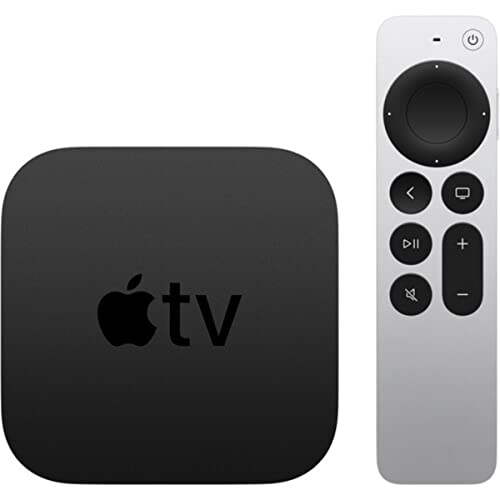
The current Siri Remote has been my daily driver for eight months and it remains the best in the category. The aluminum body feels genuinely premium, the rechargeable battery has gone weeks between charges without ever dying on me, and the redesigned clickpad navigates precisely without the over-sensitivity that plagued the old glass touchpad. Being able to ping a misplaced remote from my phone is a small thing that turns out to be genuinely useful.
The dedicated voice button is faster than holding a button as you do on some rivals, and voice search has been quick and accurate in daily use. If there is a missing piece it is a programmable shortcut button, which a couple of competitors include, but it has not bothered me in practice given how fast the box itself is to navigate.
Living with the remote for eight months also clarified the little ergonomic choices Apple got right. The weight is balanced enough that it sits naturally in one hand, the click-pad ring lets you skip through long content quickly without overshooting, and the dedicated power and mute buttons mean it can run my whole living-room setup rather than just the box. After years of cheap plastic streaming remotes that I lose in the couch and never want to touch, this is the rare one I actually reach for, and that everyday pleasantness is a real part of what you are paying for.
HDR, audio, and ecosystem integration
On format support the Apple TV is complete where it counts. Dolby Vision, HDR10, and HLG are all handled, the box automatically matches source frame rate and dynamic range, and Dolby Atmos passthrough worked cleanly over eARC with both my soundbar and my receiver across titles from multiple services. I never ran into an HDR or audio handoff problem during the test.
Ecosystem integration is where the price premium pays off if you live in Apple’s world. AirPlay from an iPhone or Mac works with no setup step, HomeKit camera notifications appear as picture-in-picture overlays, Fitness Plus pulls heart rate from an Apple Watch automatically, and using an iPhone as a FaceTime camera mounted on the TV is genuinely useful for living-room calls. None of this is essential, but together it makes the box meaningfully more capable in an Apple household.
Where the price premium bites
The honest weak spot is value relative to the competition. This box costs more than the strong rivals, and for a household that does not use AirPlay, HomeKit, or the rest of Apple’s ecosystem, those competitors cover the great majority of the same use cases for less. The Apple TV’s advantages are real, but they are advantages you have to actually use to justify the premium.
A couple of smaller caveats: Apple’s own content gets nudged to the front of the interface, and the box tops out at 4K at 60 frames, so there is no high-frame-rate gaming mode here. For streaming none of that matters, but it is worth knowing if you expected this to double as a game machine.
Who should buy the Apple TV 4K?
Buy it if you own an iPhone, iPad, or Mac and lean on AirPlay or iCloud Photos. Buy it if you want the fastest, smoothest, most polished streaming experience available and you genuinely hate ads on a home screen. Buy it if you use HomeKit cameras or Apple Fitness Plus, where the integration is a real day-to-day benefit.
Skip it if you are an Android household, where a platform-native streamer makes more sense. Skip it if your priority is the lowest possible price, since a strong rival costs less and covers the basics. And skip it if you wanted high-frame-rate gaming, which this box does not do.
The verdict
After eight months as my main streamer, the 2024 Apple TV 4K is still the box I recommend to anyone in the Apple ecosystem. It is the fastest and most polished streamer I have used, the remote is the best in the category, and the ad-free, deeply integrated experience is genuinely better than the alternatives if you actually use Apple’s services. Pay the premium only if you will use what it offers, but if you will, it earns it.
How it stacks up
| Model | Best for | Rating | |
|---|---|---|---|
| Apple TV 4K (3rd Gen 2024) | Top Pick | 4.7 | Check price |
| Roku Ultra 2024 | Recommended | 4.5 | Check price |
| Google TV Streamer 4K | Recommended | 4.4 | Check price |
| Amazon Fire TV Cube 3rd Gen | Recommended | 4.3 | Check price |
Key specifications
LIVE specs pulled from Amazon; performance specs from our testing.
Apple TV 4K (3rd Generation, 2024) FAQs
Yes if you live in the Apple ecosystem. AirPlay from iPhone is seamless, HomeKit camera feeds work natively, and the Siri Remote is the best in the category. If you do not own an iPhone or iPad, the Roku Ultra 2024 at this price covers 90 percent of the same use cases for less.
Pick the Apple TV for iPhone households, faster app launches, and the better remote. Pick the Roku Ultra for non-Apple households, lower price, and a more app-neutral home screen. Both have full HDR support, both are excellent.
Only if you want the wired Ethernet port. The extra 64 GB of storage rarely matters for a streaming box. If your Wi-Fi 6 router is solid, the price 64 GB model is the better buy.
No. The Apple TV 4K maxes out at 4K/60. There is no 4K/120 mode. Apple Arcade games on the device run at 60 Hz. For 4K/120 gaming use a console or PC, not this box.
Materially better. The 2021 redesign and the 2022 USB-C version both work fine. The clickpad navigates without the over-sensitive issues of the 2015 glass touchpad. Find My support means you can ping it from your iPhone if it goes missing.
Update log
- Jun 20, 2026: Review published.
- Jun 25, 2026: Current Amazon price and availability refreshed.
Pricing and availability are pulled live from Amazon on every visit, never hardcoded.