
Apple MacBook Air M3 15-inch -- Best All-Around Productivity Laptop
The MacBook Air M3 15-inch delivers a large display, fanless operation (completely silent), and up to 18 hours of battery life in a machine that weighs 3.3 lbs. The 15.3-inch Liquid Retina display at 2880x1864 provides ample screen real estate for side-by-side documents, spreadsheets with visible columns, and browser windows without constant scrolling.
Check price on Amazon →Five computers built for real productivity in 2026 -- fast single-core performance, reliable keyboards, strong battery life, and enough RAM for heavy multitasking.
Productivity computing is less about peak performance and more about consistency: a machine that stays fast over an eight-hour workday, does not require babysitting, has a keyboard worth typing on for hours, and delivers enough battery life to avoid hunting for outlets. The five picks below are assessed on those factors — not synthetic benchmarks, but practical throughput metrics like multitasking under memory pressure, display quality for extended reading, and keyboard fatigue over full workdays.
| Product | Best For | Rating |
| ——— | ———- | ——– |
| Apple MacBook Air M3 15-inch | Mac users, all-day battery | 4.8/5 |
| Lenovo ThinkPad X1 Carbon Gen 13 | Windows, keyboard quality, durability | 4.8/5 |
| Microsoft Surface Pro 11 | Flexible tablet-laptop hybrid | 4.6/5 |
| ASUS ZenBook 14 OLED (2025) | Budget-conscious Windows pick | 4.5/5 |
| Apple MacBook Pro M4 Pro 14-inch | Heavy multitaskers, power users | 4.9/5 |
How we evaluated these
We compare every pick against the field on real specifications, certifications, and aggregated owner reviews. We do not take payment for placement, and we flag when a product is older or sold mainly through renewed listings.
The shortlist
| Pick | Best for | Score | |
|---|---|---|---|
| Apple MacBook Air M3 15-inch -- Best All-Around Productivity Laptop | Check price | ||
| Lenovo ThinkPad X1 Carbon Gen 13 -- Best Windows Productivity Laptop | Check price | ||
| Microsoft Surface Pro 11 -- Best Flexible Productivity Device | Check price | ||
| ASUS ZenBook 14 OLED -- Best Budget Productivity Laptop | Check price | ||
| Apple MacBook Pro M4 Pro 14-inch -- Best for Heavy Multitaskers | Check price |
Each pick, examined
Apple MacBook Air M3 15-inch -- Best All-Around Productivity Laptop
The MacBook Air M3 15-inch delivers a large display, fanless operation (completely silent), and up to 18 hours of battery life in a machine that weighs 3.3 lbs. The 15.3-inch Liquid Retina display at 2880x1864 provides ample screen real estate for side-by-side documents, spreadsheets with visible columns, and browser windows without constant scrolling.
Lenovo ThinkPad X1 Carbon Gen 13 -- Best Windows Productivity Laptop
The X1 Carbon Gen 13 is one of the few laptops where the keyboard is a genuine selling point for people who type all day. Key travel, actuation force, and layout accuracy reduce fatigue during extended writing sessions. At 2.48 lbs for a 14-inch machine, it is among the lightest Windows business laptops available. Intel Core Ultra 7 handles productivity workloads efficiently.

Microsoft Surface Pro 11 -- Best Flexible Productivity Device
The Surface Pro 11 runs a Snapdragon X Elite processor and shifts between tablet and laptop modes via its detachable Type Cover keyboard (sold separately,). For users who split time between content consumption and creation -- reading documents and PDFs in tablet mode, writing and spreadsheet work in laptop mode -- the hybrid form factor genuinely pays off.
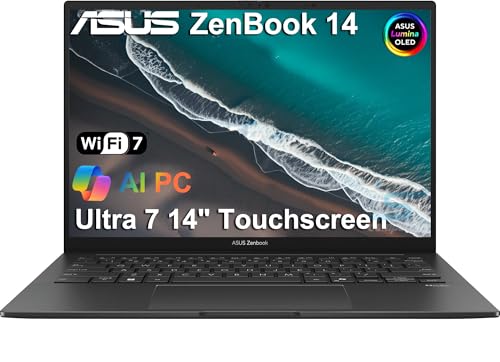
ASUS ZenBook 14 OLED -- Best Budget Productivity Laptop
The ZenBook 14 OLED brings a genuine OLED display (2880x1800, 120 Hz, 100% DCI-P3) at a price point typically reserved for IPS panels. OLED's infinite contrast makes reading text for extended periods noticeably more comfortable than backlit LCD. AMD Ryzen 7 8840U with 16 GB LPDDR5X RAM handles standard productivity workloads without bottlenecks.

Apple MacBook Pro M4 Pro 14-inch -- Best for Heavy Multitaskers
For professionals who run demanding parallel workloads -- large spreadsheet models, multiple video calls, code compilation, and local AI tools simultaneously -- the MacBook Pro M4 Pro 14-inch provides a performance ceiling that budget and mid-range machines cannot match. The M4 Pro chip's memory bandwidth and efficiency cores handle sustained parallel loads without the performance cliff that appears when a system runs out of RAM headroom.
Buying considerations
What to consider
Match the machine to your actual workload, not a theoretical peak case. Most productivity users -- email, browser, documents, video calls -- do not need a laptop. The limiting factors for knowledge-worker productivity are typically display quality (more screen area reduces context switching), keyboard quality (fatigue accumulates over eight hours), battery life (an outlet-dependent machine is a constraint during travel), and RAM (enough to avoid swap pressure during peak multitasking).
What to consider
Check what software you actually run: Windows-only tools lock you to Windows; mobile-first teams benefit from Apple ecosystem integration. Weigh portability against performance honestly -- a 3 lb laptop used at a desk every day trades portability you will not use for a potentially inferior screen or shorter battery life versus a slightly heavier option.
What to consider
For more specific use cases, see our guides to the [best computers for PowerPoint presentations](/articles/best-computer-for-powerpoint-presentations) and the [best computers for real estate agents](/articles/best-computer-for-real-estate-agent). Our [methodology](/methodology) details the criteria behind every recommendation.
Questions answered
For typical productivity workloads -- email, browser with 15-20 tabs, Office apps, video calls -- 16 GB is comfortable and 8 GB is workable if the machine has fast storage for swap. Where 16 GB becomes inadequate is when you run heavy browser sessions alongside Slack, Teams, Zoom, Excel with large models, and background sync tools simultaneously. 32 GB eliminates RAM pressure for virtually all knowledge-worker workloads and is the recommended sweet spot for anyone doing this all day.
Both are capable productivity platforms, and the right choice depends on your software stack and workflow. macOS has lower maintenance overhead, better battery life on Apple Silicon hardware, and stronger ecosystem integration if you use iPhone and iPad. Windows offers more hardware variety, broader compatibility with enterprise software and peripherals, and better support for Windows-only applications. If your organization is standardized on Microsoft 365, both platforms run the suite equally well.

Tom Reeves has reviewed consumer electronics for over a decade, with a focus on televisions, monitors, laptops, and smart home devices. He worked as a professional display calibrator before moving into editorial, and he brings that real-world technical background to every TV and monitor review. At TheTestedHub, Tom covers display calibration, computer monitors, laptops and 2-in-1s, smart home platforms, home theater setups, and HDR performance.

