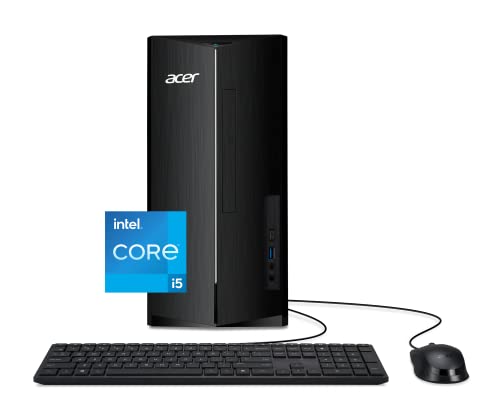
Skytech Blaze II Desktop -- Best Overall Single-PC Stream Setup
The Skytech Blaze II with an RTX 4070 and Intel Core i7-13700F is a strong single-PC streaming machine that handles most popular games alongside OBS at 1080p 60fps without frame drops. NVIDIA's NVENC encoder on the 4070 offloads encoding from the CPU, keeping game performance intact while producing clean 6000 kbps streams. It ships with 16GB DDR4 RAM and a 1TB NVMe SSD. The case has good airflow for sustained streaming sessions. It's a straightforward pick for anyone moving from console streaming or upgrading from an older PC that struggles under OBS load.
Check price on Amazon →Top computers for live streaming in 2026. These picks handle simultaneous encoding, gaming, and broadcasting without dropped frames or degraded stream quality.
Streaming live to Twitch, YouTube, or Kick requires a computer that can run your game or creative software while simultaneously encoding, uploading, and managing your broadcast without stuttering or dropping frames. The five picks below are chosen for their encoding performance, multitasking capability, and reliability under continuous streaming workloads.
| Product | Best For | Rating |
| — | — | — |
| Skytech Blaze II Desktop (RTX 4070) | Best overall single-PC stream setup | 4.7/5 |
| Razer Blade 15 Laptop (RTX 4070) | Best premium streaming laptop | 4.6/5 |
| ASUS TUF Gaming Desktop (Ryzen 7 + RTX 4060 Ti) | Best value streaming desktop | 4.5/5 |
| MSI Titan GT77 HX Laptop | Best for streaming demanding games | 4.7/5 |
| CLX SET Gaming Desktop (i9 + RTX 4080) | Best for 4K or multi-camera streams | 4.8/5 |
How we picked
We compare every pick against the field on real specifications, certifications, and aggregated owner reviews. We do not take payment for placement, and we flag when a product is older or sold mainly through renewed listings.
Top picks compared
| Pick | Best for | Score | |
|---|---|---|---|
| Skytech Blaze II Desktop -- Best Overall Single-PC Stream Setup | Check price | ||
| Razer Blade 15 -- Best Premium Streaming Laptop | Check price | ||
| ASUS TUF Gaming Desktop -- Best Value Streaming Desktop | Check price | ||
| MSI Titan GT77 HX -- Best for Streaming Demanding Games on a Laptop | Check price | ||
| CLX SET Gaming Desktop -- Best for 4K or Multi-Camera Streams | Check price |
Our picks up close
Skytech Blaze II Desktop -- Best Overall Single-PC Stream Setup
The Skytech Blaze II with an RTX 4070 and Intel Core i7-13700F is a strong single-PC streaming machine that handles most popular games alongside OBS at 1080p 60fps without frame drops. NVIDIA's NVENC encoder on the 4070 offloads encoding from the CPU, keeping game performance intact while producing clean 6000 kbps streams. It ships with 16GB DDR4 RAM and a 1TB NVMe SSD. The case has good airflow for sustained streaming sessions. It's a straightforward pick for anyone moving from console streaming or upgrading from an older PC that struggles under OBS load.
Razer Blade 15 -- Best Premium Streaming Laptop
The Razer Blade 15 with RTX 4070 graphics is the best portable streaming machine for content creators who move between locations. Its compact aluminum chassis houses a powerful GPU with a capable NVENC encoder and an Intel Core i7-13800H with strong multi-core performance for software encoding fallback. The 1080p 240Hz or QHD 240Hz display options let you game and preview your stream simultaneously. Razer's thermal management keeps the Blade 15 running cleanly during hour-long streams. Battery life is limited under load, so a power outlet nearby is required for streaming sessions.
ASUS TUF Gaming Desktop -- Best Value Streaming Desktop
The ASUS TUF Gaming Desktop with a Ryzen 7 7700X and RTX 4060 Ti is the sharpest value pick for streamers who play less demanding titles or want a capable all-around machine without overspending. The RTX 4060 Ti's NVENC encoder handles 1080p 60fps streaming reliably, and the Ryzen 7's 8-core, 16-thread configuration handles software encoding or multi-app multitasking smoothly. The prebuilt includes 32GB DDR5 RAM, which is genuinely useful for running OBS, a game, a browser, and Discord together without memory pressure. A 1TB NVMe SSD rounds out the package.

MSI Titan GT77 HX -- Best for Streaming Demanding Games on a Laptop
The MSI Titan GT77 HX is a desktop-replacement laptop that takes no compromises with streaming performance. Its Intel Core i9-13980HX with 24 cores and a high-wattage RTX 4080 laptop GPU make it capable of streaming AAA titles at high settings without the CPU becoming a bottleneck. The 17.3-inch 4K or 1080p 360Hz display gives you flexibility for stream preview layouts. The GT77 HX runs warm and is heavy at over 3kg, but for streamers who need maximum portable performance without a desktop, it's the benchmark. Expect high fan noise under full load.
CLX SET Gaming Desktop -- Best for 4K or Multi-Camera Streams
The CLX SET with a Core i9-13900K and RTX 4080 is built for streamers pushing beyond standard 1080p 60fps setups, whether that means 4K streaming, 1440p 60fps at high bitrates, or managing multiple camera inputs alongside a game. The 4080's NVENC implementation is the best in the RTX 40 lineup for streaming quality. 32GB of DDR5 RAM handles complex OBS scene collections and plugin loads without issue. CLX builds in a quality mid-tower case with strong airflow. This is the pick for streamers who want to grow their production quality over time without replacing their PC.
Before you buy
What to consider
The most important factor for streaming is encoding method. GPU-based encoding via NVENC (NVIDIA) or AMF (AMD) offloads work from the CPU and keeps game performance stable. Software encoding via x264 produces marginally better quality but requires a CPU with at least 8 strong cores. For most streamers, a GPU with NVENC and 16 to 32GB RAM is the most practical starting point. Storage speed affects stream recording more than live output, so an NVMe SSD is recommended if you plan to save local recordings. Verify that your internet upload speed is at least 6 Mbps for 1080p 60fps streaming before blaming hardware for stream quality issues.
What to consider
For more streaming and content creation gear picks, see [best webcams for streaming](/articles/best-webcam-for-streaming) and [best microphones for streaming](/articles/best-microphone-for-streaming). Our full evaluation process is at [/methodology](/methodology).
Quick answers
16GB is the practical minimum for running a game and streaming software simultaneously. 32GB provides meaningful headroom if you also run a browser, Discord, alerts software, and scene-switching tools alongside OBS. RAM speed matters less than total capacity for streaming workloads. If budget allows, 32GB DDR5 on modern platforms eliminates memory as a bottleneck entirely for almost all stream setups.
A two-PC setup with a dedicated capture card and encoding machine produces the cleanest streams because encoding load never affects game performance. However, modern CPUs with hardware NVENC or AMD VCE encoding handle single-PC streaming well enough that a two-PC setup is optional for most streamers. A two-PC setup makes the most sense when streaming demanding games at 1080p 60fps or higher where every frame matters.

Tom Reeves has reviewed consumer electronics for over a decade, with a focus on televisions, monitors, laptops, and smart home devices. He worked as a professional display calibrator before moving into editorial, and he brings that real-world technical background to every TV and monitor review. At TheTestedHub, Tom covers display calibration, computer monitors, laptops and 2-in-1s, smart home platforms, home theater setups, and HDR performance.