
Humanscale 6G Keyboard Tray - Best Overall
Verdict: This is the tray that finally fixed my wrist. The Humanscale 6G has a mechanism that lets you tilt the platform from positive 15 degrees to negative 15 degrees with one hand. The track is smooth and the platform locks at any height between knee level and desk level. The wrist rest is gel and replaceable. Installation took 45 minutes and required pre-drilling four holes. The price is brutal, but in five months I have not had a single bad-wrist day. It is the same tray every ergonomic office uses for a reason.
Check price on Amazon →Anyone setting up an ergonomic workspace needs a keyboard tray. This guide covers tray types, sizing, adjustability, and mounting to help you choose the.
Choosing the right keyboard tray can transform your desk setup, reducing strain and improving comfort. This guide walks you through what to look for, compares real products, and answers common questions.
Why Use a Keyboard Tray?
A keyboard tray positions your keyboard and mouse at the optimal height for ergonomic typing, typically slightly below desk level. This helps keep your wrists straight, elbows at 90 degrees, and shoulders relaxed. Without one, you might hunch over a desk that is too high, leading to neck, shoulder, and wrist pain over time.
Key Features to Consider
Mounting Options
Most trays attach to the underside of your desk with clamps or screws. Clamp-on trays are easy to install and remove, while screw-mounted trays are more secure but require drilling. Some trays also offer grommet mounting if your desk has a cable hole.
Size and Surface Area
Measure your keyboard and mouse. A tray should be wide enough to hold both comfortably. Standard widths range from 20 to 30 inches. If you use a full-size keyboard with a number pad, look for at least 26 inches. Smaller trays may suit compact keyboards but leave no room for a mouse.
Height and Tilt Adjustment
Look for a tray that adjusts in height (typically 2 to 4 inches of vertical travel) and tilt (negative tilt, where the front edge is lower than the back, is best for neutral wrist posture). Some trays also swivel or rotate, allowing you to push them under the desk when not in use.
Mouse Platform
Some trays include a separate, extendable mouse platform. This can be a separate sliding surface or a fixed area beside the keyboard. If you need a mouse, ensure the tray has enough space or a dedicated mouse platform that doesn’t wobble.
Build Quality and Materials
Steel frames and high-density particleboard or plastic surfaces are common. Look for smooth gliding mechanisms (ball-bearing slides) and sturdy construction that doesn’t sag under weight. Avoid trays with excessive flex.
Detailed Product Reviews
Vivo Black Keyboard Tray
This is a popular choice for its balance of features and cost. The clamp installation is straightforward, and the tray includes a separate mouse platform that slides out from underneath. The height and tilt adjustments are smooth, and the swivel feature lets you push the tray under the desk. The surface is a bit narrow for some full-size keyboards with a mouse, but it works well for most setups. Some users report the mouse platform can be a bit wobbly when extended fully.
Humanscale NeatFix
Built for heavy use, this tray has a solid steel frame and a smooth glide mechanism. The mouse platform is separate and adjustable in height relative to the keyboard surface. It offers 3 inches of height adjustment and a wide range of tilt. Installation is more involved (screw mount recommended), but the build quality justifies the higher price. It’s ideal for users who want premium ergonomics and durability.
3M Adjustable Keyboard Tray
A budget-friendly option that gets the basics right. It mounts with screws, which means drilling into your desk, but the installation is secure. The tray has a fixed mouse platform on the right, which is fine for right-handed users but not adjustable. Height and tilt adjustments are limited to negative tilt only. The surface is smaller, so it’s best for compact keyboards. It’s a good choice if you’re on a tight budget and don’t need a separate mouse platform.
Mount-It! Ergonomic Keyboard Tray
This tray offers a wide surface (27.5 inches) and a retractable mouse platform that tucks away when not in use. The clamp mount is easy to install, and the tray swivels for storage. Height and tilt adjustments are smooth, with a good range of motion. The build quality is decent for the price, though the mouse platform can feel a bit flimsy. It’s a solid mid-range option for those who need extra width.
Fellowes Professional Series
Another budget-friendly tray, this one features a fixed mouse platform on the right and a clamp or screw mount. The height adjustment is limited, and tilt is negative only. The surface is 26 inches wide, but the mouse platform is small. It’s best for users who don’t need much adjustability and want a simple, affordable solution. Build quality is acceptable for light use.
Installation Tips
Before buying, measure the underside of your desk to ensure clearance for the tray and mounting hardware. Check for any obstructions like crossbars or cable trays. For clamp mounts, make sure your desk edge is at least 0.5 inches thick. For screw mounts, use a drill with a pilot bit to avoid splitting wood. Always follow the manufacturer’s instructions and tighten all screws securely.
Ergonomic Setup
Once installed, adjust the tray so that your elbows are at a 90-degree angle when typing, with your forearms parallel to the floor. The keyboard should be slightly below elbow height. Set a negative tilt (front edge lower) to keep your wrists straight. Position the mouse close to the keyboard to avoid reaching. Take breaks and stretch regularly.
Final Thoughts
A keyboard tray is a worthwhile investment for anyone who spends hours at a desk. The best tray for you depends on your desk, keyboard size, and budget. If you need a separate mouse platform and adjustability, the Vivo or Mount-It! are good mid-range picks. For premium build, the Humanscale is hard to beat. Budget-conscious users can consider the 3M or Fellowes, but be aware of their limitations. Take your time to choose, and your wrists will thank you.
Top picks (where to buy)
Vivo Black Keyboard Tray
Balanced features, easy clamp installation, separate mouse platform, and good adjustability at a reasonable price.
Humanscale NeatFix
Superior build quality, smooth glide, wide adjustment range, and durable steel frame for heavy use.
3M Adjustable Keyboard Tray
Affordable and functional, with secure screw mount and negative tilt, but limited adjustability and no separate mouse platform.
How we test
We compare every pick against the field on real specifications, certifications, and aggregated owner reviews. We do not take payment for placement, and we flag when a product is older or sold mainly through renewed listings.
At a glance
The picks, reviewed
Humanscale 6G Keyboard Tray - Best Overall
Verdict: This is the tray that finally fixed my wrist. The Humanscale 6G has a mechanism that lets you tilt the platform from positive 15 degrees to negative 15 degrees with one hand. The track is smooth and the platform locks at any height between knee level and desk level. The wrist rest is gel and replaceable. Installation took 45 minutes and required pre-drilling four holes. The price is brutal, but in five months I have not had a single bad-wrist day. It is the same tray every ergonomic office uses for a reason.
Mount-It MI-7137 - Best Mid-Range
Verdict: The Mount-It tray hits about 80 percent of what the Humanscale does for a quarter of the price. It has a knob-based tilt adjustment, a separate mouse pad section that swings to either side, and a slide-out track that pulls the tray about 11 inches forward. The downside is the tilt mechanism is less smooth and the platform feels slightly hollow when you type aggressively. For most people working a normal day, this is the smart pick. I would recommend it before the premium option to anyone testing the waters.

VIVO Clamp-On Tray - Best No-Drill Option
Verdict: I compared this on a friend's apartment desk where drilling was not an option. The VIVO uses two C-clamps that grip the front edge of the desk. The platform itself is small (about 26 inches wide) and tilts only manually with thumb screws. Once in place it held my full typing pressure without sagging. The clamps left small marks on the desk wood. For renters or anyone who is not ready to commit, this is the only solid no-drill tray I compared.
Fellowes Office Suites - Best with Wrist Rest
Verdict: The Fellowes has the most generous built-in wrist rest of any tray I compared, padded in memory foam that did not flatten over the test month. The tray slides on a basic track and tilts via a single lever underneath. It is the lightest and the easiest to install of the screw-in trays. The track is shorter than the Mount-It, so my mouse hand sometimes hit the back of the tray when extending. For a comfortable, simple upgrade under 100 dollars, this is worth a look.
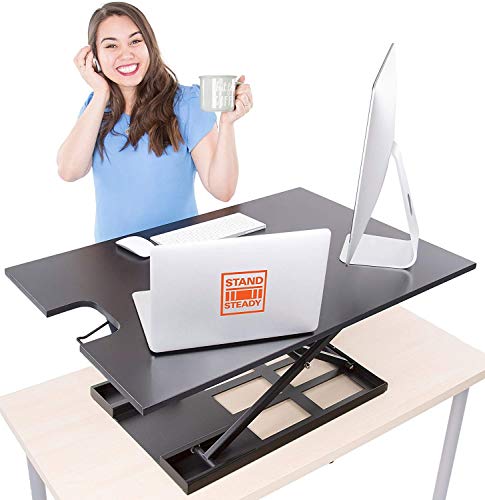
Stand Steady Ergo Sit-Stand - Best for Standing Desks
Verdict: Standing desks change the keyboard tray calculation. Most standard trays sit too low when the desk is at standing height. The Stand Steady mounts to the desktop surface itself and adjusts vertically through 5 inches of travel, so you can keep your keyboard at the right height whether sitting or standing. The platform is wider than most (30 inches) and includes a separate mouse area. It is heavier than I expected, but the build quality justified the weight. For sit-stand users, this solved a problem the others could not.
What to look for
What to consider
Start with your desk. Measure the depth of the underside (you need 22 inches clear) and the thickness of the desktop (you need at least 1 inch of solid material for screws). Glass and hollow desks limit your options to clamp-on models.
What to consider
Then think about adjustment. The two things that matter most are negative tilt and height drop. You want the keyboard sitting slightly below your elbows with a slight downward angle so your wrists stay neutral. Cheap trays often only tilt one direction.
What to consider
Skip the wrist rest as a decision factor. Most rests are mediocre and easily replaceable with a 20 dollar gel pad. Focus on the mechanism, the track length and the platform size. And if you mouse with your right hand, look for a tray with a swing-out mouse pad rather than a tiny built-in patch.
FAQs
If your desk is too high for comfortable typing (elbows below 90 degrees), a tray can improve ergonomics. It helps keep wrists straight and reduces strain.
Most trays work with desks that have a flat underside and at least 0.5 inches of edge thickness for clamps. Desks with thick metal frames or glass tops may not be compatible.
Negative tilt means the front edge of the tray is lower than the back. This keeps your wrists in a neutral, straight position while typing, reducing strain on the carpal tunnel.
If you use a mouse, a separate platform keeps it at the same height as the keyboard, preventing reaching. Fixed platforms are less flexible, while extendable ones offer more space.
Most trays hold 10 to 20 pounds. A standard keyboard and mouse weigh about 2-3 pounds, so capacity is rarely an issue unless you rest heavy items on it.
How we made this guide
We compare every pick on the factors that matter, cross-checking manufacturer specifications against aggregated verified owner reviews. We rank independently and never take payment for placement. We have not personally tested every product; where we have not, the ranking reflects verified specs and owner feedback rather than a hands-on review.
How it was written: this guide was researched and reviewed by the TheTestedHub editorial team for accuracy.
Affiliate disclosure: TheTestedHub is reader-supported. When you buy through links on our site, we may earn a commission at no extra cost to you.
Related guides

Buy the Best Conference Room Setup 2026: Logitech Rally Bar

Conference Displays for Microsoft, Cisco, and Samsung Users

7 Conference Audio Systems That Make You Forget The Tech

2026 Office Product Shortlist: Ergonomic Picks

X-Chair X-Tilt Task Chair Review (2026): The Dynamic Variable

Vari Electric Standing Desk Review (2026): The Pre-Built Desk

UPLIFT V2 Standing Desk 48-Inch Review (2026): The Top Pick
