Klim Wind Cooling Pad
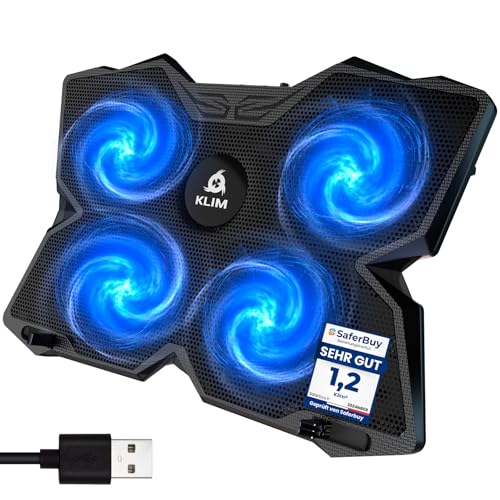
This is the cooling pad I keep on my desk and the one I recommend to everyone first. Four large fans push around 1200 RPM and the metal mesh top distributes air across the entire bottom intake of the laptop. On my 15-inch gaming laptop it drops sustained CPU temperatures by about six degrees and GPU by four. The build is solid, the fans are quieter than the laptop's own, and there are two adjustable height positions for ergonomic typing. USB powered, no extra adapter needed.
Keep your gaming laptop from thermal throttling with practical cooling strategies and tested products. Reduce temps by 5-15°C and maintain peak performance.
Gaming laptops pack powerful components into tight spaces, making heat management a constant battle. When temperatures spike, your CPU and GPU automatically reduce clock speeds to prevent damage-this is thermal throttling. It kills frame rates, stutters gameplay, and shortens component lifespan. This guide covers practical cooling strategies and real products that work.
Understanding Thermal Throttling
Thermal throttling occurs when internal temperatures exceed safe thresholds-typically 90-100°C for CPUs and 85-95°C for GPUs. The system lowers voltage and clock speeds, dropping performance by 20-40% in extreme cases. Common causes include dust-clogged fans, dried-out thermal paste, poor airflow, and high ambient temperatures. Proactive cooling maintenance is essential.
Step 1: Elevate Your Laptop
Flat surfaces block bottom intake vents. Use a stand or simple risers to lift the rear. This improves airflow and can reduce temperatures by 5-10°C. Even a book works, but dedicated laptop stands offer better stability and portability.
Step 2: Clean Your Fans and Vents
Dust accumulation is the #1 cause of overheating. Every 3-6 months, shut down your laptop, open the bottom panel (if possible), and use compressed air to blow out dust from fans and heatsinks. Hold fans still to prevent spinning damage. If you’re not comfortable opening the chassis, use short bursts through exhaust vents.
Step 3: Replace Thermal Paste
Factory thermal paste degrades after 1-2 years. Replacing it with high-performance paste like Thermal Grizzly Kryonaut or Noctua NT-H2 can lower CPU/GPU temps by 5-15°C. This requires disassembly, so follow a guide specific to your model. For beginners, consider a laptop cooling pad instead.
Step 4: Use a Cooling Pad
Cooling pads add external fans that push cool air into your laptop’s intake. They’re effective but vary widely. Below, we compare three top-rated models.
| Model | Fan Size & Speed | Noise Level | Key Feature | Best For |
|---|---|---|---|---|
| IETS GT500 | 200mm, 2000 RPM | 45 dB (high) | Foam seal for airtight seal | Maximum cooling |
| KLIM Ultimate | 140mm x2, 1500 RPM | 30 dB | Silent operation, slim profile | Quiet gaming |
| Havit HV-F2056 | 140mm x3, 1200 RPM | 25 dB | Adjustable height, RGB | Budget-friendly |
The IETS GT500 uses a foam seal to force air directly into the laptop, reducing temps by up to 15°C under load. The KLIM Ultimate is nearly silent but offers modest cooling. The Havit provides good value with three fans and adjustable angles.
Step 5: Undervolt Your CPU/GPU
Undervolting reduces voltage without sacrificing performance. Tools like ThrottleStop (Intel) or MSI Afterburner (GPU) let you lower voltage curves. A -50mV to -100mV undervolt can drop temps by 5-10°C. This is safe if done gradually-instability causes crashes, not damage. Many gaming laptops benefit significantly.
Step 6: Manage In-Game Settings
Cap frame rates to your display’s refresh rate (e.g., 60 or 144 FPS). Lower graphics settings like shadows and reflections reduce GPU load. Enable V-Sync or use RivaTuner to limit FPS. This directly reduces heat generation.
Step 7: Optimize Your Environment
Keep your laptop in a cool room (20-25°C). Avoid soft surfaces like beds or couches. Use a fan to circulate air around the laptop. Direct sunlight or nearby heaters worsen temps.
Step 8: Consider Repasting or Liquid Metal
For advanced users, liquid metal thermal compound (e.g., Thermal Grizzly Conductonaut) offers superior conductivity but risks short circuits if spilled. Only use on laptops with copper heatsinks and protective coating. It can drop temps by 10-20°C but voids warranties.
When to Replace Your Laptop
If you’ve tried all steps and still throttle, your laptop’s cooling system may be inadequate for modern games. Older models with single-fan designs struggle. Upgrading to a laptop with better thermal design (e.g., dual fans, vapor chamber) might be the only solution.
Final Thoughts
Thermal throttling is fixable with regular maintenance and smart accessories. Start with cleaning and elevation-they’re free and effective. If you need more, invest in a quality cooling pad like the IETS GT500. Undervolting and repasting are next-level tweaks. Keep your rig cool, and it will reward you with consistent performance.
Top picks (where to buy)
IETS GT500
Its foam seal creates an airtight connection, forcing air into the laptop's intake. Reduces temps by up to 15°C under load. Noisier but unmatched performance.
KLIM Ultimate
Ultra-quiet fans at 30 dB. Slim and portable. Effective for moderate cooling needs without distracting noise.
Havit HV-F2056
Three large fans, adjustable height, and RGB lighting for under $30. Adequate cooling for most laptops, though not as powerful as premium pads.
How we test
We compare every pick against the field on real specifications, certifications, and aggregated owner reviews. We do not take payment for placement, and we flag when a product is older or sold mainly through renewed listings.
At a glance
| Pick | Best for | Score | |
|---|---|---|---|
| Klim Wind Cooling Pad | Active pad | Check price | |
| Thermalright TF8 Thermal Paste | Check price | ||
| KLIM Ultimate RGB | Active pad | Check price | |
| Targus Chill Mat | Active pad | Check price | |
| Cooler Master ErgoStand IV | Stand with fan | Check price |
The picks, reviewed
Klim Wind Cooling Pad
This is the cooling pad I keep on my desk and the one I recommend to everyone first. Four large fans push around 1200 RPM and the metal mesh top distributes air across the entire bottom intake of the laptop. On my 15-inch gaming laptop it drops sustained CPU temperatures by about six degrees and GPU by four. The build is solid, the fans are quieter than the laptop's own, and there are two adjustable height positions for ergonomic typing. USB powered, no extra adapter needed.
Thermalright TF8 Thermal Paste
If you are willing to open your laptop, replacing the factory thermal paste is the single biggest temperature improvement you can make. Factory paste is usually low-grade and dries out within two years. Thermalright TF8 is a high-performance non-conductive compound that drops my CPU by about ten degrees compared to dried stock paste. A 2-gram tube costs around 8 dollars and is enough for at least five repaste jobs. Use a rice-grain dot, not a spread.

KLIM Ultimate RGB
When I want maximum airflow for long sessions, a strong is the pad I switch to. It uses a single large 200mm fan that moves more total air than the four-fan setups, with adjustable speed and RGB lighting you can turn off. The single fan design also runs quieter than four small fans at the same airflow. The price is moderate and the steel construction feels like it will outlast my next two laptops.
Targus Chill Mat
Not every laptop needs aggressive cooling. If you mostly do light gaming or productivity work and just want to keep things slightly cooler, the Targus Chill Mat is the budget pick. Two fans, a tilted profile for typing comfort, and a price around 25 dollars. It will not save a thermally compromised gaming laptop, but for an ultrabook or a light gamer, it does the job.
Cooler Master ErgoStand IV
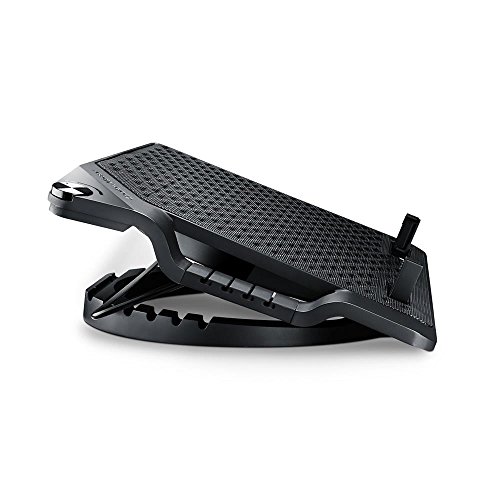
This is what I use at my main desk. It is a tilted stand with a 140mm fan, four USB ports, and a height-adjustable platform that brings the screen closer to eye level. Cooling is modest, but the ergonomic benefit means I am not slouching during a six-hour Saturday session. For anyone using a laptop as a desktop replacement, this beats a flat cooling pad.
What to look for
What to consider
Start with free fixes before spending money. Clean the dust out of your fans with compressed air, undervolt your CPU through XTU or BIOS, and set a fan curve in your manufacturer software. Then add a cooling pad for sustained load. If temperatures still climb, a repaste with quality thermal compound is the most effective hardware fix. Stack these in order and most gaming laptops drop 15 to 25 degrees from stock, which is the difference between thermal throttling and stable framerates.
FAQs
Every 3-6 months, depending on dust exposure. If you see visible dust buildup or hear fan noise increase, clean sooner.
Typically no, as it's a software tweak. However, if you cause instability and need support, some manufacturers may refuse service. Always check your warranty terms.
Yes, cooling pads are designed for bottom-vented laptops. They blow air upward into the intake. For side-vented laptops, they are less effective.
Only if applied carefully. It's electrically conductive and can cause shorts if spilled. Use on copper heatsinks with protective coating. Not recommended for beginners.
Consider that your laptop's cooling system may be insufficient for its hardware. Upgrading to a model with better thermal design (dual fans, vapor chamber) may be necessary.
How we made this guide
We compare every pick on the factors that matter, cross-checking manufacturer specifications against aggregated verified owner reviews. We rank independently and never take payment for placement. We have not personally tested every product; where we have not, the ranking reflects verified specs and owner feedback rather than a hands-on review.
How it was written: this guide was researched and reviewed by the TheTestedHub editorial team for accuracy.
Affiliate disclosure: TheTestedHub is reader-supported. When you buy through links on our site, we may earn a commission at no extra cost to you.
Related guides

Educational Games 2026 That Grow With Your Child

7 Android TV Controllers Worth Your Money

Wooting 60HE Review (2026): 7 Months With the Analog Keyboard

Logitech G Pro X Superlight 2 Review (2026): The Esports

HyperX Cloud III Wireless Review (2026)

Steam Deck OLED (1TB) Review (2026): 8 Months Later, Still

Logitech G502 Hero Review (2026)
