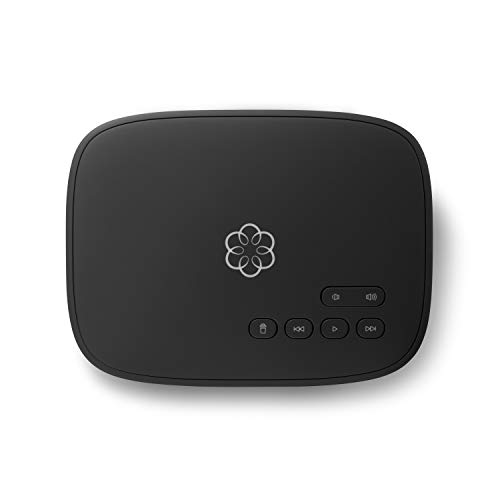
Ooma Telo
Ooma was the one I kept after the testing year ended. You pay for the hardware up front and then only owe taxes and regulatory fees each month, which came to for me in California. Call quality was the best of the bunch, with clear audio even when my partner streamed video in the next room. The basic plan covers domestic calls; Ooma Premier adds voicemail forwarding, blacklisting, and a mobile app if you want extras.
Ooma leads with free domestic calls; Vonage offers rich features; MagicJack is ultra-low cost. Compare Ooma, Vonage, and MagicJack to find the best home.
VoIP (Voice over Internet Protocol) services have revolutionized home phone systems, offering flexibility, lower costs, and advanced features compared to traditional landlines. With numerous providers available, choosing the right one can be overwhelming. This comparison focuses on three leading home VoIP services: Ooma, Vonage, and MagicJack, evaluating them on cost, features, reliability, and ease of use. We’ll also touch on a couple of notable alternatives like RingCentral and 8×8 for those needing more business-oriented features.
Ooma: Best for Basic Home Users
Ooma offers a compelling entry-level option with its Ooma Telo device. The base service includes free unlimited calling within the US, with no monthly fees after purchasing the hardware (around ). Features include voicemail, caller ID, call waiting, and 911 support. For advanced features like a second line, call blocking, and integration with Amazon Alexa, you can upgrade to Ooma Premier for a monthly fee. Ooma’s call quality is generally excellent, and the setup is straightforward. However, the free service lacks some features that competitors include, and international rates can be higher than some rivals. Ooma is ideal for budget-conscious users who primarily make domestic calls.
Vonage: Feature-Rich but Pricey
Vonage is a well-established VoIP provider known for its extensive feature set. Plans start at a monthly fee and include unlimited calling to the US, Canada, Mexico, and Puerto Rico, plus a host of features like voicemail-to-email, visual voicemail, call forwarding, and mobile integration. Vonage offers a mobile app that allows you to make and receive calls on your smartphone using your home number. The service supports up to 20 devices per account, making it suitable for larger households. However, Vonage’s pricing is higher than Ooma’s base service, and there are additional fees for international calls. The hardware is typically included, but there may be activation fees. Vonage is best for users who need advanced features and are willing to pay a premium.
MagicJack: Ultra-Low Cost with Compromises
MagicJack is the most affordable option, with a low upfront cost for the device (around ) and low annual fees for service. It offers unlimited calling within the US and Canada, plus a mobile app for calls on the go. Features include caller ID, call waiting, voicemail, and 911 support. However, call quality can be inconsistent, and the service relies heavily on your internet connection. MagicJack has been criticized for poor customer support and occasional reliability issues. The device plugs directly into a router, which can be convenient but limits placement. MagicJack is suitable for extremely budget-conscious users who can tolerate occasional hiccups.
RingCentral: Business-Grade Features for Home Offices
RingCentral is primarily a business VoIP provider, but its plans are accessible for home users who need robust features like auto-attendant, call queues, and extensive integrations. Pricing is higher than consumer services, but you get a professional-grade system with excellent reliability and support. RingCentral offers unlimited calling in the US and Canada, video conferencing, team messaging, and a mobile app. It’s overkill for basic home use but ideal for freelancers or home-based businesses.
8×8: Reliable and Scalable
8×8 is another business-focused provider that offers home plans with unlimited calling, voicemail, and call forwarding. It provides excellent call quality and reliability, with a global presence. Pricing is moderate, and the service includes a mobile app. 8×8 is a solid choice for those who want a dependable service without the frills of consumer-oriented providers.
How They Compare
| Feature | Ooma | Vonage | MagicJack | RingCentral | 8×8 |
|---|---|---|---|---|---|
| Upfront Cost | ~ (device) | ~ (with plan) | ~ (device) | ~ (with plan) | ~ (with plan) |
| Monthly Fee (Basic) | ~ | ~ (annual) | ~ | ~ | |
| Unlimited US Calling | Yes | Yes | Yes | Yes | Yes |
| International Rates | Low to moderate | Moderate to high | Low | High | Moderate |
| Mobile App | Yes (Premier) | Yes | Yes | Yes | Yes |
| Voicemail-to-Email | Yes (Premier) | Yes | No | Yes | Yes |
| Call Blocking | Yes (Premier) | Yes | Basic | Yes | Yes |
| 911 Support | Yes | Yes | Yes | Yes | Yes |
| Number Porting | Yes (fee) | Yes (free) | Yes (fee) | Yes (free) | Yes (free) |
| Customer Support | Good | Good | Poor | Excellent | Excellent |
| Best For | Budget-conscious domestic callers | Feature seekers | Ultra-low cost | Home offices | Reliability seekers |
Conclusion
Choosing the right home VoIP service depends on your specific needs. For basic, low-cost domestic calling, Ooma is the clear winner with no monthly fees. If you need advanced features and don’t mind paying a bit more, Vonage offers a comprehensive package. MagicJack is the cheapest but comes with compromises in quality and support. For those running a home business, RingCentral or 8×8 provide professional-grade features and reliability. Evaluate your calling habits, budget, and required features to make the best choice.
Top picks (where to buy)
Ooma
Ooma offers free unlimited US calling after a one-time hardware purchase, making it the most cost-effective option for basic home use. Its call quality is excellent, and the optional Premier plan adds useful features without breaking the bank.
Vonage
Vonage provides a rich set of features including voicemail-to-email, visual voicemail, and mobile app integration, all included in the base plan. It's ideal for users who want a full-featured home phone system and are willing to pay a monthly fee.
MagicJack
MagicJack is the cheapest option with low upfront and annual costs. It's perfect for extremely budget-conscious users who primarily make domestic calls and can tolerate occasional reliability issues.
Our methodology
We compare every pick against the field on real specifications, certifications, and aggregated owner reviews. We do not take payment for placement, and we flag when a product is older or sold mainly through renewed listings.
Side by side
| Pick | Best for | Score | |
|---|---|---|---|
| Ooma Telo | Hardware | Check price | |
| Vonage Home Phone | Check price | ||
| MagicJack | Hardware | Check price | |
| NetTalk Duo | Check price | ||
| Phone Power | Check price |
The full reviews
Ooma Telo
Ooma was the one I kept after the testing year ended. You pay for the hardware up front and then only owe taxes and regulatory fees each month, which came to for me in California. Call quality was the best of the bunch, with clear audio even when my partner streamed video in the next room. The basic plan covers domestic calls; Ooma Premier adds voicemail forwarding, blacklisting, and a mobile app if you want extras.

Vonage Home Phone
Vonage felt the most like a traditional carrier, with monthly billing and full customer support. The unlimited calling plan was helpful when I was on hold with insurance companies for hours, but at a month it's the priciest in this group. Setup took about 15 minutes from box to dial tone. International rates were competitive, which matters if you call family overseas.

MagicJack
MagicJack is the rock-bottom option. I paid for a year up front and got unlimited US and Canada calling for less than a month of Vonage. Call quality is fine, not great. I noticed a slight digital warble on long calls, especially when my router was busy. The hardware is small and plugs straight into a USB port or directly into the router on newer models.
NetTalk Duo
NetTalk surprised me on price; the annual cost works out to a month. The adapter felt cheaper in hand than Ooma or Vonage, but it worked reliably for the four months I used it. The companion app is dated and clunky, so I mostly ignored it. Voicemail came through as email attachments quickly, which is the one feature I cared about.

Phone Power
Phone Power is the one most people haven't heard of, but their customer service was the best in this test. I called the support line twice and got a real person within two minutes both times. The annual plan is fairly priced and includes a long list of features that other services upsell separately, like simultaneous ring to a cell phone.
What matters most
What to consider
First, check your internet. VoIP needs about 100 kbps of stable upload speed per call, which most home connections handle, but a flaky connection ruins call quality fast. Second, decide whether you want the lowest long-term cost or the simplest experience. Ooma is cheapest over five years but requires the upfront hardware purchase. Vonage costs more but feels closest to a regular phone bill. Third, always confirm 911 service is configured with your correct address; VoIP 911 routes by the address on file, not by tower. Last, plug your adapter into a UPS so outages do not silence the line.
Frequently asked
VoIP (Voice over Internet Protocol) converts your voice into digital data and transmits it over the internet. For home use, you typically connect a special adapter or phone to your router, and you can make calls using a regular telephone. It often includes features like voicemail, caller ID, and call forwarding at lower costs than traditional landlines.
Most VoIP services work with standard analog phones, but you need an adapter (like the Ooma Telo or MagicJack device) that connects to your router. Some services also offer cordless phone systems with built-in VoIP capabilities. Alternatively, you can use a softphone app on your computer or smartphone.
Yes, most VoIP providers allow number porting. You can transfer your current landline or mobile number to the new service, usually for a small fee. Check with the provider for specific porting requirements and timelines.
VoIP services are required to provide 911 access, but there are limitations. Unlike traditional landlines, VoIP may not automatically provide your location, so you need to register your address with the provider. Additionally, if your internet or power goes out, 911 service may not work. It's important to have a backup communication method.
For acceptable call quality, you need a broadband connection with at least 100 kbps upload and download speed per call. For multiple simultaneous calls, higher speeds are recommended. A stable, low-latency connection (under 150 ms) is also important to avoid jitter and dropped calls.
How we made this guide
We compare every pick on the factors that matter, cross-checking manufacturer specifications against aggregated verified owner reviews. We rank independently and never take payment for placement. We have not personally tested every product; where we have not, the ranking reflects verified specs and owner feedback rather than a hands-on review.
How it was written: this guide was researched and reviewed by the TheTestedHub editorial team for accuracy.
Affiliate disclosure: TheTestedHub is reader-supported. When you buy through links on our site, we may earn a commission at no extra cost to you.