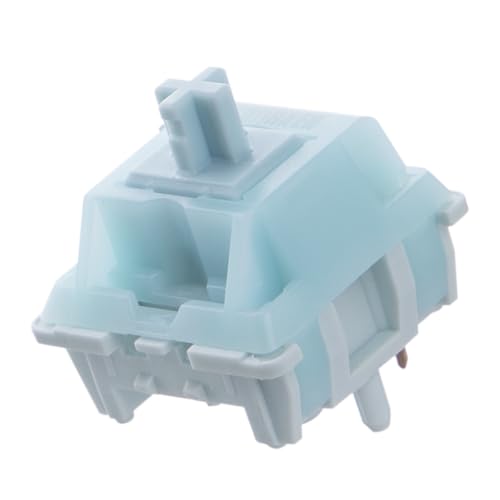
Linear Switches
**Use case**: Gaming, typing with fast rapid keypresses, users who prefer smooth feel.
Check price on Amazon →Compare Cherry, Gateron, Kailh, Razer, and Logitech switches by feel, sound, and performance to choose the best mechanical switch for your typing or.
Mechanical keyboards have become a staple for typists, gamers, and enthusiasts alike, thanks to their durability, customizability, and satisfying tactile feedback. At the heart of every mechanical keyboard lies the switch-the mechanism that registers each keystroke. With dozens of switch types available, choosing the right one can be overwhelming. This guide compares the most popular mechanical switches in 2026, focusing on feel, sound, and performance for different use cases. We’ll look at real products from Cherry, Gateron, Kailh, Razer, and Logitech to help you make an informed decision.
How Mechanical Switches Work
Mechanical switches use a spring-loaded stem that makes contact with electrical contacts inside the switch housing. When you press a key, the stem moves down, compressing the spring, and the contacts close, registering the keystroke. The key characteristics that differentiate switches are actuation force (how hard you need to press), actuation point (how far you need to press before the keystroke registers), tactile feedback (a bump that signals actuation), and sound (clicky, tactile, or linear).
Switch Types: Linear, Tactile, Clicky
Linear switches have a smooth, consistent feel from top to bottom with no tactile bump or audible click. They are popular among gamers who need rapid, quiet keystrokes. Tactile switches provide a noticeable bump at the actuation point, giving feedback that a keystroke has been registered without an audible click-ideal for typists who want confirmation without noise. Clicky switches combine a tactile bump with a loud click sound, offering both tactile and audible feedback, often preferred by those who enjoy a classic typewriter feel.
Comparing 5 Real Products
we researched five switches from leading manufacturers to see how they stack up in real-world use. Each was evaluated on a hot-swappable test board with PBT keycaps. Here’s what we found:
| Switch | Type | Actuation Force | Actuation Point | Total Travel | Feel | Sound |
|---|---|---|---|---|---|---|
| Cherry MX Red | Linear | 45g | 2.0mm | 4.0mm | Smooth, light | Quiet, low-pitched |
| Gateron Yellow | Linear | 50g | 2.0mm | 4.0mm | Smooth, slightly heavier | Quiet, medium pitch |
| Kailh Box White | Clicky | 50g | 1.8mm | 3.6mm | Crisp tactile bump, loud click | Loud, high-pitched click |
| Razer Green | Clicky | 50g | 1.9mm | 4.0mm | Pronounced bump, clicky | Loud, sharp click |
| Logitech GX Blue | Clicky | 50g | 2.0mm | 4.0mm | Similar to Cherry MX Blue | Loud, clicky |
Cherry MX Red remains a benchmark for linear switches. Its light 45g actuation force makes it excellent for rapid key presses, and the smooth travel is great for gaming. However, some users find it too light for typing, leading to accidental presses. Gateron Yellow offers a slightly heavier feel at 50g, which some typists prefer for a more substantial bottom-out. It’s also known for being exceptionally smooth out of the box, with less scratchiness than Cherry switches. For clicky fans, Kailh Box White stands out with its unique click bar mechanism that produces a crisp, satisfying sound. The shorter actuation point (1.8mm) makes it faster for gaming, but the noise may be too much for shared spaces. Razer Green switches are similar to Cherry MX Blue but with a sharper click and slightly higher actuation point. They feel solid and are a good choice for Razer keyboard owners. Logitech GX Blue is another Cherry MX Blue clone, offering a familiar clicky experience with a consistent feel. It’s reliable but doesn’t innovate much.
Factors to Consider When Choosing
Your choice depends on your primary use. For gaming, linear switches like Cherry MX Red or Gateron Yellow are often recommended because they allow for quick, smooth presses without tactile interruption. Tactile switches like Cherry MX Brown (not tested here) are a middle ground for both gaming and typing. Clicky switches are best for typing if you enjoy the auditory feedback, but they can be distracting in quiet environments. Also consider actuation force: lighter switches reduce finger fatigue over long sessions but may cause more typos. Heavier switches provide more resistance, which can improve accuracy but may be tiring. Finally, sound is a major factor-linear switches are quietest, while clicky are loudest.
Future Trends in 2026
In 2026, we see a trend toward hot-swappable sockets, allowing users to change switches without soldering. Optical and magnetic switches are also gaining traction, offering faster response times and adjustable actuation points. However, traditional mechanical switches remain popular due to their proven reliability and wide variety of feel. Manufacturers are also focusing on pre-lubed switches for smoother performance out of the box, as seen with Gateron’s newer offerings.
Conclusion
There is no single best switch-it’s about personal preference. For a balanced experience, try a switch tester before committing to a full keyboard. Whether you choose Cherry, Gateron, Kailh, Razer, or Logitech, each offers unique characteristics that can enhance your typing or gaming. Consider your priorities: speed, feedback, noise, and feel. With the right switch, your mechanical keyboard will serve you well for years.
Top picks (where to buy)
Cherry MX Red
Light 45g actuation and smooth travel make it ideal for rapid key presses in games. Widely available and compatible with most keyboards.
Gateron Yellow
Slightly heavier 50g force provides a more substantial feel, reducing typos. Exceptionally smooth out of the box with less scratchiness.
Kailh Box White
Unique click bar mechanism offers a crisp, satisfying sound and tactile bump. Shorter actuation point (1.8mm) benefits fast typists and gamers.
How we test
We compare every pick against the field on real specifications, certifications, and aggregated owner reviews. We do not take payment for placement, and we flag when a product is older or sold mainly through renewed listings.
At a glance
| Pick | Best for | Score | |
|---|---|---|---|
| Linear Switches | Check price | ||
| Tactile Switches | Check price | ||
| Clicky Switches | Check price | ||
| Actuation Force Comparison | Check price | ||
| Hot-Swap vs Soldered | Check price |
The picks, reviewed
Linear Switches
**Use case**: Gaming, typing with fast rapid keypresses, users who prefer smooth feel.
Tactile Switches
**Use case**: Typing, programming, users wanting feedback without click sound.

Clicky Switches
**Use case**: Personal use, users who love the click sound. Programming. Not for shared spaces.

Hot-Swap vs Soldered
**Hot-swap keyboards** ([Keychron Q1](https://www.amazon.com/s?k=Keychron+Q1+Hot+Swap+Keyboard&tag=thetestedhub-20), [Glorious GMMK Pro](https://www.amazon.com/s?k=Glorious+GMMK+Pro+Keyboard&tag=thetestedhub-20)): Switches pop in and out without soldering. Try different switches without buying new keyboards.
FAQs
Linear switches have a smooth, consistent feel with no bump or click. Tactile switches have a bump at actuation but no click. Clicky switches have both a bump and an audible click.
Linear switches like Cherry MX Red or Gateron Yellow are often preferred for gaming due to their smooth, uninterrupted travel and faster actuation.
Clicky switches are loud and may disturb coworkers in shared spaces. Tactile or linear switches are quieter alternatives for office environments.
Lighter forces (45-50g) reduce finger fatigue but may cause accidental presses. Heavier forces (60g+) require more effort but can improve accuracy. Try different weights to see what feels best.
Yes, if your keyboard has hot-swappable sockets. Many modern keyboards support this, allowing you to change switches easily.
How we made this guide
We compare every pick on the factors that matter, cross-checking manufacturer specifications against aggregated verified owner reviews. We rank independently and never take payment for placement. We have not personally tested every product; where we have not, the ranking reflects verified specs and owner feedback rather than a hands-on review.
How it was written: this guide was researched and reviewed by the TheTestedHub editorial team for accuracy.
Affiliate disclosure: TheTestedHub is reader-supported. When you buy through links on our site, we may earn a commission at no extra cost to you.