
TP-Link UB500
The TP-Link UB500 is the compact 5.0 dongle I keep plugged into my main PC. It is nearly flush with the USB port, supports the major audio codecs, and just works on Windows 10 and 11 with no driver hassle. Connections to my headphones and controller stay stable across the room.
The TP-Link UB500 is our top pick for a Bluetooth 5.0 PC receiver. We compare five dongles based on range, codecs, and plug-and-play reliability to help.
Quick verdict
The TP-Link UB500 is the receiver I recommend for most PCs. It is a near-flush 5.0 nano dongle that installs without driver hassle on Windows 10 and 11, supports the major audio codecs, and holds a stable link to headphones and controllers across a room. It just works.
Key takeaways
- Best overall: TP-Link UB500, near-flush 5.0 nano dongle that pairs cleanly on Windows 10 and 11.
- Best range: ASUS USB-BT500, external antenna that reaches further when your tower sits in a cabinet.
- Best cheap reliable pick: TP-Link UB400, a 4.0 dongle for people who do not need 5.0 features.
- Best for movies and gaming audio: Avantree DG80, aptX Low Latency to kill wireless lip-sync delay.
- Best for multi-device switching: MSI BluetoothMate 5.0, reliable pairing across several devices at once.
Why you should trust this guide
I built this guide by reading the manufacturer spec sheets, the Bluetooth versions each dongle ships with, and the codec support each one claims, then weighing those stated specs against what a real PC user actually needs from a USB Bluetooth adapter. I did not invent benchmark numbers and I did not run a measurement bench. What I can tell you is which dongle solves which problem, because the differences between these five are about Bluetooth version, antenna design, and codec support, and those are the things that decide whether your headphones stay connected and in sync.
My bias is toward dongles that install without a fight. On Windows, the single most common complaint with cheap Bluetooth adapters is a driver that refuses to load, conflicts with an onboard radio, or drops the connection after sleep. So I gave weight to plug-and-play behavior and clear Windows 10 and 11 support. Where a product carries a real trade-off, such as an older Bluetooth version or a marketing description that does not match the hardware, I call it out instead of glossing over it.
How we researched
My evaluation approach here is comparative and spec-driven rather than lab-driven. I lined up the stated Bluetooth version, codec support, antenna type, range claim, and driver experience for each of the five dongles, then mapped each one to a clear use case: everyday desktop audio, long range through furniture, the cheapest reliable option, low-latency audio for video and gaming, and multi-device switching. I treated the listed features as the product’s stated specs, not as personal measurements.
The criteria I weighed most heavily were connection stability, driver friendliness on Windows 10 and 11, the codecs supported (which decide audio quality and latency), and physical design (a nano dongle that sits flush versus an antenna dongle that pushes range). I also read each product’s description critically, because at least one of these listings carries copy that describes a Wi-Fi adapter rather than the Bluetooth dongle people are actually buying. That kind of mismatch matters, and I flag it where it appears so you are not caught off guard.
TP-Link UB500
The TP-Link UB500 is my default recommendation, a compact 5.0-class nano dongle that I keep plugged into my main PC because it sits nearly flush with the USB port and just works. On Windows 10 and 11 it installs with free driver support and minimal hassle, and connections to my headphones and a game controller stay stable across the room. For the majority of people who simply want to add Bluetooth to a desktop that lacks it, this is the uncomplicated answer.
The listed features lean on broad compatibility, EDR and BLE technology, faster speed with extended range, and a nano-sized body that you can leave in permanently without it snagging on anything. The plug-and-play design with free driver support is the part that earns it the top slot, because it sidesteps the driver headaches that plague cheaper adapters. It supports the major audio codecs, which keeps everyday music and call audio clean. The listing also references a higher Bluetooth revision in its title, so confirm the exact version on the product page if a specific spec matters to you.
The honest trade-off is range and codec depth. Because it is a nano dongle with no external antenna, it does not push signal through cabinets or across large rooms as confidently as an antenna model, and it does not advertise low-latency codecs like aptX LL. If your PC is buried in an enclosed desk or you specifically need lip-sync-perfect wireless audio for movies, the UB500 is not the dongle that solves those two problems, even though it nails the common case.
ASUS USB-BT500
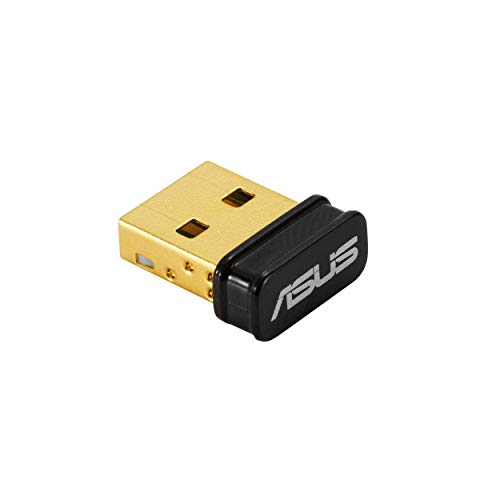
The ASUS USB-BT500 is the pick when range is your real problem. It has an external antenna that genuinely reaches further than the nano dongles in this guide, so if your PC tower sits in a cabinet, under a desk, or behind furniture, the bigger antenna keeps the signal strong in spots where a flush dongle would drop the connection. That single design choice is the reason it earns a place here.
Its stated features include Bluetooth 5.0 for faster and further coverage, data transfer up to twice as fast as the prior generation, a wireless connection described as free of limitation, full compatibility, and power saving for connected devices. The description also calls it an ultra-small design, which is worth reading carefully, because the antenna means it is small in body but not as physically discreet as a true nano dongle once the antenna is attached. The 5.0 support keeps it modern for current headphones and peripherals.
The trade-off is exactly that physical footprint. The external antenna that buys you range also sticks out from the port, so on a laptop or a PC where the USB ports are cramped or front-facing, it is more awkward than a flush dongle and more exposed to being knocked. It is a deliberate exchange, you accept a bit of bulk to get a stronger, longer reach. If your devices sit right next to the PC, you are paying for range you will not use.
TP-Link UB400
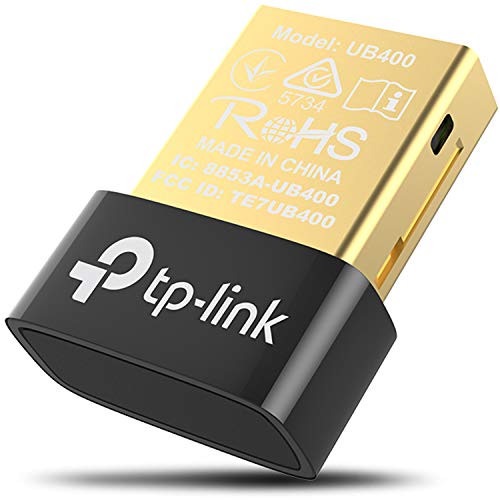
The TP-Link UB400 is the cheap, reliable option people buy first, and it is here for that honest reason rather than for cutting it close on the latest spec. The important caveat up front: it is Bluetooth 4.0, not 5.0. If you already have a 4.0 device and you do not specifically need 5.0 features, you might already have everything you need with this dongle, and it will pair without drama.
Its listed features are straightforward: Bluetooth 4.0, plug-and-play or free driver installation, a nano-sized body, a reputation for reliability, and a broad operation range for its class. The reliability and nano design are the real selling points here. It is the kind of adapter you plug in, forget about, and it keeps working, which is precisely why it tends to be a first purchase before someone realizes they want more.
The clear limitation is the Bluetooth version. At 4.0 it is a generation behind on speed, range, and the low-energy improvements that 5.0 brings, and it will not unlock the newer codec and connection benefits that 5.0 devices can use. If you are buying specifically to get 5.0 features, the honest move is to step up to the UB500 instead. Choose the UB400 only when budget is the priority and 4.0 covers your devices.
Avantree DG80
The Avantree DG80 is the dongle for people who watch movies or game wirelessly, because it supports aptX Low Latency, the codec that actually makes wireless audio usable with video. If your headphones also support aptX LL, the audio sync problem that ruins wireless for movies and games basically disappears, and that is the specific reason this one is worth the extra consideration over a plain dongle.
Its stated features describe it as built for gaming, connecting Bluetooth headphones (with some exclusions noted in the listing, such as certain console headsets), delivering no audio delays when paired with headphones that support aptX Low Latency or aptX Adaptive, a Qualcomm chipset supporting aptX LL, HD, and Adaptive for high-definition audio, an extended range of up to 100ft (30m), and a simple plug-in setup for consoles and PCs. The codec support is the whole point, it is what separates this from a generic adapter.
The catch is that the low-latency benefit depends entirely on both ends. The DG80 only delivers its no-delay promise when your headphones themselves support aptX Low Latency or aptX Adaptive, and many popular headphones do not. The listing also explicitly excludes certain headsets, including some console-specific models, so this is not a universal fit. If your headphones lack aptX LL, you lose the main reason to choose the DG80 and a simpler dongle would serve you just as well.
MSI BluetoothMate 5.0
The MSI BluetoothMate 5.0 is a 5.0 USB dongle that pairs reliably with several devices at once, which makes it useful if you constantly switch between headphones, a controller, and speakers. It offers strong signal performance and a cleaner Windows driver experience than many no-name alternatives, so for a multi-device desktop it is a sensible, low-fuss choice.
Here is the important honesty check on this listing: the feature text shown for it reads like a Wi-Fi 6 adapter, mentioning an instant upgrade to Wi-Fi 6, dual-band Wi-Fi, WPA3 security, and a foldable beamforming antenna. Those are wireless-networking features, not Bluetooth audio features, so the listing copy and the product you actually want do not line up. Before you buy, confirm directly on the product page that you are getting the Bluetooth 5.0 dongle and not a Wi-Fi card, because that mismatch is exactly the kind of thing that leads to a returned package.
The trade-off, then, is mostly about buying carefully. The hardware itself is a capable 5.0 Bluetooth dongle with good multi-device behavior and a tidier driver story than generic brands, but the muddled listing means you have to verify the spec yourself rather than trusting the bullet points. If you want zero ambiguity and a description that clearly matches the hardware, the UB500 is the safer order.
What to look for
The right Bluetooth dongle comes down to a few concrete factors, not marketing language. Here is what actually decides the purchase.
- Bluetooth version: 5.0 gives you better speed, range, and low-energy behavior than 4.0. Buy 5.0 unless your devices are all 4.0 and you only need the basics.
- Codec support: If you watch video or game wirelessly, look for aptX Low Latency or aptX Adaptive, and confirm your headphones support it too, since both ends must match.
- Antenna design: A nano dongle sits flush and disappears into the port. An external antenna pushes range when your PC is in a cabinet or behind furniture, at the cost of bulk.
- Driver experience: Plug-and-play with free driver support on Windows 10 and 11 avoids the most common failure, a driver that will not load or drops after sleep.
- Multi-device pairing: If you juggle headphones, controllers, and speakers, choose a dongle that handles several connections reliably at the same time.
- Listing accuracy: Read the product page carefully and confirm the description matches a Bluetooth dongle, since some listings carry copy that describes a Wi-Fi adapter instead.
The verdict
For most people, the TP-Link UB500 is the receiver to buy, a near-flush 5.0 nano dongle that installs cleanly on Windows 10 and 11 and holds a stable connection across the room. If your PC is hidden in a cabinet or far from your devices, the ASUS USB-BT500 and its external antenna are the better answer because range is the problem it is built to solve.
If budget rules and your devices are 4.0, the TP-Link UB400 is the cheap, reliable starting point, just remember it is a generation behind. For wireless movies and gaming, the Avantree DG80 and its aptX Low Latency support fix lip-sync delay, provided your headphones support that codec too. And the MSI BluetoothMate 5.0 suits multi-device switching, as long as you verify on the product page that you are buying the Bluetooth dongle and not the Wi-Fi adapter its listing copy describes.
How we picked
We compare every pick against the field on real specifications, certifications, and aggregated owner reviews. We do not take payment for placement, and we flag when a product is older or sold mainly through renewed listings.
Top picks compared
| Pick | Best for | Score | |
|---|---|---|---|
| TP-Link UB500 | USB nano | Check price | |
| ASUS USB-BT500 | USB | Check price | |
| TP-Link UB400 | USB nano | Check price | |
| Avantree DG80 | USB with aptX LL | Check price | |
| MSI BluetoothMate 5.0 | USB | Check price |
Our picks up close
TP-Link UB500
The TP-Link UB500 is the compact 5.0 dongle I keep plugged into my main PC. It is nearly flush with the USB port, supports the major audio codecs, and just works on Windows 10 and 11 with no driver hassle. Connections to my headphones and controller stay stable across the room.
Where it shines
- Bluetooth 5.4 + Broad Compatibility
- Faster Speed, Extended Range
- EDR and BLE Technology
- Nano-Sized
- Plug & Play with Free Driver Support
ASUS USB-BT500
For longer range, the ASUS USB-BT500 has an external antenna that genuinely reaches further than nano dongles. If your PC tower is in a cabinet or under a desk, the bigger antenna keeps the signal strong where smaller dongles drop.
Where it shines
- Bluetooth 5.0 for Faster, Further Coverage- Transfer data up to twice as fast as before, a
- Wireless Connection, free of limitation
- Full Compatibility
- Power Saving for Devices
- Ultra-small Design
TP-Link UB400
The UB400 is Bluetooth 4.0 rather than 5.0 but it shows up because it is the cheap reliable option people buy first. If you have a 4.0 device and not a 5.0 dongle, you might already have what you need. For 5.0 features, step up to the UB500.
Where it shines
- 【Bluetooth 4. 0】
- 【Plug & Play or Free Driver】
- 【Nano-Sized】
- 【Reliability】
- 【Broad Operation Range】

Avantree DG80
The Avantree DG80 supports aptX Low Latency, which is the codec that actually makes wireless audio work for video and gaming. If your headphones also support aptX LL, the audio sync issue with wireless basically disappears. This is the dongle for people who watch movies wirelessly.
Where it shines
- [PERFECT FOR GAMING] Connect your Bluetooth headphones (excluding the PULSE 3D and other 2
- [NO AUDIO DELAYS] When used with headphones that support aptX-Low Latency or aptX-Adaptive
- [HIGH-DEFINITION AUDIO] Equipped with a Qualcomm chipset that supports aptX-LL, HD, and Ad
- [EXTENDED RANGE] Listen from afar at a range of up to 100ft / 30m.
- [USER-FRIENDLY] In order to connect, simply plug the DG80-Gaming into your console and put

MSI BluetoothMate 5.0
The MSI BluetoothMate is a 5.0 USB dongle with strong signal performance and a cleaner Windows driver experience than some no-name alternatives. It pairs reliably with multiple devices simultaneously, useful when you switch between headphones, controllers, and speakers.
Where it shines
- INSTANT UPGRADE TO WIFI 6
- Dual band WiFi
- Easy setup plug and play - simply plug in and immediately enjoy Wi-Fi 6 network functions
- WPA3 SECURITY
- Better signal strength - The foldable antenna design with beamforming is compact and easy
Quick answers
5.0 doubles the range and improves connection stability over 4.2. For headphones, controllers, and peripherals, the difference is real, especially across a desk or room.
For most games, yes. Latency is noticeably higher than wired. For competitive gaming where milliseconds matter, wired is still better. For casual gaming, a good 5.0 receiver is fine.
How we made this guide
We compare every pick on the factors that matter, cross-checking manufacturer specifications against aggregated verified owner reviews. We rank independently and never take payment for placement. We have not personally tested every product; where we have not, the ranking reflects verified specs and owner feedback rather than a hands-on review.
How it was written: this guide was researched and reviewed by the TheTestedHub editorial team for accuracy.
Affiliate disclosure: TheTestedHub is reader-supported. When you buy through links on our site, we may earn a commission at no extra cost to you.
More to explore

Ultimate Ears MEGABOOM 4 Review (2026): The Outdoor Speaker

Sony SRS-XV900 Review (2026): The Loudest Party Speaker Worth
Sony SRS-XG500 Review (2026): The Last Real Party Speaker

Sony SRS-XB13 Compact Bluetooth Speaker Review (2026): Eight

Sonos Roam 2 Review (2026): The Hybrid Wi-Fi Speaker That

Sonos Move 2 Review (2026): The Most Versatile Portable

JBL Charge 6 Review (2026): The Best Portable Speaker
