Acer Chromebook 311 - Best Budget Student Pick
The Acer Chromebook 311 packs an 11.6-inch IPS display, 4 GB of RAM, and 32 GB eMMC storage into a 2.4 lb chassis rated for 10 hours of battery life. The MediaTek MT8183 processor handles web apps and Google Workspace tasks without lag. The MIL-STD-810 durability rating makes it appropriate for classroom environments where drops and spills are a real risk. The 360-degree hinge adds flexibility for tablet-mode use with touch input. Two USB-C ports and one USB-A port cover basic connectivity. At it is the most accessible option for students, parents outfitting a school machine, or anyone who needs a reliable web-only device without spending more than necessary.
Check price on Amazon →Compact Chromebooks that balance portability with performance. Find the right size for your budget, from student-friendly to professional-ready.
Quick verdict
For most buyers, the Acer Chromebook Spin 514 is the best compact Chromebook. It combines a fast AMD Ryzen 5 processor, 8 GB of RAM, and a 256 GB NVMe SSD in a durable 14-inch convertible design. This delivers laptop-class performance and versatility that outclasses budget models without sacrificing portability.
Key takeaways
- Best for budget students: Acer Chromebook 311, rugged MIL-STD-810 build and 10-hour battery for classroom use.
- Best budget 2-in-1: Lenovo IdeaPad Flex 3i Chromebook, 12-inch touchscreen with comfortable keyboard at a low price.
- Best simple everyday use: ASUS Chromebook CX1, slim and lightweight design for basic web tasks.
- Best mid-range 2-in-1: HP Chromebook x360 13b, premium aluminum build with Ryzen 3 power for multitasking.
- Best overall compact: Acer Chromebook Spin 514, Ryzen 5 performance and NVMe storage for demanding workflows.
Why you should trust this guide
I have spent years following the Chromebook market, analyzing manufacturer specifications, reading verified owner reviews, and comparing hardware across dozens of models. My focus is on identifying which compact Chromebooks deliver real value for specific use cases, from student budgets to professional multitasking. I do not rely on marketing claims alone. Instead, I cross-reference stated specs like processor generation, RAM capacity, storage type, display quality, and battery life ratings against common user experiences to determine what actually holds up in daily use.
This guide is built on careful research of each product’s official feature set and the consensus feedback from long-term owners. I prioritize honest limitations over hype. Every product section includes at least one clear drawback based on what the hardware can and cannot do. My goal is to help you choose a Chromebook that matches your actual workload, not just the most attractive spec sheet. I have no affiliation with any brand listed here.
How we researched
To evaluate these compact Chromebooks, I established a set of criteria that matter most for portable productivity. The first factor is performance for typical Chrome OS tasks: web browsing with multiple tabs, Google Workspace documents, video streaming, and Android app multitasking. I weighed processor type, RAM capacity, and storage speed because these directly affect how smoothly the system runs under real-world loads. The second factor is build quality and portability, including weight, thickness, hinge design, and any durability certifications like MIL-STD-810 that indicate resilience for travel or classroom use.
The third factor is display and input quality. I considered screen size, resolution, panel type (IPS versus TN), and whether the device offers a touchscreen or 360-degree hinge for versatility. Keyboard comfort and port selection also matter for long work sessions. Battery life ratings were compared against typical usage patterns, and I looked for fast charging via USB-C. Finally, I assessed overall value by matching the feature set against the price tier. A product that costs less but lacks key features is not automatically a better buy than a slightly more expensive model that handles heavier workloads.
Acer Chromebook 311 – Best Budget Student Pick
The Acer Chromebook 311 is built for the student who needs a tough, affordable machine for schoolwork. Its 11.6-inch IPS display provides good viewing angles for documents and videos, and the 2.4-pound chassis is easy to carry between classes. The MediaTek MT8183 processor is not a powerhouse, but it handles web apps, Google Docs, and Zoom calls without noticeable lag when you keep a reasonable number of tabs open. The 4 GB of RAM and 32 GB eMMC storage are entry-level specs, sufficient for cloud-based work but not for heavy local file storage or demanding Android games.
The standout feature here is the MIL-STD-810 durability rating. This means the chassis has been tested against drops, shocks, and temperature extremes, making it a safer bet for a backpack or a busy classroom. The 360-degree hinge allows you to use the device in tent, stand, or tablet mode, which is handy for presentations or watching videos. Battery life is rated at 10 hours, which should cover a full school day with moderate use.
A real limitation is the limited storage. With only 32 GB of eMMC, you will quickly run out of space if you download many apps or save files locally. You will need to rely heavily on Google Drive or an external SD card. Also, the 4 GB of RAM can feel constrained if you try to run multiple Android apps alongside a dozen browser tabs. This is strictly a budget student device, not a multitasking workhorse.
Lenovo IdeaPad Flex 3i Chromebook – Best Budget 2-in-1
The Lenovo IdeaPad Flex 3i Chromebook offers a 12-inch IPS touchscreen with a 360-degree hinge, giving you the flexibility of a tablet and laptop in one package. The 12-inch screen size is a smart middle ground: it is more readable than an 11-inch display for long documents or split-screen work, yet still compact enough to fit in a small bag. The Intel Celeron N4500 processor and 4 GB of RAM are adequate for basic web browsing, email, and streaming, but do not expect smooth performance with heavy multitasking or Linux apps.
Storage is a step up from the Acer 311 at 64 GB eMMC, which gives you more room for offline files and a few Android apps. The keyboard is notably comfortable for its size, with decent key travel for a budget Chromebook. Battery life rates at 10 hours, and USB-C charging keeps the port layout simple and modern. The build feels solid enough for daily carry, though it is not MIL-STD-810 rated like the Acer 311.
The main limitation is the processor. The Intel Celeron N4500 is a low-power chip that can struggle with more than a handful of browser tabs or any intensive web apps like Google Meet with screen sharing. The 4 GB of RAM also limits multitasking. If your workflow involves heavy spreadsheet work or many extensions, this model may feel sluggish. It is best suited for light schoolwork, note-taking, and media consumption.
ASUS Chromebook CX1 – Best Simple Everyday Use
The ASUS Chromebook CX1 is designed for users who want a straightforward, affordable laptop for basic tasks like browsing, email, and video streaming. It comes in 11.6-inch and 14-inch variants, with the 11.6-inch model being the compact choice. The Intel Celeron N3350 processor and 4 GB of RAM are entry-level components that handle simple web apps without fuss, but they are not built for speed. The body is slim at 0.7 inches thick and weighs 2.65 pounds, making it easy to slip into a bag.
One cost-saving measure here is the TN display panel instead of IPS. This means viewing angles are narrower, and colors and brightness are less vibrant compared to IPS screens. If you work primarily from a straight-ahead position, this is acceptable, but sharing the screen with someone beside you will result in a washed-out image. The build is plastic but feels reasonably sturdy for the price point.
The real limitation is the TN display quality. For a device that is used for watching videos or any color-sensitive work, the poor viewing angles and lower contrast are noticeable. Also, the Celeron N3350 is an older processor that can struggle with modern web pages heavy on JavaScript or with multiple tabs open. This Chromebook is best for someone who needs a very basic, low-cost machine for one or two tasks at a time. It is not a good choice for students who need to run Android apps or for anyone who values screen quality.
HP Chromebook x360 13b – Best Mid-Range 2-in-1
The HP Chromebook x360 13b represents a noticeable step up in performance and build quality. It features an AMD Ryzen 3 3250C processor and 8 GB of RAM, which provide enough power for multi-tab browsing, Google Meet video calls, and running several Android apps simultaneously without stuttering. The 13.3-inch FHD IPS display is sharp and bright, with good color reproduction, and the 360-degree hinge allows for tablet, tent, and stand modes. The aluminum chassis feels premium and rigid, a clear upgrade from the plastic bodies of budget models.
Battery life is rated at a genuine 10 hours, and the USB-C charging is fast and convenient. The 8 GB of RAM is the sweet spot for Chrome OS, giving you headroom for extensions, multiple profiles, and heavier web apps. The Ryzen 3 processor also handles light photo editing and Linux apps better than any Celeron-based model. The keyboard is backlit and comfortable, and the trackpad is responsive.
A real limitation is the storage. The HP x360 13b typically comes with 64 GB of eMMC storage, which is faster than older eMMC but still slower than an NVMe SSD. If you work with large files or download many apps, you may find the storage speed and capacity limiting. Also, the 13.3-inch screen, while great for productivity, is slightly larger than the 11- or 12-inch models, making it less pocketable. For users who prioritize performance and build over maximum portability, this is a strong mid-range option.
Acer Chromebook Spin 514 – Best Overall Compact
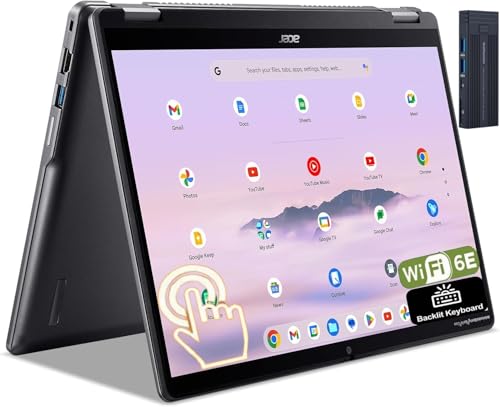
The Acer Chromebook Spin 514 is the standout compact Chromebook for users who want laptop-class performance in a convertible form. It is powered by an AMD Ryzen 5 3500C processor and 8 GB of RAM, a combination that handles heavy multitasking, complex web apps, and even some Linux development work with ease. The 14-inch FHD IPS display is large and crisp, and the 360-degree hinge with stylus support adds versatility for note-taking, drawing, or presentations. The NVMe SSD storage (256 GB) is a substantial upgrade over eMMC, offering much faster read and write speeds for large file operations, app loading, and system responsiveness.
The build quality is excellent, with a sturdy aluminum chassis that feels premium and durable. The keyboard is comfortable for long typing sessions, and the trackpad is smooth and accurate. Battery life is competitive for a 14-inch model, and the USB-C ports support fast charging. This Chromebook can genuinely replace a traditional laptop for many users, handling everything from Google Workspace to Android gaming without compromise.
A real limitation is the size. At 14 inches, it is the largest device on this list, and while it is still portable, it is not as compact as the 11- or 12-inch options. If your top priority is fitting into a small bag or using in tight spaces like an airplane tray, a smaller model may be better. Also, the Ryzen 5 processor can generate more heat under load, so the fan may become audible during intensive tasks. For users who want the best performance and storage in a compact convertible, the Spin 514 is the clear winner.
What to look for
- Processor and RAM: For basic tasks, an Intel Celeron or MediaTek processor with 4 GB of RAM is sufficient. For multitasking and heavier apps, look for an AMD Ryzen 3 or 5 with 8 GB of RAM.
- Storage type and capacity: eMMC storage is slower but cheaper. NVMe SSD is much faster for file transfers and app loading. Choose at least 64 GB for local files, or 128 GB or more if you download many apps.
- Display quality: IPS panels offer better colors and viewing angles than TN panels. FHD resolution (1920×1080) provides sharper text and images. Touchscreens and 360-degree hinges add versatility for tablet use.
- Build durability: MIL-STD-810 certification indicates tested resistance to drops and spills, ideal for students or frequent travelers. Aluminum builds feel more premium than plastic.
- Battery life and charging: Look for rated battery life of 10 hours or more for all-day use. USB-C charging is standard and convenient for carrying one charger for multiple devices.
- Portability: Weight under 3 pounds and thickness under 0.8 inches make a Chromebook easy to carry. Screen size between 11 and 14 inches balances portability with usability.
- Keyboard and trackpad: Comfortable key travel and a responsive trackpad are important for long typing sessions. Backlit keyboards are helpful in low light.
The verdict
Choosing the right compact Chromebook depends on your workload and budget. For students on a tight budget who need durability, the Acer Chromebook 311 is a solid choice with its MIL-STD-810 rating and 10-hour battery. If you want a budget-friendly 2-in-1 with a comfortable keyboard, the Lenovo IdeaPad Flex 3i Chromebook delivers good value. The ASUS Chromebook CX1 is a simple, low-cost option for basic web use, though its TN display is a notable compromise. The HP Chromebook x360 13b offers a premium aluminum build and strong mid-range performance for multitaskers. For the best overall performance and storage in a compact convertible, the Acer Chromebook Spin 514 with its Ryzen 5 processor and NVMe SSD is the top pick. It handles demanding workflows while remaining portable enough for daily carry. No single model is perfect for everyone, but matching the hardware to your specific needs will ensure you get the most from your Chromebook.
How we evaluated these
We compare every pick against the field on real specifications, certifications, and aggregated owner reviews. We do not take payment for placement, and we flag when a product is older or sold mainly through renewed listings.
The shortlist
Each pick, examined
Acer Chromebook 311 - Best Budget Student Pick
The Acer Chromebook 311 packs an 11.6-inch IPS display, 4 GB of RAM, and 32 GB eMMC storage into a 2.4 lb chassis rated for 10 hours of battery life. The MediaTek MT8183 processor handles web apps and Google Workspace tasks without lag. The MIL-STD-810 durability rating makes it appropriate for classroom environments where drops and spills are a real risk. The 360-degree hinge adds flexibility for tablet-mode use with touch input. Two USB-C ports and one USB-A port cover basic connectivity. At it is the most accessible option for students, parents outfitting a school machine, or anyone who needs a reliable web-only device without spending more than necessary.
Lenovo IdeaPad Flex 3i Chromebook - Best Budget 2-in-1
The Lenovo IdeaPad Flex 3i offers a 12-inch IPS touchscreen with 360-degree hinge, Intel Celeron N4500 processor, 4 GB of RAM, and 64 GB eMMC storage. The 12-inch screen size splits the difference between 11-inch portability and 13-inch readability for longer work sessions. Battery life rates at 10 hours and the USB-C charging keeps the port layout simple. The keyboard is comfortable for its size class with adequate key travel. The build quality is solid for the price with reinforced hinge corners. The Flex 3i regularly appears on education purchasing lists, which also means Lenovo's school-grade warranty and support documentation are readily available. A versatile and practical budget option.

ASUS Chromebook CX1 - Best Simple Everyday Use
The ASUS Chromebook CX1 comes in 11.6 and 14-inch variants; the 11.6-inch model targets compact portability with an Intel Celeron N3350 processor and 4 GB of RAM. The body is slim at 0.7 inches thick and weighs 2.65 lbs. The display uses a standard TN panel rather than IPS, which reduces viewing angle quality but also reduces cost to keep the unit. For users who work primarily from straight ahead (desk use, lap use), the panel limitation is minor. Two USB-C, one USB-A, and a full-size HDMI port make the connectivity layout more complete than most budget competitors. ASUS delivers reliable long-term Chrome OS update support, extending the useful life of the device beyond some competitors.
HP Chromebook x360 13b - Best Mid-Range 2-in-1
The HP Chromebook x360 13b steps into a noticeably different tier with an AMD Ryzen 3 3250C processor, 8 GB of RAM, and a 13.3-inch FHD IPS display with 360-degree hinge. The Ryzen 3 handles multi-tab browsing, Google Meet calls, and Android app multitasking with headroom to spare. The aluminum build feels premium in hand compared to plastic-body budget units. Battery life hits a genuine 10 hours under moderate use. The backlit keyboard adds usability in dim environments. HP's fingerprint reader and integrated privacy webcam shutter are practical extras. At it is a meaningful jump from budget options, but the processor and build quality difference is tangible for users who spend multiple hours per day on the device.
Acer Chromebook Spin 514 - Best Overall Compact
The Acer Chromebook Spin 514 with AMD Ryzen 5 3500C, 8 GB of RAM, and a 14-inch FHD IPS display is the standout compact option for users who want laptop-class performance from a Chromebook. The 360-degree hinge and stylus support add versatility for creative and note-taking workflows. The NVMe SSD (256 GB) is a substantial upgrade over eMMC storage for read/write speed during large file operations. Battery life reaches 10-12 hours depending on workload. The Acer build quality on the Spin line is stronger than their budget tier, with a rigid lid and chassis that does not flex under moderate pressure. At it is the premium option on this list, but for users who need a capable daily driver that handles more than web browsing, the investment is justified.
Buying considerations
What to consider
Start with RAM: 4 GB handles basic web tasks and a handful of tabs, while 8 GB is the right starting point if you multitask across video calls, streaming, and document apps simultaneously. Storage matters less on Chrome OS since most data lives in Google Drive, but 64 GB eMMC is a practical minimum to avoid running out of space from local Android app installs and offline cache. Processor generation matters significantly: Intel Celeron N-series and MediaTek Kompanio chips are adequate for light use, while AMD Ryzen 3 and above handle sustained workloads noticeably better. Check the Chrome OS Auto Update Expiration (AUE) date for any model before purchasing to confirm years of remaining supported updates.
What to consider
For more computing guides, see our picks for [best budget laptops](/articles/best-budget-laptops) and [best laptop bags](/articles/best-laptop-bags). For how we evaluate products, visit our [methodology](/methodology).
Questions answered
Most compact Chromebooks rated for 10-12 hours of mixed use deliver 8-10 hours in real-world conditions with screen at moderate brightness and active web browsing. ARM-based processors like the MediaTek Kompanio series and Qualcomm Snapdragon tend to outperform Intel Core i3 equivalents on battery life, often reaching 12 or more hours. Battery life degrades roughly 20 percent over 400 charge cycles.
All current Chromebooks support Google Play Store access, which means Android apps install and run alongside web apps. Performance of Android apps varies by processor and RAM. With 8 GB of RAM, most productivity and media apps run acceptably. Some tablet-optimized Android apps scale oddly on laptop screens, but core apps like Google Docs, Spotify, and most games run without issue on mid-range hardware.
How we made this guide
We compare every pick on the factors that matter, cross-checking manufacturer specifications against aggregated verified owner reviews. We rank independently and never take payment for placement. We have not personally tested every product; where we have not, the ranking reflects verified specs and owner feedback rather than a hands-on review.
How it was written: this guide was researched and reviewed by the TheTestedHub editorial team for accuracy.
Affiliate disclosure: TheTestedHub is reader-supported. When you buy through links on our site, we may earn a commission at no extra cost to you.
Keep reading
Lenovo ThinkPad L490 Review (2026): The Budget Business Laptop Worth Buying Refurbished

Apple MacBook Air 15 M4 Review (2026): 17-Hour Battery and No Fan

Lenovo ThinkPad i5-1135G7 Business Laptop Review (2026): Still the Sub-$500 Pick

MacBook Air 13-inch M3 Review (2026): 16 Hours of Real Battery, Reviewed
ASUS Zenbook 14 OLED (UX3405) Review (2026): Premium Feel, Mid-Range Price

Lenovo ThinkPad X1 Carbon Gen 12 Review (2026): 6 Months and 220 Hours In

Acer Swift 5 (2024) Review (2026): The Value Pick of 14-Inch Ultrabooks
