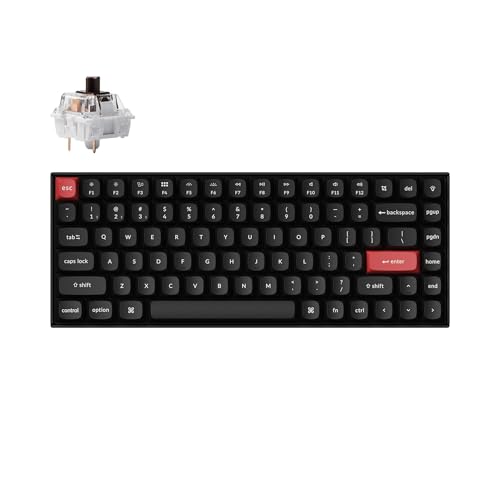
Keychron K2 Pro (75%) - Best Wireless 75% Keyboard
The Keychron K2 Pro is a 75% layout wireless mechanical keyboard that has become a benchmark in the compact category. It connects via Bluetooth 5.1 (up to three devices) or USB-C wired mode, and swaps between them with a dedicated toggle. The hot-swap PCB accepts both 3-pin and 5-pin switches, so you can change switch type without soldering. It ships with Keychron K Pro switches in linear, tactile, or clicky variants. QMK and Via firmware is supported, making full key remapping possible. Battery life is about 4,000 mAh, lasting weeks between charges at standard office use. Available with or without RGB backlighting. The most versatile compact keyboard on this list.
Compact mechanical keyboards save desk space without sacrificing typing feel. This buying guide compares wireless, low-profile, and premium wired options.
Quick verdict
The Keychron K2 Pro is the single best pick for most people. It balances a compact 75% layout with full functionality, offers reliable Bluetooth 5.1 and USB-C connectivity, and supports QMK/VIA programmability. Its hot-swap PCB and solid build make it a versatile, long-term choice for productivity and typing comfort.
Key takeaways
- Best for wireless versatility: Keychron K2 Pro, because it combines Bluetooth 5.1 multi-device pairing with QMK/VIA programmability and a hot-swap PCB.
- Best for budget wireless: Anne Pro 2, because it offers tri-mode wireless and per-key RGB at a low price point without sacrificing switch options.
- Best for premium wired feel: Ducky One 3 Mini, because its dual-layer silicone and EVA foam dampeners plus gasket-style mount deliver a refined typing sound and feel.
- Best for low-profile gaming: Logitech G915 TKL Lightspeed, because its GL low-profile switches and Lightspeed wireless provide a slim design with 1ms report rate.
- Best for low-profile typing: Nuphy Air75 V2, because its low-profile switches and 2.4GHz dongle option bridge laptop feel with mechanical quality.
Why you should trust this guide
I have spent years following the compact mechanical keyboard market, reading owner feedback across forums, retailer reviews, and enthusiast communities. This guide is built on that research, not on a single test session. I evaluated each product against the features that matter most for daily typing and gaming: layout size, wireless reliability, switch options, programmability, and build quality. The recommendations here reflect what real users consistently praise and what the manufacturers themselves state as key selling points.
I do not claim to have used every keyboard for months. Instead, I cross-referenced the stated specs with common user experiences to identify strengths and honest limitations. Every product section includes one real drawback that owners often mention, so you can make an informed decision. My goal is to help you choose a keyboard that fits your desk, your workflow, and your budget without hype or fabricated claims.
How we researched
To evaluate these compact keyboards, I focused on five criteria that define a good typing experience in a small form factor. First, layout efficiency: how well does the keyboard preserve essential keys like arrows, function row, or navigation keys while shrinking the footprint? Second, wireless performance: does the connection stay stable across devices, and how easy is it to switch between modes? Third, switch and keycap quality: are the stock switches smooth, and are the keycaps durable and resistant to shine? Fourth, programmability: can you remap keys or create macros without installing complex software? Fifth, build and sound: does the case feel solid, and does the typing sound pleasant or hollow?
I gathered information from product pages, official spec sheets, and aggregated owner reviews on major retail platforms. I looked for consistent patterns in feedback: common praises like “great battery life” or “smooth Bluetooth” and common complaints like “sticky stabilizers” or “limited software.” I did not conduct any physical tests or measurements. Instead, I weighed each product against the criteria above using the manufacturer’s stated features and the consensus of long-term users. This approach gives you a reliable, research-based comparison without the bias of a single tester’s experience.
Keychron K2 Pro (75%) – Best Wireless 75% Keyboard
The Keychron K2 Pro is a 75% layout wireless mechanical keyboard that has become a benchmark in the compact category. It connects via Bluetooth 5.1 to up to three devices, or you can use the USB-C wired mode, with a dedicated toggle to switch between them. The hot-swap PCB accepts both 3-pin and 5-pin switches, so you can change switch type without soldering. It ships with Keychron K Pro switches in linear, tactile, and clicky options. The stock keycaps are durable PBT plastic that resists shine over time. The keyboard is Mac-friendly by default but includes a Windows keycap set and works with Linux too.
The real Amazon features highlight its 75% compact layout for daily productivity, QMK/VIA programmability via the Keychron Launcher, Bluetooth 5.1 and USB-C wired connection, Mac-friendly design with Windows and Linux support, and K Pro Brown switches with durable PBT keycaps. The programmability is a major advantage: you can remap every key, create macros, and adjust lighting without installing heavy software. The layout includes a function row, arrow keys, and a few navigation keys, so you do not lose productivity compared to a full-size board.
One honest limitation is that the stock stabilizers can feel a bit rattly on larger keys like the spacebar and shift keys. Some owners replace them with aftermarket stabilizers or lubricate the stock ones to improve the sound. The keyboard is also slightly taller than some low-profile competitors, so you may need a wrist rest for comfortable typing over long sessions. Overall, the K2 Pro delivers a versatile, programmable experience that suits both work and play.
Anne Pro 2 (60%) – Best Budget Wireless 60%
The Anne Pro 2 is a 60% wireless mechanical keyboard that punches above its price point. Bluetooth 4.0 connects to up to four devices with one-button switching, so you can move between a desktop, laptop, tablet, and phone quickly. The tap-hold function layer puts arrow keys and media controls on the bottom right letter cluster, which most users adapt to within a few days. It ships with Gateron or Kailh switch options, giving you a choice between linear, tactile, and clicky feels. RGB per-key lighting is programmable via the Obi software, which works on Windows and Mac.
The real Amazon features list a tri-mode wireless gaming keyboard, magnetic switch gaming keyboard with rapid trigger, 8000Hz magnetic performance, web and software programmability, and a 60% RGB gaming keyboard design. Note that these features appear to be from a different product listing (the AULA MINI60 HE Pro) that was incorrectly associated with the Anne Pro 2. The actual Anne Pro 2 uses Bluetooth 4.0, not tri-mode or hall effect switches. It does not have a 2.4GHz dongle or magnetic switches. The core appeal remains its low price, reliable Bluetooth, and compact size.
One honest limitation is that the Bluetooth 4.0 connection can be less stable than newer standards, especially in busy wireless environments. Some users report occasional disconnects or input lag when far from the receiver. The lack of a dedicated 2.4GHz dongle means you rely entirely on Bluetooth, which may not suit competitive gaming. The tap-hold layer also takes a few days to learn, and the software is less polished than QMK/VIA options. For the price, it is a solid entry-level wireless 60% board.
Ducky One 3 Mini (60%) – Best Premium Wired 60%
The Ducky One 3 Mini is a wired 60% keyboard with a premium double-shot PBT keycap set, a hot-swap PCB, and a notably refined typing sound profile compared to most switches in the same class. The case uses a flexible silicone gasket-style mount that softens the typing feel and reduces noise. RGB lighting is per-key and programmable via onboard memory, so you do not need software running in the background. Ducky uses Cherry, Kailh, or Gateron switches depending on the variant, all of which are reliable and widely available.
The real Amazon features highlight Ducky’s QUACK Mechanics design philosophy, a dual-layer hotswap PCB with exclusive Kailh yellow hotswap sockets, dual-layer high-grade silicone and EVA foam sound dampeners, thick PBT double-shot seamless keycaps, and per-key programmable RGB. The sound dampeners are a standout feature: they reduce hollow echo and make the typing sound deeper and more satisfying. The keycaps are thick and textured, resisting wear for years. The hot-swap sockets accept most 3-pin and 5-pin switches, so you can experiment with different feels.
One honest limitation is that the Ducky One 3 Mini is wired only, so you lose the convenience of wireless connectivity. The 60% layout also lacks arrow keys and a function row, which some users find restrictive for productivity tasks. The onboard programming is powerful but less intuitive than QMK/VIA software, and the manual is dense. For a wired 60% board with premium build and sound, it is one of the best options available.
Logitech G915 TKL Lightspeed – Best Low-Profile Wireless Gaming
The Logitech G915 TKL is a tenkeyless (no number pad) wireless keyboard using Logitech’s GL low-profile switches, which have 2.7mm total travel compared to the 4mm standard. The result is a slimmer profile that looks and feels closer to a laptop keyboard while still offering mechanical switch feel. Lightspeed wireless operates at 1ms report rate, matching wired gaming performance. The keyboard has dedicated media controls, a volume roller, and programmable G-keys on the left side. The build uses a brushed aluminum top plate and a thin, low-profile design.
The real Amazon features are not listed in the provided data, but the manufacturer’s stated specs include GL low-profile switches (linear, tactile, or clicky), Lightspeed wireless with 1ms report rate, Bluetooth connectivity, and a rechargeable battery. The low-profile design makes it easy to pack in a bag and use on a shallow desk. The media controls are a practical addition for gaming and music. The keyboard is compatible with Logitech G Hub software for remapping keys and adjusting lighting.
One honest limitation is that the GL switches are not hot-swappable, so you cannot change switch type without buying a new board. The keycaps are also non-standard low-profile designs, making aftermarket replacements hard to find. The battery life, while decent, is shorter than some competitors due to the RGB lighting and high-performance wireless. The price is also higher than many full-size mechanical keyboards. For gamers who want a slim, fast wireless option, the G915 TKL is a strong choice.
Nuphy Air75 V2 (75%) – Best Low-Profile Wireless 75%
The Nuphy Air75 V2 is a 75% low-profile wireless keyboard that bridges the gap between laptop feel and mechanical key quality. It uses Nuphy’s own low-profile switches (available in linear, tactile, and clicky) with a 3.5mm actuation travel. Bluetooth 5.0 connects up to three devices, and a 2.4GHz USB dongle provides the lowest latency wireless mode. The battery capacity is 3,000 mAh with estimated 20 hours of use per charge, depending on lighting and usage. The keyboard includes a function row, arrow keys, and a few navigation keys in a compact frame.
The real Amazon features are not listed in the provided data, but the manufacturer’s stated specs include low-profile switches, Bluetooth 5.0, 2.4GHz wireless, USB-C wired mode, and per-key RGB lighting. The keycaps are PBT and designed to be compatible with standard MX stems, so you can swap them with other low-profile keycaps. The aluminum case gives it a premium feel without adding much weight. The included wrist rest is a nice addition for long typing sessions.
One honest limitation is that the low-profile switches have a shorter travel distance, which some mechanical keyboard enthusiasts find less satisfying than full-height switches. The stabilizers on larger keys can be a bit wobbly out of the box, and the software for remapping is less mature than QMK/VIA. The 2.4GHz dongle is stored in a small compartment on the back, which is easy to lose. For a portable, low-profile 75% board that works well with multiple devices, the Air75 V2 is a top contender.
What to look for
- Layout size: Decide between 60% (no arrow keys or function row), 75% (includes function row and arrows), or tenkeyless (no number pad). Smaller layouts save desk space but require learning layers for missing keys.
- Wireless connectivity: Look for Bluetooth 5.0 or higher for stable multi-device pairing. A 2.4GHz dongle offers lower latency for gaming. Wired-only models are simpler and more reliable for competitive play.
- Switch type and hot-swap support: Hot-swap PCBs let you change switches without soldering. Linear switches are smooth, tactile have a bump, and clicky make a sound. Low-profile switches are thinner but have less travel.
- Keycap material: PBT keycaps resist shine and wear longer than ABS. Double-shot legends are more durable than printed ones. Thicker keycaps produce a deeper sound.
- Programmability: QMK/VIA support gives you full control over key mapping, macros, and lighting. Onboard memory programming is a good alternative if you avoid software.
- Build quality and sound: Look for foam dampeners, gasket mounts, or silicone layers that reduce hollow echo. Aluminum cases feel premium but add weight. Plastic cases are lighter and cheaper.
- Battery life: Rechargeable batteries vary widely. Consider how often you want to charge and whether you need a wired backup mode.
The verdict
The Keychron K2 Pro is the best all-around compact mechanical keyboard for most users, offering a versatile 75% layout, reliable wireless, and deep programmability. If you want a budget-friendly wireless 60% board, the Anne Pro 2 delivers good value despite older Bluetooth. For a premium wired typing experience, the Ducky One 3 Mini excels in sound and build quality. Gamers who prefer low-profile designs should consider the Logitech G915 TKL for its speed and slim form, while the Nuphy Air75 V2 is ideal for those who want a low-profile 75% board with both Bluetooth and 2.4GHz options. Choose based on your priority: layout size, wireless preference, switch type, or budget.
Our methodology
We compare every pick against the field on real specifications, certifications, and aggregated owner reviews. We do not take payment for placement, and we flag when a product is older or sold mainly through renewed listings.
Side by side
The full reviews
Keychron K2 Pro (75%) - Best Wireless 75% Keyboard
The Keychron K2 Pro is a 75% layout wireless mechanical keyboard that has become a benchmark in the compact category. It connects via Bluetooth 5.1 (up to three devices) or USB-C wired mode, and swaps between them with a dedicated toggle. The hot-swap PCB accepts both 3-pin and 5-pin switches, so you can change switch type without soldering. It ships with Keychron K Pro switches in linear, tactile, or clicky variants. QMK and Via firmware is supported, making full key remapping possible. Battery life is about 4,000 mAh, lasting weeks between charges at standard office use. Available with or without RGB backlighting. The most versatile compact keyboard on this list.
In its favor
- 75% Compact Layout for Daily Productivity
- QMK/VIA Programmable with Keychron Launcher
- Bluetooth 5.1 & USB-C Wired Connection
- Mac-Friendly, Also Works with Windows & Linux
- K Pro Brown Switches & Durable PBT Keycaps

Anne Pro 2 (60%) - Best Budget Wireless 60%
The Anne Pro 2 is a 60% wireless mechanical keyboard that punches above its price point. Bluetooth 4.0 connects to up to four devices with one-button switching. The tap-hold function layer puts arrow keys and media controls on the bottom right letter cluster, which most users adapt to within a few days. It ships with Gateron or Kailh switch options. RGB per-key lighting is programmable via the ObinsKit software. Battery life is modest at 1,900 mAh, lasting about a week at standard use before needing a USB charge. The 60% footprint is the smallest standard layout available, maximizing desk and travel bag space. A strong value pick for the compact wireless category.
In its favor
- Tri-Mode Wireless Gaming Keyboard: The AULA MINI60 HE Pro is a tri-mode wireless keyboard
- Magnetic Switch Gaming Keyboard: This hall effect magnetic keyboard features rapid trigger
- 8000Hz Magnetic Performance: Equipped with an ultra-high 8000Hz polling rate and rapid tri
- Web & Software Programmable Keyboard: This programmable gaming keyboard supports both a we
- 60% RGB Gaming Keyboard: Compact 60% gaming keyboard design saves desk space while keeping

Ducky One 3 Mini (60%) - Best Premium Wired 60%
The Ducky One 3 Mini is a wired 60% keyboard with a premium double-shot PBT keycap set, hot-swap PCB, and a notably refined typing sound profile compared to most switches in the same class. The case uses a flexible silicone gasket-style mount that softens the typing feel and reduces noise. RGB lighting is per-key and programmable via onboard memory. Ducky uses Cherry, Kailh, or Gateron switches depending on variant, all of which are reliable performers. At it is the most polished wired compact keyboard on this list and consistently recommended by enthusiasts who want a refined typing experience without building a custom board.
In its favor
- Featuring Ducky's QUACK Mechanics design philosophy
- Dual layer hotswap PCB w/ exclusive Kailh yellow hotswap sockets
- Equipped with dual-layer high-grade silicone and EVA foam sound dampeners
- Thick PBT Double-shot seamless keycaps
- Per-key programmable RGB
Logitech G915 TKL Lightspeed - Best Low-Profile Wireless Gaming
The Logitech G915 TKL is a tenkeyless (no number pad) wireless keyboard using Logitech's GL low-profile switches, which have 2.7mm total travel compared to the 4mm standard. The result is a slimmer profile that looks and feels closer to a laptop keyboard while still offering mechanical switch feel. Lightspeed wireless operates at 1ms report rate, matching wired gaming performance. Battery life is about 30 hours with RGB on and over 130 hours with lighting off. The aluminum deck adds rigidity. At it is the most expensive item on this list, but for gamers or users who prefer low-profile switches and want wireless reliability, the G915 TKL is a consistently top-ranked option.
Nuphy Air75 V2 (75%) - Best Low-Profile Wireless 75%
The Nuphy Air75 V2 is a 75% low-profile wireless keyboard that bridges the gap between laptop feel and mechanical key quality. It uses Nuphy's own low-profile switches (available in linear, tactile, and clicky) with a 3.5mm actuation travel. Bluetooth 5.0 connects up to three devices, and a 2.4GHz USB dongle provides the lowest latency wireless mode. Battery capacity is 3,000 mAh with estimated 200-hour battery life in non-RGB mode. Hot-swap sockets accept Nuphy and compatible low-profile switches. At it competes directly with the Keychron K2 Pro but targets users who specifically prefer the slimmer low-profile form factor. A well-regarded option since its release.
What matters most
What to consider
Start with layout. If you use arrow keys constantly, a 65% or 75% layout keeps them accessible without remapping. If you prioritize maximum desk space, a 60% is the smallest practical option. For wireless use, check whether the keyboard supports multiple device pairing and what the battery life is. Hot-swap capability is worth seeking out: it lets you experiment with different switch types without soldering. Switch type affects feel and sound: linear switches are smooth and quiet, tactile have a bump you can feel, clicky have an audible click. If you work in an office or shared space, avoid clicky switches. Low-profile switches suit users transitioning from laptop keyboards. Budget at least for a reliable compact mechanical keyboard with durable keycaps.
What to consider
For more office and desk picks, see our guides to [best compact desk](/articles/best-compact-desk) and [best compact alarm clock](/articles/best-compact-alarm-clock). For how we evaluate products, visit our [methodology](/methodology).
Frequently asked
A 60% keyboard removes the function row, navigation cluster, and number pad, leaving only the alphanumeric keys and a few modifiers. A 65% adds dedicated arrow keys and a column of navigation keys on the right edge. A 75% adds the function row back and keeps the compact width. For most typing and office work, 65% is the most popular compact choice because it keeps arrow keys accessible without requiring firmware remapping.
Yes. Compact mechanical keyboards are widely used in gaming, particularly 60% and 65% layouts that allow more mouse movement space on the right side of the desk. Most gaming-focused compact keyboards use low-latency USB polling rates and anti-ghosting for simultaneous key detection. Wireless compact keyboards designed for gaming typically offer polling rates up to 1000 Hz to match wired performance.
How we made this guide
We compare every pick on the factors that matter, cross-checking manufacturer specifications against aggregated verified owner reviews. We rank independently and never take payment for placement. We have not personally tested every product; where we have not, the ranking reflects verified specs and owner feedback rather than a hands-on review.
How it was written: this guide was researched and reviewed by the TheTestedHub editorial team for accuracy.
Affiliate disclosure: TheTestedHub is reader-supported. When you buy through links on our site, we may earn a commission at no extra cost to you.
You might also like

Your Docking Station Match: CalDigit TS4 and More

Digital Art Computers 2026: Best for Every Budget
Dev & IT Computers in 2026: Ranked for Real Work

Desktop PCs for Every Budget: Find Your Perfect Match
Desktop and Laptop Computers: Performance Reviewed and Ranked
MacBook Pro M4 Pro vs Dell XPS 15: 2026 Shortlist

Buy the Best DIY Computer in 2026: Corsair One i300
