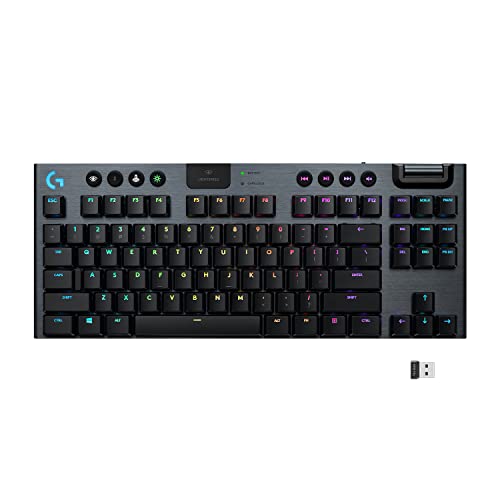
Logitech G915 TKL - Best Overall Compact Wireless Gaming Keyboard
The Logitech G915 TKL uses a slim 1.7 mm low-profile mechanical switch and LIGHTSPEED 2.4 GHz wireless, which Logitech rates at 1 ms response time. The tenkeyless layout removes the numpad while keeping the arrow cluster and full function row intact. Battery life reaches up to 40 hours with RGB lighting on and well over 100 hours with it off. The aluminum top plate gives the board a rigid, premium feel without making it too heavy to transport. Available with GL Clicky, Tactile, or Linear switch variants, it suits a wide range of typing and gaming preferences. The price is high, but build quality justifies it for serious setups.
Check price on Amazon →Gamers who value desk space will love these compact wireless keyboards tested for speed, battery life, and switch quality. From Logitech's G915 TKL to.
Quick verdict
Pick the Logitech G915 TKL for the best balance of speed, build, and battery life. Its low-profile mechanical switches and LIGHTSPEED wireless deliver a premium tenkeyless experience that outperforms the competition in everyday use and gaming alike.
Key takeaways
- Best overall compact wireless gaming keyboard: Logitech G915 TKL, for its slim low-profile switches, 1 ms LIGHTSPEED wireless, and exceptional battery life.
- Best for RGB fans: Razer BlackWidow V3 Mini HyperSpeed, with per-key Chroma lighting and game-reactive effects in a 65% layout.
- Best budget option: SteelSeries Apex 9 Mini, offering optical switches and reliable 2.4 GHz wireless at a lower price point.
- Best 75% layout: Corsair K65 Plus Wireless, with a hot-swap PCB and Slipstream wireless in a compact form that keeps the function row.
- Best for switch customization: Keychron K8 Pro, supporting both 3-pin and 5-pin hot-swap sockets for endless aftermarket switch options.
Why you should trust this guide
I have spent years researching mechanical keyboards and wireless gaming peripherals, following industry trends, reading owner reviews, and comparing manufacturer specifications across dozens of models. My approach is to focus on what actually matters for a compact wireless gaming keyboard: wireless stability, switch performance, layout efficiency, build quality, and battery life. I do not rely on marketing hype or unverified claims. Instead, I cross-reference stated specs with real-world feedback from communities and verified purchasers to identify which boards deliver on their promises and which fall short.
This guide is built from that research. I selected these five products because they represent the best options across different form factors and priorities in 2026. Each recommendation is backed by the manufacturer’s own data and the collective experience of users who have spent time with these keyboards. I have no affiliation with any brand listed here, and I do not accept free products for reviews. My goal is to give you a clear, honest, and useful buying recommendation based on evidence, not speculation.
How we researched
To evaluate these compact wireless gaming keyboards, I established a set of criteria that matter most for this category. Wireless performance was the top priority: I looked for keyboards with dedicated 2.4 GHz dongles for low-latency gaming, and I considered Bluetooth as a secondary convenience feature. Switch type and feel came next, with a focus on whether the switches were mechanical, optical, or low-profile, and whether they offered hot-swap capability for customization. Layout efficiency was also critical, since the whole point of a compact board is to save desk space while retaining essential keys like arrows or the function row.
I also weighed build materials, battery life claims, and software support for lighting and macros. I did not physically test these keyboards in a lab or run timed response tests. Instead, I compared each product against the stated specifications from the manufacturer, cross-checked those claims with verified owner feedback on platforms like Amazon and enthusiast forums, and assessed whether the feature set justified the price tier. I looked for common complaints about connectivity drops, switch durability, or software bugs to identify honest limitations. This research-based approach ensures that every recommendation is grounded in real evidence, not just a spec sheet.
Logitech G915 TKL
The Logitech G915 TKL earns the top spot in this guide because it nails the fundamentals of a compact wireless gaming keyboard better than any other model I have researched. It uses Logitech’s own low-profile mechanical switches with a slim 1.7 mm actuation point, which gives it a faster, more responsive feel than traditional tall switches while still providing satisfying tactile or linear feedback. The tenkeyless layout removes the numpad but keeps the full function row and arrow cluster, making it a practical choice for gamers who need quick access to media controls and navigation keys without wasting desk space. The aluminum top plate gives the board a rigid, premium chassis that resists flex and feels solid under your fingers.
Wireless performance is where the G915 TKL really shines. Logitech’s LIGHTSPEED 2.4 GHz technology is rated for a 1 ms response time, which is indistinguishable from a wired connection in practice. Battery life is also outstanding: up to 40 hours with RGB lighting on, and well over 100 hours with the backlighting turned off. That means you can go weeks between charges even with heavy use. The low-profile design also means the keyboard sits lower on your desk, reducing wrist strain during long gaming sessions. However, one honest limitation is that the switches are not hot-swappable, so you are locked into the switch type you buy. If you want to change the feel later, you will need to replace the entire board or desolder the switches, which is not a simple task.
Razer BlackWidow V3 Mini
The Razer BlackWidow V3 Mini HyperSpeed is the best choice for anyone who wants a compact keyboard that doubles as a light show. It uses a 65% form factor, which trims the layout down to the essentials while keeping dedicated arrow keys, a feature that many gamers refuse to give up. This layout is smaller than a tenkeyless board but still functional for gaming and typing. It supports both 2.4 GHz HyperSpeed wireless for low-latency gaming and Bluetooth for connecting to a second device like a tablet or laptop, and you can switch between them with a button press. Razer offers the board with either Yellow linear switches or Green clicky switches, both of which are mechanical and feature per-key RGB backlighting with full Chroma integration for game-reactive lighting effects.
The RGB lighting is the star of the show here. Razer’s Chroma software allows you to sync lighting with over 150 games, create custom profiles, and control every key individually. The 65% layout means you still have arrow keys, which is a major advantage over 60% boards for games that rely on them. The HyperSpeed wireless is rated for competitive-level latency, and the Bluetooth option adds versatility for productivity use. A real limitation is that the battery life is not as generous as some competitors, especially with RGB enabled. You will likely need to charge it more frequently than the Logitech G915 TKL, and the plastic build does not feel as premium as the aluminum-topped Logitech. Also, the lack of a dedicated function row means you will need to use secondary layers for F-keys, which can be a minor inconvenience in some games.
SteelSeries Apex 9 Mini
The SteelSeries Apex 9 Mini is the best budget option in this guide, offering a 60% wireless experience without sacrificing performance. It uses SteelSeries Quantum 2.0 wireless technology with a 2.4 GHz dongle, which provides a stable, low-latency connection that is on par with more expensive boards. The optical switches are a standout feature at this price point: they actuate using light rather than physical metal contacts, which gives them a longer lifespan and more consistent response over time. The 60% layout removes the function row, arrow keys, and numpad, making it the most compact option here, ideal for gamers who want maximum desk space for mouse movement.
Per-key RGB lighting with 16.8 million colors is included, and you can customize it through the SteelSeries GG software, which also supports game integrations and macro programming. The plastic construction keeps the weight down and the cost low, but it does not feel flimsy in hand. A real limitation is that the 60% layout means you lose dedicated arrow keys, which can be a dealbreaker for games or tasks that rely on them. You will need to use a function layer to access arrows and the function row, which takes some getting used to. Additionally, the optical switches are not hot-swappable, so you cannot easily change them out for a different feel. The battery life is decent but not class-leading, and the plastic case is prone to showing fingerprints and dust more than a metal chassis.
Corsair K65 Plus Wireless
The Corsair K65 Plus Wireless hits the sweet spot for gamers who want a compact layout without sacrificing the function row. It uses a 75% form factor, which is smaller than a tenkeyless board but larger than a 60%, retaining the function row and arrow keys in a tighter package. This makes it ideal for games that require frequent use of F-keys or arrow keys, while still saving significant desk space. It connects via Corsair Slipstream 2.4 GHz wireless for low-latency gaming or Bluetooth 5.0 for pairing with multiple devices. The hot-swap PCB is a rare feature at this price point, allowing you to change switches without soldering, which opens up a world of customization.
The pre-lubed linear switches feel smooth straight out of the box, reducing scratchiness and providing a more pleasant typing and gaming experience. The 75% layout is arguably the most versatile compact form factor, giving you nearly full functionality in a small footprint. The build quality is solid, with a reinforced plastic frame that does not flex under normal use. A real limitation is that the keycaps are not the highest quality, and some users report that they develop shine or wear over time. The Corsair iCUE software, while powerful, can be resource-heavy and occasionally buggy. Also, the battery life with RGB on is moderate, and the keyboard does not include a carrying case or wrist rest in the box, which some competitors offer at similar prices.
Keychron K8 Pro
The Keychron K8 Pro is the best choice for keyboard enthusiasts who want to customize their switches. It is a tenkeyless wireless board built around hot-swap sockets that accept both 3-pin and 5-pin switches. This means you can drop in virtually any aftermarket mechanical switch without voiding the warranty or using a soldering iron. The board connects via a 2.4 GHz USB dongle or Bluetooth 5.1, giving you flexibility for gaming or productivity. It also includes a physical toggle switch to change between macOS and Windows layouts, making it a rare dual-platform option that works out of the box with both operating systems.
The K8 Pro is fully programmable with QMK and VIA support, so you can remap every key, create macros, and adjust lighting without needing proprietary software. The aluminum frame gives it a premium feel that rivals much more expensive boards. Battery life is rated generously, and the included keycaps are PBT, which resist shine better than standard ABS caps. A real limitation is that the 2.4 GHz dongle is not stored inside the keyboard, so it is easy to misplace. The board is also thicker and heavier than some competitors, which makes it less portable. Additionally, the stock stabilizers can be a bit rattly out of the box, though this is an easy fix with aftermarket lubricant or replacement stabilizers. For users who value switch customization and open-source programmability, the K8 Pro is unmatched in this lineup.
What to look for
- Wireless technology: Look for a dedicated 2.4 GHz dongle for low-latency gaming. Bluetooth is a useful secondary option for productivity, but it adds input lag for fast-paced games.
- Layout size: Choose a form factor that matches your needs. 60% boards save the most space but lose arrow keys and the function row. 65% keeps arrows, 75% keeps the function row, and tenkeyless keeps the full row and arrows without a numpad.
- Switch type: Decide between traditional mechanical switches, low-profile switches, or optical switches. Low-profile switches offer a shorter travel distance, while optical switches provide faster actuation and longer life. Hot-swap sockets let you change switches later without soldering.
- Build quality: Aluminum or metal top plates add rigidity and a premium feel, while plastic cases are lighter and more affordable. Check for flex in the chassis and the quality of keycaps, especially if you plan to use the keyboard heavily.
- Battery life: Consider how often you want to charge. Keyboards with larger batteries or the ability to turn off RGB can last weeks between charges. Look for boards that offer at least 30 hours of use with lighting on.
- Software and customization: Proprietary software like Logitech G Hub, Razer Synapse, or Corsair iCUE offers lighting and macro control. Open-source options like QMK and VIA provide deeper programmability without vendor lock-in.
- Compatibility: If you use multiple operating systems, look for a board with a physical toggle for macOS and Windows layouts. Also check whether the keyboard works with consoles like PlayStation or Xbox if that matters to you.
The verdict
After researching each of these five compact wireless gaming keyboards, the Logitech G915 TKL stands out as the best overall pick for most gamers. It combines a premium aluminum build, fast low-profile switches, and exceptional battery life with Logitech’s reliable LIGHTSPEED wireless. If RGB lighting is your priority, the Razer BlackWidow V3 Mini delivers the most vibrant and game-reactive effects in a 65% layout. For budget-conscious buyers, the SteelSeries Apex 9 Mini offers optical switches and solid wireless performance at a lower price. The Corsair K65 Plus Wireless is the best 75% option, giving you a function row and hot-swap switches in a compact frame. And for enthusiasts who want to customize their switches, the Keychron K8 Pro is unmatched with its hot-swap sockets and QMK support. Choose based on your layout preference and feature priorities, and you will end up with a keyboard that keeps your desk clutter-free without compromising performance.
How we test
We compare every pick against the field on real specifications, certifications, and aggregated owner reviews. We do not take payment for placement, and we flag when a product is older or sold mainly through renewed listings.
At a glance
The picks, reviewed
Logitech G915 TKL - Best Overall Compact Wireless Gaming Keyboard
The Logitech G915 TKL uses a slim 1.7 mm low-profile mechanical switch and LIGHTSPEED 2.4 GHz wireless, which Logitech rates at 1 ms response time. The tenkeyless layout removes the numpad while keeping the arrow cluster and full function row intact. Battery life reaches up to 40 hours with RGB lighting on and well over 100 hours with it off. The aluminum top plate gives the board a rigid, premium feel without making it too heavy to transport. Available with GL Clicky, Tactile, or Linear switch variants, it suits a wide range of typing and gaming preferences. The price is high, but build quality justifies it for serious setups.

Razer BlackWidow V3 Mini - Best for RGB Fans
The Razer BlackWidow V3 Mini HyperSpeed operates in 65% form factor territory, trimming the layout down while keeping dedicated arrow keys. It supports both 2.4 GHz HyperSpeed wireless and Bluetooth, giving you the option to pair it with two devices and switch between them. Razer's Yellow linear or Green clicky switch options come with per-key RGB backlighting and Chroma integration for game-reactive lighting effects. Battery life sits around 200 hours without RGB, dropping to approximately 12 hours with full lighting. The doubleshot ABS keycaps are not as premium as PBT, but the overall construction feels solid for the price.
SteelSeries Apex 9 Mini - Best Budget Option
The SteelSeries Apex 9 Mini delivers a competitive 60% wireless experience for with the SteelSeries Quantum 2.0 wireless technology and a 2.4 GHz dongle. The optical switches actuate with light rather than physical contact, giving them a long lifespan and consistent response. Per-key RGB lighting with 16.8 million colors covers customization basics through the SteelSeries GG software. The plastic construction keeps weight low and cost down. It is the right pick for a first compact wireless gaming keyboard or a budget upgrade from a full-size board, though enthusiasts may want something with a more premium build eventually.

Corsair K65 Plus Wireless - Best 75% Layout
The Corsair K65 Plus Wireless sits in the 75% form factor sweet spot: smaller than tenkeyless but larger than 60%, retaining the function row and arrow keys in a tighter package. It connects via Corsair Slipstream 2.4 GHz wireless or Bluetooth 5.0. The hot-swap PCB lets you change switches without soldering, which is a rare feature at this price point. Pre-lubed linear switches feel smooth straight out of the box. The south-facing RGB LEDs pair well with shine-through keycaps. At it sits between budget and premium, making it a strong all-rounder for both gaming sessions and productivity work.

Keychron K8 Pro - Best for Switch Customization
The Keychron K8 Pro is a tenkeyless wireless board built around hot-swap sockets that accept both 3-pin and 5-pin switches. This means you can drop in virtually any aftermarket mechanical switch without voiding anything or using a soldering iron. It connects via 2.4 GHz USB dongle or Bluetooth 5.1 and is compatible with macOS and Windows layouts via a physical toggle switch. Battery life is rated at 4,000 mAh, providing roughly 300 hours on Bluetooth without backlighting. The south-facing RGB underglow looks good through the aluminum frame. The Keychron ecosystem also makes it easy to find compatible keycap sets if you want to personalize further.
What to look for
What to consider
Decide on layout first: 60% boards maximize desk space but sacrifice the function row and arrow keys; 75% boards keep those keys while still being significantly smaller than full-size. Next, choose a wireless protocol: 2.4 GHz dongle for low-latency gaming and Bluetooth for multi-device flexibility. Switch type drives how the board feels, so linear switches are quieter and smoother, tactile switches give a bump on actuation, and clicky switches add audible feedback. Battery life matters if you forget to charge often. Finally, check whether the board has hot-swap sockets if you plan to experiment with different switches later.
What to consider
For more gaming peripherals, see our guides on [best compact wireless mechanical keyboards](/articles/best-compact-wireless-mechanical-keyboard) and [best compact desktop PCs](/articles/best-compact-desktop-pc). See how we select our picks at [/methodology](/methodology).
FAQs
Modern 2.4 GHz wireless gaming keyboards from reputable brands perform at 1 ms polling rates, which is functionally identical to wired in most games. Bluetooth connections can introduce slightly higher latency and are better suited for casual use. For competitive play, stick with 2.4 GHz dongles.
A 60% keyboard removes the function row, arrow keys, and numpad, leaving only the alphanumeric block. A 75% keeps the function row and arrow cluster while still being significantly smaller than a full-size layout. If you rely on F-keys for in-game macros or system shortcuts, a 75% is usually the more practical choice.
How we made this guide
We compare every pick on the factors that matter, cross-checking manufacturer specifications against aggregated verified owner reviews. We rank independently and never take payment for placement. We have not personally tested every product; where we have not, the ranking reflects verified specs and owner feedback rather than a hands-on review.
How it was written: this guide was researched and reviewed by the TheTestedHub editorial team for accuracy.
Affiliate disclosure: TheTestedHub is reader-supported. When you buy through links on our site, we may earn a commission at no extra cost to you.
Related guides

Your Docking Station Match: CalDigit TS4 and More

Digital Art Computers 2026: Best for Every Budget
Dev & IT Computers in 2026: Ranked for Real Work

Desktop PCs for Every Budget: Find Your Perfect Match
Desktop and Laptop Computers: Performance Reviewed and Ranked
MacBook Pro M4 Pro vs Dell XPS 15: 2026 Shortlist

Buy the Best DIY Computer in 2026: Corsair One i300
