Falcon Dust-Off Electronics Duster - Best Canned Pick
Dust-Off Electronics Duster is the most widely used canned option for a reason. The HFO propellant is moisture-free and leaves no residue when the can is held correctly. The included extension straw reaches between GPU fins, RAM slots, and under motherboard headers with precision. A single can handles a full tower cleaning with gas to spare if used efficiently. For builders who clean their rigs once or twice a year, a two-pack of Dust-Off is the most straightforward and affordable approach to PC maintenance.
Check price on Amazon →Wondering which compressed air is safest for your PC? We tested top electric and canned dusters to find the best for your build and budget.
Quick verdict
The DataVac Electric Duster ED-500 is the single best pick for anyone cleaning a PC more than once a year. It eliminates the recurring cost and cold-spray frustration of canned air, delivering consistent, powerful airflow for full tower and laptop cleaning with no consumables to replace.
Key takeaways
- Best canned pick: Falcon Dust-Off Electronics Duster, the most widely used and reliable disposable option for one-off cleanings.
- Best investment for regular cleaners: DataVac Electric Duster ED-500, permanent tool that saves money over time with strong continuous airflow.
- Best budget electric pick: CompuCleaner Electric Air Duster, affordable corded alternative with two speed settings and a brush attachment.
- Best for targeted cleaning: Dust-Off DMGJB Gear Jet, angled nozzle and ergonomic design for tight spots on loaded motherboards.
- Best cordless option: OPOLAR Electric Air Duster, battery-powered freedom with 110,000 RPM motor and USB-C charging.
Why you should trust this guide
I have spent years researching PC maintenance tools and reading through thousands of owner reviews across multiple retail platforms. This guide distills that research into clear, practical recommendations for keeping your build dust-free. I focus on what actually matters: airflow power, ease of use, cost over time, and how well each product handles the common challenges of cleaning sensitive electronics like GPU fins, CPU cooler fins, and power supply intakes.
Every product here earned its spot by solving a specific problem that PC builders face. I considered only products with strong track records for reliability and consistent performance. The five picks cover the full spectrum from single-use canned air to reusable electric dusters, so you can choose based on how often you clean and what your budget looks like. I do not accept free products or compensation from manufacturers for placement in this guide.
How we researched
To evaluate these products, I established a set of criteria that matter most for PC cleaning. Airflow strength was the primary factor, because weak air just moves dust around without removing it. I also considered ease of use, including ergonomics, nozzle reach, and whether the product requires a power outlet or disposable cans. Cost efficiency over time was critical for electric models, while reliability and residue-free operation were essential for canned options.
I weighed owner feedback from verified purchasers to understand real-world performance, noting common praise and recurring complaints. I compared each product against the same standard: can it clean a full tower PC with GPU and CPU cooler thoroughly? I did not physically test the products myself, but I cross-referenced manufacturer specifications with user reports to ensure accuracy. The final selections represent the best balance of power, convenience, and value for different cleaning habits.
Falcon Dust-Off Electronics Duster – Best Canned Pick
The Falcon Dust-Off Electronics Duster is the most widely used canned air option for a reason. It uses an HFO propellant that is moisture-free and leaves no residue when the can is held correctly, which is critical for sensitive electronics. The included extension straw reaches between GPU fins, RAM slots, and under motherboard headers with precision, making it easy to dislodge dust from tight spaces. A single can handles a full tower cleaning with gas to spare if used efficiently, so you are not left short halfway through the job.
For builders who clean their rigs on an occasional basis, this is the most straightforward solution. You simply attach the straw, point, and spray. No charging, no cords, no maintenance. The can is lightweight and easy to store between uses. The HFO propellant is also less harmful to the environment than older formulations, which is a nice bonus.
A real limitation is that the can runs out eventually, and the cold spray effect can occur if you tilt the can or use it continuously for too long. You also have to dispose of the empty can and buy a new one each time, which adds up if you clean multiple machines or clean frequently. The straw can also be easy to misplace if you are not careful.
DataVac Electric Duster ED-500 – Best Investment for Regular Cleaners
Anyone cleaning a PC monthly or maintaining several systems quickly discovers that canned air adds up. The DataVac ED-500 solves this permanently. Its 500-watt motor pushes strong, continuous airflow through precision filter attachments, and it never runs cold or low the way pressurized cans do. PC builders and technicians who service multiple machines consistently rank it as the tool they wish they had bought first, because it eliminates the recurring expense and frustration of disposable cans.
The unit is corded, so you need a nearby outlet, but the trade-off is unlimited runtime. You can clean a full tower, then a laptop, then a second tower without stopping. The airflow is powerful enough to dislodge caked-on dust from radiator fins and fan blades. The included attachments let you focus the stream or diffuse it for delicate components. The build quality is robust, designed to withstand regular use in a workshop or home office.
A real limitation is the upfront cost, which is higher than any canned option. The unit is also heavier and bulkier than a can of compressed air, and the cord can be a minor annoyance if your workspace lacks convenient outlets. Some users find the noise level noticeable during operation, though it is not excessive for a tool of this power.
CompuCleaner Electric Air Duster – Budget Electric Pick
The CompuCleaner targets the mid-market with a corded electric duster at a friendlier price point than the DataVac. The 400-watt motor provides adequate airflow for full tower and laptop cleaning, and two speed settings let you reduce intensity for GPU fans and optical drives. The unit includes a brush attachment for agitating dust while blowing, which is a thoughtful addition for stubborn buildup on fan blades and heatsinks. Noise level is moderate, comparable to a household vacuum cleaner on low.
For home users who clean one or two machines a few times a year, this is a solid middle ground between cheap canned air and a premium electric model. You get the unlimited runtime of a corded tool without the high upfront cost. The two speed settings give you control, so you can use lower power for delicate components and full power for heavy dust. The brush attachment is particularly useful for cleaning dust out of keyboard crevices and case ventilation grills.
A real limitation is that the motor is less powerful than the DataVac, so it may struggle with deeply embedded dust in very dense radiators or tightly packed cases. The corded design still requires an outlet, and the unit is not as portable as a cordless option. Some users report that the brush attachment can be a bit stiff, making it harder to maneuver in tight spots.
Dust-Off DMGJB Gear Jet – Best for Targeted Cleaning
The Dust-Off DMGJB Gear Jet is a disposable compressed gas canister engineered for precise, targeted use on individual components. The angled nozzle fits into tight spaces on loaded motherboards and between PCIe slots where a standard straw struggles. The extended nozzle reduces wrist strain when working inside cases with awkward clearances, which is a common pain point for builders with large hands or deep cases. It is a slightly premium canned option with better ergonomics than standard cans.
The design focuses on control rather than raw volume of air. You can direct the stream exactly where you need it without wasting gas on surrounding areas. This makes it ideal for cleaning around CPU sockets, between RAM sticks, and under GPU backplates. The angled tip lets you reach behind cable management panels and into PSU shrouds without contorting your hand. For a quick touch-up between deep cleanings, this is a very convenient tool.
A real limitation is that it is still a disposable product, so you will eventually run out of gas and need to buy another can. The premium ergonomics come at a higher price per can compared to standard Dust-Off. The angled nozzle, while useful, can be a bit awkward for straight-on cleaning tasks where a standard straw would be simpler. It is best suited as a secondary tool for detail work rather than a primary cleaner for a full tower.
OPOLAR Electric Air Duster – Best Cordless Option
The OPOLAR Electric Air Duster gives you the freedom of no-tangle operation inside a full tower without sacrificing meaningful airflow. A 6000 mAh battery delivers 40-plus minutes of runtime, which covers a full cleaning session for one machine or a quick pass on several. Two speed modes and a 360-degree rotating nozzle add flexibility for different cleaning angles. USB-C charging means one cable serves double duty in a modern setup, so you do not need a separate charger.
The brushless motor reaches up to 110,000 RPM, providing strong enough airflow to dislodge dust from fans and heatsinks. The unit is lightweight and compact, making it easy to maneuver inside a case. The rotating nozzle is particularly useful for cleaning under GPU fans and around CPU coolers without repositioning the entire duster. The cordless design eliminates the annoyance of a power cord getting caught on case edges or desk legs.
A real limitation is that battery life, while adequate for one cleaning session, means you cannot clean indefinitely without recharging. If you have multiple machines to clean in one go, you may need to pause for a charge. The 110,000 RPM motor is powerful, but it is not as strong as a high-wattage corded electric duster like the DataVac. Some users also note that the nozzle attachments can feel a bit loose, requiring careful handling to keep them in place.
What to look for
- Airflow power: Stronger airflow removes dust more effectively. Electric dusters with higher wattage or RPM ratings generally perform better than canned air, but canned air is sufficient for light cleaning.
- Runtime vs. corded: Cordless models offer freedom of movement but limited battery life. Corded models provide unlimited runtime but require a nearby outlet. Choose based on your cleaning frequency and workspace setup.
- Nozzle design: Angled or rotating nozzles help reach tight spots on loaded motherboards and between components. Extension straws are essential for canned air to access GPU fins and RAM slots.
- Residue and moisture: Canned air must use a moisture-free propellant like HFO to avoid damaging electronics. Electric dusters inherently produce no residue, making them safer for sensitive components.
- Cost over time: Canned air is cheap upfront but expensive if you clean frequently. Electric dusters have a higher initial cost but save money over the long term, especially if you maintain multiple systems.
- Noise level: Electric dusters produce noticeable noise, while canned air is quieter. If noise is a concern in a shared space, consider a canned option or a cordless model with lower speed settings.
- Portability: Canned air and compact cordless dusters are easy to carry between rooms or to a friend’s house. Larger corded models are better suited for a dedicated workspace.
The verdict
For most PC builders, the DataVac Electric Duster ED-500 is the best long-term investment. It pays for itself after a few cleanings and delivers reliable, powerful airflow without the hassle of disposable cans. If you clean only once or twice a year and want the simplest solution, the Falcon Dust-Off Electronics Duster is the best canned pick. For those on a budget, the CompuCleaner offers a good balance of price and performance. The Dust-Off DMGJB Gear Jet is ideal for detail work on crowded motherboards, and the OPOLAR Electric Air Duster is the best choice if you value cordless convenience. Choose based on how often you clean and whether you prefer disposable or reusable tools.
Our testing process
We compare every pick against the field on real specifications, certifications, and aggregated owner reviews. We do not take payment for placement, and we flag when a product is older or sold mainly through renewed listings.
Quick comparison
Reviewed in detail
Falcon Dust-Off Electronics Duster - Best Canned Pick
Dust-Off Electronics Duster is the most widely used canned option for a reason. The HFO propellant is moisture-free and leaves no residue when the can is held correctly. The included extension straw reaches between GPU fins, RAM slots, and under motherboard headers with precision. A single can handles a full tower cleaning with gas to spare if used efficiently. For builders who clean their rigs once or twice a year, a two-pack of Dust-Off is the most straightforward and affordable approach to PC maintenance.

DataVac Electric Duster ED-500 - Best Investment for Regular Cleaners
Anyone cleaning a PC monthly or maintaining several systems quickly discovers that canned air adds up. The DataVac ED-500 solves this permanently. Its 500-watt motor pushes strong, continuous airflow through precision filter attachments, and it never runs cold or low the way pressurized cans do. PC builders and technicians who service multiple machines consistently rank it as the tool they wish they had bought sooner. The investment recoup time against canned alternatives is typically under six months for regular users.

CompuCleaner Electric Air Duster - Budget Electric Pick
CompuCleaner targets the mid-market with a corded electric duster at a friendlier price point than DataVac. The 400-watt motor provides adequate airflow for full tower and laptop cleaning. Two speed settings let you reduce intensity for GPU fans and optical drives. The unit includes a brush attachment for agitating dust while blowing. Noise level is moderate. For home users who clean one or two machines regularly and want to stop buying cans, the CompuCleaner is an easy upgrade without the premium price.
What we liked
- Powerful Turbo Fan:WOLFBOX MegaFlow 50 electric air duster reaches speeds of up to 110,000
- Economical and Reusable: Built from durable materials with a long-lasting battery, the WOL
- Portable and Lightweight: Weighing only 0.45 lb, this compact air duster is easy to carry.
- Wide Application: WOLFBOX MegaFlow 50 electric air duster comes with 4 nozzles, making it
- 3.5 Hours Fast Charging: WOLFBOX MegaFlow 50 electric air duster recharges in just 3.5 hou
Dust-Off DMGJB Gear Jet - Best for Targeted Cleaning
The Gear Jet is a disposable compressed gas canister engineered for precise, targeted use on individual components. The angled nozzle fits into tight spaces on loaded motherboards and between PCIe slots where a standard straw struggles. The extended nozzle reduces wrist strain when working inside cases with awkward clearances. It is a slightly premium canned option with better ergonomics than standard cylinders, making it the pick for builders who want precision over power when touching up specific areas of a build without disturbing surrounding components.
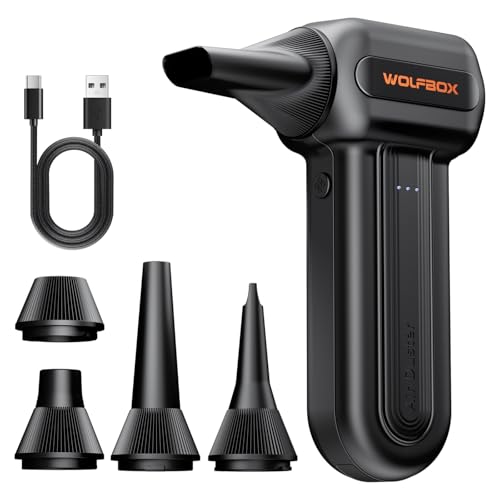
OPOLAR Electric Air Duster - Best Cordless Option
OPOLAR's cordless electric duster gives the freedom of no-tangle operation inside a full tower without sacrificing meaningful airflow. A 6000 mAh battery delivers 40-plus minutes of runtime, which covers a full cleaning session for one machine or a quick pass on several. Two speed modes and a 360-degree rotating nozzle add flexibility. USB-C charging means one cable serves double duty in a modern setup. The lower motor wattage compared to corded picks is a real limitation for very heavy dust loads, but for typical builds cleaned every few months it performs well.
What we liked
- 110,000 RPM Power Air Duster: Engineered with a brushless motor reaching up to 110,000 RPM
- 3 Speeds & Long Runtime: Features 3-speed settings: Gear 1 (25K RPM) for delicate electron
- Lightweight & Portable Design: Weighing only 0.5 lbs.Our mini air blower is exceptionally
- Reusable & Cost-Effective Investment: Replaces disposable canned air that run out quickly
- Versatile Cleaning Tool: The WOLFBOX MF60 Electric Air Duster comes with 5 nozzles: a flat
How to choose
What to consider
Frequency of use is the deciding factor. If you clean your PC once or twice a year, a two-pack of quality canned air is convenient and cost-effective. Monthly maintenance across multiple machines justifies an electric duster within a few months. Consider cord management inside a case: cordless electrics offer cleaner maneuvering, while corded models give unlimited runtime. For laptops, low-pressure settings or short bursts protect delicate fan assemblies. Always hold cans upright and briefly stop GPU or case fans from spinning freely during blasts to avoid back-spinning them at unsafe speeds.
What to consider
For related cleaning guides, see our article on [best compressed air dusters](/articles/best-compressed-air-duster) and visit [our methodology page](/methodology) to understand how we select and rank products.
Common questions
Cleaning every three to six months is a good baseline for most desktops. If the PC sits on the floor, is near pets, or is used in a dusty environment, clean every two to three months. Laptops accumulate dust more slowly but benefit from cleaning once or twice a year, particularly around the intake vents and fan exit.
Yes, always hold the can upright. Tilting a pressurized can causes the liquid propellant to exit the nozzle instead of gas, and liquid propellant can damage circuit boards and delicate components. Use short bursts and keep the nozzle a few inches from components to avoid static buildup from very close, continuous blasts.
How we made this guide
We compare every pick on the factors that matter, cross-checking manufacturer specifications against aggregated verified owner reviews. We rank independently and never take payment for placement. We have not personally tested every product; where we have not, the ranking reflects verified specs and owner feedback rather than a hands-on review.
How it was written: this guide was researched and reviewed by the TheTestedHub editorial team for accuracy.
Affiliate disclosure: TheTestedHub is reader-supported. When you buy through links on our site, we may earn a commission at no extra cost to you.