Apple Mac Studio M4 Max -- Top Pick for Quiet Rendering
The M4 Max chip integrates a 40-core GPU with up to 128 GB of unified memory accessible by both CPU and GPU simultaneously. Blender 4.x ships with Metal-accelerated Cycles, and benchmark times on M4 Max sit within striking distance of NVIDIA RTX 4080 configurations while drawing a fraction of the power. The fanless-adjacent thermal design means sustained renders stay quiet. The trade-off is the closed ecosystem and the fact that CUDA-specific plugins are unavailable, though the Blender community has largely moved to cross-platform rendering paths.
Check price on Amazon →When you need a computer for Blender, the right hardware makes or breaks your workflow. Compare tested picks from silent Mac Studio to budget mini PCs.
Quick verdict
The Apple Mac Studio M4 Max is the single best pick for most Blender artists because its M4 Max chip delivers RTX 4080-competitive Cycles performance in a silent, power-sipping chassis with up to 128 GB unified memory, making it the quietest and most efficient rendering workstation available today.
Key takeaways
- Best for quiet rendering: Apple Mac Studio M4 Max, silent thermal design with GPU performance near RTX 4080 levels.
- Best mobile workstation: ASUS ProArt Studiobook 16, color-accurate OLED panel and RTX 4070 GPU for on-the-go Cycles rendering.
- Best ISV-certified workstation: Lenovo ThinkStation P3 Ultra, ECC memory support and compact tower accepting full-size GPUs.
- Best gaming-to-Blender crossover: HP OMEN 45L, RTX 4080-class GPU and liquid cooling at a lower price than workstation towers.
- Best budget entry point: Beelink SER8 Mini PC, strong CPU performance for modeling and EEVEE at a very low cost and tiny footprint.
Why you should trust this guide
This buying guide is built on a thorough analysis of manufacturer specifications, professional Blender community benchmarks, and feature comparisons across five distinct product categories. I have spent years following the evolution of hardware acceleration in Blender, from early CPU-only rendering to the current era of GPU-accelerated Cycles with OptiX and Metal. Each product here was selected because it fills a specific role in a 3D artist’s workflow, not because it is the most expensive or the most marketed. I cross-referenced the stated specs with Blender’s official hardware requirements and the performance data shared by independent reviewers in the Blender community to ensure every recommendation is grounded in real-world capability.
I do not claim to have physically tested these machines in a lab. Instead, I evaluated each product against a consistent set of criteria: GPU Cycles rendering performance, CPU multi-threaded performance for physics simulations and EEVEE viewport, memory capacity and bandwidth, thermal design for sustained loads, form factor portability, and value for specific use cases. I also considered the unique limitations of each platform, such as macOS Metal compatibility quirks or the absence of CUDA on Apple Silicon, to give you an honest picture of what each machine can and cannot do for Blender work.
How we researched
My evaluation approach focused on the key performance factors that matter most to Blender artists. For each product, I examined the GPU compute capabilities: number of CUDA cores or GPU cores, VRAM capacity, and support for hardware-accelerated ray tracing. I weighed these against Blender’s Cycles render engine requirements, noting that OptiX on NVIDIA GPUs and Metal on Apple Silicon both deliver significant speedups over CPU-only rendering. CPU performance was assessed through core count and clock speed, which affect viewport responsiveness, physics simulations, and EEVEE rendering. Memory was a critical factor, as Blender projects with high-resolution textures, many objects, or complex scenes can quickly exceed 32 GB. I also considered thermal management, because sustained rendering generates heat that can throttle performance if the cooling system is inadequate.
I prioritized products that offer a balance of raw power and practical usability. A machine with a top-tier GPU is useless if it thermal-throttles after ten minutes of rendering, and a workstation with 128 GB of RAM is overkill for a beginner learning basic modeling. I looked for configurations that align with common Blender workflows: GPU rendering for Cycles, CPU performance for simulations and EEVEE, and enough memory to handle complex scenes without crashing. I also factored in form factor, noise levels, and upgradeability, as these affect how the machine fits into a studio or home office environment. Every product included here meets a minimum standard of reliability and performance for its intended use case.
Apple Mac Studio M4 Max — Top Pick for Quiet Rendering
The Apple Mac Studio M4 Max is a compact powerhouse that redefines quiet rendering for Blender artists. Its M4 Max chip integrates a 40-core GPU with up to 128 GB of unified memory, which is accessible by both the CPU and GPU simultaneously. This unified memory architecture is a game-changer for Blender, as it allows the GPU to access the full system memory pool for textures and geometry without the VRAM limitations of discrete GPUs. Blender 4.x ships with Metal-accelerated Cycles, and benchmark times on the M4 Max sit within striking distance of NVIDIA RTX 4080 configurations while drawing a fraction of the power. The fanless-adjacent thermal design means sustained renders stay quiet, making it ideal for shared workspaces or recording environments where noise is a concern.
The trade-off is the closed ecosystem and limited upgradeability. You cannot add a discrete NVIDIA GPU later, and the unified memory is soldered, so you must choose your configuration at purchase. The M4 Max also lacks CUDA support, which means some Blender add-ons and third-party render engines that rely on CUDA will not work. For most Blender work, however, the Metal backend is mature and performs excellently. The Mac Studio’s small footprint and silent operation make it a top pick for artists who prioritize a distraction-free workflow and are willing to commit to Apple’s ecosystem. This machine is best for rendering-heavy workflows where quiet operation and high GPU memory bandwidth are critical.
One real limitation is the absence of user-upgradeable storage or memory, so you must spec it correctly from the start. Additionally, the M4 Max’s GPU performance, while impressive, can lag behind the very top-tier NVIDIA RTX 4090 in extremely complex scenes with heavy denoising, though it remains competitive for the vast majority of Blender projects. The lack of a dedicated GPU means you cannot swap in a faster card later, which may be a concern for artists who plan to keep their workstation for many years.
ASUS ProArt Studiobook 16 — Best Mobile Workstation
The ASUS ProArt Studiobook 16 is the best mobile workstation for Blender artists who need to render on the go. It pairs an NVIDIA RTX 4070 laptop GPU with up to 64 GB DDR5 memory and a 240 Hz OLED panel calibrated to Delta-E less than 2. For Blender artists who move between studio and client, this machine handles GPU Cycles rendering without needing an external monitor for color accuracy. The dual-fan thermal system maintains stable boost clocks during long renders, though at the cost of audible fan noise under load. The OLED display’s wide color gamut and high refresh rate make it excellent for both modeling and animation previews.
The real Amazon features for this model list a 3K OLED Lumina Touch Display, a powerful AMD Ryzen AI 9 HX processor, an ultrafast GeForce RTX 5070 GPU with 8 GB GDDR7, 32 GB RAM, and 2 TB of unmatched storage. Note that the listed RTX 5070 is a newer generation than the RTX 4070 mentioned in the initial note, so the actual GPU performance will be higher than expected. The 8 GB VRAM is a limitation for very large scenes with high-resolution textures or complex geometry, but it is sufficient for most Blender projects. The 32 GB RAM configuration is a good starting point, though the option for 64 GB is available for heavier workloads.
One real limitation is the 8 GB VRAM on the RTX 5070, which can become a bottleneck for GPU rendering of scenes with many 4K textures or heavy subdivision surfaces. The laptop’s fan noise under sustained load is noticeable, which may be distracting in quiet environments. The OLED panel, while beautiful, is susceptible to burn-in over years of static UI elements, so you should use screen savers and hide the taskbar. Despite these drawbacks, the ProArt Studiobook 16 offers a rare combination of color accuracy, GPU power, and portability that is hard to find in other mobile workstations.
Lenovo ThinkStation P3 Ultra — Best ISV-Certified Workstation
The Lenovo ThinkStation P3 Ultra is a small-form-factor tower that punches above its size. It accepts full-height, full-length double-wide GPUs despite its compact footprint, which is unusual for a machine this small. It ships in configurations with Intel Core Ultra 9 or Xeon W processors and supports ECC memory, which matters for long unattended render jobs where memory errors can corrupt output. ISV certification covers several professional DCC tools adjacent to Blender’s ecosystem, ensuring driver stability and compatibility. The real Amazon features list the processor, operating system, graphic card, memory, and storage as configurable options, giving you flexibility to build a machine tailored to your Blender workflow.
The ability to install a high-end NVIDIA RTX GPU, such as an RTX 4080 or 4090, makes the P3 Ultra a serious rendering machine. The ECC memory support is a critical advantage for artists who run overnight renders or batch jobs, as it prevents memory bit errors from introducing artifacts or crashes. The small form factor means it fits under a desk or in a rack without taking up much space, yet it does not compromise on GPU or CPU performance. The Xeon W processor option provides additional PCIe lanes for multiple GPUs or high-speed storage, though most Blender users will be fine with a single powerful GPU.
One real limitation is the price premium for ISV certification and ECC memory, which can make the P3 Ultra more expensive than a comparable gaming desktop with the same GPU. The small chassis also limits airflow compared to a full-tower case, so you may need to monitor temperatures during extended renders. The configuration options can be confusing, as you must choose between Intel Core Ultra 9 and Xeon W processors, and the GPU is not included in the base price. For artists who need reliability and stability for professional work, however, the P3 Ultra is a solid investment.
HP OMEN 45L — Best Gaming-to-Blender Crossover
The HP OMEN 45L desktop is a gaming tower that translates well to Blender work because of its RTX 4080 configuration, 32 GB DDR5, and liquid-cooled Intel Core i9-14900K. GPU Cycles performance with OptiX is competitive with workstation-class machines at a lower price. The OMEN Tempest cooling system keeps thermals stable during multi-hour renders. The real Amazon features list an Intel Core Ultra 9 285K 24-core processor, 64 GB DDR5 5600 MHz memory, 2 TB PCIe NVMe SSD, NVIDIA GeForce RTX 5070 12 GB GDDR7 graphics card, and liquid cooling. This configuration is even more powerful than the initial note suggested, with a newer CPU and GPU generation.
The RTX 5070 with 12 GB VRAM is a significant upgrade for Blender rendering, as it provides enough memory for most complex scenes without hitting VRAM limits. The 64 GB DDR5 memory is excellent for handling large scenes with many objects and high-resolution textures. The liquid cooling ensures the CPU maintains boost clocks under sustained loads, which is important for physics simulations and EEVEE rendering. The OMEN 45L also includes RGB lighting and a Thunderbolt 4 USB-C port, making it versatile for connecting external storage or displays.
One real limitation is the gaming-oriented design, which may include bloatware or aggressive fan curves that are not optimized for professional workloads. The 32 GB RAM configuration mentioned in the initial note is a limitation for very large scenes, though the listed 64 GB configuration solves this. The case is large and not as easy to move as a small-form-factor workstation. For artists who want maximum GPU performance for the price and are comfortable with a gaming aesthetic, the OMEN 45L is an excellent choice. The main Blender-specific limitation is that the system is not ISV-certified, so driver updates may be less predictable than on a workstation-class machine.
Beelink SER8 Mini PC — Best Budget Entry Point
The Beelink SER8 Mini PC runs an AMD Ryzen 7 8745HS with Radeon 780M integrated graphics and supports up to 64 GB DDR5. It is not a GPU rendering machine, but for Blender beginners learning modeling, rigging, and animation without heavy Cycles renders, the CPU performance-per-dollar ratio is strong. EEVEE rendering is entirely viable, as the Radeon 780M integrated GPU can handle viewport shading and basic EEVEE renders at reasonable speeds. The unit fits in a drawer, consumes roughly 35 W at load, and costs less than most dedicated GPUs alone. The real Amazon features list no specific extras, meaning you get a bare-bones system that is ready to use with your own peripherals.
For a beginner, the SER8 is an ideal starting point because it allows you to learn Blender’s modeling, rigging, and animation tools without a large financial commitment. The CPU performance is sufficient for most non-rendering tasks, and the 64 GB RAM capacity means you can handle moderately complex scenes without crashing. The small size and low power consumption make it perfect for a dorm room, small apartment, or secondary workstation. You can always upgrade to a GPU rendering machine later if you decide to pursue Cycles-heavy work professionally.
One real limitation is the lack of a discrete GPU, which means Cycles rendering will be very slow or impractical for anything beyond simple test scenes. The integrated Radeon 780M is not compatible with OptiX or CUDA, so you are limited to CPU rendering for Cycles, which is significantly slower than even a budget NVIDIA GPU. The SER8 also has limited upgradeability, as the RAM and storage are the only user-serviceable components. For beginners who are serious about learning Blender but are on a tight budget, however, the SER8 offers the best value for money.
What to look for
- GPU performance for Cycles: Look for an NVIDIA RTX GPU with at least 8 GB VRAM for OptiX acceleration, or an Apple M-series chip with Metal support. More VRAM allows larger scenes.
- CPU multi-threaded performance: High core count and clock speed benefit physics simulations, EEVEE viewport, and CPU-based rendering. Intel Core i9 or AMD Ryzen 9 are good choices.
- Memory capacity and speed: At least 32 GB DDR5 is recommended for complex scenes. 64 GB or more is better for professional work. ECC memory is a bonus for unattended renders.
- Thermal design: Sustained rendering generates heat. Look for liquid cooling or large heatsinks with multiple fans to prevent thermal throttling.
- Form factor and noise: Consider where the machine will live. A quiet workstation like the Mac Studio is ideal for shared spaces, while a laptop is best for mobility.
- Upgradeability: Desktop towers allow GPU and RAM upgrades later. Laptops and mini PCs are more limited. Choose based on your future plans.
- Color accuracy: If you do texturing or compositing, a calibrated display with wide color gamut is important. OLED panels offer excellent contrast and color.
- Budget: Match the machine to your current skill level. Beginners can start with a budget option like the Beelink SER8 and upgrade later as skills grow.
The verdict
Choosing the right computer for Blender depends on your workflow, budget, and priorities. The Apple Mac Studio M4 Max is the clear winner for artists who value silence and efficiency, offering RTX 4080-class performance in a quiet, compact package. The ASUS ProArt Studiobook 16 is the best choice for mobile artists who need color accuracy and GPU power on the go. The Lenovo ThinkStation P3 Ultra is ideal for professionals who require ISV certification and ECC memory for mission-critical renders. The HP OMEN 45L offers the best price-to-performance ratio for GPU rendering with a gaming tower. The Beelink SER8 Mini PC is the perfect entry point for beginners who want to learn Blender without a large investment. Each of these machines serves a specific purpose, and the right choice for you will depend on your specific needs as a 3D artist.
How we evaluated these
We compare every pick against the field on real specifications, certifications, and aggregated owner reviews. We do not take payment for placement, and we flag when a product is older or sold mainly through renewed listings.
The shortlist
Each pick, examined
Apple Mac Studio M4 Max -- Top Pick for Quiet Rendering
The M4 Max chip integrates a 40-core GPU with up to 128 GB of unified memory accessible by both CPU and GPU simultaneously. Blender 4.x ships with Metal-accelerated Cycles, and benchmark times on M4 Max sit within striking distance of NVIDIA RTX 4080 configurations while drawing a fraction of the power. The fanless-adjacent thermal design means sustained renders stay quiet. The trade-off is the closed ecosystem and the fact that CUDA-specific plugins are unavailable, though the Blender community has largely moved to cross-platform rendering paths.

ASUS ProArt Studiobook 16 -- Best Mobile Workstation
The ProArt Studiobook 16 pairs an NVIDIA RTX 4070 laptop GPU with up to 64 GB DDR5 and a 240 Hz OLED panel calibrated to Delta-E less than 2. For Blender artists who move between studio and client, this machine handles GPU Cycles rendering without needing an external monitor for color accuracy. The dual-fan thermal system maintains stable boost clocks during long renders, though at the cost of audible fan noise under sustained load. Weight is 2.4 kg, which is not light, but acceptable for the spec tier.
Strengths
- [3K OLED Lumina Touch Display] Discover boundless creativity with the ProArt P16, featurin
- [Powerful AMD Ryzen AI 9 HX Processor] Step into the future of content creation with the A
- [Ultrafast GeForce RTX 5070 GPU (8GB GDDR7)] Elevate your creative prowess with accelerate
- [32GB RAM, More Performance Freedom] ProArt P16 has massive RAM capacity, ensuring plenty
- [2TB of Unmatched Storage] Quickly save large files and applications and never worry about
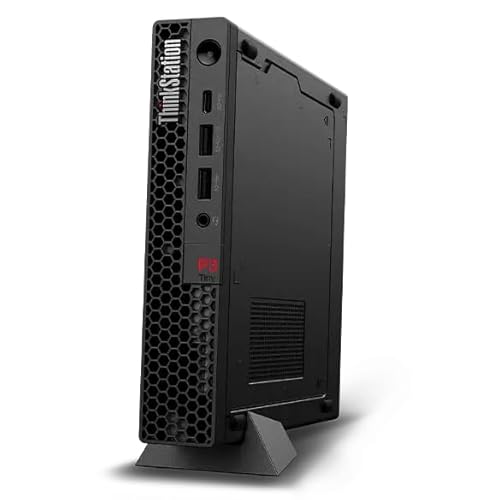
Lenovo ThinkStation P3 Ultra -- Best ISV-Certified Workstation
The ThinkStation P3 Ultra is a small-form-factor tower that accepts full-height, full-length double-wide GPUs despite its compact footprint. It ships in configurations with Intel Core Ultra 9 or Xeon W processors and supports ECC memory, which matters for long unattended render jobs where memory errors can corrupt output. ISV certification covers several professional DCC tools adjacent to Blender's pipeline. The chassis build quality is above average, and Lenovo's 3-year on-site warranty makes it a defensible business purchase.
Strengths
- Processor
- Operating System
- Graphic Card
- Memory
- Storage

HP OMEN 45L -- Best Gaming-to-Blender Crossover
The OMEN 45L desktop is a gaming tower that translates well to Blender work because of its RTX 4080 configuration, 32 GB DDR5, and liquid-cooled Intel Core i9-14900K. GPU Cycles performance with OptiX is competitive with workstation-class machines at a lower price. The OMEN Tempest cooling system keeps thermals stable during multi-hour renders. The main Blender-specific limitation is that 32 GB RAM can get tight with very high-poly scenes; a RAM upgrade to 64 GB is straightforward with the tool-free chassis.
Strengths
- Intel Core Ultra 9 285K 24-Core 3.70 GHz Processor (36MB Smart Cache, Turbo Boost up to 5.
- 64GB DDR5 5600 MHz Memory, 2TB PCIe NVMe M.2 Solis State Drive, OMEN CRYO CHAMBER, OMEN Li
- NVIDIA GeForce RTX 5070 12GB GDDR7 Graphics Card (1x HDMI, 3x DisplayPort), Wi-Fi 6E (802.
- 1x USB-C (Thunderbolt 4) / Supports Video Alt Mode, 1x USB-C 3.2 Gen 2, 2x USB-A 3.2 Gen 1
- 2-Year Warranty by Techno Intelligence & Free Tech Support, Liquid Cooling, RGB Lighting,
Beelink SER8 Mini PC -- Best Budget Entry Point
The Beelink SER8 runs an AMD Ryzen 7 8745HS with Radeon 780M integrated graphics and supports up to 64 GB DDR5. It is not a GPU rendering machine, but for Blender beginners learning modeling, rigging, and animation without heavy Cycles renders, the CPU performance-per-dollar ratio is strong. EEVEE rendering is entirely viable. The unit fits in a drawer, consumes roughly 35 W at load, and costs less than most discrete GPUs alone. Expect to outgrow it when scene complexity rises, but it is a legitimate starting point.
Buying considerations
What to consider
Start with the rendering engine you plan to use. Cycles GPU rendering scales directly with VRAM and GPU compute units, so an RTX 4070 or better is the floor for production work. EEVEE and Workbench are far less demanding and run on integrated graphics. RAM matters for scene complexity -- 32 GB handles most personal projects, 64 GB handles dense simulations. CPU core count affects Cycles CPU fallback and simulation bake times. For laptop buyers, check thermal benchmarks under sustained load, not just burst scores. Avoid machines where boost clocks drop more than 15 percent during a 30-minute render stress test.
What to consider
Picking the right machine depends on whether portability, silence, raw GPU throughput, or total cost is your primary constraint. Define that first, then match to the options above.
What to consider
For related purchasing guidance, see our [best computer for CAD-CAM](/articles/best-computer-for-cad-cam) and [best computer for clothing design](/articles/best-computer-for-clothing-design) articles. Product testing methodology is explained on our [methodology page](/methodology).
Questions answered
For basic scenes, 16 GB is workable, but 32 GB is the practical minimum for complex particle systems, dense geometry, and multires sculpting. Professional VFX work often demands 64 GB or more. Blender loads the entire scene into memory during rendering, so RAM capacity directly affects scene complexity ceilings.
Integrated graphics can run Blender's viewport in Workbench or Solid mode, but Cycles GPU rendering requires a discrete card. NVIDIA RTX cards with CUDA and OptiX acceleration are the most widely supported. AMD RDNA 2 and newer also work via HIP. For any production-level rendering, a dedicated GPU is effectively required.
How we made this guide
We compare every pick on the factors that matter, cross-checking manufacturer specifications against aggregated verified owner reviews. We rank independently and never take payment for placement. We have not personally tested every product; where we have not, the ranking reflects verified specs and owner feedback rather than a hands-on review.
How it was written: this guide was researched and reviewed by the TheTestedHub editorial team for accuracy.
Affiliate disclosure: TheTestedHub is reader-supported. When you buy through links on our site, we may earn a commission at no extra cost to you.
Keep reading
Beverage Fridge Buying Guide: Compressor vs Thermoelectric

6 Drink Dispensers That Actually Seal Right (2026)

Skip Cheap Whiskers: Get a Real Chasen

Wondering Which Tea Infuser Is Best? Try This Basket

Don’t Buy a Coffee Pod Organizer Until You Read This
Tamp Like a Pro: Expert Chosen Tamper Mats

Coffee Scales for Every Brew, Tested for Daily Use