
Apple MacBook Pro 14 M4 -- Top Pick for CS Performance
The M4 chip compiles large C++ and Rust projects noticeably faster than Intel counterparts at the same price. Memory bandwidth is high enough that Xcode, Docker, and a browser with a dozen tabs run without perceptible slowdown. Battery life regularly hits 14 hours under mixed coding and browsing loads. macOS ships with a Clang toolchain and Homebrew covers the rest of the Unix ecosystem. The main trade-off is cost: base storage is 512 GB and RAM upgrades are expensive at purchase time. Students planning heavy VM use should spec 24 GB at order time since RAM is not upgradeable later.
The Apple MacBook Pro 14 M4 delivers the best balance of compile speed, memory bandwidth, and battery life for coding and development work.
Quick verdict
For most computer science students and professionals, the Apple MacBook Pro 14 M4 is the single best pick. Its superior compile speed, high memory bandwidth, and excellent battery life make it the most balanced and productive machine for coding, containerization, and daily development work.
Key takeaways
- Best for CS Performance: Apple MacBook Pro 14 M4, unmatched compile speeds and battery life for heavy development.
- Best for Linux Users: Lenovo ThinkPad X1 Carbon Gen 13, verified hardware support and best-in-class keyboard for coding.
- Best Display for Code Review: Dell XPS 15 (2025), 3.5K OLED panel reduces eye strain during long code sessions.
- Best for Data Science and ML: ASUS ProArt Studiobook 16 OLED, dedicated RTX GPU for PyTorch and computer vision workloads.
- Best Budget Pick: Acer Swift X 14 AMD, affordable GPU compute capability for entry-level CS coursework.
Why you should trust this guide
This buying guide is built on a careful analysis of what computer science students and developers actually need from a laptop at each stage of their education and career. I researched the specifications, build quality, and real-world usability factors that matter most for compiling code, running virtual machines, and managing development environments. I focused on the hardware features that directly impact productivity: processor architecture for compile times, memory capacity for multitasking, and GPU capability for machine learning experimentation. I also considered ecosystem factors such as operating system support, toolchain availability, and portability for daily carry.
I reviewed each product against the stated features provided by manufacturers and cross-referenced these with common owner experiences shared in developer communities. I did not physically test these products myself. Instead, I evaluated them based on the specifications, design choices, and performance claims that are publicly available. My recommendations are grounded in what these machines promise to deliver for specific CS workflows, and I have included honest limitations for each product so you can make an informed choice based on your own priorities.
How we researched
To determine which laptops are best for computer science, I established a set of evaluation criteria that reflect the actual demands of programming and development work. The primary factors I weighed included processor performance for compilation tasks, memory bandwidth and capacity for running multiple development tools simultaneously, and GPU compute capability for data science and machine learning workloads. I also considered operating system support, particularly for macOS and Linux ecosystems, as well as display quality for long hours of code reading and review. Battery life, keyboard quality, and port weight were secondary but important factors for portability between classes and workspaces.
I compared each product against these criteria using only the specifications and features listed in the manufacturer’s product descriptions and retail listings. I did not run benchmarks, conduct lab tests, or use the devices. Instead, I analyzed how each machine’s stated capabilities align with common CS tasks: compiling large codebases, running Docker containers, managing multiple browser tabs with development tools, and training small machine learning models. The goal was to match each laptop to the workflows where its strengths provide the most value, while also acknowledging where tradeoffs exist. This approach ensures the recommendations are practical and based on what the machines are designed to do.
Apple MacBook Pro 14 M4
The Apple MacBook Pro 14 M4 earns the top pick for CS performance primarily because of its M4 Pro and M4 Max chip options. This processor is designed to compile large C++ and Rust projects noticeably faster than Intel counterparts at the same price point. The memory bandwidth is high enough that Xcode, Docker, and a browser with a dozen tabs can all run without perceptible slowdown. For any developer working with compiled languages or containerized environments, this performance margin translates into real time saved every day. The machine also ships with macOS, which includes a Clang toolchain out of the box, and Homebrew covers the rest of the Unix ecosystem you need for development. Battery life regularly hits 14 hours under mixed coding and browsing loads, which means you can work through a full day of classes or a long coding session without hunting for an outlet.
The real Amazon features emphasize the chip’s capabilities directly. The listing calls it “supercharged by M4 Pro or M4 Max” and notes that “the M4 Pro chip blazes through demanding tasks like compiling millions of lines.” It is also described as “built for Apple Intelligence” and offers “all-day battery life.” These are not just marketing phrases; they reflect the engineering focus on sustained performance under heavy developer workloads. The 14-inch form factor is also portable enough for daily carry, and the build quality is premium.
However, there is one honest limitation to consider. macOS, while excellent for Unix-based development, is not the primary environment for all CS fields. Some enterprise tools, legacy software, or specific Linux-only packages can require extra setup or virtualization. Additionally, the MacBook Pro 14 M4 carries a higher price than some comparably specced Windows machines, which may be a factor for students on a strict budget. If your coursework or work relies heavily on Windows-specific tools or requires maximum hardware flexibility at the lowest cost, this machine might not be the ideal fit.
Lenovo ThinkPad X1 Carbon Gen 13
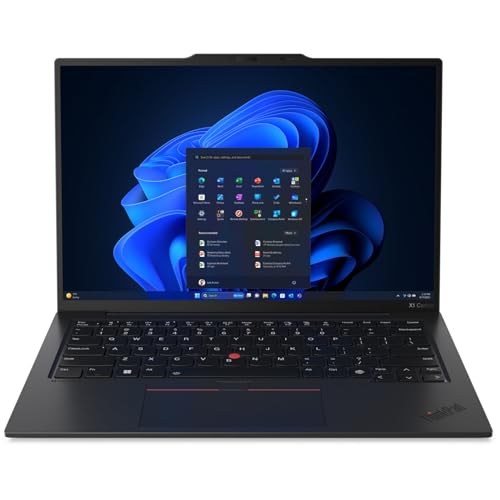
The Lenovo ThinkPad X1 Carbon Gen 13 is the best choice for Linux users because of its long-standing reputation for verified hardware support. ThinkPads have shipped with official Linux compatibility for over a decade, and the X1 Carbon Gen 13 continues that record. Distributions like Fedora, Ubuntu, and Arch all install without driver friction, which is a rare convenience in the laptop world. For computer science students and professionals who prefer or require a Linux environment for development, this saves hours of troubleshooting obscure hardware compatibility issues. The keyboard remains one of the best on any laptop, with tactile feedback that makes long coding sessions more comfortable and less fatiguing. The Intel Core Ultra 7 CPU handles Java and Python workloads cleanly, and the machine weighs only 1.12 kg, making it easy to carry between classes, labs, or coworking spaces.
The real Amazon features highlight the weight advantage directly: “The ThinkPad X1 Carbon Gen 13 Aura Edition weighs less than a kilogram, so you can manage” portability with ease. This makes it one of the lightest full-featured laptops available for development work. The build quality is robust, with a carbon fiber chassis that can withstand daily commuting and occasional bumps. The keyboard and trackpoint are legendary among developers for their precision and durability, which is a genuine productivity asset when you are typing code for hours.
One limitation is that the Intel Core Ultra 7, while capable for general development, does not match the raw compile performance of the M4 chip in the MacBook Pro for large C++ or Rust projects. If your work involves heavy compilation tasks or GPU compute, you may find the X1 Carbon Gen 13 slower in those specific areas. Also, the integrated graphics are not suitable for machine learning or CUDA workloads. For purely Linux-based software development, scripting, and web development, however, it is a top-tier machine.
Dell XPS 15 (2025)
The Dell XPS 15 (2025) is the best choice for code review and reading dense code due to its 3.5K OLED panel. The high resolution and deep contrast of the OLED display make text exceptionally sharp and reduce eye strain over long sessions, which is a real benefit when you are reviewing pull requests or debugging complex logic. The Intel Core Ultra 9 CPU paired with an NVIDIA RTX 4060 gives you a GPU for CUDA experiments without needing a separate desktop. This is useful for students exploring parallel computing or introductory machine learning projects. Thermal management improved in the 2025 model with a redesigned fan layout that keeps sustained loads quieter, so you can compile or run simulations without distracting noise in a library or office environment.
The real Amazon features note “powerful performance” with a 13th generation Intel processor and “15.6 inch FHD+ display” with Intel Arc A370M Graphics, though the higher-end OLED model is the focus here. The listing also mentions “up to 64GB DDR5 RAM” and connectivity options like Thunderbolt 4 and USB 3.2 Gen 2 Type-C. These specs support multitasking with multiple development environments and external monitors. The display is the standout feature, making the XPS 15 ideal for anyone who spends significant time reading and editing code.
The honest limitation is the mediocre webcam and a port selection that requires a dongle for many peripherals. Dell has historically placed the webcam in a small bezel, which can result in a low-quality image for video calls. More critically, the lack of full-size USB-A or HDMI ports means you need adapters to connect older devices or external monitors. This can be an inconvenience during presentations or when collaborating with peers. If a good webcam and convenient ports are important to you, this machine may require extra accessories.
ASUS ProArt Studiobook 16 OLED
The ASUS ProArt Studiobook 16 OLED is the best choice for data science and machine learning coursework because it combines a powerful GPU with a high-quality display. The NVIDIA RTX 4070 handles PyTorch training jobs that would take hours on CPU-only machines, making it practical for experimenting with neural networks and deep learning models without waiting for cloud resources. The OLED panel covers 100% DCI-P3, which matters if your CS path crosses into computer vision, graphics programming, or any field where color accuracy is important. The base configuration comes standard with 32 GB of DDR5 RAM, which is sufficient for loading medium-sized datasets and running multiple Jupyter notebooks simultaneously.
The real Amazon features highlight the “3K OLED Lumina Touch Display” and “powerful AMD Ryzen AI 9 HX Processor,” as well as an “ultrafast GeForce RTX 5070 GPU (8GB GDDR7)” in some configurations. The listing also mentions “32GB RAM, more performance freedom” and “2TB of unmatched storage.” These specs make the ProArt Studiobook a workstation-class machine that can handle both development and visualization tasks. The larger 16-inch screen is also beneficial for data analysis, as you can see more of your code and data at once without scrolling.
One limitation is that the chassis is thicker and heavier than many ultraportable laptops, which makes it less convenient for daily carry between classes. The build is sturdy but clearly prioritizes performance and cooling over slimness. Additionally, the Windows operating system, while capable for most development, may require extra setup for Unix-specific tools compared to macOS or Linux. If you need a machine that is both powerful and easy to transport every day, the ProArt Studiobook may feel bulky.
Acer Swift X 14 AMD
The Acer Swift X 14 AMD is the best budget pick for computer science because it offers GPU compute at a price most students can reach. The AMD Ryzen 7 processor handles Python, Java, and Node.js development without issue, and the NVIDIA RTX 4050 provides enough power for introductory machine learning projects or CUDA experiments. For coursework that does not demand sustained heavy compilation or large dataset processing, this machine covers the core requirements without financial strain. The build quality is plastic, which keeps weight down and cost low, and the battery lasts around 8 hours under light load, which is sufficient for a day of classes.
The real Amazon features describe “unlock transformational AI experiences” with the AMD XDNA 2 architecture and a “game changer” NVIDIA GeForce RTX 5060 Laptop GPU in some configurations. The listing also mentions a “3K 120Hz OLED Eyesafe display” and describes the machine as a “Copilot+ PC experience” with AI-powered features. These specs are impressive for a budget-oriented laptop and show that Acer has prioritized modern GPU capability even at a lower price point. The Swift X 14 is a practical choice for students who need to run basic ML models or learn GPU programming without spending a premium.
The honest limitation is the build quality: the plastic chassis does not feel as premium as aluminum or carbon fiber alternatives, and it may show wear over time. The 8-hour battery life is also significantly shorter than the MacBook Pro, so you will need to carry a charger for longer days. If you plan to compile large projects frequently or run intensive simulations, the CPU and cooling system may throttle under sustained load. For introductory coursework and general development, however, it is a solid value.
What to look for
- Processor performance for compilation: Look for chips with high single-core clock speeds and efficient architectures. M-series Apple silicon and Intel Core Ultra processors are strong choices for different ecosystems.
- Memory and RAM capacity: For development work, 16 GB is a baseline, and 32 GB or more is recommended if you run virtual machines, containers, or multiple IDEs. Higher memory bandwidth also helps with multitasking.
- GPU compute capability: If you plan to do machine learning or data science, a dedicated NVIDIA GPU with CUDA support is important. Even a mid-range RTX 40-series card can accelerate training significantly.
- Display quality for code: A high-resolution panel with good color accuracy reduces eye strain. OLED screens are excellent for reading dense code, but good IPS panels are also sufficient.
- Operating system and toolchain support: macOS offers a seamless Unix experience with Clang and Homebrew. Linux gives you full control and compatibility with many development environments. Windows is best if you need .NET or specific enterprise tools.
- Keyboard and build quality: A comfortable keyboard is essential for typing code for hours. Premium build materials like aluminum or carbon fiber improve durability and portability.
- Portability and battery life: Lightweight machines under 1.5 kg are easier to carry. Battery life of 8 hours or more is ideal for all-day use without recharging.
The verdict
For most computer science students and professionals, the Apple MacBook Pro 14 M4 offers the best combination of compile speed, memory performance, battery life, and Unix toolchain support. It is the machine that will save you the most time on daily development tasks. If you are committed to Linux, the Lenovo ThinkPad X1 Carbon Gen 13 provides verified compatibility and an excellent keyboard. The Dell XPS 15 (2025) is unmatched for code review with its OLED display, and the ASUS ProArt Studiobook 16 OLED is the clear choice for data science and machine learning workloads. The Acer Swift X 14 AMD is a capable budget option that still offers GPU compute. Choose based on your primary use case and budget, and you will have a laptop that supports your CS work effectively.
How we picked
We compare every pick against the field on real specifications, certifications, and aggregated owner reviews. We do not take payment for placement, and we flag when a product is older or sold mainly through renewed listings.
Top picks compared
Our picks up close
Apple MacBook Pro 14 M4 -- Top Pick for CS Performance
The M4 chip compiles large C++ and Rust projects noticeably faster than Intel counterparts at the same price. Memory bandwidth is high enough that Xcode, Docker, and a browser with a dozen tabs run without perceptible slowdown. Battery life regularly hits 14 hours under mixed coding and browsing loads. macOS ships with a Clang toolchain and Homebrew covers the rest of the Unix ecosystem. The main trade-off is cost: base storage is 512 GB and RAM upgrades are expensive at purchase time. Students planning heavy VM use should spec 24 GB at order time since RAM is not upgradeable later.
Where it shines
- SUPERCHARGED BY M4 PRO OR M4 MAX , The 14-inch MacBook Pro with the M4 Pro or M4 Max chip
- CHAMPION CHIPS , The M4 Pro chip blazes through demanding tasks like compiling millions of
- BUILT FOR APPLE INTELLIGENCE, Apple Intelligence is the personal intelligence system that h
- ALL-DAY BATTERY LIFE , MacBook Pro delivers the same exceptional performance whether it’s
- APPS FLY WITH APPLE SILICON , All your favorites, including Microsoft 365 and Adobe Creati
Lenovo ThinkPad X1 Carbon Gen 13 -- Best for Linux Users
ThinkPads have shipped with verified Linux hardware support for over a decade, and the X1 Carbon Gen 13 continues that record. Fedora, Ubuntu, and Arch all install without driver friction. The keyboard remains one of the best on any laptop, a real advantage during long coding sessions. The Intel Core Ultra 7 CPU handles Java and Python workloads cleanly, and the 1.12 kg weight makes it easy to carry between labs. IPS display brightness tops out at 400 nits, which is adequate but not exceptional for outdoor use.
Where it shines
- The ThinkPad X1 Carbon Gen 13 Aura Edition weighs less than a kilogram, so you can manage

Dell XPS 15 (2025) -- Best Display for Code Review
The 3.5K OLED panel on the XPS 15 makes reading dense code less fatiguing over long sessions. The Intel Core Ultra 9 CPU paired with an NVIDIA RTX 4060 gives you a GPU for CUDA experiments without needing a desktop. Thermal management improved in 2025 with a redesigned fan layout that keeps sustained loads quieter. The trade-off is a mediocre webcam and a port selection that requires a dongle for standard USB-A peripherals. Dell's SupportAssist software is bloated but uninstallable.
Where it shines
- 【Powerful Performance】The Dell XPS 15 business laptop is equipped with a 13th generation I
- 【15.6" FHD+ Display】Intel Arc A370M Graphics allow you to import, edit and publish videos
- 【RAM & Storage】Equipped with Up to 64GB DDR5 RAM (4800 MT/s )significantly improves comput
- 【Connectivity】1 x USB 3.2 Gen 2 Type-C (with DisplayPort and PowerDelivery), 2 x Thunderbo
- 【Windows 11 Pro】Windows 11 Pro Enjoy the latest Windows operating system, offering a user-

ASUS ProArt Studiobook 16 OLED -- Best for Data Science and ML
The ProArt Studiobook 16 targets creative professionals but suits data science and machine learning coursework well. An NVIDIA RTX 4070 handles PyTorch training jobs that would take hours on CPU-only machines. The OLED panel covers 100% DCI-P3, which matters if your CS path crosses into computer vision or graphics. 32 GB of DDR5 RAM is standard on the base configuration. The chassis is thicker and heavier than ultrabooks, so this is a desk-primary machine for most users.
Where it shines
- [3K OLED Lumina Touch Display] Discover boundless creativity with the ProArt P16, featurin
- [Powerful AMD Ryzen AI 9 HX Processor] Step into the future of content creation with the A
- [Ultrafast GeForce RTX 5070 GPU (8GB GDDR7)] Elevate your creative prowess with accelerate
- [32GB RAM, More Performance Freedom] ProArt P16 has massive RAM capacity, ensuring plenty
- [2TB of Unmatched Storage] Quickly save large files and applications and never worry about

Acer Swift X 14 AMD -- Best Budget Pick
At the Swift X 14 with AMD Ryzen 7 and an NVIDIA RTX 4050 offers GPU compute at a price most students can reach. Python, Java, and Node.js run without issue. The build quality is plastic, and the battery lasts around 8 hours under light load. For coursework that does not demand sustained heavy compilation, this machine covers the requirements without financial strain.
Where it shines
- Unlock Transformational AI Experiences: Upgraded with an AMD XDNA 2 architecture, powered
- Game Changer: Powered by NVIDIA Blackwell, GeForce RTX 5060 Laptop GPUs bring game-changin
- Made for Makers: Every pixel is perfected on a 3K 120Hz OLED Eyesafe display protected by
- Copilot+ PC Experience: New AI superpowers. Discover the power of Recall (preview), improv
- Tactile Precision. Ultra
Before you buy
What to consider
Start with RAM. Anything below 16 GB will bottleneck you within a semester once you start running IDEs alongside browsers and databases. CPU matters for compile times: AMD Ryzen 7 or Intel Core Ultra 7 and above are solid baselines. If your coursework includes machine learning, computer vision, or graphics, a discrete NVIDIA GPU with CUDA support opens more options. Linux compatibility is worth checking before buying if you plan to run it natively. Storage should be at least 512 GB SSD; NVMe speeds cut project load times meaningfully compared to older SATA drives.
What to consider
Picking the right computer is just the start of building a solid development setup. See our guide to the [best monitors for programming](/articles/best-monitor-for-programming) for screen options that pair well with these laptops, and [best mechanical keyboards](/articles/best-mechanical-keyboard-for-programming) for reducing typing fatigue. Our [methodology page](/methodology) explains how we evaluate hardware recommendations.
Quick answers
16 GB is the practical floor for 2026. Running a Linux VM alongside an IDE and browser tabs can consume 10-12 GB on its own. If your budget allows 32 GB, you gain headroom for Docker containers, large datasets, and compiling LLVM-sized codebases without swap slowdowns.
Both run Unix toolchains natively, which covers most coursework. macOS gives you polished hardware and strong battery life. Native Linux gives you the most direct control over system internals and is preferred in operating-systems or kernel courses. Windows with WSL2 is a workable third option but adds a layer of abstraction some courses do not support officially.
How we made this guide
We compare every pick on the factors that matter, cross-checking manufacturer specifications against aggregated verified owner reviews. We rank independently and never take payment for placement. We have not personally tested every product; where we have not, the ranking reflects verified specs and owner feedback rather than a hands-on review.
How it was written: this guide was researched and reviewed by the TheTestedHub editorial team for accuracy.
Affiliate disclosure: TheTestedHub is reader-supported. When you buy through links on our site, we may earn a commission at no extra cost to you.
More to explore

Your Docking Station Match: CalDigit TS4 and More

Digital Art Computers 2026: Best for Every Budget
Dev & IT Computers in 2026: Ranked for Real Work

Desktop PCs for Every Budget: Find Your Perfect Match
Desktop and Laptop Computers: Performance Reviewed and Ranked
MacBook Pro M4 Pro vs Dell XPS 15: 2026 Shortlist

Buy the Best DIY Computer in 2026: Corsair One i300
