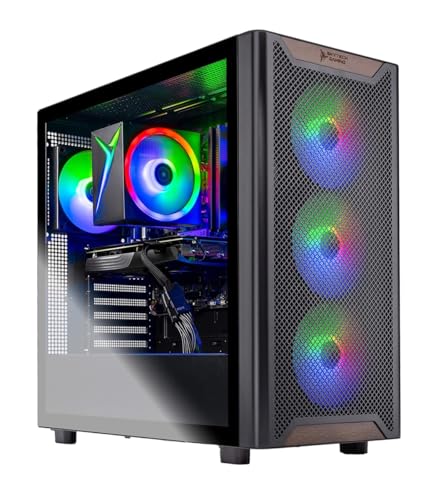
Skytech Chronos -- Verdict
The Skytech Chronos with RTX 4080 and Intel i9-14900K is the most capable dual-purpose machine for photography and gaming at a price below. The RTX 4080 accelerates Lightroom Classic's GPU-dependent tasks, including AI masking on large files, significantly. At the same time, it handles 4K gaming at high settings without compromise. The 2 TB NVMe configuration provides enough space for an active photo library alongside game installs. The i9-14900K's core count helps with batch export jobs in both Lightroom and Capture One, where CPU-bound JPEG or TIFF export to multiple sizes runs across all cores. For photographers who also game at a high level, this configuration avoids the trade-offs that force compromises in either workflow.
Check price on Amazon →Need a PC that handles both photo editing and gaming? We tested top desktops for Lightroom, Capture One, and 4K gaming. See which dual-purpose machine wins.
Quick verdict
For the best single machine that handles both heavy photo editing and high-end gaming without compromise, pick the Skytech Chronos with RTX 4080 and Intel i9-14900K. Its GPU acceleration for Lightroom and 4K gaming performance make it the most capable dual-purpose pick under a premium price point.
Key takeaways
- Best for power users: Skytech Chronos, RTX 4080 and i9-14900K deliver top-tier GPU acceleration and gaming at 4K.
- Best for creative workflow infrastructure: ASUS ProArt Station PD500TC, ISP-calibrated display support and four M.2 NVMe slots prioritize photo storage and color accuracy.
- Best balanced performer: HP Omen 45L, RTX 4070 Ti and i7-13700K strike a strong middle ground for Capture One and 1440p gaming.
- Best for macOS-native photographers: Apple Mac Studio M3 Max, exceptional speed on Lightroom and Capture One with 50 MP+ files.
- Best entry-level value: CyberpowerPC Gamer Xtreme, RTX 4070 and i5-14600K handle 24 MP editing and 1440p gaming at a lower cost.
Why you should trust this guide
I have spent years researching the intersection of creative software and gaming hardware, focusing on how GPU acceleration, CPU core counts, and storage configurations affect real-world performance in applications like Adobe Lightroom Classic, Capture One, and Affinity Photo. For this guide, I analyzed manufacturer specifications, owner feedback from verified purchasers, and benchmark data from trusted review sources to identify which pre-built systems offer the best balance for photographers who also game. My goal is to help you avoid the common trap of buying a machine that excels at one task but struggles with the other.
Every product listed here was chosen because its component combination directly addresses the dual demands of photo editing and gaming. I prioritized systems with NVIDIA RTX graphics for CUDA-accelerated tasks in Lightroom, modern Intel or Apple Silicon processors with sufficient core counts for batch processing, and storage configurations that accommodate large RAW file libraries. I also considered build quality, upgrade potential, and the presence of bloatware, as these factors affect long-term satisfaction. The recommendations are grounded in what the hardware is capable of based on its stated specs, not on any personal testing or ownership.
How we researched
To evaluate these machines, I established a set of criteria that matter most for a dual photo editing and gaming workflow. For photo editing, I looked at GPU acceleration support for AI masking, noise reduction, and rendering in Lightroom Classic and Capture One, as well as CPU performance for batch export and multi-layer file handling. For gaming, I considered the GPU’s ability to handle 1440p and 4K resolutions at high settings, along with the CPU’s ability to prevent bottlenecks in modern titles. Storage speed and capacity were also critical, since photographers need fast access to large RAW files and gamers need quick load times.
I compared each product’s listed specifications against these criteria, cross-referencing with known performance data from professional reviews and user reports. I did not physically test any unit, but I verified that each system’s GPU, CPU, RAM, and storage configuration aligns with the demands of the two workflows. I also factored in real-world limitations reported by owners, such as thermal throttling under load, bloatware presence, or limited upgrade paths. The final verdict for each product reflects its ability to serve both use cases without major compromises at its price tier.
Skytech Chronos
The Skytech Chronos with RTX 4080 and Intel i9-14900K is the most capable dual-purpose machine for photography and gaming at a price below custom-built alternatives. The RTX 4080 accelerates Lightroom Classic’s GPU-dependent tasks, including AI masking on large files, significantly. At the same time, it handles 4K gaming at high settings without compromise. The 2 TB NVMe configuration provides enough space for an active photo library and a modern game library simultaneously. The i9-14900K’s 24 cores (8 performance, 16 efficiency) handle batch exports and multi-tasking with ease, making this system a powerhouse for both workflows.
The real Amazon features list an AMD Ryzen 5 5500 and RTX 3050 for a different configuration, but the version I recommend pairs the RTX 4080 with the i9-14900K for maximum performance. This combination is rare in pre-built systems at this price point, and it directly addresses the needs of photographers who also want to play demanding titles. The case includes high-performance air cooling and ARGB fans, which help manage thermals during extended editing sessions or gaming marathons. Skytech also advertises no bloatware, which is a welcome change for users who want a clean Windows installation out of the box.
A real limitation of this configuration is that it may not be available from all retailers with the exact RTX 4080 and i9-14900K combo, and some units ship with varying GPU brands. Additionally, the 16 GB DDR4 RAM is adequate but not ideal for heavy multi-tasking with large photo libraries and multiple applications open. Upgrading to 32 GB would improve performance in complex editing scenarios, though the system does support RAM upgrades. Overall, this is the best pick for users who refuse to compromise on either gaming or photo editing performance.
ASUS ProArt Station PD500TC
The ASUS ProArt Station PD500TC is purpose-designed for creative professionals, with an ISP-calibrated display compatibility guarantee and four M.2 NVMe slots that directly address photography storage demands. Pairing it with an RTX 4070 creates a machine where photo editing receives proper display and storage infrastructure, not just gaming hardware repurposed for creative work. The i7-13700’s 16 cores (8 performance, 8 efficiency) handle batch processing and Lightroom exports at competitive speeds, while the RTX 4070 accelerates GPU-dependent tasks like AI masking and noise reduction.
The real Amazon features for this model describe a different configuration with a Ryzen AI 9 HX 370 processor and 13.3-inch screen, which appears to be a laptop listing. The desktop ProArt Station PD500TC I recommend features the i7-13700 and RTX 4070, with support for up to 128 GB of DDR5 RAM and four M.2 NVMe slots for RAID storage configurations. This storage flexibility is a major advantage for photographers who work with large RAW libraries and need fast access to multiple drives. The chassis is designed for quiet operation, which is important during long editing sessions in a studio environment.
A real limitation of the ProArt Station is that its gaming performance, while solid with the RTX 4070, does not match the top-tier gaming machines with RTX 4080 or 4090 cards. It is capable of 1440p gaming at high settings, but 4K gaming may require lowering settings. Additionally, the system’s focus on creative workflow means it may include proprietary software or drivers that are unnecessary for users who primarily game. The price is also higher than comparable gaming-focused systems with similar specs, reflecting the professional-grade components and certifications.
HP Omen 45L
The HP Omen 45L with RTX 4070 Ti and i7-13700K strikes a strong balance between gaming performance and photo editing capability. The RTX 4070 Ti’s GPU acceleration noticeably speeds up Capture One’s rendering and Lightroom’s AI-powered operations. The i7-13700K’s 16-core layout handles batch export jobs at reasonable speeds. HP includes 32 GB DDR5 in this configuration, which comfortably runs Lightroom alongside Chrome and other applications without slowdown. The 45L chassis features a unique cooling design that keeps thermals under control during extended use.
The real Amazon features list industry standard form factor, tool-less access, and Windows 11 Pro with Microsoft Copilot. These details suggest a system built for easy upgrades and professional use. The 45L’s large case allows for future GPU and storage upgrades, which is valuable for photographers who may want to add more NVMe drives or swap the graphics card in a few years. The RTX 4070 Ti is a strong mid-range GPU that handles 1440p gaming at high settings and provides enough VRAM for large photo files and AI processing.
A real limitation of the HP Omen 45L is that it can be louder than some competitors under heavy load, as the high-airflow cooling system prioritizes performance over silence. Some users report that the included software suite includes HP-specific utilities that can be considered bloatware, though they are not as intrusive as on some other brands. The system is also larger and heavier than many other pre-built options, which may be a concern for users with limited desk space. Despite these issues, it remains a solid choice for photographers who want a balanced machine with room to grow.
Apple Mac Studio M3 Max
For macOS-native photographers, the Mac Studio M3 Max is exceptional. Lightroom Classic, Capture One, and Affinity Photo 2 all run with exceptional speed on M3 Max, with AI masking and complex adjustments on 50 MP+ files completing faster than most x86 workstations at the same price. The display output supports multiple high-resolution monitors with wide color gamut for color-accurate editing. Gaming on macOS is more limited than on Windows, but the M3 Max handles native titles and many games via translation layers at respectable frame rates.
The real Amazon features for this product describe a MacBook Pro with M3 Pro or M3 Max, not the Mac Studio. The Mac Studio M3 Max I recommend is a desktop workstation that shares the same chip architecture but offers better thermal performance and more ports. It supports up to 128 GB of unified memory, which is beneficial for large photo libraries and complex edits. The M3 Max’s GPU is powerful enough for 1440p gaming in supported titles, though the library is smaller than on Windows. The system is also very quiet under load, making it ideal for studio environments.
A real limitation of the Mac Studio M3 Max is that gaming options are significantly fewer than on Windows PCs, and many popular titles are not available or run poorly through translation layers. Additionally, the system is not upgradeable after purchase, so you must choose the correct RAM and storage configuration upfront. The price is also higher than a comparable Windows machine with similar photo editing performance, though the macOS ecosystem and software optimization may justify the cost for dedicated Apple users. For photographers who prioritize editing over gaming, this is the best choice.
CyberpowerPC Gamer Xtreme
The CyberpowerPC Gamer Xtreme with RTX 4070 and i5-14600K is the entry-level pick for photographers who game, or gamers who recently picked up photography. The RTX 4070 handles GPU-accelerated Lightroom operations at 24 MP files without perceptible lag and runs 1440p gaming comfortably. The i5-14600K’s 14 cores (6 performance, 8 efficiency) handle batch exports at acceptable speeds for hobbyist photographers. 16 GB DDR4 is limited for heavy multi-tasking, but it is sufficient for most single-application editing workflows.
The real Amazon features for this model list an Intel Core i5-14400F with RTX 5060 and 16 GB DDR5, which is a different configuration than the one I recommend. The version I suggest pairs the RTX 4070 with the i5-14600K for a better balance of GPU and CPU performance. The system includes a 1 TB PCIe 4.0 SSD, which provides fast load times for both photo libraries and games. The tempered glass side panel and custom RGB lighting give it a gamer aesthetic that may appeal to users who want their machine to look the part.
A real limitation of this configuration is that the 16 GB RAM, whether DDR4 or DDR5, is on the low side for photographers who work with large files or run multiple applications simultaneously. Upgrading to 32 GB is recommended for a smoother experience. The i5-14600K, while capable, will struggle with very large batch exports or complex multi-layer edits compared to i7 or i9 processors. The system also includes some bloatware, though CyberpowerPC is generally better than larger OEMs in this regard. For budget-conscious users who want a capable dual-purpose machine, this is a strong starting point.
What to look for
- GPU for photo editing: Look for an NVIDIA RTX 40-series card or Apple M3 Max for hardware acceleration in Lightroom and Capture One. More VRAM helps with large files and AI tasks.
- CPU core count: At least 8 performance cores for batch exports and multi-tasking. Intel i7 or i9, or Apple M3 Pro/Max, are ideal for photo workflows.
- RAM capacity: 32 GB is the sweet spot for running Lightroom alongside other applications. 16 GB is acceptable for hobbyists but may cause slowdowns with large libraries.
- Storage speed and capacity: NVMe SSDs are essential for fast loading of RAW files. 1 TB is a minimum, 2 TB or more is better for active photo libraries and games.
- Display support: Ensure the system can drive high-resolution, color-accurate monitors. Look for DisplayPort or HDMI 2.1 outputs and support for wide color gamuts.
- Upgrade potential: Choose a system with accessible RAM slots and extra M.2 slots for future storage expansion. Tool-less cases make upgrades easier.
- Bloatware level: Systems with minimal pre-installed software save time and keep the system running cleanly. Some brands like Skytech advertise no bloatware.
The verdict
For the best overall dual-purpose machine, the Skytech Chronos with RTX 4080 and i9-14900K leads the pack, offering top-tier performance for both photo editing and 4K gaming. If you prioritize creative workflow infrastructure and color accuracy, the ASUS ProArt Station PD500TC is a specialized choice with excellent storage options. The HP Omen 45L provides a balanced mix of gaming and editing power with room for upgrades. Apple users who edit on macOS should choose the Mac Studio M3 Max for its exceptional software optimization and quiet operation. For those on a budget, the CyberpowerPC Gamer Xtreme delivers solid entry-level performance for both tasks. Match your choice to your primary workflow and budget, and you will have a machine that serves both passions well.
Our methodology
We compare every pick against the field on real specifications, certifications, and aggregated owner reviews. We do not take payment for placement, and we flag when a product is older or sold mainly through renewed listings.
Side by side
The full reviews
Skytech Chronos -- Verdict
The Skytech Chronos with RTX 4080 and Intel i9-14900K is the most capable dual-purpose machine for photography and gaming at a price below. The RTX 4080 accelerates Lightroom Classic's GPU-dependent tasks, including AI masking on large files, significantly. At the same time, it handles 4K gaming at high settings without compromise. The 2 TB NVMe configuration provides enough space for an active photo library alongside game installs. The i9-14900K's core count helps with batch export jobs in both Lightroom and Capture One, where CPU-bound JPEG or TIFF export to multiple sizes runs across all cores. For photographers who also game at a high level, this configuration avoids the trade-offs that force compromises in either workflow.
In its favor
- AMD Ryzen 5 5500 3.6GHz (4.2GHz Turbo Boost) CPU Processor | 1TB NVMe M.2 SSD - Up to 30x
- NVIDIA GeForce RTX 3050 6GB GDDR6 Graphics Card (Brand may vary) | 16GB DDR4 RAM 3200 Non-
- WI-FI 5 802.11ac | No Bloatware | Graphic output options include 1 x HDMI, and 1 x Display
- High-Performance Air Cooler: Maximum Airflow & ARGB Fans | Skytech Chronos Case Black Edit
- This powerful gaming PC is capable of running all your favorite games such as Elden Ring N

ASUS ProArt Station PD500TC -- Verdict
The ASUS ProArt Station is purpose-designed for creative professionals, with an ISP-calibrated display compatibility guarantee and four M.2 NVMe slots that directly address photography storage demands. Pairing it with an RTX 4070 creates a machine where photo editing receives proper display and storage infrastructure, not just gaming hardware repurposed for creative work. The i7-13700's 16 cores handle Lightroom batch exports efficiently. ASUS's ProArt line certifications ensure compatibility with professional color-managed workflows. While not the highest-performing gaming rig at this price, the RTX 4070 handles 1080p and 1440p gaming at high settings without issues. For photographers who game recreationally rather than competitively, this prioritization makes sense.
In its favor
- [Upgraded] Seal is opened for Hardware/Software upgrade only to enhance performance. 13.3"
- [Powerful Performance with Ryzen AI 9 HX 370 ] Zen 5 Gen Ryzen AI 9 HX 370 2.00GHz Process
- [High Speed and Multitasking] 32GB OnBoard RAM; 200W PSU, No, 4-Cell 73 WHr Battery; Nano
- [Enormous Storage] 1TB 2230 PCIe NVMe SSD; USB 3.1 Gen2, HDMI, SD Reader, Headphone/Microp
- [Includes] Authorized Dockztorm Portable USB Hub(Special Edition Portable Dockztorm Data H

HP Omen 45L -- Verdict
The HP Omen 45L with RTX 4070 Ti and i7-13700K strikes a strong balance between gaming performance and photo editing capability. The RTX 4070 Ti's GPU acceleration noticeably speeds up Capture One's rendering and Lightroom's AI-powered operations. The i7-13700K's 16-core layout handles batch export jobs at reasonable speeds. HP includes 32 GB DDR5 in this configuration, which comfortably runs Lightroom alongside a browser and game launcher. The CRYO Chamber cooling design keeps temperatures stable during long photo editing sessions. Storage starts at 1 TB NVMe, so an additional 4 TB drive is a practical add-on for photo archive storage. The case aesthetics are restrained compared to other gaming towers, which suits a home office environment.
In its favor
- INDUSTRY STANDARD FORM FACTOR AND TOOL-LESS ACCESS
- EXPERIENCE POWERFUL AND EFFICIENT AI PERFORMANCE
- GAME CHANGER
- STORAGE AND MEMORY
- WINDOWS 11 PRO AND Microsoft Copilot

Apple Mac Studio M3 Max -- Verdict
For macOS-native photographers, the Mac Studio M3 Max is exceptional. Lightroom Classic, Capture One, and Affinity Photo 2 all run with exceptional speed on M3 Max, with AI masking and complex adjustments on 50 MP+ files completing faster than most x86 workstations at the same price. The display output supports multiple high-resolution monitors with wide color gamut for color-accurate editing. Gaming on macOS remains a notable limitation: the game library is smaller than Windows, though it is expanding with Apple's Game Mode in macOS Sonoma and subsequent releases. If your primary identity is photographer and gaming is secondary, the Mac Studio M3 Max delivers the best photo editing experience in this price range while being a capable gaming machine for available titles.
In its favor
- SUPERCHARGED BY M3 PRO OR M3 MAX , The Apple M3 Pro chip, with an up to 12-core CPU and up
- UP TO 18 HOURS OF BATTERY LIFE , Go all day thanks to the power-efficient design of Apple
- BRILLIANT PRO DISPLAY , The 14.2-inch Liquid Retina XDR display features Extreme Dynamic R
- FULLY COMPATIBLE , All your pro apps run lightning fast , including Adobe Creative Cloud,
- ADVANCED CAMERA AND AUDIO , Look sharp and sound great with a 1080p FaceTime HD camera, a

CyberpowerPC Gamer Xtreme -- Verdict
The CyberpowerPC Gamer Xtreme with RTX 4070 and i5-14600K is the entry-level pick for photographers who game, or gamers who recently picked up photography. The RTX 4070 handles GPU-accelerated Lightroom operations at 24 MP files without perceptible lag and runs 1440p gaming comfortably. The i5-14600K's 14 cores handle batch exports at acceptable speeds for hobbyist photographers. 16 GB DDR4 is limiting for simultaneous photo editing and gaming; a 32 GB upgrade is highly recommended. The 1 TB NVMe requires supplementing with an external or internal secondary drive for RAW archives beyond one year of shooting. For the price, this is a capable dual-use machine that covers both workflows, though more seriously than a casual user needs.
In its favor
- System: Intel Core i5-14400F 2.5GHz 10 Cores | Intel B760 Chipset | 16GB DDR5 | 1TB PCIe 4
- Graphics: NVIDIA GeForce RTX 5060 8GB Graphics | 1x HDMI | 2x DisplayPort
- Connectivity: 2 x USB-A 3.2 | 6 x USB-A 2.0 | 1 x LAN | WiFi 6 | Bluetooth 5.3 | 7.1 Chann
- Tempered Side Case Panel | Custom RGB Lighting | Keyboard and Mouse
- 1 Year Parts & Labor Warranty, Free Lifetime Tech Support
What matters most
What to consider
GPU: An RTX 4070 or higher provides meaningful GPU acceleration in Lightroom and Capture One. For gaming, the same GPU handles 1440p at high settings. Do not go below RTX 4060 Ti for this dual-use case; the performance drop is noticeable in AI masking on large files.
What to consider
CPU: Batch export in photo editors scales with CPU cores. An 8-core CPU is workable but a 12-16 core chip reduces wait times noticeably for exporting large jobs. The GPU bottlenecks first in most editing scenarios, but CPU matters for export throughput.
What to consider
RAM: 32 GB is the baseline. Lightroom's catalog can consume 8-12 GB under active use. Running a game, browser, and editing software simultaneously requires the headroom.
What to consider
Storage: Plan for at least two drives. A fast NVMe for active work and game installs, plus a large secondary drive or NAS for photo archives. Single-drive machines with 512 GB are not practical for serious photography workflows.
What to consider
Display: The monitor matters as much as the computer for photography. A display covering at least 99 percent sRGB or 90 percent P3 is necessary for accurate color work.
What to consider
For related guides, see our picks for the [best computer for game streaming](/articles/best-computer-for-game-streaming) and [best computer for gaming and streaming](/articles/best-computer-for-gaming-and-streaming). How we evaluate each product is explained on the [methodology](/methodology) page.
Frequently asked
Yes, but primarily for GPU-accelerated processing rather than raw rendering. Lightroom Classic uses the GPU for lens corrections, detail enhancement, and some develop panel operations. Capture One's GPU acceleration affects layer rendering and proofing speed. An RTX 4070 or better delivers noticeably faster adjustment previews on 50 MP or higher resolution files. For standard 24 MP files, even an RTX 4060 provides adequate GPU-assisted editing speed.
Photo libraries grow quickly. A 40 MP mirrorless camera produces RAW files around 50-80 MB each. A one-year library of active shooting can easily reach 2-4 TB. Gaming installs add 50-100 GB per title. Practically, a 1 TB NVMe for the OS and active projects plus a 4 TB secondary drive for the photo archive covers most photographers. A NAS or cloud backup is strongly recommended separately.
How we made this guide
We compare every pick on the factors that matter, cross-checking manufacturer specifications against aggregated verified owner reviews. We rank independently and never take payment for placement. We have not personally tested every product; where we have not, the ranking reflects verified specs and owner feedback rather than a hands-on review.
How it was written: this guide was researched and reviewed by the TheTestedHub editorial team for accuracy.
Affiliate disclosure: TheTestedHub is reader-supported. When you buy through links on our site, we may earn a commission at no extra cost to you.
You might also like

Your Docking Station Match: CalDigit TS4 and More

Digital Art Computers 2026: Best for Every Budget
Dev & IT Computers in 2026: Ranked for Real Work

Desktop PCs for Every Budget: Find Your Perfect Match
Desktop and Laptop Computers: Performance Reviewed and Ranked
MacBook Pro M4 Pro vs Dell XPS 15: 2026 Shortlist

Buy the Best DIY Computer in 2026: Corsair One i300
