Apple MacBook Pro M4 Max 16-inch -- Best Portable Premiere Machine
The M4 Max chip includes a 40-core GPU and hardware ProRes encode/decode blocks that cut ProRes export times by 60-70 percent compared to software-only encoding on competing chips. Unified memory up to 128 GB eliminates the CPU-to-GPU memory transfer bottleneck that plagues discrete GPU setups. Real-world 4K H.264 to H.264 export runs at roughly 3x realtime on a 10-minute timeline with standard effects.
Check price on Amazon →Need a PC that won't choke on 4K timelines? These five computers are built to handle Premiere Pro's brutal multi-system demands,from CPU to storage.
Adobe Premiere Pro taxes every subsystem simultaneously: the CPU decodes footage and runs effects, the GPU accelerates rendering and export, RAM holds decoded frame caches, and the storage drive streams raw footage while writing the project file. A bottleneck in any one area shows up as dropped playback frames, sluggish scrubbing, or export times that stretch hours on a job that should take minutes. The five machines below were selected to cover that full workload without cutting corners.
| Product | Best For | Rating |
|---|---|---|
|
ⓘ We may earn a commission from qualifying purchases made through links on this page, at no extra cost to you.
|
ProRes, portability, efficiency | 4.9/5 |
| Custom PC: AMD Ryzen 9 9950X + RTX 4090 | Maximum Windows export speed | 4.9/5 |
| Apple Mac Studio M4 Ultra | Studio desktop, all codecs | 4.8/5 |
| Razer Blade 16 (2026) | Portable Windows powerhouse | 4.6/5 |
| Dell XPS 15 (2025) | Mid-budget Windows editing | 4.5/5 |
How we picked
We compare every pick against the field on real specifications, certifications, and aggregated owner reviews. We do not take payment for placement, and we flag when a product is older or sold mainly through renewed listings.
Top picks compared
Our picks up close
Apple MacBook Pro M4 Max 16-inch -- Best Portable Premiere Machine
The M4 Max chip includes a 40-core GPU and hardware ProRes encode/decode blocks that cut ProRes export times by 60-70 percent compared to software-only encoding on competing chips. Unified memory up to 128 GB eliminates the CPU-to-GPU memory transfer bottleneck that plagues discrete GPU setups. Real-world 4K H.264 to H.264 export runs at roughly 3x realtime on a 10-minute timeline with standard effects.
Custom PC: AMD Ryzen 9 9950X + RTX 4090 -- Best Windows Export Speed
No pre-built laptop matches a desktop Ryzen 9 9950X (16 cores, 5.7 GHz boost) paired with an RTX 4090 (24 GB GDDR6X VRAM) for raw Premiere export throughput. H.264 and HEVC hardware encoding through Nvidia's NVENC is the fastest available on Windows, and the 4090's VRAM handles complex GPU effects at 4K without memory pressure. A 64 GB DDR5 kit and a 2 TB PCIe 5.0 NVMe drive complete a system with no obvious weak link.
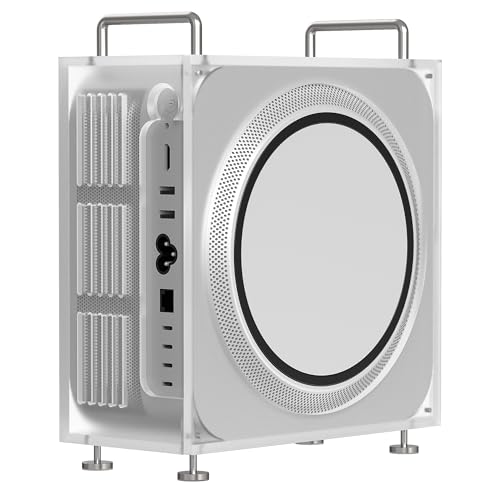
Apple Mac Studio M4 Ultra -- Best Desktop for Professional Premiere Work
The M4 Ultra combines two M4 Max dies via Apple's UltraFusion interconnect, delivering 80 CPU cores and 80 GPU cores with up to 192 GB unified memory. It handles 8K ProRes RAW timelines with multiple streams and real-time color grades that would require dedicated hardware on any other platform. Premiere runs on Rosetta 2 or natively depending on the build version, and Adobe's Apple Silicon support has matured significantly.
Razer Blade 16 (2026) -- Best Windows Laptop for Premiere Editing
The Razer Blade 16 fits an RTX 4090 laptop GPU into a 16-inch chassis, giving it the highest mobile GPU performance available on Windows. The 240 Hz Mini LED display (QHD+) is accurate enough for color work, though a hardware-calibrated display it is not. Intel Core Ultra 9 with 32 GB LPDDR5X RAM handles 4K timelines without proxy workflows for most H.264 and HEVC footage.
Dell XPS 15 (2025) -- Best Mid-Budget Windows Option for Premiere
The XPS 15 balances Premiere-capable hardware at a more accessible price. Intel Core Ultra 9, RTX 4070 laptop GPU, 32 GB DDR5, and a 3456x2160 OLED display make it a credible editing machine for 1080p and standard 4K work. The OLED display is a genuine advantage for color accuracy -- DCI-P3 coverage is near-complete and factory calibration is tight.
Before you buy
What to consider
GPU acceleration is the first variable to examine. Premiere uses GPU for rendering effects, color grading, and export encoding -- a capable GPU reduces timeline lag and cuts export times significantly. On Windows, an Nvidia card with at least 8 GB VRAM is the safe choice for CUDA acceleration. On Mac, any Apple Silicon chip delivers well-optimized Metal acceleration plus hardware ProRes codecs.
What to consider
RAM of 32 GB should be the floor for any serious editing work. Storage speed matters: NVMe SSD read speeds above 3,000 MB/s prevent stuttering on raw 4K footage. If your workflow is laptop-based, check thermal performance -- machines that throttle heavily under sustained export deliver inconsistent results. Choose based on your primary codec: ProRes workflows favor Mac, H.264/HEVC/CUDA-heavy workflows run well on Windows.
What to consider
For related picks, see our guide to the [best computers for productivity](/articles/best-computer-for-productivity) and the [best computers for Pro Tools](/articles/best-computer-for-pro-tools). Our [methodology](/methodology) covers how every product on this site is evaluated.
Quick answers
Adobe's official minimum is 16 GB, but 16 GB leaves little headroom when running After Effects, Audition, or Chrome alongside an active timeline. For 4K H.264 or HEVC editing, 32 GB is the practical baseline. Editors cutting 4K RAW, 6K, or 8K footage in multi-cam timelines benefit measurably from 64 GB, as Premiere caches decoded frames in RAM to speed up scrubbing.
Both platforms perform well, but they differ in GPU acceleration paths. On Apple Silicon Macs, Premiere uses Metal for GPU acceleration and ProRes encode/decode is hardware-accelerated at the chip level, which dramatically speeds up Apple ProRes workflows. On Windows, CUDA acceleration on Nvidia GPUs gives Premiere access to more VRAM and is faster for H.264/HEVC encode and effects-heavy timelines using third-party plugins that target CUDA specifically.
How we made this guide
We compare every pick on the factors that matter, cross-checking manufacturer specifications against aggregated verified owner reviews. We rank independently and never take payment for placement. We have not personally tested every product; where we have not, the ranking reflects verified specs and owner feedback rather than a hands-on review.
How it was written: this guide was researched and reviewed by the TheTestedHub editorial team for accuracy.
Affiliate disclosure: TheTestedHub is reader-supported. When you buy through links on our site, we may earn a commission at no extra cost to you.
More to explore

Your Docking Station Match: CalDigit TS4 and More

Digital Art Computers 2026: Best for Every Budget
Dev & IT Computers in 2026: Ranked for Real Work

Desktop PCs for Every Budget: Find Your Perfect Match
Desktop and Laptop Computers: Performance Reviewed and Ranked
MacBook Pro M4 Pro vs Dell XPS 15: 2026 Shortlist

Buy the Best DIY Computer in 2026: Corsair One i300
