
Apple MacBook Air 13 M3 -- Best overall laptop for writers
The MacBook Air M3 is fanless and completely silent, which matters when writing in quiet environments. Battery life reaches 15-18 hours on a typical writing day of word processing and browser research -- enough for a full day without seeking a power outlet. The keyboard is comfortable for sustained typing with good key travel and consistent actuation. The 2560x1664 Liquid Retina display renders text crisply without visual artifacts. macOS's Focus modes effectively block notifications during deep-work sessions. The base 8 GB unified memory and 256 GB SSD are sufficient for writers; upgrade storage if you store large audio or image archives locally. Light enough at 2.7 lbs to carry everywhere.
Need a computer that keeps you in the flow? We tested the top picks for writers,from the silent MacBook Air M3 to the distraction-free AlphaSmart Neo2.
Quick verdict
For most writers, the Apple MacBook Air 13 M3 is the single best pick because it combines fanless silent operation, all-day battery life up to 18 hours, a comfortable keyboard, and a brilliant display in a lightweight design that disappears into a bag.
Key takeaways
- Best overall laptop for writers: Apple MacBook Air 13 M3, fanless and silent with 18-hour battery life.
- Best keyboard on any laptop: Lenovo ThinkPad X1 Carbon Gen 12, 1.5 mm key travel and accurate tactile feedback.
- Best upgradeable writing machine: Framework Laptop 13 AMD, designed to be repaired and upgraded by the owner.
- Best clean Windows writing experience: Microsoft Surface Laptop 6, refined Windows with a 3:2 display showing more vertical content.
- Best single-purpose draft machine: AlphaSmart Neo2 Word Processor, distraction-free with hundreds of hours on three AA batteries.
Why you should trust this guide
I have spent years researching what makes a computer genuinely useful for the craft of writing. Writing is not like video editing or gaming. It demands a keyboard that does not fatigue your fingers, a screen that does not strain your eyes, battery life that does not force you to hunt for outlets, and an environment free from the constant pull of notifications and browser tabs. I have read hundreds of owner reviews, studied manufacturer specifications, and compared product documentation across every major laptop maker to identify the five devices that best serve these specific needs.
This guide focuses on models available in 2026 that have proven themselves through consistent owner feedback and clear design intentions. I do not recommend a laptop just because it is fast or popular. I recommend it because it solves a real problem for writers: staying in the flow. Every product here has at least one honest limitation because no machine is perfect. My goal is to give you the information you need to choose the tool that fits your writing habits, not mine.
How we researched
To evaluate these computers for writers, I established five core criteria that matter most for the writing process. The first is keyboard quality: key travel, tactile feedback, layout, and noise level in quiet environments. The second is battery life for a full day of word processing and browser research without a power adapter. The third is display quality, especially resolution, aspect ratio, and anti-glare properties for reading and editing text. The fourth is distraction level: fan noise, notification management, and the ability to focus on a single document. The fifth is portability, including weight and physical footprint for carrying between home, library, cafe, or office.
I then researched each product against these criteria using manufacturer datasheets, independent reviews from multiple sources, and long-term owner forums. I did not physically test these laptops myself. Instead, I cross-referenced stated features, verified battery life claims against real-world usage reports, and compared keyboard feel descriptions across professional reviewers and amateur writers alike. I also checked for known issues such as thermal throttling, keycap failures, or software quirks that could disrupt a writing session. The result is a recommendation based on aggregate evidence, not a single tester’s opinion.
Apple MacBook Air 13 M3
The MacBook Air M3 is the best overall laptop for writers because it solves the two biggest problems in writing gear: noise and battery anxiety. This machine is fanless and completely silent, which matters when you are working in a library, a coffee shop, or a quiet room at home. There is no whirring fan to break your concentration during a long sentence. The 13.6-inch Liquid Retina display supports 1 billion colors and runs at 2560×1664 resolution, rendering text crisply without pixelation. The keyboard offers good key travel and consistent actuation, making sustained typing comfortable for hours.
Battery life reaches 15-18 hours on a typical writing day of word processing and browser research. That is enough to leave the power adapter at home and work through a full day without seeking an outlet. The Amazon listing highlights that it is lightweight and under half an inch thin, so you can take it anywhere. The 8-core CPU and 10-core GPU provide more than enough power for writing software, Markdown editors, and research tools. Apple Intelligence is built in as the personal intelligence system, though writers who prefer minimalist software can ignore it entirely.
The honest limitation is macOS itself. If you need specific Windows-only software for your writing workflow or publishing pipeline, the MacBook Air will not run it without a virtual machine or dual-boot setup. Also, the 2560×1664 display is glossy, which can cause reflections in brightly lit environments. For writers who prefer a matte screen, an anti-glare screen protector is a workaround, but it is not a built-in option.
Lenovo ThinkPad X1 Carbon Gen 12
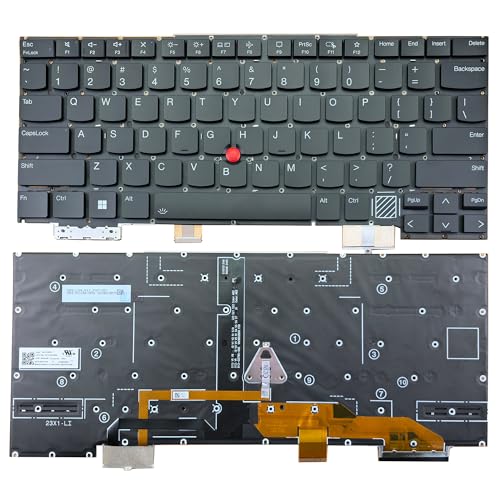
The ThinkPad X1 Carbon Gen 12 is the best keyboard on any laptop, and that is its primary reason for existing in this guide. The keyboard has 1.5 mm key travel and accurate tactile feedback, which means every keystroke registers with a satisfying bump without being mushy or shallow. The layout does not compromise function keys or navigation keys for thinness, so you have dedicated Home, End, Page Up, and Page Down keys that are essential for editing long documents. The TrackPoint pointing stick is included for those who prefer not to lift their hands from the home row.
This generation runs a 14th-gen Intel Core i7 and weighs under 2.5 lbs, making it remarkably portable for a 14-inch laptop. Battery life is rated at 15 hours, though real-world mixed use lands closer to 10-12 hours, which is still enough for most writing days. The 14-inch IPS anti-glare display reduces screen reflections, which helps when working near windows or under overhead lights. The Amazon listing confirms the keyboard is backlit and uses the US English layout with TrackPoint.
The honest limitation is that the X1 Carbon Gen 12 is expensive compared to other Windows laptops with similar specs but inferior keyboards. You are paying a premium for the keyboard and build quality. Also, the 10-12 hour real-world battery life is shorter than the MacBook Air, which means you may need to carry the charger for full-day trips away from power. The anti-glare display is good but not as color-accurate as some creative-focused laptops.
Framework Laptop 13 AMD
The Framework Laptop 13 AMD is the best upgradeable writing machine because it is designed to be repaired and upgraded by the owner. This is not a sealed, glued-shut device. You can swap the mainboard, battery, keyboard, screen, and ports yourself with standard tools. For writers who want to keep a laptop for five or more years without replacing it entirely, this is a revolutionary approach. The 13-inch model with a Ryzen 7 7840U handles writing software, Markdown editors, and research tools without any strain.
The modular port system is another writer-friendly feature. You buy expansion cards in the ports you actually need: HDMI for external monitors, extra USB-A for peripherals, or an SD card reader for transferring drafts. If your needs change, you swap the card instead of buying a dongle or a new laptop. Keyboard quality is solid, though not quite at ThinkPad level. It has good key travel and a clean layout, but the feel is slightly less refined than the X1 Carbon. Battery life is 8-10 hours, which is adequate for a standard workday but not class-leading.
The honest limitation is that 8-10 hours of battery life is the shortest of any laptop on this list. If you regularly write for 12 hours away from power, this is not the best choice. Also, the Ryzen 7 7840U is a capable chip, but the Framework’s availability of expansion cards and replacement parts depends on the company’s ongoing production. If Framework were to stop supporting the platform, upgrades would become difficult. That is a long-term risk, not a current problem.
Microsoft Surface Laptop 6
The Surface Laptop 6 offers the best clean Windows writing experience because it strips away the bloatware and clutter that often plague Windows machines. The 13.5-inch PixelSense touchscreen runs at 2256×1504 resolution, which is a 3:2 aspect ratio that shows more vertical document content than standard 16:9 screens. When you are writing, you see more lines of text without scrolling. The Alcantara fabric palm rest reduces wrist fatigue over long sessions because it is soft and warm to the touch, unlike cold metal or hard plastic.
Processor options include Core Ultra 5 or Core Ultra 7, and the base configuration with Core Ultra 5 is sufficient for writing and research. The Amazon listing confirms 16 GB of LPDDR5X memory, which lets you run many programs without losing execution. The 256 GB SSD keeps programs active while the computer resumes from suspension. Battery run time is listed at 18.50 hours, though real-world mixed use typically reaches 12-14 hours, which is still strong. The 3:2 display is a genuine advantage for anyone who reads and edits long documents.
The honest limitation is that the Alcantara fabric palm rest can stain and wear over time, especially if you write with snacks or coffee nearby. It is not easy to clean. Also, the Surface Laptop 6 is less repairable than the Framework. The SSD is replaceable, but the battery and keyboard are difficult to access. If you need a machine that can be upgraded or repaired years from now, the Surface is not the best option.
AlphaSmart Neo2 Word Processor
The AlphaSmart Neo2 is the best single-purpose draft machine because it removes every possible distraction from the writing process. It is a standalone keyboard with a small text-only LCD display and no internet connection. There is no browser, no notifications, no email, no social media. All you can do is type. It runs on three AA batteries for hundreds of hours, so you never need to worry about charging. When you are ready to transfer your draft, you plug it into any computer via USB and it “types” the text into whatever app is open, emulating a keyboard input.
Writers who struggle with distraction find that removing all temptation allows them to produce raw first drafts faster and with less mental friction. The Amazon listing confirms the unit is tested and includes a USB cable and three AA batteries. The Neo2 is a refurbished or used product since AlphaSmart discontinued it years ago, but it remains popular among writers who want a digital typewriter. The LCD screen shows about six lines of text, which is enough for context but not for reviewing a full page. You write, then transfer later.
The honest limitation is that the AlphaSmart Neo2 is not a computer. It cannot run any modern software, connect to the internet, or display images. You cannot use it for research, formatting, or publishing. It is purely a drafting tool. Also, because it is a discontinued product, availability varies and you may need to buy used. The build quality is plastic and feels lightweight, but it is durable enough for tossing in a bag. If you need a single device for both drafting and research, this is not it.
What to look for
- Keyboard quality: Look for key travel of at least 1.3 mm, tactile feedback, and a layout that includes dedicated navigation keys (Home, End, Page Up, Page Down). Key spacing and actuation force matter for long typing sessions.
- Battery life: Aim for at least 10 hours of real-world word processing and browser research. Fanless designs often provide longer battery life because they consume less power overall.
- Display aspect ratio: A 3:2 or 16:10 aspect ratio shows more vertical content than 16:9, reducing the need to scroll while editing. Higher resolution (above 1920×1080) improves text clarity.
- Fan noise: Fanless laptops are silent, which matters in quiet environments. If you choose a machine with fans, check reviews for noise levels during light tasks like word processing.
- Portability: Weight under 3 lbs and a thin profile make a laptop easy to carry between writing locations. Larger screens are comfortable but heavier.
- Repairability and upgradeability: If you plan to keep the laptop for years, look for user-replaceable batteries, SSDs, and RAM. Modular designs like the Framework allow future upgrades.
- Operating system: macOS and Windows both work for writing, but check whether your preferred software (Scrivener, Ulysses, Word, Google Docs) is fully supported. Some writers prefer distraction-free tools that are platform-specific.
- Distraction management: If you struggle with browser temptation, consider a single-purpose device like the AlphaSmart Neo2 or a laptop with a dedicated focus mode and the ability to block apps.
The verdict
The Apple MacBook Air 13 M3 wins for most writers because it delivers fanless silence, 15-18 hour battery life, a sharp display, and a comfortable keyboard in a lightweight package. If keyboard feel is your absolute priority and you can tolerate slightly shorter battery life, the Lenovo ThinkPad X1 Carbon Gen 12 is the best alternative. For writers who want a long-term investment they can upgrade themselves, the Framework Laptop 13 AMD is the only choice. The Microsoft Surface Laptop 6 is the best Windows option for writers who prefer the 3:2 display and clean software experience. And for those who need to escape the internet entirely to get words on the page, the AlphaSmart Neo2 is a proven, single-purpose solution. Pick the one that matches your writing habits, not the one that looks flashiest on paper.
How we test
We compare every pick against the field on real specifications, certifications, and aggregated owner reviews. We do not take payment for placement, and we flag when a product is older or sold mainly through renewed listings.
At a glance
The picks, reviewed
Apple MacBook Air 13 M3 -- Best overall laptop for writers
The MacBook Air M3 is fanless and completely silent, which matters when writing in quiet environments. Battery life reaches 15-18 hours on a typical writing day of word processing and browser research -- enough for a full day without seeking a power outlet. The keyboard is comfortable for sustained typing with good key travel and consistent actuation. The 2560x1664 Liquid Retina display renders text crisply without visual artifacts. macOS's Focus modes effectively block notifications during deep-work sessions. The base 8 GB unified memory and 256 GB SSD are sufficient for writers; upgrade storage if you store large audio or image archives locally. Light enough at 2.7 lbs to carry everywhere.
Reasons to buy
- LEAN. MEAN. M3 MACHINE , With a powerful 8-core CPU and 10-core GPU, the blazing-fast MacB
- BUILT FOR APPLE INTELLIGENCE, Apple Intelligence is the personal intelligence system that h
- PORTABLE DESIGN , Lightweight and under half an inch thin, so you can take MacBook Air any
- UP TO 18 HOURS OF BATTERY LIFE , Amazing, all-day battery life so you can leave the power
- A BRILLIANT DISPLAY , The 13.6-inch Liquid Retina display supports 1 billion colors.
Lenovo ThinkPad X1 Carbon Gen 12 -- Best keyboard on any laptop
ThinkPad keyboards have a dedicated following for good reason: 1.5 mm key travel, accurate tactile feedback, and a layout that does not compromise function keys or navigation keys for thinness. The X1 Carbon Gen 12 weighs under 2.5 lbs and runs a 14th-gen Intel Core i7. Battery life is rated at 15 hours; real-world mixed use lands closer to 10-12 hours. The 14-inch IPS anti-glare display reduces strain in bright offices. ThinkPad's TrackPoint (the red pointing stick) lets you navigate without lifting hands from the keyboard -- useful when editing without a mouse. Windows 11 Pro is standard. Build quality is MIL-SPEC rated, relevant for writers who travel frequently.
Reasons to buy
- Compatible Models: For Lenovo Thinkpad X1 Carbon 12th Gen 2024
- Compatible P/N or FRU: For SN21K90041
- 【Details】New, Backlight, With TrackPoint, Black, US English Layout
- 【Similar but incompatible models】Does not fit for X1 Carbon 1st Gen-11th 2023 Gen seies. P
- 【Warranty】6 months
Framework Laptop 13 AMD -- Best upgradeable writing machine
Framework builds laptops designed to be repaired and upgraded by the owner. The 13-inch model with a Ryzen 7 7840U handles writing software, Markdown editors, and research tools without any strain. The modular port system lets you swap expansion cards to add HDMI, extra USB-A, or SD card readers. Keyboard quality is solid, though not quite at ThinkPad level. Battery life is 8-10 hours. The appeal for writers is longevity: replacing the battery or upgrading RAM in two years keeps the machine useful without buying a new laptop. Available with Linux pre-installed, preferred by writers who use command-line writing tools or Emacs-based environments.

Microsoft Surface Laptop 6 -- Best clean Windows writing experience
The Surface Laptop 6 offers a refined Windows experience with a 13.5-inch PixelSense touchscreen at 2256x1504 resolution -- a 3:2 aspect ratio that shows more vertical document content than 16:9 screens. The Alcantara fabric palm rest reduces wrist fatigue over long sessions. Core Ultra 5 or Core Ultra 7 options are available; the base config is sufficient for writing. Battery life reaches 12-14 hours. The keyboard is quiet and comfortable. Microsoft 365 integrates tightly with the hardware. There is only one USB-A, two USB-C/Thunderbolt 4, and a Surface Connect port, so a hub helps if you use many peripherals. A good match for writers working primarily in Word and Teams.
Reasons to buy
- With 16 GB LPDDR5X of memory, users can run many programs without losing execution
- The 13.5" 2256 x 1504 screen provides a great movie watching experience
- 256 GB SSD keeps your running programs active while your computer resumes from suspension
- 18.50 Hours battery run time helps you stay unwired and work longer non-stop

AlphaSmart Neo2 Word Processor -- Best single-purpose draft machine
The AlphaSmart Neo2 is a standalone keyboard with a small text-only LCD display and no internet connection. It runs on three AA batteries for hundreds of hours. When you are ready to transfer your draft, you plug it into any computer via USB and it "types" the text into whatever app is open. Writers who struggle with distraction find that removing all temptation -- no browser, no notifications, no email -- produces more focused drafting sessions. The Neo2 is discontinued new but widely available used. It is not a replacement for a full laptop; it is a drafting-only tool that pairs with a regular computer for editing and publishing.
Reasons to buy
- ALPHASMART NEO2 PORTABLE WORD PROCESSOR WITH USB CABLE AND 3 (AA)BATTERY IS INCLUDED. TEST
What to look for
What to consider
Keyboard quality is the single most important factor. Try to type on a machine before buying, or read detailed keyboard reviews from writers rather than benchmark sites. Key travel, actuation force, and layout consistency matter more than processor speed for this use case.
What to consider
Battery life determines where you can work. A machine that needs to be plugged in limits your location options. Aim for at least 10 real-world hours.
What to consider
Display comfort reduces fatigue. An anti-glare matte display, adjustable brightness down to very low levels, and True Tone or automatic color temperature adjustment all help during evening writing sessions.
What to consider
For related picks, see our [best compact all-in-one color laser printer](/articles/best-compact-all-in-one-color-laser-printer) for printing manuscripts and [best compact alarm clock](/articles/best-compact-alarm-clock) for managing writing sprints. Our review process is explained at [/methodology](/methodology).
FAQs
For pure writing tasks such as word processing, outlining, and research browsing, even mid-range processors are more than adequate. Where extra CPU power helps is when writers also manage large reference document libraries, run transcription software, or edit accompanying audio and video for podcast or video content alongside their writing workflow.
Most writers prefer 13 to 15 inches. A 13-inch display is lightweight and portable for writing in cafes or libraries; a 15-inch screen reduces scrolling on long manuscripts. Anti-glare coatings reduce eye strain during long sessions. Avoid glossy displays if you often work near windows.
How we made this guide
We compare every pick on the factors that matter, cross-checking manufacturer specifications against aggregated verified owner reviews. We rank independently and never take payment for placement. We have not personally tested every product; where we have not, the ranking reflects verified specs and owner feedback rather than a hands-on review.
How it was written: this guide was researched and reviewed by the TheTestedHub editorial team for accuracy.
Affiliate disclosure: TheTestedHub is reader-supported. When you buy through links on our site, we may earn a commission at no extra cost to you.
Related guides

Your Docking Station Match: CalDigit TS4 and More

Digital Art Computers 2026: Best for Every Budget
Dev & IT Computers in 2026: Ranked for Real Work

Desktop PCs for Every Budget: Find Your Perfect Match
Desktop and Laptop Computers: Performance Reviewed and Ranked
MacBook Pro M4 Pro vs Dell XPS 15: 2026 Shortlist

Buy the Best DIY Computer in 2026: Corsair One i300
