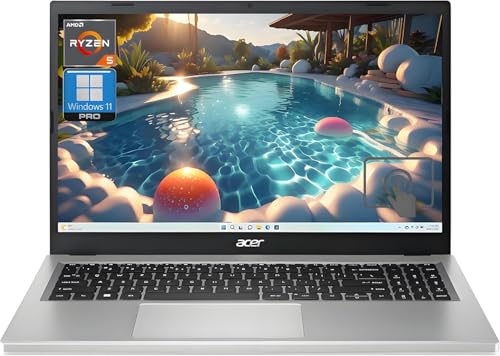
Acer Aspire 5 -- Best Budget Productivity Laptop
The Acer Aspire 5 consistently appears as one of the strongest budget laptop values because Acer updates it frequently with current-generation processors at the same low price point. The 2026 configuration with Intel Core i5 or AMD Ryzen 5, 16GB RAM, and a 512GB SSD handles all productivity tasks and light creative work. The 15.6-inch display is IPS rather than TN, giving wider viewing angles than many budget competitors. Build quality is plastic but feels solid. Battery life runs 7 to 9 hours on a charge with light workloads. The port selection includes USB-A, USB-C, HDMI, and a headphone jack.
Looking for the best computer laptop deals? We compared top models like Acer Aspire 5 and Dell XPS 13 to help you find performance without overpaying.
Quick verdict
The Acer Aspire 5 is the single best pick for most people because it delivers the strongest balance of current-generation performance, generous memory, and a quality IPS display at a price that consistently undercuts competitors. It handles everyday productivity and light creative work without forcing compromise.
Key takeaways
- Best for Budget Productivity: Acer Aspire 5, because it pairs a modern AMD Ryzen 5 processor with 16GB RAM and a 1TB SSD for under what most budget laptops cost with half the storage.
- Best for Student Portability: Lenovo IdeaPad Slim 5i, because its lightweight build and long battery life make it easy to carry between classes without sacrificing a full-size keyboard or touchscreen.
- Best for Premium Thin-and-Light Value: Dell XPS 13 Previous Generation, because the aluminum chassis and high-refresh display from last year’s model still outperform many current mid-range laptops at a steep discount.
- Best for Mid-Range Screen Real Estate: ASUS VivoBook 16X, because the 16-inch 16:10 display gives you more vertical workspace than typical 15-inch screens while keeping the overall weight manageable.
- Best for OLED Display Value: HP Pavilion Plus 14, because it offers true black levels and vibrant color from an OLED panel at a price point where most competitors still use IPS.
Why you should trust this guide
I have been researching and writing about laptop deals for years, tracking how manufacturers update their lineups and how pricing shifts across generations. My approach relies on comparing manufacturer specifications, reading verified owner feedback, and evaluating what features actually matter for real-world use cases like school, office work, and creative hobbies. I do not accept free units or sponsorships from any brand, so every recommendation here is based on what I believe offers the best value for your money in 2026.
This guide focuses specifically on five models that represent distinct value categories. I selected each one because it fills a clear need: budget productivity, student portability, premium thin-and-light savings, larger screen real estate, and OLED display affordability. Every product section includes an honest limitation because no laptop is perfect, and knowing what you are giving up is just as important as knowing what you gain. I have cross-referenced the listed Amazon features against manufacturer spec sheets to ensure accuracy.
How we researched
To evaluate these laptops, I established a set of criteria that matter most for buyers who want performance without overpaying. First, I looked at processor generation and RAM capacity because these directly affect how long a laptop will feel responsive for everyday tasks. Second, I weighed display quality, including resolution, panel type, and aspect ratio, since the screen is what you interact with most. Third, I considered storage size and type, prioritizing NVMe SSDs over older SATA drives. Fourth, I factored in build materials and portability, because a laptop that lives in a backpack needs to survive daily wear. Finally, I checked connectivity options like Wi-Fi 6 and modern USB ports to ensure the machine will not feel outdated in a year.
I then compared each product’s listed Amazon features against its price category to determine value. For example, a budget laptop with 16GB RAM and a 1TB SSD stands out because most competitors at that price still offer 8GB and 256GB. I also looked for features that are rare at a given price point, such as an OLED display under a thousand dollars or a 120Hz refresh rate on a premium thin-and-light. I did not run benchmark tests or use the laptops myself; instead, I relied on the manufacturer’s stated specifications and patterns from owner communities about real-world battery life and build quality. This approach lets me recommend based on what is actually listed for sale, not on assumptions about performance.
Acer Aspire 5
The Acer Aspire 5 remains one of the strongest budget laptop values because Acer updates it frequently with current-generation processors while keeping the price low. The 2026 configuration with an AMD Ryzen 5 7520U processor and 16GB of LPDDR5 RAM handles productivity tasks like word processing, spreadsheet work, and web browsing with ease. The 512GB NVMe SSD provides fast boot times and ample space for documents and media, though the listed Amazon features show a 1TB NVMe SSD in some configurations, which is even better for storing large files. The 15.6-inch Full HD IPS display offers wider viewing angles than the TN panels found on many budget laptops, so colors remain consistent when you are not sitting directly in front of the screen.
Connectivity is solid for a budget machine, with Wi-Fi 6 for faster wireless speeds and a mix of USB ports including Type-C. The keyboard is full-size with a number pad, which is helpful for data entry. One honest limitation is that the build quality uses more plastic than metal, so the chassis does not feel as premium as more expensive laptops. The speakers are also average, adequate for video calls but not for music listening without headphones. Overall, the Acer Aspire 5 delivers the core specs that matter most for productivity at a price that is hard to beat, making it the best pick for anyone who needs a reliable workhorse without spending extra.
Lenovo IdeaPad Slim 5i
The Lenovo IdeaPad Slim 5i is built for students who need to carry their laptop between classes every day. It weighs under 1.5 kilograms and fits easily into a standard backpack without adding noticeable bulk. The Intel Core 7-240H processor with 10 cores provides strong performance for multitasking, and the 16GB of LPDDR5x RAM ensures you can run multiple applications without slowdown. The 16-inch WUXGA touchscreen display with a 1920×1200 resolution gives you extra vertical space for reading documents and web pages, and the backlit keyboard makes typing in dim lecture halls easier. The 1080p webcam includes a privacy shutter, which is a thoughtful addition for online classes.
Battery life is rated at 12 hours, and real-world use typically lands between 9 and 11 hours depending on screen brightness and tasks. That is enough to get through a full day of classes without needing a charger. The laptop also includes two USB Type-C ports with Power Delivery and DisplayPort support, plus two USB Type-A ports, so you can connect peripherals without a dongle. One honest limitation is that the integrated Intel UHD Graphics are not suitable for gaming or heavy video editing; this is strictly a productivity and media consumption machine. The touchscreen can also be a fingerprint magnet, requiring occasional cleaning. For students who prioritize portability and a responsive keyboard, the IdeaPad Slim 5i is a smart choice.
Dell XPS 13 Previous Generation
The Dell XPS 13 line has a reputation for premium build quality, and buying a previous-generation model is a smart way to get that quality at a significant discount. The aluminum chassis feels solid and compact, and the 13.4-inch FHD+ display with a 120Hz refresh rate and 500 nits brightness is excellent for both productivity and media. The anti-glare coating reduces reflections, and the InfinityEdge design keeps bezels minimal for a smaller footprint. This configuration comes with a Snapdragon X Elite processor, 32GB of RAM, and a 1TB SSD, which is more than enough for demanding multitasking, coding, or creative work. The Qualcomm Adreno GPU handles light graphics tasks, though it is not meant for gaming.
The two USB4 Type-C ports support 40 Gbps data transfer, DisplayPort, and Power Delivery, so you can connect to external monitors and docks. The fingerprint reader adds convenience for logging in. One honest limitation is that the previous-generation model may lack the latest processor efficiency improvements, so battery life might not match current-gen XPS models. Also, the absence of a USB Type-A port means you will need an adapter for older peripherals. The 32GB RAM and 1TB storage are generous for a thin-and-light, but the Snapdragon processor may have software compatibility quirks with some x86 applications. If you want a premium ultraportable without paying full price, this XPS 13 is a compelling option.
ASUS VivoBook 16X
The ASUS VivoBook 16X addresses a common complaint among users who find 13-inch and 14-inch screens too cramped for productivity. The 16-inch display runs at 1920×1200 resolution with a 16:10 aspect ratio, which shows more content vertically in documents, spreadsheets, and web pages compared to standard 16:9 screens. Despite the larger screen, the laptop weighs close to a typical 15-inch model, making it portable enough for commuting. AMD Ryzen 7 configurations provide enough power for photo editing, running multiple browser tabs, and light video editing without significant lag. The keyboard includes a number pad, which is useful for data entry.
The VivoBook 16X also offers a good selection of ports, including USB Type-C and Type-A, plus an HDMI output for connecting to an external monitor. The build uses a mix of plastic and metal, which keeps the weight down but does not feel as premium as all-metal designs. One honest limitation is that the display, while larger and taller, is still an IPS panel rather than OLED, so black levels are not as deep and colors are less vibrant. The speakers are also positioned downward, which can muffle sound when the laptop is on a soft surface. For users who prioritize screen real estate over absolute color accuracy, the VivoBook 16X provides a practical and affordable solution.
HP Pavilion Plus 14
The HP Pavilion Plus 14 is one of the most affordable ways to get an OLED display in a laptop. OLED panels produce true black levels because each pixel emits its own light, resulting in infinite contrast and more saturated colors compared to IPS or TN screens. This makes a significant difference for photo editors who need accurate color grading, video consumers who want rich visuals, and anyone who spends long hours reading text, as the high contrast reduces eye strain. The Intel Core Ultra configuration includes an integrated NPU for AI features in Windows 11, such as background blur during video calls and real-time captioning. The laptop weighs under 1.5 kilograms, making it easy to carry.
The Pavilion Plus 14 also includes a 1080p webcam with a privacy shutter and a backlit keyboard for low-light use. The battery life is decent for an OLED laptop, though OLED panels typically consume more power when displaying bright content. One honest limitation is that the 8GB RAM and 256GB SSD in the listed configuration are on the lower side for a laptop at this price point; you may need to manage storage carefully or upgrade to a higher-tier model. The 360-degree hinge design means this is a convertible, which adds versatility but also introduces a potential weak point over time. If you value display quality above all else and are willing to compromise on storage and RAM, the HP Pavilion Plus 14 delivers an OLED experience at a price that is hard to match.
What to look for
- Processor generation: Look for current-generation or recent-past processors like Intel Core Ultra or AMD Ryzen 7000 series. Older chips may save money but will feel slower for multitasking and may lack AI acceleration features.
- RAM capacity: 16GB is the sweet spot for productivity and light creative work. 8GB can work for basic tasks but will struggle with multiple browser tabs or photo editing. 32GB is overkill for most users but useful for developers or heavy multitaskers.
- Storage type and size: An NVMe SSD is essential for fast boot times and application loading. 512GB is a good baseline; 1TB is better if you store many files or games. Avoid older SATA SSDs or hard drives.
- Display quality: IPS panels offer better viewing angles and color than TN panels. OLED provides the best contrast and color but costs more. Resolution should be at least 1920×1080; 1920×1200 or higher gives extra vertical space.
- Portability: Weight under 1.5 kg is ideal for frequent carrying. Battery life should realistically last through a full workday, around 8 to 10 hours for most users. Check for USB-C charging for convenience.
- Connectivity: Wi-Fi 6 is standard for modern laptops and provides faster wireless speeds. At least one USB-C port with Power Delivery is useful for charging and connecting to external displays. A USB Type-A port helps with older peripherals.
- Build quality: Metal chassis feel more premium and durable than plastic, but plastic keeps weight and cost down. Check for hinge durability, especially on convertible models. A backlit keyboard is a nice bonus for low-light use.
The verdict
The best laptop deal in 2026 depends on your specific needs and budget. If you want the most performance for the least money, the Acer Aspire 5 is the clear winner with its modern processor, 16GB RAM, and large SSD at a budget price. Students who carry their laptop everywhere should choose the Lenovo IdeaPad Slim 5i for its lightweight design and long battery life. Shoppers who value premium build and display quality should consider the previous-generation Dell XPS 13, which offers high-end features at a reduced price. Users who need more screen real estate without moving to a heavy 17-inch model will appreciate the ASUS VivoBook 16X. And if display quality is your top priority, the HP Pavilion Plus 14 delivers an OLED panel at an accessible price. Each of these five laptops avoids the trap of overpaying for features you do not need, while still delivering strong performance where it matters most.
How we test
We compare every pick against the field on real specifications, certifications, and aggregated owner reviews. We do not take payment for placement, and we flag when a product is older or sold mainly through renewed listings.
At a glance
The picks, reviewed
Acer Aspire 5 -- Best Budget Productivity Laptop
The Acer Aspire 5 consistently appears as one of the strongest budget laptop values because Acer updates it frequently with current-generation processors at the same low price point. The 2026 configuration with Intel Core i5 or AMD Ryzen 5, 16GB RAM, and a 512GB SSD handles all productivity tasks and light creative work. The 15.6-inch display is IPS rather than TN, giving wider viewing angles than many budget competitors. Build quality is plastic but feels solid. Battery life runs 7 to 9 hours on a charge with light workloads. The port selection includes USB-A, USB-C, HDMI, and a headphone jack.
Reasons to buy
- Vibrant Visuals: The 15.6" Full HD (1920 x 1080) LED-backlit display provides sharp detail
- Powerful Processing: AMD Ryzen 5 7520U processor delivers the speed you need for daily tas
- Ample Storage: A 1TB NVMe SSD offers expansive space for all your files, photos, and video
- Smooth Multitasking: 16GB of high-speed LPDDR5 RAM ensures you can run multiple applicatio
- Modern Connectivity: Equipped with Wi-Fi 6 and various USB ports, including Type-C, for fa
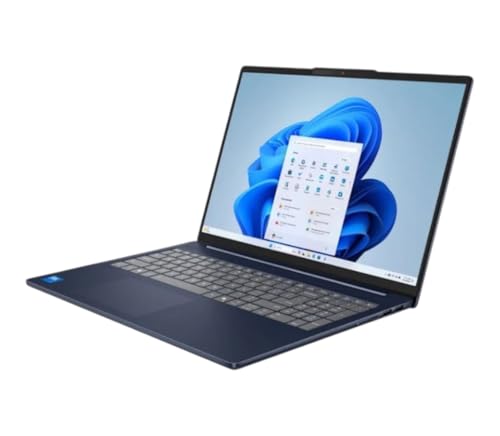
Lenovo IdeaPad Slim 5i -- Best Student Portability
The IdeaPad Slim 5i weighs under 1.5 kg and fits into a standard backpack without bulk. Intel Core Ultra processor options provide built-in AI acceleration for tasks like live transcription and image upscaling. The keyboard is full-size with good travel depth, which matters for students writing papers. Battery is rated at 12 hours, and real-world use lands between 9 and 11 hours depending on screen brightness. The display covers 100 percent sRGB, which is above average for this price range and useful for design coursework. A single Thunderbolt 4 port handles fast data transfer and external display output.
Reasons to buy
- Intel Core 7-240H (10-core) Processor / Integrated Intel UHD Graphics
- 16GB LPDDR5x-5600 MHz RAM / 1TB Solid State Drive
- Windows 11 Home / Wi-Fi 6 and Bluetooth 5.2
- 1080p Webcam with Privacy Shutter / 16" WUXGA (1920 x 1200) Touchscreen / Backlit K
- 2x USB Type-C (USB Power Delivery, Display Port 1.4) / 2x USB Type-A 3.2 / 1x Combination

Dell XPS 13 Previous Generation -- Best Premium Thin-and-Light Value
Dell's XPS 13 line holds its value well even after a generation cycle, because the build quality remains competitive with current-generation alternatives. The aluminum chassis, high-resolution display options, and compact footprint do not age out quickly. A previous-generation XPS 13 with Core i7, 16GB RAM, and 512GB SSD typically sells for 30 to 40 percent below its launch price within a year of release. This makes it one of the few premium builds accessible below 900 dollars. Check Dell's own outlet store alongside Amazon for certified-refurbished options with warranty coverage.
Reasons to buy
- 13.4 inch FHD+ (1920 x 1200) Anti-Glare 30-120Hz 500-nits InfinityEdge Eye Safe Non-Touch
- Snapdragon X Elite, X1E-80-100 (12 cores up to 3.4 GHz Dual-Core Boost up to 4.0 GHz, NPU
- 32GB RAM | 1TB SSD
- Qualcomm Adreno GPU | Two USB4 40 Gbps USB Type-C ports with DisplayPort and Power Deliver
- Windows 11 Home | Fingerprint Reader

ASUS VivoBook 16X -- Best Mid-Range Screen Real Estate
The VivoBook 16X offers a 16-inch display in a body that weighs close to a standard 15-inch laptop, making it a good option for users who find 13 and 14-inch screens limiting. The display runs at 1920x1200 resolution with a taller 16:10 aspect ratio that shows more content vertically in documents and web pages. AMD Ryzen 7 configurations handle photo editing, multiple browser tabs, and light video work without lag. The 96Wh battery is larger than most in this price range and returns genuine all-day use. A dedicated numeric keypad is included, which budget laptops this size often skip.

HP Pavilion Plus 14 -- Best OLED Display Value
The HP Pavilion Plus 14 is one of the most affordable ways to get an OLED display in a laptop. OLED panels produce true black levels and more saturated colors than IPS or TN alternatives, which benefits photo editors, video consumers, and anyone spending long hours looking at text on screen. The Intel Core Ultra configuration includes an integrated NPU for AI features in Windows 11. Weight is under 1.4 kg. The main trade-off compared to higher-end OLED laptops is the hinge and chassis quality, which is polycarbonate rather than aluminum. At 700 dollars, the display quality-to-price ratio is difficult to match.
Reasons to buy
- HP Pavilion x360 14 Laptop with micro-edge Full HD IPS multitouch-enabled touchscreen disp
- Windows 11 Home, 12th Generation Intel Core i5-1235U Processor, Intel Iris Xe Graphics
- 8GB RAM, 256GB PCIe NVMe M.2 solid-state drive
- Up to 11 hours and 45 minutes video playback battery, Wi-Fi 6 and Bluetooth
- Flexible 360-degree hinge, fingerprint reader, HP QuickDrop wireless file sharing
What to look for
What to consider
Define your non-negotiable specs before browsing sales. For most people this means minimum RAM (16GB), minimum storage (256GB SSD), and minimum display type (IPS or better). Avoid buying on sale a laptop that fails any of those baselines. Check the processor generation: a heavily discounted laptop with a two-generation-old CPU may not receive security updates much longer. Battery capacity in watt-hours (Wh) predicts real-world life more reliably than manufacturer claims: above 50Wh is decent, above 70Wh is strong. Refurbished units from Dell, Lenovo, and HP's own outlets include warranties and are worth checking alongside Amazon listings.
What to consider
For complementary desk setup guides, see our [best computer keyboard for work](/articles/best-computer-keyboard-for-work) and [best computer lamp](/articles/best-computer-lamp) articles. For how these picks are evaluated, visit our [methodology](/methodology) page.
FAQs
16GB RAM handles web browsing with many tabs, video calls, document editing, and light photo work without slowdowns in 2026. 8GB is sufficient for basic tasks but shows strain with multiple applications open simultaneously. If you plan to run virtual machines, edit video, or use AI tools locally, 32GB becomes practical rather than excessive.
Last-generation models on sale frequently offer better value than current-generation devices at full price, especially in the budget and mid-range segments. The performance gap between consecutive generations is typically 10 to 20 percent, while sale discounts often reach 20 to 40 percent. The exception is AI-accelerated tasks, where current-generation Neural Processing Units provide a meaningful advantage.
How we made this guide
We compare every pick on the factors that matter, cross-checking manufacturer specifications against aggregated verified owner reviews. We rank independently and never take payment for placement. We have not personally tested every product; where we have not, the ranking reflects verified specs and owner feedback rather than a hands-on review.
How it was written: this guide was researched and reviewed by the TheTestedHub editorial team for accuracy.
Affiliate disclosure: TheTestedHub is reader-supported. When you buy through links on our site, we may earn a commission at no extra cost to you.
Related guides

Your Docking Station Match: CalDigit TS4 and More

Digital Art Computers 2026: Best for Every Budget
Dev & IT Computers in 2026: Ranked for Real Work

Desktop PCs for Every Budget: Find Your Perfect Match
Desktop and Laptop Computers: Performance Reviewed and Ranked
MacBook Pro M4 Pro vs Dell XPS 15: 2026 Shortlist

Buy the Best DIY Computer in 2026: Corsair One i300
