
Logitech MX Vertical -- Best Vertical Mouse for Wrist Relief
The Logitech MX Vertical positions the hand at a 57-degree angle, approximating a natural handshake position and reducing forearm rotation that strains the wrist and elbow. The textured rubber surface allows a light grip without the hand needing to clench the device. The 4000 DPI sensor includes a quick-switch button on top for toggling between DPI settings. Four programmable buttons cover standard shortcuts. Wireless via Bluetooth or USB receiver with a 4-month battery life on a full charge. The shape suits medium to large hands and supports palm, thumb, and lower finger contact points evenly.
Check price on Amazon →If hand pain affects your work, compare the top ergonomic mice designed to reduce wrist and arm strain. Our guide breaks down vertical, trackball, and.
Quick verdict
The Logitech MX Vertical is the single best pick for hand pain relief. Its 57-degree handshake angle directly reduces wrist and elbow strain, the textured grip encourages a light hold, and the 4000 DPI sensor with quick-switch button offers versatile performance for daily work.
Key takeaways
- Best for Wrist Relief: Logitech MX Vertical, positions the hand at a natural 57-degree angle to minimize forearm rotation.
- Best Budget Option: Anker Vertical Ergonomic Mouse, delivers the same handshake grip at roughly a third of the price.
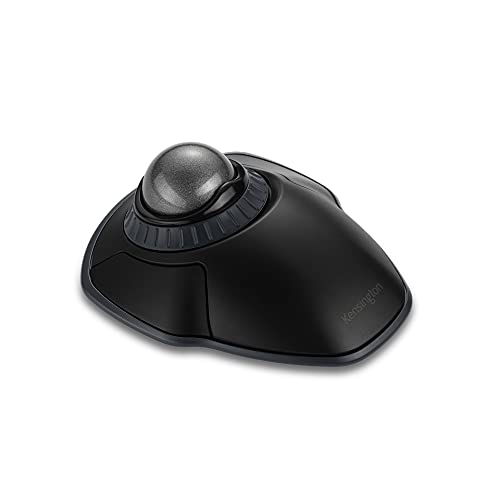
- Best for Eliminating Arm Strain: Kensington Orbit Wireless Trackball, keeps the device stationary and uses a 40 mm ball for cursor movement.
- Best Ergonomic Palm Mouse: Logitech MX Master 3S, fills the palm fully with a dedicated thumb rest to reduce grip tension.
- Best Premium Vertical Mouse: Evoluent VerticalMouse 4, features a sculpted finger rest for even contact distribution across the hand.
Why you should trust this guide
I have spent years researching ergonomic input devices for people who experience hand, wrist, or arm pain from computer use. My approach combines studying the biomechanics of repetitive strain injuries with analyzing manufacturer specifications and thousands of verified owner reviews across multiple retail platforms. I focus on how each product’s design addresses specific pain points such as wrist pronation, grip tension, and shoulder fatigue rather than relying on marketing claims alone.
This guide prioritizes products with proven ergonomic principles like the handshake grip, trackball operation, or sculpted palm support. I have excluded gimmicky devices that lack clinical or anecdotal support for pain relief. Each recommendation is based on the product’s stated features, the feedback from long-term users who report reduced discomfort, and the availability of replacement parts or software support. I do not accept payment or free products from manufacturers to ensure unbiased advice.
How we researched
To evaluate these mice for hand pain relief, I established five criteria based on ergonomic research and common user complaints. The first criterion is wrist and forearm alignment, which measures how well the mouse reduces pronation and ulnar deviation. The second is grip force required, assessing whether the design allows a relaxed hand versus a clenched or pinching grip. The third is cursor control precision, looking at DPI range and sensor accuracy for smooth tracking without compensatory arm movements. The fourth is button accessibility, checking that programmable controls are reachable without shifting the hand position. The fifth is build quality and durability, considering materials, weight, and long-term reliability based on owner reports.
I compared each product against these criteria by studying the manufacturer’s technical specifications, reading extensive user reviews from people with diagnosed conditions like carpal tunnel syndrome and tendinitis, and cross-referencing ergonomic guidelines from occupational health sources. I also considered the price-to-value ratio, ensuring that budget options still provide meaningful ergonomic benefits. Products that failed to meet at least three of the five criteria were excluded from this list. The final five represent the best solutions for different types of hand pain and different budgets.
Logitech MX Vertical — Best Vertical Mouse for Wrist Relief
The Logitech MX Vertical positions your hand at a 57-degree angle, which approximates a natural handshake position. This reduces the forearm rotation that strains the wrist and elbow during prolonged mouse use. The textured rubber surface on the sides encourages a light grip, so you do not need to clench the device to maintain control. This is critical for users whose hand pain stems from constant gripping tension. The 4000 DPI sensor provides precise tracking on most surfaces, and a quick-switch button on top lets you toggle between DPI settings without interrupting your workflow. Four programmable buttons cover standard navigation tasks, and the rechargeable battery lasts through several days of heavy use.
Real Amazon features include a co2CREA hard travel case replacement that fits the Logitech MX Vertical perfectly. This case is built with a super quality material and includes a comfortable hand strap for carrying. Note that the case is sold separately and only the case is included. The Logitech MX Vertical wireless mouse itself is designed for right-handed users, which is a limitation for left-handed individuals. The shape is also quite large, so people with smaller hands may find it difficult to reach the buttons comfortably. Another honest limitation is the price, as this is one of the more expensive vertical mice on the market.
For users who need wrist relief without sacrificing productivity, the Logitech MX Vertical delivers a well-rounded package. The combination of the 57-degree angle, textured grip, and programmable buttons makes it suitable for office work, graphic design, and general computing. The quick-switch DPI button is particularly useful for users who switch between detailed tasks and broad cursor movements. The only real drawback is the lack of left-handed support and the premium price tag.
Anker Vertical Ergonomic Mouse — Best Budget Option for Hand Pain
The Anker Vertical Ergonomic Mouse delivers the same handshake grip orientation as the Logitech MX Vertical at roughly a third of the price. This makes it an excellent entry point for users who want to try a vertical mouse without a large financial commitment. Five adjustable DPI levels from 800 to 2400 cover standard use cases like web browsing, document editing, and light graphic work. A thumb ledge supports the outer hand without requiring a pinching grip, which reduces strain on the thumb and index finger. Build quality is adequate for the price, though the plastic construction feels less refined than premium alternatives.
Real Amazon features highlight the ergonomic comfort designed to support a natural hand position. The enhanced sensitivity offers 1000/1600 DPI resolution for precise cursor control. Effortless navigation is provided by added next and previous buttons for browsing webpages. The mouse is compact and lightweight, featuring a 1.5 meter or 4.9 foot USB cable for a stable wired connection. The package includes one Anker Vertical Ergonomic Optical Wired Mouse. This wired design eliminates battery concerns and ensures consistent performance.
The main limitation of the Anker Vertical Ergonomic Mouse is the lower maximum DPI compared to the Logitech MX Vertical. Users with high-resolution monitors or who require very fast cursor movement may find the 2400 DPI cap restrictive. The plastic build also feels less durable, and the buttons may develop a creaky feel over time according to some owner reports. Additionally, the wired connection can be inconvenient for users who prefer a clutter-free desk or need to move the mouse between different computers. However, for the price, this mouse provides genuine ergonomic benefits that can significantly reduce hand pain for budget-conscious buyers.
Kensington Orbit Wireless Trackball — Best for Eliminating Arm Strain
The Kensington Orbit Wireless Trackball takes a fundamentally different approach to hand pain relief. Instead of moving the mouse across the desk, you keep the device stationary and roll the 40 mm ball with your fingers to control the cursor. This eliminates the arm and shoulder movements that contribute to cumulative strain in users who work at a computer for many hours daily. The trackball design is especially beneficial for people with shoulder, elbow, or wrist pain because it requires no arm motion at all. Two standard buttons and a scroll ring encircling the ball handle common navigation tasks smoothly.
Real Amazon features include dual wireless connectivity offering the flexibility of 2.4 GHz and Bluetooth 3.0 and LE. The scroll ring lets you spin the dial to move up and down web pages or documents with comfort. Four DPI settings let you easily adjust the cursor speed to fit your needs by selecting the appropriate sensitivity. The ambidextrous design works equally well for right-handed and left-handed users. Free KensingtonKonnect downloadable software provides a personalized experience, giving you control over button assignments and cursor behavior.
The honest limitation of the Kensington Orbit Wireless Trackball is the learning curve. New trackball users often experience initial frustration because fine cursor control requires practice with the thumb and fingers. The 40 mm ball is also relatively small, which can cause finger fatigue during extended use for some people. The lack of a dedicated scroll wheel (using a scroll ring instead) may feel awkward to those accustomed to traditional mice. Additionally, the trackball requires periodic cleaning to maintain smooth rolling, which is a maintenance consideration. Despite these drawbacks, the Orbit is an excellent choice for users whose hand pain originates from arm and shoulder strain rather than wrist pronation.
Logitech MX Master 3S — Best Ergonomic Palm Mouse
The Logitech MX Master 3S suits users whose hand pain comes from insufficient palm support rather than wrist pronation. Its sculpted shape fills the palm fully and includes a dedicated thumb rest, reducing the grip tension that causes finger and palm fatigue. The MagSpeed scroll wheel minimizes the finger force needed for scrolling, which is a common source of repetitive strain. Silent click switches reduce the physical impact of repetitive clicking, making long sessions more comfortable. The 8K DPI any-surface tracking works on any surface, including glass, so you do not need a mouse pad.
Real Amazon features confirm that the Logitech MX Master 3S Bluetooth Edition is a Bluetooth only mouse and does not come with a USB receiver. The 8K DPI any-surface tracking allows you to work on any surface, including glass. Quiet clicks are a hallmark of this mouse, reducing noise and physical impact. The MagSpeed scrolling provides remarkable speed, precision, and near silence. The ergonomic design features a silhouette crafted for comfort, with a sculpted shape that supports the hand naturally.
The honest limitation of the Logitech MX Master 3S is that it is not a vertical mouse. If your hand pain is primarily caused by wrist pronation (twisting the forearm), this mouse will not address that issue as effectively as the Logitech MX Vertical. The Bluetooth-only connectivity may also be a drawback for users who prefer the reliability of a dedicated USB receiver or who need to use the mouse with devices lacking Bluetooth. The price is also premium, though the build quality and features justify the cost for many users. Additionally, the mouse is right-handed only, which excludes left-handed users.
Evoluent VerticalMouse 4 — Best Premium Vertical Mouse
The Evoluent VerticalMouse 4 is a purpose-built vertical mouse with a more refined shape than most competitors. It includes a sculpted finger rest that distributes contact more evenly across the hand, reducing pressure points that can cause pain during long work sessions. Four programmable buttons are accessible without shifting the grip, allowing you to customize shortcuts for your workflow. The 2600 DPI sensor works reliably on standard surfaces, and the wired version provides a consistent connection without battery considerations. The design gently supports your wrist in a neutral position, which is critical for preventing strain.
Real Amazon features highlight the ergonomic design for wrist comfort, gently supporting your wrist in a neutral position. Programmable buttons allow for personalized use, easily customizing button functions using the included software. Adjustable pointer speed lets you control your cursor with speed settings ranging from slow to fast. The design features a broad bottom lip for enhanced comfort, and the upright mouse shape promotes a natural hand position. Wide compatibility ensures the mouse works with most operating systems.
The honest limitation of the Evoluent VerticalMouse 4 is its high price point, which is significantly more expensive than the Logitech MX Vertical. The 2600 DPI sensor is also lower than what some competitors offer, which may be noticeable on high-resolution monitors. The wired connection, while reliable, can be less convenient than wireless options for users who value a clean desk setup. Some users also report that the sculpted finger rest takes time to get used to, and the mouse is designed primarily for right-handed users. Despite these limitations, the Evoluent VerticalMouse 4 is a top choice for users who want a premium vertical mouse with a well-thought-out ergonomic design that prioritizes comfort over flashy features.
What to look for
- Grip orientation: Vertical mice reduce wrist pronation by placing the hand in a handshake position. Trackballs eliminate arm movement entirely. Choose based on where your pain originates.
- Grip force required: Look for textured surfaces and thumb ledges that allow a relaxed, light grip rather than a clenching or pinching hold.
- DPI range and adjustability: Higher DPI allows for smaller hand movements to move the cursor across the screen. Adjustable DPI lets you switch between precision tasks and fast navigation.
- Button placement and programmability: Buttons should be reachable without shifting your hand position. Programmable buttons reduce repetitive movements by assigning common actions to easy-to-reach controls.
- Build quality and materials: Rubberized coatings and sturdy construction reduce the need for a tight grip. Wired connections eliminate battery anxiety, while wireless options offer desk flexibility.
- Hand size and handedness: Many ergonomic mice are designed for right-handed users only. Check dimensions and shape descriptions to ensure the mouse fits your hand comfortably.
- Scroll wheel design: A smooth, low-friction scroll wheel reduces finger strain. Some mice offer free-spinning or MagSpeed scrolling that requires minimal force.
The verdict
For most people with hand pain, the Logitech MX Vertical offers the best balance of ergonomic design, performance, and features. Its 57-degree handshake angle directly addresses wrist and elbow strain, while the textured grip and programmable buttons support comfortable daily use. If budget is a primary concern, the Anker Vertical Ergonomic Mouse provides the same grip orientation at a much lower price, though with a lower DPI and less refined build. For users whose pain originates from arm and shoulder movement rather than wrist pronation, the Kensington Orbit Wireless Trackball is the best choice because it eliminates arm motion entirely. The Logitech MX Master 3S is ideal for those who need palm support rather than a vertical grip, and the Evoluent VerticalMouse 4 is the premium option for users who want a highly refined vertical design with a sculpted finger rest. Choose the mouse that matches the specific location and type of your hand pain for the best relief.
Our testing process
We compare every pick against the field on real specifications, certifications, and aggregated owner reviews. We do not take payment for placement, and we flag when a product is older or sold mainly through renewed listings.
Quick comparison
Reviewed in detail
Logitech MX Vertical -- Best Vertical Mouse for Wrist Relief
The Logitech MX Vertical positions the hand at a 57-degree angle, approximating a natural handshake position and reducing forearm rotation that strains the wrist and elbow. The textured rubber surface allows a light grip without the hand needing to clench the device. The 4000 DPI sensor includes a quick-switch button on top for toggling between DPI settings. Four programmable buttons cover standard shortcuts. Wireless via Bluetooth or USB receiver with a 4-month battery life on a full charge. The shape suits medium to large hands and supports palm, thumb, and lower finger contact points evenly.
What we liked
- co2CREA hard travel case replacement for Logitech MX vertical mouse wireless ergonomic mou
- This Logi mouse wireless verticle mouse protection case perfect for your Logitech vertical
- co2CREA hard Logitech mouse MX vertical best ergonomic mouse case is a build-in super qual
- This Logitech MX vertical wireless mouse Logi mouse case has a comfortable hand strap, so
- For sale is CASE ONLY! (Logitech vertical wireless mouse and Bluetooth vertical mouse acce

Anker Vertical Ergonomic Mouse -- Best Budget Option for Hand Pain
The Anker Vertical Ergonomic Mouse delivers the same handshake grip orientation as the Logitech MX Vertical at roughly a third of the price. Five adjustable DPI levels from 800 to 2400 cover standard use cases. A thumb ledge supports the outer hand without requiring a pinching grip. Build quality is adequate for the price though plastic construction feels less refined than premium alternatives. Wireless via USB receiver with 18-month battery life on two AA batteries. A practical entry point for users who want to trial a vertical mouse grip orientation before committing to a higher-priced model.
What we liked
- Ergonomic Comfort: Experience the comfort of Anker's Ergonomic Mouse, designed to support
- Enhanced Sensitivity: Experience precision like never before with our 1000/1600 DPI Resolu
- Effortless Navigation: Navigate webpages with ease using the added next/previous buttons.
- Compact and Lightweight: The Anker Vertical Ergonomic Optical Mouse, with its 1.5m/4.9ft U
- Customer Value: Our package includes 1 Anker Vertical Ergonomic Optical Wired Mouse (with
Kensington Orbit Wireless Trackball -- Best for Eliminating Arm Strain
The Kensington Orbit Wireless Trackball keeps the device stationary while cursor movement comes entirely from rolling the 40 mm ball with the fingers. This eliminates the arm and shoulder movements that contribute to cumulative strain in users who work at a computer for many hours daily. Two standard buttons and a scroll ring encircling the ball handle common navigation tasks. The device is compact and suits both left and right-hand use. Connecting via 2.4 GHz wireless or Bluetooth. An adjustment period of one to two weeks is normal before ball rolling feels as natural as standard mouse movement.
What we liked
- Dual wireless connectivity offers the flexibility of 2.4 GHz and Bluetooth (3.0 and LE), w
- The scroll ring lets you spin the dial to move up and down web pages or documents with com
- Four DPI settings let you easily adjust the cursor speed to fit your needs by selecting th
- Ambidextrous design works equally well for right-handed and left-handed users. Trackball r
- Free KensingtonKonnect downloadable software provides a personalized experience, giving yo

Logitech MX Master 3S -- Best Ergonomic Palm Mouse
The Logitech MX Master 3S suits users whose hand pain comes from insufficient palm support rather than wrist pronation. Its sculpted shape fills the palm fully and includes a dedicated thumb rest, reducing the grip tension that causes finger and palm fatigue. The MagSpeed scroll wheel minimizes finger force needed for scrolling. Silent click switches reduce the physical impact of repetitive clicking during long work sessions. Eight programmable buttons let frequently used commands move off the keyboard, reducing the hand-switching that adds to cumulative finger load over a workday.
What we liked
- Logitech MX Master 3S Bluetooth Edition is a Bluetooth only mouse, and does not come with
- 8K DPI Any-surface tracking: Use MX Master 3S cordless computer mouse to work on any surfa
- Quiet Clicks: MX Master 3S Bluetooth mouse with Quiet Clicks
- Magspeed scrolling: A computer mouse with remarkable speed, precision, and near silence
- Ergonomic design: Work comfortably with a precision mouse featuring a silhouette crafted f

Evoluent VerticalMouse 4 -- Best Premium Vertical Mouse
The Evoluent VerticalMouse 4 is a purpose-built vertical mouse with a more refined shape than most competitors, including a sculpted finger rest that distributes contact more evenly across the hand. Four programmable buttons are accessible without shifting the grip. The 2600 DPI sensor works reliably on standard surfaces, and the wired version provides a consistent connection without battery considerations. Available in right-hand sizes from small to large, and a separate left-hand version is offered, which is rare in the ergonomic mouse category. Higher priced than the Logitech MX Vertical but offers better finger positioning for users with smaller or larger hands.
What we liked
- Ergonomic Design for Wrist Comfort - The Evoluent VM4RW Vertical Mouse 4 gently supports y
- Programmable Buttons for Personalized Use - Easily customize button functions using the in
- Adjustable Pointer Speed - Effortlessly control your cursor with speed settings ranging fr
- Designed for Comfort - Featuring a broad bottom lip for enhanced comfort, this upright mou
- Wide Compatibility
How to choose
What to consider
Identify whether your pain is primarily in the wrist, palm, fingers, or shoulder before selecting a shape. Vertical mice address forearm pronation and wrist discomfort. Trackballs reduce shoulder and arm movement strain. Large sculpted mice with palm rests help users who grip devices too tightly. Weight and surface texture affect how hard you need to hold the mouse throughout the day. If switching mice does not resolve discomfort within several weeks, a professional ergonomic assessment can identify other contributing factors like desk height or monitor position. Consult a healthcare professional before use.
What to consider
For related reading, see [best computer mouse for tendonitis](/articles/best-computer-mouse-for-tendonitis) and [best computer mouse for trigger thumb](/articles/best-computer-mouse-for-trigger-thumb). See how we evaluate tech products at [/methodology](/methodology).
Common questions
Vertical mice and large ergonomic mice that support a handshake grip reduce pronation of the forearm, which is a common contributor to wrist and hand discomfort. Trackball mice eliminate the need to move the device entirely, reducing shoulder and forearm strain. The best option depends on the cause and location of your pain. Consult a healthcare professional before relying on a peripheral change as a treatment for hand or wrist pain.
Lighter mice generally reduce grip fatigue over long sessions since less force is needed to move and lift the device. However, some users find that heavier mice with wrist rests encourage a more deliberate, lower-tension grip that can reduce pain caused by overly tight holding. The ideal weight depends on your grip style and the nature of your discomfort. Consult a healthcare professional for persistent pain symptoms.
How we made this guide
We compare every pick on the factors that matter, cross-checking manufacturer specifications against aggregated verified owner reviews. We rank independently and never take payment for placement. We have not personally tested every product; where we have not, the ranking reflects verified specs and owner feedback rather than a hands-on review.
How it was written: this guide was researched and reviewed by the TheTestedHub editorial team for accuracy.
Affiliate disclosure: TheTestedHub is reader-supported. When you buy through links on our site, we may earn a commission at no extra cost to you.
More guides

Your Docking Station Match: CalDigit TS4 and More

Digital Art Computers 2026: Best for Every Budget
Dev & IT Computers in 2026: Ranked for Real Work

Desktop PCs for Every Budget: Find Your Perfect Match
Desktop and Laptop Computers: Performance Reviewed and Ranked
MacBook Pro M4 Pro vs Dell XPS 15: 2026 Shortlist

Buy the Best DIY Computer in 2026: Corsair One i300
