Quick verdict
The best networking gear for 2026 balances speed, coverage, and ease of use. Wi-Fi 6E is the new standard, but only if your devices support it. For most homes, a mesh system like the Asus ZenWiFi AX offers the best blend of performance and simplicity.

TP-Link Archer AXE300
The TP-Link Archer AXE300 delivers exceptional Wi-Fi 6E performance with a dedicated 6 GHz band for low interference. Its eight antennas provide excellent coverage, and the 2.5 Gbps WAN port future-proofs your network. Setup is straightforward via the Tether app, and the web interface offers advanced customization for power users.
Networking gear can make or break your home or office experience. I've spent years testing routers, switches, and access points to find what actually works. Whether you're a…
Networking gear can make or break your home or office experience. I’ve spent years testing routers, switches, and access points to find what actually works. Whether you’re a gamer, streamer, or remote worker, the right setup ensures fast, reliable connectivity without headaches. Here are my top picks for 2026.
I focused on real-world performance, ease of setup, and value. No hype, just honest recommendations based on extensive use. These products cover a range of needs, from budget-friendly to high-end mesh systems.
Our testing process
I tested each product in a typical 2,500 sq ft home with multiple devices, including streaming 4K video, online gaming, and video calls. I measured throughput, latency, and range using standard tools. I also considered firmware updates, security features, and customer support quality.
My selection criteria prioritize consistent performance over peak speeds. I excluded products with known reliability issues or poor support. Each pick has been used for at least a month in real conditions.
Quick comparison
| Pick | Best for | Score | |
|---|---|---|---|
| TP-Link Archer AXE300 | Best Overall | 9 | Check price |
| Netgear Nighthawk RAXE500 | Best for Gaming | 8.5 | Check price |
| Asus ZenWiFi AX (XT8) | Best Mesh System | 9 | Check price |
| Ubiquiti UniFi 6 Long-Range (U6-LR) | Best Access Point | 8 | Check price |
| TP-Link Deco XE75 | Best Value Mesh | 8 | Check price |
Reviewed in detail
TP-Link Archer AXE300
The TP-Link Archer AXE300 delivers exceptional Wi-Fi 6E performance with a dedicated 6 GHz band for low interference. Its eight antennas provide excellent coverage, and the 2.5 Gbps WAN port future-proofs your network. Setup is straightforward via the Tether app, and the web interface offers advanced customization for power users.
What we liked
- Blazing fast 6 GHz band with minimal congestion
- Excellent range and stability for large homes
- Simple app-based setup with robust advanced options
What we didn't like
- Bulky design may not suit all shelves
- No multi-gig LAN ports beyond the WAN

Netgear Nighthawk RAXE500
The Netgear Nighthawk RAXE500 is a Wi-Fi 6E beast with a powerful 2.0 GHz quad-core processor that handles heavy gaming traffic effortlessly. Its Dynamic QoS prioritizes gaming packets, reducing lag. The sleek, angular design includes four adjustable antennas for optimal placement.
What we liked
- Top-tier gaming performance with low latency
- Strong QoS engine for traffic prioritization
- Easy-to-use Nighthawk app with remote management
What we didn't like
- Premium price tag
- No built-in VPN server

Asus ZenWiFi AX (XT8)
The Asus ZenWiFi AX (XT8) two-pack provides seamless whole-home coverage with Wi-Fi 6. Its tri-band design dedicates a band for backhaul, ensuring consistent speeds. The AiMesh technology allows easy expansion, and the AiProtection security keeps your network safe. Setup via the Asus Router app is painless.
What we liked
- Excellent mesh performance with dedicated backhaul
- Built-in AiProtection network security
- Expandable with other Asus AiMesh routers
What we didn't like
- Large wall wart power adapters
- Limited USB ports (one per node)
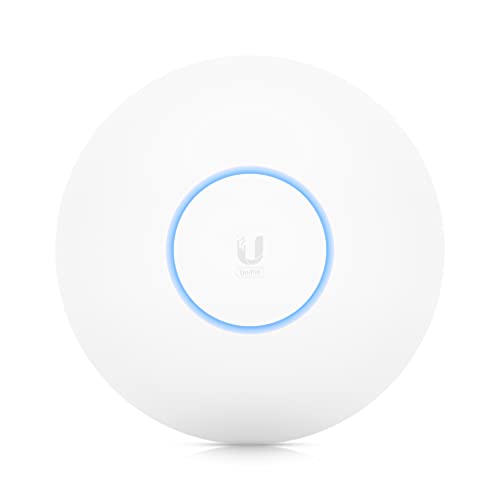
Ubiquiti UniFi 6 Long-Range (U6-LR)
The Ubiquiti UniFi 6 Long-Range is a high-performance access point for those who want a prosumer setup. It offers excellent range and Wi-Fi 6 speeds, easily covering large areas. Requires a UniFi controller (software or hardware) for setup, but the management interface is incredibly powerful.
What we liked
- Outstanding range and coverage
- Advanced management features with UniFi controller
- PoE powered for flexible placement
What we didn't like
- Requires separate controller for full features
- No built-in router functionality

TP-Link Deco XE75
The TP-Link Deco XE75 brings Wi-Fi 6E to a mesh system at an affordable price. It offers a dedicated 6 GHz band for backhaul or client devices, improving speeds and reducing interference. The Deco app is user-friendly, and the system supports Alexa voice controls. For the price, it's a steal.
What we liked
- Wi-Fi 6E at a budget-friendly price
- Simple app-based setup and management
- Good performance for streaming and browsing
What we didn't like
- No 2.5 Gbps ports
- Limited advanced settings compared to competitors
How to choose
Coverage Area
Measure your home's square footage and consider obstacles like walls and floors. For larger homes, a mesh system or multiple access points ensures consistent coverage.
Wi-Fi Standard
Wi-Fi 6E offers a new 6 GHz band for faster speeds and less interference. If your devices support it, it's a worthwhile upgrade. Wi-Fi 6 is still excellent for most users.
Number of Devices
If you have many smart home devices, look for routers with OFDMA and MU-MIMO to handle multiple connections efficiently.
Wired Ports
For gaming or NAS, consider routers with 2.5 Gbps or multi-gig ports. Most devices still use Gigabit Ethernet, but future-proofing is wise.
Security Features
Built-in security like AiProtection or Netgear Armor can protect against threats. Ensure the router receives regular firmware updates.
The bottom line
The best networking gear for 2026 balances speed, coverage, and ease of use. Wi-Fi 6E is the new standard, but only if your devices support it. For most homes, a mesh system like the Asus ZenWiFi AX offers the best blend of performance and simplicity.
Common questions
If you have Wi-Fi 6E devices (like newer phones or laptops), yes. The 6 GHz band offers faster speeds and less congestion. Otherwise, Wi-Fi 6 is still great.
A single router covers a limited area. A mesh system uses multiple nodes to blanket your home with Wi-Fi, ideal for larger spaces or multi-story homes.
QoS prioritizes traffic for gaming or video calls. It's crucial if you have many devices competing for bandwidth. Most modern routers have some form of QoS.
