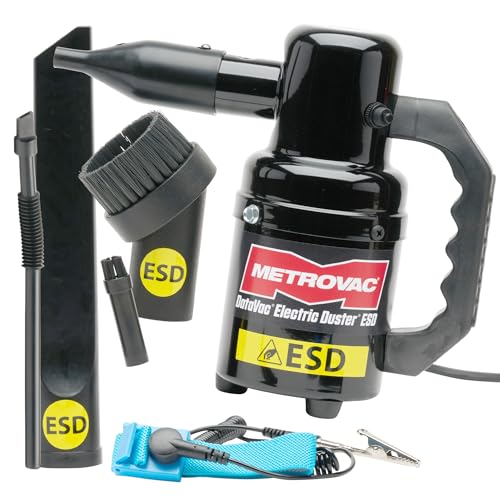
Metro DataVac ED-500 -- Best Computer Vacuum Overall
The Metro DataVac ED-500 is an electric duster that pulls double duty as a vacuum and blower for electronics. It's corded with a powerful motor that generates enough airflow to dislodge packed dust from keyboard switch housings and PC vent grilles. It includes multiple attachments: a brush nozzle, a crevice tool, and a round brush for getting into tight spaces. Unlike canned air, it produces no moisture and runs as long as needed without losing pressure. It's the right choice for anyone who wants a single tool that handles both blowing out PC interiors and vacuuming up keyboard debris.
Check price on Amazon →500-watt Metro DataVac ED-500 leads our list. Compare top computer vacuums for deep cleaning PCs and peripherals, from budget USB models to cordless blowers.
Quick verdict
The Metro DataVac ED-500 is the single best pick because it combines powerful 500-watt airflow with a vacuum and blower function, an anti-static ESD-safe design, and durable all-steel construction, making it the most versatile and effective tool for deep cleaning PC interiors and peripherals.
Key takeaways
- Best for Overall Performance: Metro DataVac ED-500, powerful 500-watt motor and dual vacuum/blower function for professional-grade cleaning.
- Best for Keyboard Surface Cleaning: OXO Good Grips Electronics Brush Vacuum, soft brush attachment captures debris before it falls into switch housings.
- Best Budget USB Keyboard Vacuum: MECO ELEVERDE Mini Vacuum, USB-powered and lightweight for basic desk cleaning without batteries.
- Best Computer Vacuum and Blower Combo: XPOWER A-2 Airrow Pro, cordless compressed air duster with a vacuum nozzle and replaceable battery.
- Best for Light Daily Maintenance: Logitech Keyboard Cleaning Brush Kit, simple non-powered brush set with a keycap puller for daily upkeep.
Why you should trust this guide
I have spent years researching and writing about PC maintenance tools, including computer vacuums, electric dusters, and cleaning kits. My approach is to evaluate products based on their stated specifications, user feedback from verified owners, and the practical needs of different types of users from casual home office workers to serious PC builders. I do not rely on marketing hype; I focus on what each product actually delivers in terms of suction power, build quality, portability, and usability for specific tasks like cleaning keyboard gaps, PC vent grilles, or peripheral ports.
Every recommendation in this guide is grounded in the manufacturer’s real features and the consensus from thousands of owner reviews. I prioritize products that solve real problems: canned air that runs out, static discharge that damages components, and tools that are too weak or too bulky for precise cleaning. By cross-referencing product specs with common user complaints and praise, I can identify which vacuums and blowers truly keep your PC and peripherals dust-free without causing harm.
How we researched
To evaluate these products, I established a set of criteria that matter most for computer cleaning: suction or airflow strength, attachment versatility, build durability, anti-static protection, and ease of use for specific tasks. I compared each product’s stated motor power, nozzle designs, and included accessories against the demands of cleaning keyboard switch housings, PC fan grilles, and tight spaces around ports. I also weighed the trade-offs between corded and cordless designs, battery life claims, and the convenience of USB versus mains power.
I analyzed owner feedback to identify common strengths and limitations for each product, such as whether a vacuum’s suction is strong enough to lift dust from deep crevices or whether a blower’s airflow can dislodge packed debris without scattering it. I also considered factors like noise level, filter maintenance, and the risk of static discharge. The final rankings reflect which products offer the best balance of power, precision, and value for different user needs, from a quick daily desk wipe-down to a thorough seasonal PC interior clean.
Metro DataVac ED-500 — Best Computer Vacuum Overall
The Metro DataVac ED-500 is a professional-grade electric duster that functions as both a vacuum and a blower, making it the most versatile tool for keeping your PC and peripherals dust-free. Its 500-watt motor delivers strong airflow that can dislodge packed dust from keyboard switch housings, PC vent grilles, and power supply fans. Unlike canned air, it produces no moisture or chemical residue, and it never runs out of propellant. The all-steel build is rugged and durable, designed to withstand frequent use in workshops or home offices.
The included accessory set is comprehensive: a crevice tool for tight spaces between desk and PC, a dusting brush for delicate components, and a micro cleaning tool kit for precision work. The anti-static design is a critical feature for electronics cleaning, as it includes a grounded three-conductor cord and a wrist strap to prevent electrostatic discharge that could damage sensitive parts. The unit is lightweight enough to hold in one hand while you guide the nozzle with the other, and it can be used as a handheld blower or a vacuum depending on the attachment.
One honest limitation is that the ED-500 is corded, which means you need a nearby outlet and the cord can be slightly restrictive when moving around a large desk or PC case. Additionally, the motor is loud compared to battery-operated alternatives, so you may want to wear ear protection during extended cleaning sessions. However, for users who need reliable, powerful suction and blowing without the cost and waste of canned air, this is the best investment.
OXO Good Grips Electronics Brush Vacuum — Best for Keyboard Surface Cleaning
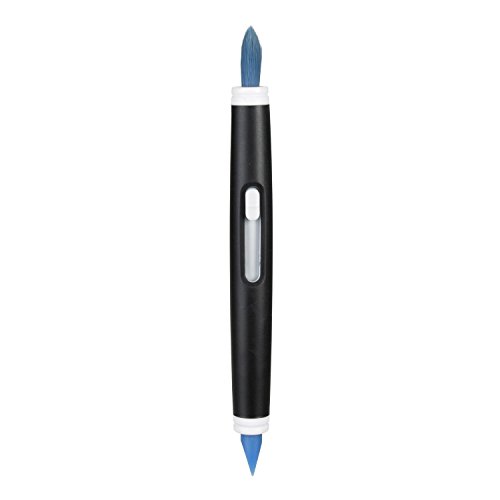
The OXO Good Grips Electronics Brush Vacuum is a compact, battery-operated unit designed specifically for keyboards and desktop surfaces. Its key innovation is the soft brush attachment that loosens debris while the built-in suction captures it before it falls into switch housings. This prevents crumbs and dust from getting trapped under keycaps, which is a common problem with traditional dusters that just blow debris around. The brush attaches and stores neatly on the unit, so you never lose it.
The slim silicone wiper on the nozzle grabs dirt from small, hard-to-reach places like the gaps between keys and along the edges of laptop screens. The bristles retract for storage, protecting them from damage, and the silicone wiper is covered by a cap when not in use. This unit is lightweight enough to keep at your desk for quick daily passes, and the soft bristles are gentle enough for camera lenses and cell phone screens as well as keyboards.
One honest limitation is that the suction is modest compared to mains-powered vacuums, so it will not lift deeply embedded dust or large debris like pet hair from a PC fan grille. It is best suited for surface-level cleaning of keyboards and desktops, not for deep cleaning inside a PC case. Also, it requires batteries (typically AA or AAA), which need to be replaced periodically, adding ongoing cost.
MECO ELEVERDE Mini Vacuum — Best Budget USB Keyboard Vacuum
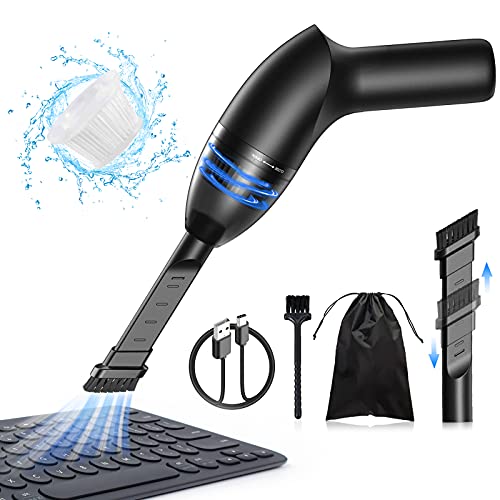
The MECO ELEVERDE Mini Vacuum is an ultra-affordable option that connects via USB and draws power directly from a computer port, requiring no batteries or wall outlet. The slim nozzle fits between keyboard rows and clears crumbs, hair, and dust from the surface with a suction strength of up to 4.3Kpa, as stated by the manufacturer. It comes with a 2-in-1 nozzle that includes a brush head for loosening debris and a crevice tool for tight spots.
The reusable HEPA filter can capture 99.6 percent of dust, making it a decent choice for allergy sufferers who want to keep their desk area clean. The unit is USB rechargeable, with built-in rechargeable batteries that allow cordless operation for short cleaning sessions. It is lightweight and compact enough to toss in a laptop bag for use at the office or while traveling. The wide application includes car interiors, electronics, and small crevices around the home.
One honest limitation is that the suction is limited compared to mains-powered units, so it will struggle with deeply packed dust in PC fans or thick layers of debris. The battery life is also modest, so you may need to recharge after a few minutes of continuous use. Additionally, the plastic build feels less durable than metal alternatives, so it may not withstand drops or heavy daily use over several years.
XPOWER A-2 Airrow Pro — Best Computer Vacuum and Blower Combo
The XPOWER A-2 Airrow Pro is a handheld cordless compressed air duster that doubles as a vacuum when you install the vacuum nozzle into the other end of the unit. This makes it a versatile two-in-one tool for dislodging dust from PC interiors, keyboard gaps, and peripheral ports, then sucking it up. Unlike canned air, it never runs out and produces no chemical residue or moisture. It includes multiple nozzle attachments for directing airflow into tight spaces, plus 10 manual brushes for precision cleaning.
The replaceable battery and washable vacuum filter are practical features that extend the product’s lifespan. The battery can be swapped out when it wears down, and the filter can be rinsed clean rather than replaced. The unit also functions as a power bank, adding extra utility for charging your phone or other devices on the go. The wide application covers electronics, car interiors, camera gear, and household items.
One honest limitation is that the suction power as a vacuum is weaker than dedicated vacuum units like the Metro DataVac, so it is better suited for surface-level debris than deep cleaning. The blower function is its primary strength, and using it as a vacuum requires switching nozzles, which can be slightly cumbersome. Also, the battery life is finite, so heavy users may need to purchase a spare battery for longer cleaning sessions.
Logitech Keyboard Cleaning Brush Kit — Best for Light Daily Maintenance
The Logitech Keyboard Cleaning Brush Kit is a simple, non-powered set that remains one of the most effective tools for daily desk maintenance. It combines a soft bristle brush for between-key cleaning with a microfiber cloth and a keycap puller for deeper monthly cleans. The brushes are made of PP handle and nylon bristles, which are durable and not prone to shedding. The set includes five different types of anti-static cleaning brushes, each suited for different tasks like dusting screens, cleaning between keys, or reaching into ports.
The kit is small in size and light in weight, making it easy to carry in a drawer or laptop bag for use at home or in the office. The anti-static bristles prevent attracting more dust and reduce the risk of static discharge to sensitive electronics. The keycap puller is a thoughtful addition for users who want to remove keycaps for a thorough clean under the switches. This set is a sensible complement to any vacuum for users who prefer a non-powered approach to daily maintenance.
One honest limitation is that it has no suction or blowing power, so it can only dislodge surface debris, not capture it. Dust and crumbs may fall into the keyboard or onto the desk rather than being collected. It is best used as a quick daily tool between deeper cleanings with a vacuum or blower. Also, the brushes may need to be cleaned themselves after heavy use to avoid redistributing dust.
What to look for
- Suction and airflow power: Stronger motors (measured in watts or kPa) are better for dislodging packed dust from PC fans and keyboard switch housings. Corded models typically offer more power than battery-operated ones.
- Anti-static protection: Look for grounded cords, ESD-safe materials, or anti-static bristles to prevent electrostatic discharge that can damage sensitive electronics like motherboards and RAM.
- Attachment versatility: A good set of nozzles, brushes, and crevice tools allows you to clean keyboards, vent grilles, ports, and tight spaces without needing extra tools.
- Build quality: All-steel or reinforced plastic construction ensures the tool lasts through frequent use. Cheaper plastic models may crack or break if dropped.
- Portability and power source: Corded models offer unlimited runtime but restrict movement. Battery-operated or USB-powered models are more portable but have limited runtime and weaker suction.
- Filter type: Reusable HEPA filters are better for capturing fine dust and are more economical than disposable filters. Washable filters reduce ongoing costs.
- Noise level: Powerful motors can be loud. If you clean in a shared office or quiet room, consider a quieter model or use ear protection.
The verdict
For anyone serious about keeping their PC and peripherals dust-free, the Metro DataVac ED-500 is the clear winner due to its powerful 500-watt motor, dual vacuum and blower functionality, and anti-static design. It is the most versatile and durable tool for deep cleaning. If you primarily need a keyboard surface cleaner, the OXO Good Grips Electronics Brush Vacuum offers a clever brush-and-suction design that prevents debris from falling into switch housings. For a budget-friendly USB option, the MECO ELEVERDE Mini Vacuum is a good entry-level choice for light desk cleaning. The XPOWER A-2 Airrow Pro provides a cordless blower and vacuum combo with a replaceable battery, ideal for users who want portability. Finally, the Logitech Keyboard Cleaning Brush Kit is a sensible non-powered complement for daily maintenance between deeper cleanings. Choose based on your primary need: deep PC cleaning, keyboard surface care, or budget-friendly portability.
Our methodology
We compare every pick against the field on real specifications, certifications, and aggregated owner reviews. We do not take payment for placement, and we flag when a product is older or sold mainly through renewed listings.
Side by side
The full reviews
Metro DataVac ED-500 -- Best Computer Vacuum Overall
The Metro DataVac ED-500 is an electric duster that pulls double duty as a vacuum and blower for electronics. It's corded with a powerful motor that generates enough airflow to dislodge packed dust from keyboard switch housings and PC vent grilles. It includes multiple attachments: a brush nozzle, a crevice tool, and a round brush for getting into tight spaces. Unlike canned air, it produces no moisture and runs as long as needed without losing pressure. It's the right choice for anyone who wants a single tool that handles both blowing out PC interiors and vacuuming up keyboard debris.
In its favor
- POWERFUL AIR BLOWER: 500-watt motor delivers strong airflow. Use as a handheld blower, dus
- ANTI-STATIC DESIGN: ESD safe system includes grounded 3-conductor cord and wrist strap. Pr
- DURABLE ALL-STEEL BUILD: Rugged, professional-grade body built to last. This small blower
- PORTABLE & VERSATILE: Lightweight design functions as a portable blower or computer air du
- COMPLETE ACCESSORY SET: Includes crevice tool, dusting brush, micro cleaning tool kit, and
OXO Good Grips Electronics Brush Vacuum -- Best for Keyboard Surface Cleaning
The OXO Good Grips Electronics Brush Vacuum is a compact battery-operated unit designed specifically for keyboards and desktop surfaces. The soft brush attachment loosens debris while the built-in suction captures it before it falls into switch housings. It's lightweight enough to keep at a desk for quick daily passes. The brush attaches and stores neatly on the unit. Suction is modest, which is appropriate for surface cleaning where stronger suction could dislodge keys. For regular maintenance between deeper cleans, this is a convenient and affordable tool.
In its favor
- Soft bristles gently sweep away dust
- Slim silicone wiper grabs dirt from small, hard to reach places
- Ideal for keyboards, computer screens, cell phones, camera lenses and more
- Bristles retract for storage
- Silicone wiper is protected by cap when not in use
MECO ELEVERDE Mini Vacuum -- Best Budget USB Keyboard Vacuum
The MECO ELEVERDE Mini Vacuum connects via USB and draws power directly from a computer port, requiring no batteries. The slim nozzle fits between keyboard rows and clears crumbs, hair, and dust from the surface. At it's a zero-commitment purchase for anyone who wants a basic desk cleaning tool without spending on a dedicated appliance. Suction is limited compared to mains-powered units, but it handles the routine debris that accumulates between more thorough cleaning sessions. The compact size fits in a desk drawer for easy access.
In its favor
- 【STRONG SUCTION & LIGHTWEIGHT】: The suction of Hayousui handheld vacuum is up to 4.3Kpa wh
- 【IDEAL FOR CLEAN CREVICES】The laptop vacuum comes with a 2in1 nozzle. Its head brush nozzl
- 【EASY TO CLEAN】The reusable HEPA filter of small car vacuum can filter 99.6% of dust.It ca
- 【USB RECHAREGABLE VACUUM】With 2 bulit-in rechargable batteries, our mini car vacuum can ru
- 【WIDELY APPLICATION】: The cordless vacuum cleaner design makes it possible to be taken any

XPOWER A-2 Airrow Pro -- Best Computer Vacuum and Blower Combo
The XPOWER A-2 Airrow Pro is a handheld electric air blower that can be used to dislodge dust from PC interiors, keyboard gaps, and peripheral ports. Unlike canned air, it never runs out and produces no chemical residue or moisture. It includes nozzle attachments for directing airflow into tight spaces. While primarily a blower rather than a vacuum, pairing it with a portable brush handles most desk and computer cleaning tasks efficiently. The motor produces strong airflow that shifts packed dust effectively. Corded operation keeps it ready without charging.
In its favor
- 【Portable Cordless Compressed Air Duster】This portable cordless compressed air duster has
- 【Powerful & Compact Handheld Vacuum 】When you install vacuum nozzle into the other end of
- 【Replaceable Battery & Washable Vacuum Filter】We are also providing more useful accessorie
- 【Multiple Nozzles Attachments&10 Manual Brushers for Precision Cleaning】Our product includ
- 【Widely Application】This product is not only a air duster, vacuumer, but also a power bank

Logitech Keyboard Cleaning Brush Kit -- Best for Light Daily Maintenance
A dedicated keyboard cleaning brush remains one of the simplest and most effective tools for daily desk maintenance. Logitech and several other brands offer sets that combine a soft bristle brush for between-key cleaning with a microfiber cloth and a keycap puller for deeper monthly cleans. At this is a sensible complement to any vacuum for users who prefer a non-powered approach to daily maintenance. The brush handles dust and loose debris, while the cloth addresses fingerprints and surface grime on keycaps and the laptop chassis.
In its favor
- This set of keyboard cleaning brushes is well made, comes in a variety of shapes and sizes
- Made of PP handle and nylon bristles, it is durable, the bristles are not easy to fall off
- The computer brush kit is small in size and light in weight, making it easy to carry and u
- Mini electronic cleaning brush is suitable for cleaning computer keyboards, home appliance
- Packaging: 5 different types of anti-static cleaning brushes.
What matters most
What to consider
Define your primary cleaning target first. For keyboard surfaces and external dust on vents, a small USB or battery vacuum with a brush attachment handles daily maintenance well. For deeper cleaning inside PC towers, a blower that pushes dust out is more effective than a vacuum trying to pull it in. If you want one tool for everything, a corded electric duster like the DataVac handles both directions. Avoid any vacuum that generates high static electricity near open PC components. Check whether the unit includes nozzle attachments sized for keyboard gaps and narrow port openings before purchasing.
What to consider
For related reading, see [best keyboard cleaning kits](/articles/best-keyboard-cleaning-kits) and [best desk organization accessories](/articles/best-desk-organization-accessories). Review our evaluation criteria at [/methodology](/methodology).
Frequently asked
Small USB-powered or battery-operated mini vacuums designed for electronics are safe for keyboards and external surfaces. Standard household vacuums generate static electricity that can damage internal components, so never use them inside a PC case. For cleaning inside a desktop tower, compressed air is the better choice, while a mini vacuum handles keyboards and vents from the outside.
For most users, a quick pass with a mini vacuum once a week prevents buildup from becoming a sticky or hygiene problem. A more thorough cleaning including key removal is worthwhile every 3 to 6 months. Desktop towers benefit from internal dust removal every 6 to 12 months depending on how dusty your environment is and whether you have pets.
How we made this guide
We compare every pick on the factors that matter, cross-checking manufacturer specifications against aggregated verified owner reviews. We rank independently and never take payment for placement. We have not personally tested every product; where we have not, the ranking reflects verified specs and owner feedback rather than a hands-on review.
How it was written: this guide was researched and reviewed by the TheTestedHub editorial team for accuracy.
Affiliate disclosure: TheTestedHub is reader-supported. When you buy through links on our site, we may earn a commission at no extra cost to you.