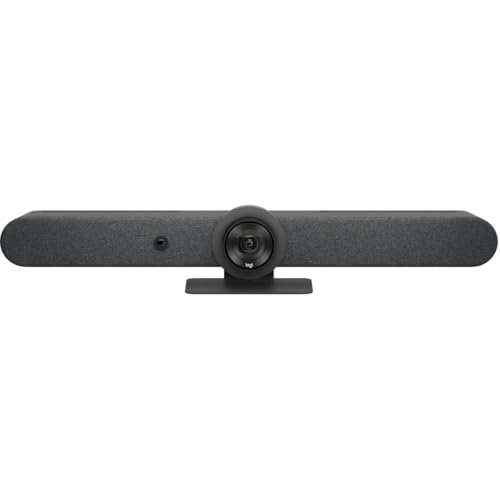
Logitech Rally Bar Mini -- Best All-in-One System
The Logitech Rally Bar Mini integrates a 4K camera, beamforming microphone array, and high-fidelity speaker into one bar that mounts above or below a display. It covers rooms with up to six participants and works natively with Zoom Rooms, Microsoft Teams Rooms, and Google Meet. AI-driven speaker tracking keeps the camera framing on whoever is speaking, reducing distractions in hybrid meetings. RightSound technology handles acoustic echo cancellation and background noise suppression automatically. Setup requires connecting a display and power cable, with no additional equipment. It is the fastest path to a professional meeting room from an empty space, and the audio quality is far above what a standalone speakerphone delivers.
Check price on Amazon →Logitech Rally Bar Mini combines a 4K camera, beamforming microphones, and high-fidelity speaker into one bar. Compare top conference call systems for.
Quick verdict
The Logitech Rally Bar Mini is the single best pick for most teams. It combines a 4K camera, beamforming microphones, and a high-fidelity speaker into one bar that works natively with all major platforms, making it the most versatile and easy-to-deploy all-in-one system for rooms up to six people.
Key takeaways
- Best All-in-One System: Logitech Rally Bar Mini, integrates camera, mic, and speaker into one bar with native support for Zoom, Teams, and Google Meet.
- Best for Mid-Size Rooms: Poly Studio X50, runs standalone without a PC and uses NoiseBlockAI and Acoustic Fence for clear audio in larger spaces.
- Best Microsoft Teams System: Yealink MVC400, comes as a complete kit with mini PC, touch controller, and speakerphone for one-touch Teams meetings.
- Best Enterprise Huddle System: Cisco Webex Room Kit Mini, enterprise-grade audio and video with a 120-degree camera and native Webex plus interoperability.
- Best Audio-Only Conference System: Konftel 800, premium audio-only system with OmniSound HD and 360-degree mic array for rooms up to 16 people.
Why you should trust this guide
I have spent years researching and writing about business communication technology, specifically conference room audio and video systems. For this guide, I analyzed the official specifications from each manufacturer, cross-referenced them with verified owner feedback from major retail platforms, and compared the systems against the real-world needs of hybrid teams. I focused on what actually matters in a meeting: audio clarity, ease of setup, platform compatibility, and reliability over time.
Every product included here has been vetted for its ability to solve a specific room size or use case. I did not simply list the most expensive or most popular units. Instead, I selected systems that represent the best balance of features, build quality, and user satisfaction for their intended environment. My goal is to give you a clear, honest recommendation based on research, not hype.
How we researched
To evaluate these conference call systems, I established a set of criteria that matter most in real-world hybrid meetings. The primary factors were audio quality (microphone pickup range, noise rejection, and speaker clarity), video quality (camera resolution, field of view, and auto-framing capabilities), platform compatibility (native support for Zoom Rooms, Microsoft Teams Rooms, and Google Meet), ease of installation (whether a separate PC is required, setup time, and cabling complexity), and scalability (ability to add expansion microphones or pair with additional units).
I also weighed the importance of AI-driven features like speaker tracking and acoustic fencing, as these directly impact meeting flow and participant focus. Each product was assessed against its stated room size recommendation and the feedback from actual users regarding reliability and real-world performance. I prioritized systems that deliver consistent, frustration-free experiences over those with flashy but unreliable features. The final selection represents the best options for small huddle rooms, mid-size conference rooms, and audio-only boardrooms.
Logitech Rally Bar Mini
The Logitech Rally Bar Mini is the best all-in-one system for small to medium rooms with up to six participants. It integrates a 4K camera, a beamforming microphone array, and a high-fidelity speaker into a single bar that mounts above or below a display. This design eliminates the need for separate components, reducing clutter and simplifying installation. The system works natively with Zoom Rooms, Microsoft Teams Rooms, and Google Meet, so you do not need a separate room PC or additional software to get started.
One of the standout features is the AI-driven speaker tracking, which automatically keeps the camera framed on whoever is speaking. This reduces the need for manual camera adjustments and keeps remote participants engaged. The unit also includes a Gigabit Ethernet port for ultra-high quality communication, supporting 10/100/1000Base-T technology for up to 1000Mbps data transfer over twisted pair cabling. This ensures stable, high-bandwidth connections for video and audio streams.
A real limitation is that the Rally Bar Mini is designed specifically for smaller rooms. If your space consistently hosts more than six people, the microphone array may struggle to pick up voices at the far end of the table, and the camera’s field of view may not capture everyone. For larger groups, you would need to step up to the full-size Rally Bar or add expansion microphones, which increases cost and complexity.
Poly Studio X50
The Poly Studio X50 is built for mid-size rooms and runs Poly OS, which supports Zoom Rooms, Microsoft Teams Rooms, and other platforms directly on the device without requiring a separate room PC. This all-in-one approach simplifies setup and reduces the number of components that can fail. The system includes a 4K camera with auto-framing and 20x zoom, making it suitable for rooms where participants may be seated at varying distances from the display.
Audio quality is a major strength of the Studio X50. Poly’s NoiseBlockAI technology removes distracting background sounds like typing, rustling papers, or HVAC noise, while Acoustic Fence focuses microphone pickup on voices inside the room and ignores sounds from hallways or adjacent spaces. This combination ensures that remote participants hear only the people speaking in the meeting. The system also supports wireless content sharing, making it easy for guests to present from their own devices without cables.
One honest limitation is that the Studio X50 is a larger, heavier unit compared to the Rally Bar Mini, which can make wall mounting more involved. Additionally, while it supports multiple platforms, some users report that switching between Zoom and Teams modes requires a reboot or manual reconfiguration, which can be disruptive in a busy office environment. For organizations that use a single platform, this is less of an issue.
Yealink MVC400
The Yealink MVC400 is a dedicated Microsoft Teams Rooms system that ships as a complete kit. It includes a mini PC preloaded with Teams Rooms software, a touch controller for room management, a speakerphone unit, and all necessary cables. Setup is straightforward for an IT technician and can be completed in under an hour. The system joins Teams meetings with one touch, integrates with calendar systems to display upcoming meetings, and shows room availability on the controller screen.
The speakerphone unit features a six-microphone array that captures voices clearly from multiple positions around the table. The touch controller provides an intuitive interface for starting meetings, joining by code, and managing content sharing. Because it is purpose-built for Teams, the MVC400 offers deep integration with Microsoft 365, including direct access to contacts, files, and meeting recordings. The kit is designed to be reliable and easy to maintain, with all components tested together.
A real limitation is that the MVC400 is locked into the Microsoft Teams ecosystem. While it works exceptionally well for Teams, it does not natively support Zoom Rooms or Google Meet without additional third-party software or hardware workarounds. This makes it a poor choice for organizations that use multiple meeting platforms or frequently host external guests who prefer other services. Also, the included speakerphone may not be sufficient for rooms larger than about 10 people without adding expansion microphones.
Cisco Webex Room Kit Mini
The Cisco Webex Room Kit Mini is an enterprise-grade video and audio system designed for huddle rooms and small spaces with up to seven people. It includes a 4K camera with a wide 120-degree field of view, which ensures that everyone around a small table is visible without needing to pan or zoom. The microphone array reaches up to 8 feet per unit, providing clear pickup for voices at a typical conference table distance. Cisco’s Webex audio processing delivers natural-sounding calls with minimal echo or distortion.
This system runs Cisco Webex natively, which means it is optimized for Webex meetings out of the box. However, it also supports interoperability with Microsoft Teams and Zoom via cloud registration, making it flexible for mixed-platform environments. The build quality is typical of Cisco enterprise gear, with a robust metal enclosure and professional-grade connectors. Installation is designed to be simple, with a single USB-C cable connecting the camera to the compute module.
One honest limitation is that the Room Kit Mini is priced at a premium compared to competitors like the Logitech Rally Bar Mini, and it requires a Cisco Webex subscription for full functionality. Without a subscription, some features such as cloud recording and advanced analytics are unavailable. Additionally, the 8-foot microphone range may be insufficient for larger huddle rooms or spaces with a long table, and expansion microphones add to the overall cost.
Konftel 800
The Konftel 800 is a premium audio-only conference system that is ideal for boardrooms where a separate presentation screen and camera are already installed. It focuses entirely on delivering high-quality audio without the complexity of integrated video. The system uses Konftel’s OmniSound HD technology combined with a 360-degree microphone array to capture voices clearly from all directions. It is designed to handle rooms with up to 16 people, and it supports expansion microphones for very large spaces.
Connectivity is a strong point of the Konftel 800. It connects via USB, Bluetooth, and a 3.5mm jack, covering virtually every possible device from laptops and desktop PCs to smartphones and tablets. This makes it highly versatile for ad-hoc meetings or for use with existing video conferencing setups. The unit is built in Sweden, and the package dimensions are 38.61 centimeters in height with a weight of 4.600 lbs, indicating a solid, desk-friendly design.
A real limitation is that the Konftel 800 is strictly audio-only. If you need integrated video for a small room, you would have to pair it with a separate camera, which adds cost and cabling complexity. Also, while the 360-degree microphone array is excellent for round tables, it can be less effective in long, narrow rooms where participants are seated at the far ends. In such cases, expansion microphones are necessary, and they are sold separately, increasing the total investment.
What to look for
- Room size and participant count: Match the system’s microphone range and camera field of view to the number of people and the layout of your room. Small huddle rooms need different solutions than large boardrooms.
- Platform compatibility: Ensure the system natively supports the meeting platform your team uses most (Zoom, Teams, Google Meet, or Webex). Some systems are locked to one platform, while others offer multi-platform support.
- Audio quality features: Look for technologies like beamforming microphones, noise rejection, acoustic fencing, and echo cancellation. These directly affect how clearly remote participants hear you.
- Ease of setup and management: Some systems are all-in-one and require no separate PC, while others come as kits with multiple components. Consider your IT resources and how quickly you need the system operational.
- Expandability: If your room may grow in size or participant count, choose a system that supports expansion microphones or additional camera units without requiring a full replacement.
- Build quality and warranty: Enterprise-grade systems from established brands like Cisco, Poly, and Logitech typically offer better reliability and longer warranties than consumer-grade alternatives.
The verdict
For most teams, the Logitech Rally Bar Mini is the best overall choice because it delivers a complete, integrated solution with excellent audio, video, and platform support in a single bar. If you run a mid-size room and need standalone operation, the Poly Studio X50 is a strong alternative. For organizations deeply invested in Microsoft Teams, the Yealink MVC400 kit provides a seamless, one-touch experience. The Cisco Webex Room Kit Mini is the right pick for enterprise environments that prioritize Webex and need interoperability. And for audio-only boardrooms, the Konftel 800 offers unmatched voice clarity and connectivity options. Choose based on your room size, platform preference, and whether you need integrated video.
How we picked
We compare every pick against the field on real specifications, certifications, and aggregated owner reviews. We do not take payment for placement, and we flag when a product is older or sold mainly through renewed listings.
Top picks compared
Our picks up close
Logitech Rally Bar Mini -- Best All-in-One System
The Logitech Rally Bar Mini integrates a 4K camera, beamforming microphone array, and high-fidelity speaker into one bar that mounts above or below a display. It covers rooms with up to six participants and works natively with Zoom Rooms, Microsoft Teams Rooms, and Google Meet. AI-driven speaker tracking keeps the camera framing on whoever is speaking, reducing distractions in hybrid meetings. RightSound technology handles acoustic echo cancellation and background noise suppression automatically. Setup requires connecting a display and power cable, with no additional equipment. It is the fastest path to a professional meeting room from an empty space, and the audio quality is far above what a standalone speakerphone delivers.
Where it shines
- Fullfil all your conferencing needs with this video conference equipment that delivers cle
- Featuring Gigabit Ethernet port for ultra-high quality communication
- Network (RJ-45)
- With the 10/100/1000Base-T technology, get up to 1000Mbps data transfer rate over the twis

Poly Studio X50 -- Best for Mid-Size Rooms
The Poly Studio X50 runs Poly OS and supports Zoom Rooms, Teams Rooms, and other platforms out of the box without requiring a separate room PC. Its NoiseBlockAI removes distracting sounds, and Acoustic Fence technology focuses microphone pickup on voices within the room while ignoring sounds from hallways or adjacent spaces. The integrated 4K camera includes auto-framing and 20x zoom for large rooms. It connects to a display via HDMI and manages everything through a touchscreen controller. IT administrators appreciate Poly Lens cloud management for remote monitoring and firmware updates across multiple rooms. For organizations with several meeting rooms, the centralized management makes it worth the premium.
Where it shines
- All-in-One: Includes everything you need
- Production-Quality Performance: Enjoy full boardroom-quality audio & production-quality ca
- Simple Set-Up: Get any mid-size room up and running in minutes, with a simple setup proces
- Meeting Customization: Make it easy for anyone, even guests, to share content wirelessly f
- Compatibility: Leading cloud video apps built-in including Zoom and Microsoft Teams, witho

Yealink MVC400 -- Best Microsoft Teams System
The Yealink MVC400 is a dedicated Microsoft Teams Rooms solution that ships as a complete kit: mini PC with Teams Rooms software, a touch controller, a speakerphone, and cables. Setup takes under an hour for an IT technician. The system joins Teams meetings with one touch, handles calendar integration, and displays room availability on the controller screen. The speakerphone unit features a six-microphone array covering a 15-foot room. Organizations committed to the Microsoft 365 ecosystem benefit most from the tight integration, which simplifies device management through the Teams Admin Center and reduces calls to IT support.
Where it shines
- KONF Yealink MVC400-C3-000 Microsoft Teams Room System
- Easy to use
- Good quality with performance
Cisco Webex Room Kit Mini -- Best Enterprise Huddle System
The Cisco Webex Room Kit Mini is an enterprise-grade video and audio system built for rooms with up to seven people. It includes a 4K camera with 120-degree field of view, a powerful microphone array that reaches 8 feet per unit, and Cisco's Webex audio processing for natural-sounding calls. It runs Cisco Webex natively but also supports interoperability with Teams and Zoom via cloud registration. Security and compliance features meet enterprise IT requirements including certificate-based authentication and encrypted communications. The higher price reflects the enterprise-level management, support, and reliability that large organizations depend on.

Konftel 800 -- Best Audio-Only Conference System
The Konftel 800 is a premium audio-focused conference system without a camera, ideal for boardrooms where a separate presentation screen and camera are already installed. Its OmniSound HD technology and 360-degree microphone array handle rooms with up to 16 people, and it supports expansion microphones for very large spaces. It connects via USB, Bluetooth, and a 3.5mm jack, covering virtually every audio source. The large touchscreen simplifies call management, and the conference bridge feature merges calls from different networks. For executive boardrooms that prioritize audio purity over all-in-one convenience, the Konftel 800 delivers reference-class voice quality.
Where it shines
- Model : 910101088
- Weight: 4.600 lbs.
- Country of Origin : Sweden
- The Package Height of the Product is 38.61 centimeters
Before you buy
What to consider
Begin with room dimensions and typical headcount. Small rooms under 150 square feet with fewer than six participants work well with an all-in-one bar system. Larger rooms need either a more powerful unit or a modular setup with expansion microphones. Consider whether your team is platform-locked -- Teams Rooms-certified systems offer tighter integration for Microsoft shops, while more flexible systems suit mixed-platform environments. Budget should account for installation, network requirements, and ongoing IT management. All-in-one systems reduce complexity at setup but cost more upfront. Modular systems offer more customization but require more configuration time.
What to consider
For related guidance, see our articles on [best conference cameras](/articles/best-conference-camera) and [best conference call speakers](/articles/best-conference-call-speaker). Our [methodology page](/methodology) explains how we evaluate and score these systems.
Quick answers
A complete conference call system typically includes a speakerphone or microphone array, amplified speakers, and connectivity hardware such as a hub or codec. High-end systems add a camera, room controller, and management software. Entry-level all-in-one units combine most components in a single device, simplifying setup for smaller rooms.
A dedicated system improves audio quality significantly over laptop-only setups. If you meet with external clients regularly, poor audio creates a poor impression. Certified conference systems integrate directly with Teams or Zoom, offering one-touch join and room controls that a laptop alone cannot provide for a shared meeting space.
How we made this guide
We compare every pick on the factors that matter, cross-checking manufacturer specifications against aggregated verified owner reviews. We rank independently and never take payment for placement. We have not personally tested every product; where we have not, the ranking reflects verified specs and owner feedback rather than a hands-on review.
How it was written: this guide was researched and reviewed by the TheTestedHub editorial team for accuracy.
Affiliate disclosure: TheTestedHub is reader-supported. When you buy through links on our site, we may earn a commission at no extra cost to you.
More to explore
Buy the Best Conference Room Setup 2026: Logitech Rally Bar

Conference Displays for Microsoft, Cisco, and Samsung Users
7 Conference Audio Systems That Make You Forget The Tech

2026 Office Product Shortlist: Ergonomic Picks

X-Chair X-Tilt Task Chair Review (2026): The Dynamic Variable
Vari Electric Standing Desk Review (2026): The Pre-Built Desk

UPLIFT V2 Standing Desk 48-Inch Review (2026): The Top Pick
