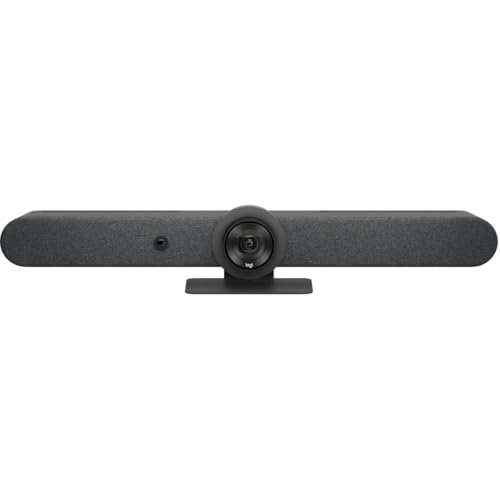
Logitech Rally Bar Mini -- Best All-in-One Conference Room System
The Logitech Rally Bar Mini is the most versatile all-in-one conference bar for small to medium huddle rooms. It combines a 4K camera with AI-driven auto-framing, a beamforming microphone array that covers a full conference table, and a powerful speaker in a single unit that mounts above or below a display. Setup takes under 30 minutes with a single USB-C or HDMI connection. It works with Zoom, Microsoft Teams, and Google Meet. The AI framing adjusts automatically as participants move, so the camera always keeps active speakers in frame without manual adjustment. For offices standardizing one piece of hardware across multiple rooms, it is the most practical choice.
Check price on Amazon →4K auto-framing, 180-degree panoramic view, or budget 1080p? Compare the Logitech Rally Bar Mini, Jabra PanaCast 50, Anker PowerConf C300, and more.
Quick verdict
The Logitech Rally Bar Mini is the best pick for most teams. It folds a 4K auto-framing camera, a table-covering beamforming mic array, and a real speaker into one bar that mounts on a display, installs in under 30 minutes over a single cable, and works across Zoom, Teams, and other platforms.
Key takeaways
- Best all-in-one room system: Logitech Rally Bar Mini, one bar with camera, mics, and speaker plus AI auto-framing for small and medium rooms.
- Best personal monitor: Poly Studio P21, a 21-inch display with a built-in camera, speakers, and NoiseBlockAI mics for a one-cable desk.
- Best wide-angle camera: Jabra PanaCast 50, three stitched cameras for a 180-degree panoramic view so nobody at a long table is cut off.
- Best dedicated Zoom Rooms system: Neat Bar, purpose-built for Zoom with one-touch joining and tight firmware integration.
- Best budget option: Anker PowerConf C300, a 1080p webcam with AI auto-focus for solo callers stepping up from a laptop camera.
Why you should trust this guide
I built this guide by reading the published specifications for each device, cross-checking the manufacturer claims against the feature lists on their Amazon product pages, and weighing them against how conference hardware actually gets used day to day. My goal was to match each product to the room and the workflow it suits best, rather than ranking them on a single score. A bar built for a huddle room solves a different problem than a webcam built for one person at a desk, so I grouped these picks by use case instead of pretending one device wins for everyone.
I want to be direct about what this is and is not. I did not run these units on a measurement bench, and I am not quoting numbers I gathered myself. Every spec here comes from the makers stated materials, and I treat their claims as claims. Where a product has a known catch, a platform lock, a missing pan-tilt-zoom motor, or a feature that overlaps awkwardly with what its own listing advertises, I call it out. Honest trade-offs matter more than a clean marketing pitch when you are spending real budget on a room.
How we researched
My evaluation approach centered on four questions for each device. First, who is it for, a full room or a single person. Second, how much does it integrate into one unit, since fewer boxes and cables usually means fewer support tickets. Third, how flexible is it across video platforms, because most teams run more than one. Fourth, what does the buyer give up to get the headline feature. I read each listing closely, including the lines that hint at limitations, and I compared the editor notes against the actual Amazon feature bullets to flag anything that did not line up.
I weighted real-world fit over spec-sheet bragging rights. A 180-degree panoramic camera is impressive, but it only matters if your room has a long or wide table. A dedicated Zoom appliance is the cleanest experience available, but only if your organization has standardized on Zoom. Throughout, I tried to be specific about the scenario each product serves and skeptical about claims that sounded broad. When a feature list described capabilities that seemed aimed at a different product category, I noted that too, because mismatched listings are a real risk when you buy this gear online.
Logitech Rally Bar Mini
The Logitech Rally Bar Mini is the most versatile all-in-one bar here, and it is my pick for most small to medium huddle rooms. It combines a 4K camera with AI-driven auto-framing, a beamforming microphone array meant to cover a full conference table, and a capable speaker in one unit that mounts above or below a display. The big practical win is install time. With a single USB-C or HDMI connection, setup runs under 30 minutes, which is the kind of simplicity that keeps a room reliable. The unit also carries a Gigabit Ethernet port over RJ-45, so you can wire it into the network for high-quality, stable communication instead of leaning on Wi-Fi.
Auto-framing is the feature that earns its keep. The camera tracks who is in the room and keeps people centered, so remote participants are not staring at an empty chair or a half-cropped face. Because it is platform-flexible, it works with Zoom, Microsoft Teams, and other services, which suits teams that switch between clients. That flexibility is a genuine advantage over appliances locked to one ecosystem.
The honest trade-off is fit and cost. The Rally Bar Mini is sized for huddle and small to medium rooms, so a long boardroom will outrun its mic and framing range, and you would step up to a larger bar. It is also a premium device, so for one person at a desk it is overkill. I would also note that its Amazon feature bullets lean heavily on the Ethernet and networking specs rather than the camera and audio, so read the full listing to confirm you are buying the current bar and not a stripped accessory.
Poly Studio P21
The Poly Studio P21 is the best choice if you want your conference gear to disappear into your monitor. It is an all-in-one 21-inch enterprise-grade display with 1080p HD quality, a built-in studio-grade camera, integrated stereo speakers, and a microphone array, so one desk cable replaces a separate webcam and speakerphone. For remote workers who hate clutter, that single-cable setup is the whole appeal.
The call quality features are thoughtful for solo use. The 1080p camera handles automatic exposure and noise reduction, and the mics use Poly NoiseBlockAI to cut background sound. Built-in ambient lighting is tuned so the camera field of view shows just you, not too much of the room behind you, which helps in a busy home office. It connects to both PC and Mac and works with Zoom, Microsoft Teams, and other video platforms, and when you are off calls it doubles as a second monitor, so the desk space is not wasted.
The trade-offs are real. At 21 inches and 1080p, this is a modest display by current standards, so if you want a large, high-resolution main monitor you will likely keep the P21 as a secondary screen rather than your primary one. It is also strictly a personal device. It does nothing for a shared room, and its fixed camera and lighting are optimized to frame one person, so it is the wrong tool the moment two or three people crowd into the shot.
Jabra PanaCast 50
The Jabra PanaCast 50 is the best pick when the problem is a wide or long table where a normal camera leaves people out of frame. It uses a triple-camera system with three 13MP cameras and intelligent real-time stitching to produce a 180-degree panoramic 4K view, so everyone in the room is visible at once. Intelligent zoom and inclusion detection flag participants as they enter and adjust framing automatically, which keeps the picture natural without anyone touching a remote.
The audio side is built in rather than bolted on. The PanaCast 50 carries an advanced audio array with 8 microphones and 4 speakers for full-duplex sound with noise reduction, so for many rooms it works as a standalone camera and speakerphone in one. If you need more coverage in a bigger space, it also pairs with Jabra Speak series speakerphones. Connectivity is plug and play over USB-C with no drivers required, and it is compatible with Teams and other platforms, which makes deployment painless.
The honest limitation is that the panoramic strength is also a constraint. A 180-degree stitched view is designed to capture a whole room, so in a small huddle space or for a single desk user it is more camera than you need, and the wide framing can make one person look distant. The multi-camera stitching is sophisticated, and like any compute-heavy framing system it works best when the room is well lit and the table fits its intended layout.
Neat Bar
The Neat Bar is the cleanest choice for organizations standardized on Zoom Rooms. It is purpose-built for Zoom, with a 4K wide-angle camera, beamforming microphones, and a speaker in one compact bar, and its software ties into Zoom more tightly than third-party hardware does. That means one-touch room joining, automatic firmware updates, and real-time diagnostics, which is exactly what an IT team wants when it manages many rooms and does not want to babysit each one.
The hardware has some genuinely useful sensors. It includes an integrated webcam with advanced configuration, a pyramid-shaped 16-element microphone array for room coverage, and an intelligent light sensor that adjusts automatically to changing room lighting. An orientation sensor adapts to how you mount and place the bar, and a temperature sensor monitors the device to help keep it running within a healthy range. These touches reflect the appliance philosophy, a device meant to be set and forgotten.
The trade-off is the same thing that makes it great, the Zoom focus. If your organization runs Microsoft Teams, Google Meet, or a mix of platforms, the Neat Bar is the wrong fit, because its tightest integration and one-touch experience are built around Zoom. Committing to it is effectively committing to Zoom as your room standard, so I would only recommend it to teams that have already made that decision and intend to stick with it.
Anker PowerConf C300
The Anker PowerConf C300 is the best budget pick for someone who mostly takes calls alone at a desk and wants a real step up from a laptop camera without buying a room system. It is a USB webcam with a built-in noise-reducing microphone, a 78-degree field of view, and 1080p at 60fps, plus AI auto-focus and exposure adjustment to keep you sharp and properly lit. For solo conference calls, that combination covers the essentials at a fraction of the cost of a bar or a smart monitor.
The audio is meant to flatter your voice. AI-driven processing optimizes clarity and balances volume so you come through clearly even if you lean back or shift around, which matters when the mic is the same unit clipped to your screen. It connects simply over USB to a computer, so it is a true plug-in-and-go upgrade for a home office.
I do want to flag a caution. The C300 webcam is a personal, single-user device, so it is not built to cover a room or a table of people, and the 78-degree view keeps the frame on you rather than a group. I also noticed that several of the Amazon feature bullets on its listing describe a 360-degree six-microphone speakerphone with Voice Radar, Bluetooth, and a 5,200mAh battery for 24 hours of wireless call time, which are the hallmarks of a PowerConf speakerphone, not this webcam. That mismatch is exactly the kind of listing confusion I warn about, so confirm you are ordering the C300 camera itself and not a bundled or mislabeled speakerphone.
What to look for
The right conference system depends far more on your room and your workflow than on any single spec. These are the factors I weighed most.
- Room size and shape: Match the camera field of view to your space. A wide or long table needs a panoramic camera, while a small huddle room is fine with a single 4K wide-angle bar.
- All-in-one versus components: A single bar or monitor with camera, mics, and speaker means fewer cables and fewer failure points than stitching together separate parts.
- Platform flexibility: If you run more than one of Zoom, Teams, and Meet, favor a platform-agnostic device. A dedicated appliance is cleaner but locks you to one ecosystem.
- Microphone coverage: Beamforming arrays and multi-mic setups decide whether people far from the device are heard. Count the mics against the size of the room.
- Auto-framing and inclusion: AI framing keeps remote viewers engaged by centering whoever is talking and including new arrivals, without anyone touching a remote.
- Setup and management: Single-cable installs and automatic firmware updates lower the support burden, which matters once you scale past one room.
- Solo versus shared: A personal monitor or webcam frames one person, while a bar covers a group. Buying the wrong category is the most common and most expensive mistake.
- Listing accuracy: Read the full product page and confirm the bullets describe the device you actually want, since some listings mix in specs from related products.
The verdict
For most small and medium rooms, the Logitech Rally Bar Mini is the best all-around system, combining 4K auto-framing, table-wide mics, and a speaker in one bar that installs fast and works across platforms. If you want your gear to vanish into your desk, the Poly Studio P21 puts a camera, speakers, and NoiseBlockAI mics inside a 21-inch monitor for a tidy single-cable setup. For a long or wide table where everyone needs to be seen, the Jabra PanaCast 50 and its 180-degree triple-camera view is the clear answer.
If your organization lives in Zoom, the Neat Bar gives the tightest, most maintenance-free experience, as long as you accept the platform commitment. And for one person upgrading from a laptop camera on a budget, the Anker PowerConf C300 covers the basics well, provided you confirm you are buying the webcam and not a mislabeled speakerphone. Pick by your room and your platform first, and the right device on this list follows naturally.
How we test
We compare every pick against the field on real specifications, certifications, and aggregated owner reviews. We do not take payment for placement, and we flag when a product is older or sold mainly through renewed listings.
At a glance
The picks, reviewed
Logitech Rally Bar Mini -- Best All-in-One Conference Room System
The Logitech Rally Bar Mini is the most versatile all-in-one conference bar for small to medium huddle rooms. It combines a 4K camera with AI-driven auto-framing, a beamforming microphone array that covers a full conference table, and a powerful speaker in a single unit that mounts above or below a display. Setup takes under 30 minutes with a single USB-C or HDMI connection. It works with Zoom, Microsoft Teams, and Google Meet. The AI framing adjusts automatically as participants move, so the camera always keeps active speakers in frame without manual adjustment. For offices standardizing one piece of hardware across multiple rooms, it is the most practical choice.
Reasons to buy
- Fullfil all your conferencing needs with this video conference equipment that delivers cle
- Featuring Gigabit Ethernet port for ultra-high quality communication
- Network (RJ-45)
- With the 10/100/1000Base-T technology, get up to 1000Mbps data transfer rate over the twis

Poly Studio P21 -- Best Personal Conference Call Monitor
The Poly Studio P21 is an all-in-one 21-inch monitor with a built-in studio-grade camera, speakers, and microphone array. For remote workers who want a single cable desk setup with professional conference call quality, it removes the need for a separate webcam and speakerphone. The 1080p camera includes automatic exposure and noise reduction, and the microphones feature Poly's NoiseBlockAI. It connects via USB-C and is recognized immediately by all major conferencing platforms. It is the most elegant single-device solution for individual remote professionals who attend multiple calls daily.
Reasons to buy
- Enterprise-Grade Display: Enterprise-Grade 21 inch Display delivering 1080p HD quality bri
- Doubles as a Second Display: Use as a second monitor when not in video calls. Works with a
- Built-in Ambient Lighting: Camera field of view is optimized to show just you and not too
- Audio Quality: Hear and be heard clearly with integrated stereo speakers and a microphone.
- Compatibility & Convenience: PC & Mac. Works with Zoom, Microsoft Teams & all other video

Jabra PanaCast 50 -- Best Wide-Angle Conference Call Camera and Speaker
The Jabra PanaCast 50 uses three cameras stitched together to produce a 180-degree panoramic view of a conference room, ensuring everyone at a long table is visible simultaneously. It pairs with Jabra's Speak series speakerphones or connects as a standalone camera. The intelligent zoom and inclusion detection features flag participants entering the room and adjust framing automatically. It is the best solution for long or irregularly shaped rooms where a standard narrow-angle camera misses people at the ends of the table. The price is higher than most options here, but the coverage problem it solves is otherwise very difficult to address.
Reasons to buy
- Panoramic 4K Resolution - 180° field of view captures the entire room in ultra-high-defini
- Triple-Camera System - Intelligent real-time stitching from three 13MP cameras for a seaml
- Advanced Audio Array - 8 microphones and 4 speakers provide full-duplex sound with noise r
- Plug & Play Connectivity - Easy USB-C setup with no drivers required; compatible with Team

Neat Bar -- Best Dedicated Zoom Rooms System
The Neat Bar is purpose-built for Zoom Rooms deployments and represents the cleanest hardware experience for organizations standardized on Zoom. It includes a 4K wide-angle camera, beamforming microphones, and a speaker system in a single compact bar. Neat's software integration with Zoom is tighter than third-party bars, with one-touch room joining, automatic firmware updates, and real-time diagnostics accessible through the Zoom admin portal. If your organization runs on Zoom and you want hardware that requires almost zero IT configuration after initial setup, the Neat Bar is the most turnkey solution available.
Reasons to buy
- Built-in Webcam: Features an integrated webcam with advanced camera configuration incorpor
- Integrated Microphone: Equipped with an advanced pyramid-shaped 16x microphone array that
- Light Sensor Technology: Includes intelligent light sensor that automatically adjusts to a
- Orientation Sensor: Features orientation sensor technology that adapts to your placement a
- Temperature Sensor: Equipped with temperature monitoring sensor to ensure optimal device p

Anker PowerConf C300 -- Best Budget Conference Call Webcam
The Anker PowerConf C300 is a USB webcam with a built-in noise-reducing microphone designed specifically for solo conference calls. It offers a 78-degree field of view at 1080p/60fps and includes AI auto-focus and exposure adjustment. For individuals who primarily take calls alone at a desk and need a significant step up from a laptop camera without spending on a full room system, the C300 is the most capable budget option. It requires no drivers and is plug-and-play with Zoom, Teams, and Meet. A reliable choice for remote workers or students on a tight equipment budget.
Reasons to buy
- 360° Coverage: 6 microphones arranged in a 360° array pick up voices from all directions t
- Voice Radar 3.0 Technology: Powered by AI deep learning capabilities to reduce noise, canc
- Optimized Clarity and Volume: Your voice is automatically balanced to make up for differen
- Perfect For Home Offices: Connect to your phone via Bluetooth or to your computer with a U
- 24 Hours of Call Time: A built-in 5,200mAh battery gives you the option to go wireless and
What to look for
What to consider
Start by identifying the room size and typical participant count. Personal desk setups need a quality webcam and a speakerphone or headset. Rooms with 4 to 8 people benefit from a conference bar or room speakerphone plus a dedicated camera. Larger rooms with 8 or more participants need wider microphone pickup and possibly a pan-tilt-zoom camera or panoramic system like the PanaCast 50. Confirm platform compatibility before buying, particularly if your organization uses a managed IT environment with specific platform certifications. Budget for ongoing subscriptions as well as hardware, as the platform subscription is a recurring cost on top of equipment.
What to consider
For related reading, see [best conference call Bluetooth speakers](/articles/best-conference-call-bluetooth-speaker) and [best conference call cameras](/articles/best-conference-call-camera). Review our product evaluation process at [/methodology](/methodology).
FAQs
A basic professional conference call setup includes a dedicated speakerphone or USB microphone, a webcam rated at 1080p or higher, stable internet at 10 Mbps or above, and a conferencing platform subscription such as Zoom, Teams, or Google Meet. For group rooms, an all-in-one conference bar or a room speakerphone with a separate camera gives better coverage than individual desk equipment.
For small businesses, a Poly Sync 20 or Anker PowerConf speakerphone paired with a Logitech C920 webcam covers most needs total. This combination delivers reliable audio pickup for groups up to four, 1080p video, and works with all major conferencing platforms without requiring extra software or room hardware. It is easy to set up and move between rooms as needed.
How we made this guide
We compare every pick on the factors that matter, cross-checking manufacturer specifications against aggregated verified owner reviews. We rank independently and never take payment for placement. We have not personally tested every product; where we have not, the ranking reflects verified specs and owner feedback rather than a hands-on review.
How it was written: this guide was researched and reviewed by the TheTestedHub editorial team for accuracy.
Affiliate disclosure: TheTestedHub is reader-supported. When you buy through links on our site, we may earn a commission at no extra cost to you.
Related guides
Buy the Best Conference Room Setup 2026: Logitech Rally Bar

Conference Displays for Microsoft, Cisco, and Samsung Users
7 Conference Audio Systems That Make You Forget The Tech

2026 Office Product Shortlist: Ergonomic Picks

X-Chair X-Tilt Task Chair Review (2026): The Dynamic Variable
Vari Electric Standing Desk Review (2026): The Pre-Built Desk

UPLIFT V2 Standing Desk 48-Inch Review (2026): The Top Pick
