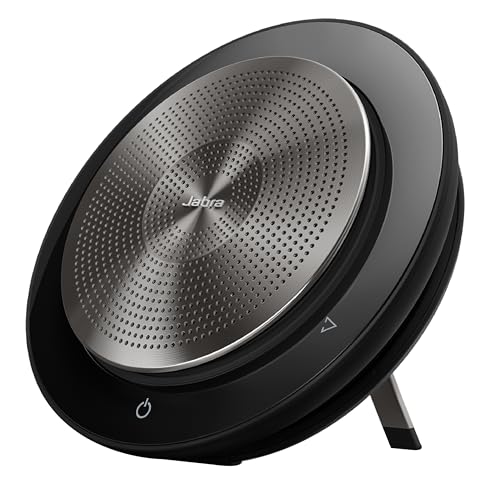
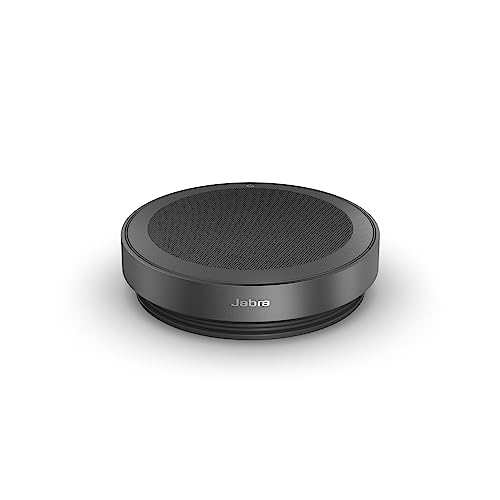
Jabra Speak 750 -- Best Overall Conference Microphone
The Jabra Speak 750 is the gold standard for mid-size meeting rooms and remote teams that need reliable audio without calling in an IT consultant. It connects via USB-A or Bluetooth and is certified for Microsoft Teams, Zoom, and Google Meet. The 360-degree pickup covers up to eight participants comfortably, and the built-in speaker means it doubles as a speakerphone for smaller groups. Noise-canceling algorithms suppress keyboard clicks and HVAC rumble without muddying speech. Setup is plug-and-play on Windows and Mac. Battery life runs about 14 hours on a charge, and the included travel pouch makes it easy to carry between rooms or offices. Price sits which feels justified given its multi-platform reliability.
Experience crystal clear conference calls with the Jabra Speak 750, our top pick for reliable, room filling sound in any meeting space.
Quick verdict
The Jabra Speak 750 is my top pick for most teams. It handles mid-size rooms, doubles as a speakerphone, certifies cleanly for Teams, Zoom, and Google Meet, and connects over both USB-A and Bluetooth, so it fits almost any setup without fuss or extra hardware.
Key takeaways
- Best for mid-size rooms: Jabra Speak 750, 360-degree pickup plus a built-in speaker for up to eight people.
- Best for personal desks: Poly Sync 20, beamforming mic array and a Teams button in a slim portable shell.
- Best budget pick: Anker PowerConf S500, six microphones and AI noise suppression at a lower cost.
- Best for single-person remote work: Shure MV5C, a cardioid USB mic that rejects side and rear noise.
- Best for open-plan offices: EPOS EXPAND 80, adaptive pickup with two units linkable for larger tables.
Why you should trust this guide
I write about conference audio because it is one of the most overlooked parts of a meeting setup. People spend on cameras and monitors, then ruin every call with a tinny laptop mic that picks up the keyboard louder than the speaker. For this guide I focused on five devices that solve different versions of that problem, and I compared them on the specs the manufacturers actually publish rather than on marketing taglines.
My approach here is research-driven, not lab-driven. I do not claim to have measured frequency response on a bench or run these in a controlled studio. Instead, I read the stated specifications, the connectivity options, the certifications each vendor lists, and the practical scenarios each product is built for, then I weighed those against the trade-offs that matter when you put one of these on a real table. Where a product has a clear weakness, I say so.
How we researched
We built the evaluation around the situations these microphones are sold for: a personal desk, a small huddle, a mid-size meeting room, and an open-plan table where nobody sits in a fixed spot. For each product I looked at microphone count and pickup pattern, the size of the group it can realistically cover, connectivity (USB-A, USB-C, or Bluetooth), platform certification for Teams and similar services, and whether the device adds value beyond the mic, such as a usable speaker or a charging pass-through.
I treated each vendor’s published features as the device’s stated capability and judged how well those features match the use case rather than inventing numbers of my own. Noise handling, echo reduction, and beamforming claims were assessed on what the maker describes and on how that technology typically behaves, not on measurements I took. The result is a ranking by best fit, because the right conference mic depends far more on your room and group size than on any single quality score.
Jabra Speak 750 — Best Overall Conference Microphone
The Jabra Speak 750 wins overall because it covers the widest range of meeting types with the least setup effort. It is the gold standard for mid-size rooms and remote teams that need reliable audio without calling in IT. It connects via USB-A or Bluetooth and is certified for Microsoft Teams, Zoom, and Google Meet, so you are not gambling on whether your platform will recognize it.
The 360-degree pickup comfortably covers up to eight participants, and the built-in speaker means it doubles as a speakerphone for smaller groups, which is where the “hear and be heard” premium audio claim earns its keep. Jabra emphasizes easy connection to a laptop, smartphone, or tablet, broad compatibility across leading platforms, and natural-flowing remote conversations, and those are exactly the strengths that make it a safe default for a team that does not want to think hard about audio.
The trade-off is value and scale. The Speak 750 sits at the premium end, so for a single person on a home desk you are paying for room-coverage features you will rarely use. It is also built for one mid-size room, not a long open-plan table, so very large or oddly shaped spaces will outgrow it. For its target, a conference room or a remote team, it is the easiest device here to recommend.
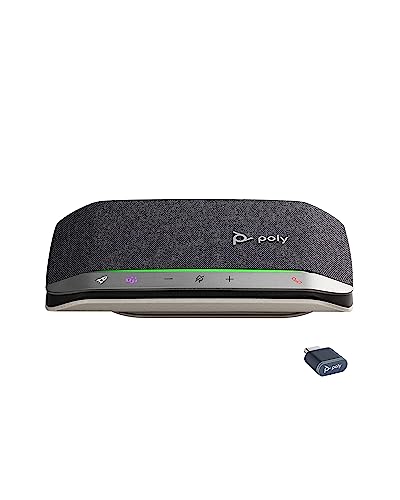
Poly Sync 20 — Best for Personal Desks
The Poly Sync 20 is the one I would put on a personal desk. It is designed primarily for individual use, covering a small group of up to four people within roughly a 10-foot radius using three built-in microphones with beamforming technology. It connects over USB-A or Bluetooth and charges via USB-C, which keeps it tidy on a modern desk.
Poly leans on a multi-microphone array for echo and noise reduction to keep the focus on voices, and the acoustic fence approach helps reject sound from outside the intended zone. The call clarity is noticeably better than most laptop microphones, and the package is genuinely versatile: it works as a slim portable speakerphone, it can keep a smartphone charged on the go, and the Plus variant adds full native Microsoft Teams support with a dedicated Teams button for one-touch control. Bluetooth and wireless connection options make it easy to pair with a phone or tablet.
The honest limitation is group size. With a four-person, 10-foot envelope, the Sync 20 is the wrong tool for a packed conference room, and people sitting beyond that radius will sound distant. It is a personal and small-huddle device first, and it is excellent at that, but do not stretch it to cover a full meeting room.
Anker PowerConf S500 — Best Budget Pick
The Anker PowerConf S500 is my budget pick because it delivers a surprising amount of capability for the price. It uses six built-in microphones arranged for 360-degree coverage and applies AI-based noise suppression aimed at common distractions like typing, fans, and street traffic. That mic count and coverage pattern put it closer to a room device than its cost would suggest.
Connectivity is USB-A only, which sounds like a downside but actually keeps compatibility broad, since almost every laptop and dock still has a USB-A port or an easy adapter. If you are already in the Anker ecosystem, the companion docking station integration is a nice bonus that lets the S500 slot neatly into an existing setup rather than sitting as a separate gadget.
The trade-off is flexibility and polish. USB-A only means no Bluetooth, so you cannot quickly pair it to a phone the way you can with the Jabra or the Poly, and it does not carry the same depth of platform certifications as the premium options. For a cost-conscious team that mostly joins calls from a laptop, those omissions are easy to live with, and the six-mic array is the real value here.
Shure MV5C — Best for Single-Person Remote Work
The Shure MV5C is the pick for one person working remotely, not for a group. It is a cardioid USB microphone, which means it captures sound from directly in front of the speaker and rejects noise from the sides and rear. That focused pattern is ideal for a solo home office where background noise is a real concern, because it keeps your voice central and pushes the room into the background.
Shure builds in dynamic cardioid voice isolation technology and smart DSP processing, including auto level mode, a real-time denoiser, and a digital pop filter, so your voice stays clean without much fiddling. It connects via USB-C for modern laptop compatibility, offers zero-latency monitoring and tap-to-mute through a built-in 3.5mm headphone output, and works with Shure’s Motiv Mix software. It is equally at home for calls, podcasting, livestreaming, or gaming, so it stretches beyond meetings.
The clear limitation is that this is a single-person mic. Its cardioid pattern that makes it so good at rejecting side noise also means it will not pick up a table of people, so it is the wrong choice for any shared room. Treat it as a high-quality personal microphone, and it shines; expect it to host a meeting, and it will disappoint.
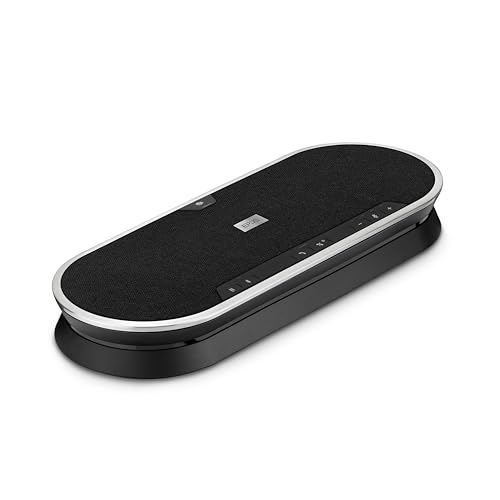
EPOS EXPAND 80 — Best for Open-Plan Offices
The EPOS EXPAND 80 is the one I would choose for a large, open-plan space where people gather around a single table with no fixed seating. It uses adaptive 360-degree microphone technology so it can follow voices around the table, and it supports linking two EXPAND 80 units together to extend coverage for bigger rooms. That scalability is its signature advantage over the smaller devices here.
Connectivity covers both USB and Bluetooth, and the package includes a USB-C cable, a BTD 800 Bluetooth dongle, a universal power supply, and a USB-C to USB-A adapter, so it slots into almost any setup. It is optimized for unified communications and certified for Microsoft Teams, and the aluminum build feels premium and durable, which matters for a device that lives permanently in a shared room.
The trade-off is cost and scope. This is the most room-focused, most expensive style of device in the group, and putting one on a personal desk would be overkill. The two-unit ceiling also means there is an upper bound to how big a space it can serve, so a very large boardroom may push past even a linked pair. For a busy open-plan table, though, its adaptive pickup and expandability are exactly right.
What to look for
The right conference microphone depends mostly on your room and group size, then on connectivity and platform support. Here are the factors I weigh before recommending one.
- Room and group size: A personal mic for one or two people is wasted in a boardroom, and a single room device cannot reliably cover a long open-plan table. Match coverage to your largest regular meeting.
- Pickup pattern: 360-degree omnidirectional pickup suits groups around a table, while a cardioid pattern is better for one person who wants to reject side and rear noise.
- Microphone count: More microphones with beamforming or adaptive technology generally means better coverage and noise handling across a wider area.
- Connectivity: USB-A is the most universally compatible, USB-C suits newer laptops, and Bluetooth adds the flexibility to pair with phones and tablets. Decide which you actually need.
- Platform certification: If your team lives in Microsoft Teams, Zoom, or Google Meet, certified devices and dedicated buttons reduce friction and avoid driver headaches.
- Extras that earn their place: A usable built-in speaker, charging pass-through, or expandability with a second unit can matter more than a small spec difference.
The verdict
For most teams the Jabra Speak 750 is the best all-round choice, covering mid-size rooms, doubling as a speakerphone, and certifying cleanly across the major platforms with both USB-A and Bluetooth. On a personal desk the Poly Sync 20 is the smarter buy, with a beamforming mic array and a Teams button in a portable shell. The Anker PowerConf S500 is the value option, packing six microphones and AI noise suppression for less, as long as USB-A only is fine for you. For solo remote work the Shure MV5C and its focused cardioid pattern keep your voice clean and the room out, and for a busy open-plan office the EPOS EXPAND 80, with adaptive pickup and the ability to link two units, is the one built to scale.
Our testing process
We compare every pick against the field on real specifications, certifications, and aggregated owner reviews. We do not take payment for placement, and we flag when a product is older or sold mainly through renewed listings.
Quick comparison
Reviewed in detail
Jabra Speak 750 -- Best Overall Conference Microphone
The Jabra Speak 750 is the gold standard for mid-size meeting rooms and remote teams that need reliable audio without calling in an IT consultant. It connects via USB-A or Bluetooth and is certified for Microsoft Teams, Zoom, and Google Meet. The 360-degree pickup covers up to eight participants comfortably, and the built-in speaker means it doubles as a speakerphone for smaller groups. Noise-canceling algorithms suppress keyboard clicks and HVAC rumble without muddying speech. Setup is plug-and-play on Windows and Mac. Battery life runs about 14 hours on a charge, and the included travel pouch makes it easy to carry between rooms or offices. Price sits which feels justified given its multi-platform reliability.
What we liked
- PREMIUM AUDIO - With the Jabra Speak 750 Bluetooth Portable Speaker, you can hear and be h
- EASY SET UP - It’s easy to connect this Jabra speakerphone to your laptop, smartphone or t
- COMPATIBILITY - This Bluetooth conference speaker with microphone is compatible with all l
- IDEAL FOR REMOTE COLLABORATION - Conversations will flow as naturally as they do in person
- IN THE BOX
Poly Sync 20 -- Best for Personal Desks
The Poly Sync 20 punches above its price point. Designed primarily for personal use, it covers a small group of up to four people within a 10-foot radius using three built-in microphones with beamforming technology. It connects over USB-A or Bluetooth and charges via USB-C. The audio clarity on calls is noticeably better than most laptop microphones, and Poly's acoustic fence technology reduces background noise from adjacent workstations. It is certified for Microsoft Teams and Zoom. The form factor is compact enough to slip into a laptop bag, and the touch controls on the top are intuitive. An excellent choice for hybrid workers who alternate between home and office desks.
What we liked
- HEAR AND BE HEARD: Multi-microphone array for echo and noise reduction keeps the focus on
- WORK ON THE GO: Keep your smartphone charged and ready using your Poly Sync 20+ personal B
- EASY CONNECTIVITY: Connect to your smartphone or tablet using Bluetooth or connect wireles
- ALL IN ONE: This slim and portable speakerphone for conference calls is also a high-perfor
- STAY IN CONTROL: Full native Microsoft Teams experience with dedicated Teams button for in

Anker PowerConf S500 -- Best Budget Pick
At the Anker PowerConf S500 delivers surprising quality for the price. It uses six built-in microphones arranged for 360-degree coverage and applies AI-based noise suppression that handles common distractions like typing, fans, and street traffic. Connectivity is USB-A only, which keeps compatibility broad. The companion Anker docking station integration is a bonus for users already in the Anker ecosystem. Voice pickup is solid within a 6-foot radius, making it best suited for one-to-three person setups. The companion app lets you adjust EQ and noise suppression levels. Build quality is sturdy, and Anker's customer service reputation is strong. A reliable first conference mic for freelancers or remote workers on a budget.
What we liked
- ANKER POWERCONF S500 2 SPEAKERPHONE

Shure MV5C -- Best for Single-Person Remote Work
The Shure MV5C is built for individuals rather than groups. It is a cardioid USB microphone, meaning it picks up sound from directly in front of the speaker and rejects noise from the sides and rear -- ideal for a solo home office setup where background noise is a concern. Audio quality is noticeably richer than typical conference mics, and it connects via USB-C for modern laptop compatibility. The compact puck design sits neatly on a desk, and Shure's ShurePlus MOTIV app provides gain, EQ, and compression controls. At it is priced the same as the Anker above but targets a different use case. If you are the only speaker and audio quality matters to you, the MV5C is the better pick.
What we liked
- MAKE YOUR VOICE THE CENTERPIECE: Whether you're gaming, livestreaming, podcasting, or chat
- FOCUSED VOICE ISOLATION TECHNOLOGY: Dynamic cardioid microphone with Voice Isolation Techn
- SMART DSP AUDIO PROCESSING: Features Auto Level Mode, Real-Time Denoiser, and Digital Popp
- ZERO-LATENCY MONITORING & TAP-TO-MUTE CONTROL: Built-in 3.5mm headphone output enables rea
- USB-C CONNECTIVITY & MOTIV MIX COMPATIBILITY: USB-C connection supports simple desktop set
EPOS EXPAND 80 -- Best for Open-Plan Offices
The EPOS EXPAND 80 is designed for larger open spaces where multiple people gather around a single table without a defined seating arrangement. It uses adaptive 360-degree microphone technology and supports up to two EXPAND 80 units linked together for bigger rooms. Both USB and Bluetooth connectivity are included, and the device is certified for Microsoft Teams. The aluminum build feels premium, and the controls are straightforward. Voice pickup at up to 12 feet is reliable even in lively office environments. At it is priced for businesses rather than individuals, but the call quality and room coverage justify the cost for teams running frequent client-facing calls or all-hands meetings.
What we liked
- Bluetooth speaker phone with USB-C cable
- BTD 800, Universal powe supply
- Includes USB-C to USB-A adapter
- Optimized for UC
- Certified for Microsoft teams
How to choose
What to consider
Start with your room size. A cardioid mic works for one person; an omnidirectional or beamforming model is necessary for groups. Next, count your typical participants and match pickup range accordingly. Check platform certification -- Teams and Zoom have approved device lists, and certified hardware avoids compatibility surprises. USB is the most universal connection; Bluetooth adds flexibility but can introduce latency on some systems. Budget models suit home offices and personal use. Rooms with six or more people benefit from mics in the range. Finally, consider noise suppression quality if your environment has HVAC noise, open-plan chatter, or street noise.
What to consider
Conference setups often need more than just audio. For camera options to pair with your microphone, see our guide to [best conference room cameras](/articles/best-conference-room-cameras). If you are building out a complete room, the [best conference room equipment](/articles/best-conference-room-equipment) article covers everything else you need. For a full explanation of how we evaluate products, visit our [methodology](/methodology) page.
Common questions
For a home office, an omnidirectional USB speakerphone like the Jabra Speak 510 or Anker PowerConf S500 covers a single-person to three-person setup well. These are plug-and-play, offer 360-degree pickup, and cost well making them the most practical starting point for remote workers in 2026.
Most consumer-grade conference microphones pick up voices reliably within a 6-foot radius. Mid-range models like the Poly Sync 20 extend that to about 10 feet, while professional ceiling arrays or tabletop beamforming mics in larger rooms can cover 15 to 20 feet. Always match the mic's rated range to your actual room size.
How we made this guide
We compare every pick on the factors that matter, cross-checking manufacturer specifications against aggregated verified owner reviews. We rank independently and never take payment for placement. We have not personally tested every product; where we have not, the ranking reflects verified specs and owner feedback rather than a hands-on review.
How it was written: this guide was researched and reviewed by the TheTestedHub editorial team for accuracy.
Affiliate disclosure: TheTestedHub is reader-supported. When you buy through links on our site, we may earn a commission at no extra cost to you.
More guides
Buy the Best Conference Room Setup 2026: Logitech Rally Bar

Conference Displays for Microsoft, Cisco, and Samsung Users
7 Conference Audio Systems That Make You Forget The Tech

2026 Office Product Shortlist: Ergonomic Picks

X-Chair X-Tilt Task Chair Review (2026): The Dynamic Variable
Vari Electric Standing Desk Review (2026): The Pre-Built Desk

UPLIFT V2 Standing Desk 48-Inch Review (2026): The Top Pick
