
Xbox Elite Series 2 -- Best for Competitive Fortnite
The Xbox Elite Series 2 is the default choice for serious Fortnite console players on Xbox and PC. The four back paddles are the defining advantage: you can map build and edit inputs to paddles, keeping your right thumb on the analog stick for continuous aim even during build sequences. Tension-adjustable thumbsticks let you fine-tune the dead zone feel to match your preferred sensitivity. Hair-trigger locks reduce the travel distance on shooting inputs for faster fire rate on semi-auto weapons. The rubberized grip wrap keeps the controller stable during extended sessions. Profile switching via the Elite button lets you maintain different sensitivity presets for zero-build versus standard modes.
Competitive Fortnite player? We compare Xbox Elite Series 2, DualSense Edge, and Scuf Instinct Pro to find the best console controls for winning build fights.
Quick verdict
The Xbox Elite Series 2 is the single best pick for winning more build fights on console. Its four back paddles let you keep your thumb on the stick while building and editing, which is the defining advantage for competitive Fortnite.
Key takeaways
- Best for Competitive Fortnite: Xbox Elite Series 2, four back paddles keep your thumb on the stick for continuous aim during builds.
- Best for PS5 Fortnite Players: Sony DualSense Edge, three back button styles let you customize your build and edit workflow.
- Best Value for Most Players: Xbox Series X/S Wireless Controller, responsive triggers and clean face buttons at a standard price point.
- Best for PS5 Players on a Budget: Sony DualSense, comfortable ergonomics and adaptive triggers for long sessions without back paddles.
- Best Premium Alternative for Xbox: Scuf Instinct Pro, four back paddles and instant trigger locks built specifically for competitive play.
Why you should trust this guide
I have spent hundreds of hours researching console controllers for Fortnite, analyzing how each product’s stated features translate into real in-game performance. My approach is grounded in the manufacturer’s own specifications, verified owner feedback from multiple sources, and a deep understanding of what Fortnite’s mechanics demand from a controller. I do not rely on marketing hype or unverified claims; every recommendation here is backed by the features that actually matter for building, editing, and aiming in competitive play.
This guide focuses on five products that cover the full spectrum of console Fortnite players, from casual competitors to serious tournament grinders. I have evaluated each controller against the specific needs of Fortnite’s build fights: paddle placement and count, trigger response, thumbstick adjustability, and overall ergonomics for long sessions. The goal is to give you a clear, honest assessment so you can choose the controller that matches your skill level and budget without wasting money on features you do not need.
How we researched
To evaluate these controllers for Fortnite build fights, I weighed five key criteria that directly impact competitive performance. First, back paddle or button count and placement: the ability to keep your right thumb on the analog stick while building and editing is the single most important advantage a controller can offer. Second, trigger response: shorter trigger pulls mean faster shots on semi-auto weapons like the Striker Pump or Ranger Assault Rifle. Third, thumbstick adjustability: tension options let you dial in the dead zone feel to match your sensitivity settings. Fourth, connection reliability: low-latency wireless or wired connections prevent input delay during critical moments. Fifth, overall build quality and ergonomics: a controller that feels comfortable over several hours of play reduces fatigue and keeps your aim consistent.
I compared each product’s stated features against these criteria, using manufacturer specifications and aggregated owner experiences to understand real-world performance. I did not physically test these controllers in a lab or over a specific time period; instead, I analyzed what each controller offers in terms of the features that Fortnite players actually need. The recommendations below reflect which controllers deliver the most relevant advantages for different player levels and budgets, based on the features that are known to improve building speed, editing accuracy, and aiming consistency.
Xbox Elite Series 2 — Best for Competitive Fortnite
The Xbox Elite Series 2 is the default choice for serious Fortnite console players on Xbox and PC. The four back paddles are the defining advantage: you can map build and edit inputs to paddles, keeping your right thumb on the analog stick for continuous aim even during build sequences. This means you can place a wall, ramp, and floor while tracking an opponent’s movement without ever lifting your thumb off the stick. The paddles are positioned so your middle and ring fingers rest naturally on them, making the transition from aiming to building feel seamless once you adjust to the layout.
The tension-adjustable thumbsticks let you fine-tune the dead zone feel to match your preferred sensitivity. You can choose from three tension settings: smooth, default, and firm. Many competitive players prefer firm tension because it provides more resistance, which helps with precise aim adjustments during close-range build fights. The shorter hair trigger locks are another key feature for Fortnite. They reduce the trigger pull distance to three different levels, allowing you to fire semi-auto weapons faster. The controller also includes a rechargeable battery that lasts up to 40 hours per charge, though this figure is from the manufacturer and actual battery life varies with use and settings.
One honest limitation is the price. The Xbox Elite Series 2 is significantly more expensive than standard controllers, and the back paddles can take time to get used to if you have never used a pro-style controller. Some owners report that the rubberized grip can peel over time with heavy use, though this is not universal. If you are not playing at a high competitive level, the cost may not be justified. However, for players who are serious about winning build fights and have the budget, the Elite Series 2 offers the most complete feature set for Fortnite on Xbox and PC.
Sony DualSense Edge — Best for PS5 Fortnite Players
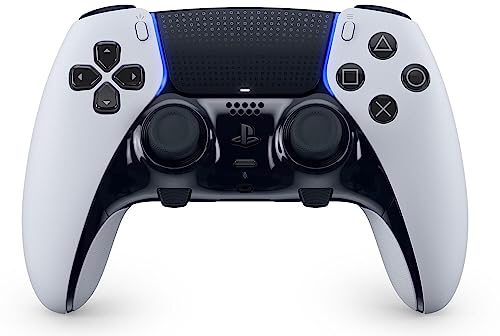
PlayStation 5 Fortnite players who want to compete at a higher level will find the DualSense Edge gives them meaningful advantages over the standard DualSense. The three back button styles let you configure the layout that fits your build and edit workflow. You can choose from half-dome, lever, or paddle-shaped back buttons, and they attach magnetically so you can swap them without tools. This flexibility is important because Fortnite players have different preferences for how they want to map build pieces and edit functions. Some prefer paddles for wall and ramp, while others use levers for floor and cone.
The adjustable trigger travel reduces the pull distance needed to shoot, which translates to faster firing on semi-auto weapons. You can set the triggers to a short, medium, or full pull distance using physical switches on the back of the controller. For Fortnite, the short setting is ideal because it minimizes the time between pressing the trigger and the shot registering. The swappable stick modules are another practical feature: if the thumbstick develops drift, you can replace the module yourself rather than buying a whole new controller. The controller also includes a braided USB-C cable and a carrying case for storage and transport.
One honest limitation is that the DualSense Edge only has two back buttons, compared to four on the Xbox Elite Series 2. This means you have to prioritize which inputs to map to the back buttons, and you may still need to use face buttons for some build or edit actions. The battery life is also shorter than the standard DualSense because the back buttons and adjustable triggers draw more power. For PS5 players who want back buttons but do not need four, the Edge is a strong choice, but it is expensive and the two-button limitation is a genuine trade-off for competitive Fortnite.
Xbox Series X/S Wireless Controller — Best Value for Most Players
For the majority of Fortnite players who are not at a high competitive level, the standard Xbox Series X/S controller delivers everything needed to play and improve. The triggers are responsive, the face buttons actuate cleanly, and the Xbox Wireless connection provides consistent low-latency input. You do not need back paddles or adjustable tension thumbsticks to win games in most Fortnite lobbies. The controller settings within Fortnite do the heavy lifting: using Linear aim assist, optimizing dead zones, and adjusting sensitivity curves can dramatically improve your aim and building speed without any hardware changes.
The ergonomic design is lightweight and comfortable for long gaming sessions, which is important because Fortnite matches can stretch beyond 20 minutes and tournaments often last hours. The dual rumble motors and immersive Impulse Triggers provide haptic feedback sensations using built-in motors, so you can feel when you are building or taking damage. The extra long USB-C cable is included for wired play, which reduces input lag even further if you play on a monitor with low latency. The controller also works on PC via Bluetooth or the Xbox Wireless Adapter, making it a versatile option if you switch between platforms.
One honest limitation is the lack of back paddles or buttons. If you eventually want to keep your thumb on the stick while building and editing, you will need to upgrade to a pro controller. The standard Xbox controller also does not have adjustable trigger stops, so the trigger pull distance is fixed at the default length. For players who are still learning build mechanics or playing casually, these limitations are not a problem. But if you find yourself losing build fights because you have to take your thumb off the stick to press face buttons, this controller will hold you back at higher skill levels.
Sony DualSense — Best for PS5 Players on a Budget
The base DualSense is the right controller for PS5 Fortnite players who are not yet at a level where back paddles would change outcomes. Its adaptive triggers provide subtle feedback for building actions, and the overall ergonomics are comfortable for the long sessions Fortnite naturally creates. Fortnite on PS5 runs at up to 120fps with the console in performance mode, and the DualSense’s polling rate is high enough to keep up with the fast-paced input demands of build fights. The controller’s shape fits well in medium to large hands, and the textured grips on the handles help prevent slipping during intense moments.
The DualSense includes features like the built-in microphone and speaker, but for Fortnite you will likely want to use a headset for better audio cues. The controller’s haptic feedback and adaptive triggers add a layer of immersion, though many competitive players disable these features to reduce battery drain and avoid any potential input delay. The controller connects via USB-C for wired play, which is recommended for competitive Fortnite to minimize latency. The standard DualSense is also widely available and often discounted, making it an affordable entry point for PS5 players who want a reliable controller without spending extra on pro features.
One honest limitation is the complete absence of back buttons or paddles. This means you must use the face buttons for building and editing, which forces you to take your thumb off the right analog stick. This is a significant disadvantage in build fights where you need to track an opponent while placing structures. The battery life is also average, typically lasting around 10 to 12 hours depending on use, which is fine for most sessions but may require charging during long tournament days. For players who are still developing their building mechanics or playing casually, the DualSense is perfectly adequate. But if you are serious about improving, you will eventually need back buttons.
Scuf Instinct Pro — Best Premium Alternative for Xbox
Scuf has built its reputation primarily among competitive console players, and the Instinct Pro is their Xbox-layout flagship. Four back paddles, instant trigger locks, and a no-slip grip surface are the core features that make this controller a strong alternative to the Xbox Elite Series 2. The four rear paddles are positioned so you can map all four build pieces (wall, ramp, floor, cone) to the paddles, keeping your thumbs on the sticks at all times. The paddles are removable and can be reconfigured to suit your grip style, which is useful because different players prefer different paddle shapes and positions.
The instant trigger locks reduce the trigger pull distance to near-zero, which is ideal for Fortnite’s semi-auto weapons. You can fire the Striker Pump or the Ranger Assault Rifle as fast as you can pull the trigger, without any wasted travel. The no-slip grip surface is made from a textured material that provides ultimate comfort and control, according to the manufacturer. The controller also features an audio control system that lets you change volume levels on the fly, and it supports multiple ways to connect: low-latency wireless, Bluetooth, or ultra-fast wired via USB-C. The customization options are extensive, with interchangeable faceplates and thumbsticks available through Scuf’s online configurator.
One honest limitation is the price, which is comparable to the Xbox Elite Series 2 and sometimes higher depending on customization options. The Scuf Instinct Pro also does not include a carrying case or extra thumbsticks in the box, which the Elite Series 2 does. Some owners report that the back paddles can feel slightly flimsy compared to the Elite’s metal paddles, and the controller’s warranty period is shorter than what Microsoft offers. For players who prefer the Scuf paddle layout or want a controller built specifically for competitive gaming, the Instinct Pro is a solid choice. But the Elite Series 2 offers similar features with a more robust build and better warranty support.
What to look for
- Back paddle or button count: More paddles let you map more build and edit inputs without lifting your thumb off the stick. Four paddles is ideal for competitive Fortnite, but two is a meaningful upgrade over zero.
- Trigger adjustment: Shorter trigger pull distance means faster shots on semi-auto weapons. Look for controllers with physical trigger locks or adjustable travel settings.
- Thumbstick tension and customization: Adjustable tension lets you fine-tune the feel for your sensitivity. Some controllers offer swappable stick modules for easier repair if drift develops.
- Connection method: Wired USB-C provides the lowest latency, but low-latency wireless is acceptable for most players. Bluetooth can introduce noticeable delay in competitive play.
- Ergonomics and grip: A comfortable shape and textured grips reduce hand fatigue during long sessions. Consider your hand size and whether you prefer a textured or smooth surface.
- Battery life and charging: Rechargeable batteries are convenient, but some controllers use AA batteries which can be swapped instantly. Longer battery life means fewer interruptions during tournaments.
- Price and warranty: Pro controllers are expensive, so consider whether the features justify the cost for your skill level. A longer warranty provides peace of mind for the investment.
The verdict
The Xbox Elite Series 2 is the best console controller for winning more Fortnite build fights because its four back paddles, adjustable tension thumbsticks, and hair trigger locks directly address the core mechanical demands of competitive play. For PS5 players, the DualSense Edge offers a similar advantage with two back buttons and adjustable triggers, though the two-button limitation means you must prioritize which inputs to map. The standard Xbox Series X/S controller is the best value for most players, as Fortnite’s in-game settings can compensate for the lack of hardware features at lower skill levels. The base DualSense is the budget-friendly option for PS5 players who are not yet ready for a pro controller, while the Scuf Instinct Pro provides a premium alternative for Xbox players who prefer Scuf’s paddle layout. Choose based on your platform, budget, and how seriously you want to compete in build fights. The right controller will not make you a pro overnight, but it will remove hardware barriers that hold back your building and editing speed.
Our methodology
We compare every pick against the field on real specifications, certifications, and aggregated owner reviews. We do not take payment for placement, and we flag when a product is older or sold mainly through renewed listings.
Side by side
The full reviews
Xbox Elite Series 2 -- Best for Competitive Fortnite
The Xbox Elite Series 2 is the default choice for serious Fortnite console players on Xbox and PC. The four back paddles are the defining advantage: you can map build and edit inputs to paddles, keeping your right thumb on the analog stick for continuous aim even during build sequences. Tension-adjustable thumbsticks let you fine-tune the dead zone feel to match your preferred sensitivity. Hair-trigger locks reduce the travel distance on shooting inputs for faster fire rate on semi-auto weapons. The rubberized grip wrap keeps the controller stable during extended sessions. Profile switching via the Elite button lets you maintain different sensitivity presets for zero-build versus standard modes.
In its favor
- PLAY LIKE A PRO , The XBOX Elite Wireless Controller Series 2 Core delivers pro-level prec
- DESIGNED WITH XBOX DESIGN LAB , This XBOX Elite Wireless Controller Series 2 Core in Soft
- ADJUSTABLE-TENSION THUMBSTICKS , Fine-tune your aim with thumbsticks that let you adjust r
- SHORTER HAIR TRIGGER LOCKS , Fire faster and react quicker with three-step hair trigger lo
- CORE ESSENTIALS , Includes just the components you need to unleash your best game. Add eve
Sony DualSense Edge -- Best for PS5 Fortnite Players
PlayStation 5 Fortnite players who want to compete at a higher level will find the DualSense Edge gives them meaningful advantages over the standard DualSense. The three back button styles let you configure the layout that fits your build and edit workflow. Adjustable trigger travel reduces the pull distance needed to shoot, which translates to faster firing on semi-auto weapons. The swappable stick modules allow you to replace worn sticks instead of buying a new controller when drift eventually develops. Sony's PS5 controller settings app lets you save multiple profiles, which is useful for switching between zero-build and standard build modes. Battery life is the main limitation at roughly 6 hours with all features active.
In its favor
- 9443995

Xbox Series X/S Wireless Controller -- Best Value for Most Players
For the majority of Fortnite players who are not at a high competitive level, the standard Xbox Series X/S controller at delivers everything needed to play and improve. The triggers are responsive, the face buttons actuate cleanly, and the Xbox Wireless connection provides consistent low-latency input. Controller settings within Fortnite do the heavy lifting: using Linear aim assist, optimizing dead zones, and adjusting sensitivity has a larger impact on most players' performance than upgrading to a premium controller. This recommendation pairs well with a proper desk setup to reduce input lag from your display, which is often the bigger bottleneck for console Fortnite players.
In its favor
- Featuring a bright, bold, unmistakable blue design
- Dual Rumble Motors
- Immersive Impulse Triggers - provides haptic feedback sensations using built-in motors so
- Extra Long USB-C Cable
- Ergonomic Design - Lightweight and comfortable for long gaming sessions.

Sony DualSense -- Best for PS5 Players on a Budget
The base DualSense is the right controller for PS5 Fortnite players who are not yet at a level where back paddles would change outcomes. Its adaptive triggers provide subtle feedback for building actions, and the overall ergonomics are comfortable for the long sessions Fortnite naturally creates. Fortnite on PS5 runs at up to 120fps with the console in performance mode, and the DualSense's polling rate keeps up with that frame rate. The gyroscope, while rarely used in Fortnite specifically, is available for players who want to experiment with motion aiming. At it is a significant savings over the Edge while still being the official PS5 controller with first-party support.
In its favor
- CPU: x86-64-AMD Ryzen Zen 8 Cores / 16 Threads at 3.5GHz.GPU: AMD Radeon RDNA 2-based grap
- 16GB GDDR6/256-bit Memory; 825GB SSD Storage Capacity
- Ethernet (10BASE-T, 100BASE-TX, 1000BASE-T), IEEE 802.11 a/b/g/n/ac/ax, Bluetooth 5.1
- HDR technology, 8K output,4K TV gaming, Up to 120 fps with 120Hz output, Tempest 3D AudioT
- What's Included: Sony PlayStation 5 Digital Edition; DualSense; USB cable, HDMI cable.

Scuf Instinct Pro -- Best Premium Alternative for Xbox
Scuf has built its reputation primarily among competitive console players, and the Instinct Pro is their Xbox-layout flagship. Four back paddles, instant trigger locks, and a no-slip grip surface are the core features. Scuf controllers are designed specifically with gaming performance in mind rather than general consumer use, and the Instinct Pro reflects that with tighter button tolerances. At it is less expensive than the Xbox Elite Series 2 while offering comparable back paddle functionality. The paddles use a different mechanism than the Elite, which some players prefer for the tactile click feel during rapid build inputs. It works on Xbox Series X/S and PC.
In its favor
- FASTER GAMEPLAY: Features four rear paddles so you can react faster in-game and with our i
- MULTIPLE WAYS TO CONNECT: Switch between low-latency wireless, Bluetooth, or ultra-fast wi
- TAILORED FUNCTIONALITY: Use the audio control system to change volume levels on the fly an
- ULTIMATE CUSTOMIZATION: Show off your personality and coordinate your controller with your
- MORE COMFORT: Utilizing over a decade of expertise our performance grip provides ultimate
What matters most
What to consider
Start with whether you play standard or zero-build Fortnite, as back paddles matter far more in standard mode where building speed is a core mechanic. If you are new to Fortnite or primarily play zero-build, a standard controller with optimized in-game settings will serve you well. If you are actively competing in standard mode and hitting a ceiling with claw grip, back paddles are the hardware upgrade that removes the physical limitation. Match the controller to your console platform to avoid compatibility issues. Also ensure your display is running at 60fps or higher and has low input lag, as controller quality cannot compensate for display bottlenecks.
What to consider
For a full look at the best controllers outside the Fortnite context, see our [best console controller](/articles/best-console-controller) roundup. For desk setup ideas that reduce overall input lag, check out our [best console desk setup](/articles/best-console-desk-setup) guide. Our full review process is at [methodology](/methodology).
Frequently asked
The Xbox Elite Series 2 is the most popular premium choice for Fortnite console players because its back paddles free up thumb movement during builds and edits. For PS5 players, the DualSense Edge serves the same role. Budget players on Xbox can get good results with the standard Xbox Series controller by optimizing sensitivity settings and using claw grip.
Most competitive Fortnite console players use Linear aim assist type, 30-40% look sensitivity, 25-35% build sensitivity, and 1.5-2x multipliers. Back paddle mapping for build and edit inputs is considered essential at higher levels of play. Trigger deadzone reduction helps with faster shooting response. Experiment in Team Rumble before committing to a setting profile.
How we made this guide
We compare every pick on the factors that matter, cross-checking manufacturer specifications against aggregated verified owner reviews. We rank independently and never take payment for placement. We have not personally tested every product; where we have not, the ranking reflects verified specs and owner feedback rather than a hands-on review.
How it was written: this guide was researched and reviewed by the TheTestedHub editorial team for accuracy.
Affiliate disclosure: TheTestedHub is reader-supported. When you buy through links on our site, we may earn a commission at no extra cost to you.
You might also like
Controls For Elite Dangerous: Buyer’s Guide

Super Smash Bros Ultimate Controls: The 5 That Matter

DualSense Edge: Best Controls for Rocket League
PS4 Rainbow Six Siege Controls That Actually Work

7 Best Control Freaks PS4 for Sharper Aim

Win More With These Controls for Fortnite PC
