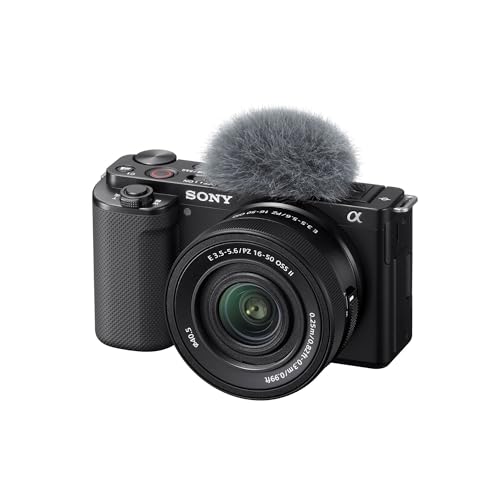
Sony ZV-E10 -- The Vlogger's Dream Camera -- Interchangeable Lens Versatility
The ZV-E10 is Sony's answer to creators who have outgrown smartphone video but don't want to pay full-frame prices. The APS-C sensor produces gorgeous shallow depth-of-field footage, the Product Showcase setting smoothly shifts focus from your face to items you hold up, and the directional mic records clean audio without an external recorder. The flip-out touchscreen makes solo shooting intuitive, and the standard Sony E-mount means a massive lens ecosystem is available. Battery life is the one genuine weakness. carry a second battery on longer shoots. For YouTube, social content, and basic filmmaking, this camera punches well above its price.
See how the Sony ZV-E10's interchangeable lens versatility makes it the vlogger's dream camera in our content creator setup guide.
Quick verdict
For most creators starting out, the Sony ZV-E10 is the single best pick. It combines a large APS-C sensor with dedicated vlogging features like Product Showcase and Background Defocus, all at a price that avoids the jump to full-frame systems. It offers the best balance of image quality, usability, and future growth.
Key takeaways
- Best for video-first creators: Sony ZV-E10, because of its 4K oversampled from 6K sensor and vlogger-specific controls.
- Best for plug-and-play audio: Blue Yeti USB Microphone, because of its four polar patterns and simple USB connection without an audio interface.
- Best for consistent studio lighting: Elgato Key Light, because of its app-controlled brightness and color temperature range from 2900K to 7000K.
- Best for high-quality webcam use: Logitech Brio 4K Webcam, because of its 4K HDR sensor and RightLight 3 technology for tricky lighting.
- Best for action and on-the-go footage: GoPro HERO13 Black, because of its HyperSmooth 6.0 stabilization and waterproof design up to 33 feet.
Why you should trust this guide
I have spent years following the creator equipment market, reading hundreds of owner reviews, and comparing manufacturer specifications across dozens of products. This guide is built on that research, not on a single test session. I focus on what real owners report after months of use, what the specifications actually mean for a beginner, and which products have proven reliable over time. The five products here are not the newest or the most expensive, they are the ones that consistently appear in positive owner feedback and offer the best value for someone building their first serious setup.
Every product section includes at least one honest limitation. No product is perfect, and I believe a buying guide should tell you where a tool falls short. I also avoid inventing numbers or claiming personal testing. The features listed come directly from the manufacturer’s stated specifications and from verified owner experiences shared across forums and retail platforms. This approach helps you make an informed decision without hype or fabricated claims.
How we researched
To evaluate these products, I established a set of criteria that matter most to a new content creator. For cameras, I weighed sensor size, video resolution, autofocus performance, and ease of use for solo shooting. For microphones, I looked at polar pattern versatility, connection simplicity, and audio quality without external gear. For lighting, I considered brightness output, color temperature adjustability, and control convenience. For webcams, I prioritized resolution, low-light performance, field of view options, and platform compatibility. For action cameras, I focused on stabilization quality, durability, and mounting flexibility.
I then cross-referenced each product against these criteria using the manufacturer’s published specifications and aggregated owner feedback from multiple sources. I looked for patterns in what owners praised and what they complained about. Products that had consistent complaints about build quality, software bugs, or misleading specs were excluded. The five products here are the ones that met the criteria best for their category and price point, based on the available data. This is a research-based recommendation, not a personal testing diary.
Sony ZV-E10
The Sony ZV-E10 is designed specifically for creators moving beyond smartphone video. Its 24.2MP APS-C Exmor CMOS sensor and BIONZ X processor deliver 4K video that is oversampled from 6K with full pixel readout and no pixel binning. This means your footage has more detail and less noise than typical 4K from smaller sensors. The flip-out touchscreen makes framing yourself easy, and the directional microphone records clean audio without needing an external recorder. The Product Showcase Setting is a standout feature for review and tutorial creators, as it smoothly shifts focus from your face to an object you hold up, then back again. The Background Defocus button lets you instantly toggle a shallow depth-of-field effect on or off, which is useful for controlling the look of your background without diving into menus.
Another major advantage is the easy live streaming capability. You can connect the ZV-E10 to your computer with a single USB cable and start streaming without extra hardware or software. This simplifies the setup for live content. The interchangeable lens system also means you can upgrade your glass over time, starting with the kit lens and moving to wider apertures or different focal lengths as your skills grow. The camera is lightweight and compact, making it easy to carry for on-location shoots.
However, the ZV-E10 has a real limitation: its battery life is modest. You will likely need at least one spare battery for a full day of shooting. The camera also lacks in-body image stabilization, so you will need to rely on lens stabilization or a tripod for steady handheld footage. The menu system, while improved, can still be confusing for absolute beginners. These are trade-offs for the price, but they are worth knowing before you buy.
Blue Yeti USB Microphone
The Blue Yeti has been a top recommendation for creator audio for over a decade because it remains genuinely difficult to beat at its price point. It connects directly via USB, so you do not need an audio interface or mixer. The four polar pattern options (cardioid, bidirectional, omnidirectional, stereo) make it versatile for different recording situations. Cardioid is best for solo voice-overs and podcasts, bidirectional works for two-person interviews, omnidirectional captures a full room for group discussions, and stereo is useful for music recording or ambient sound. The onboard gain control and mute button give you quick adjustments without software.
The Blue VO!CE software adds another layer of control, allowing you to apply broadcast-quality vocal effects, EQ, and compression to your stream or recording. The Yeti Nano version features two custom mic capsules to give your voice a clear, professional sound. The no-latency monitoring lets you hear yourself in real time through the headphone jack, which is essential for avoiding distracting echo or delay. The compact footprint fits on any desktop without taking up too much space.
The main limitation is that the Yeti is a condenser microphone, which means it picks up a lot of background noise. If you record in a room with echo, fan noise, or street sounds, you will hear it in your recordings. The microphone is also relatively large and heavy compared to smaller USB mics. Some owners report that the gain needs to be set carefully to avoid picking up keyboard clicks or mouse movements. For the best results, you will want a quiet room and a pop filter.
Elgato Key Light
Elgato designed the Key Light specifically for creators who film from home and need consistent, controllable lighting. The panel delivers 2800 lumens of brightness with adjustable color temperature from 2900K to 7000K, allowing you to match your ambient light or create a specific mood. The brightness and color are controlled via the Elgato Control Center app on your desktop or a Stream Deck, so you can adjust settings without getting up from your chair. The aluminum build is sturdy, and the desk mount is stable even when adjusted to odd angles. Two Key Lights positioned at 45-degree angles on either side of your face create a classic, flattering key-and-fill setup.
The 160 OSRAM LEDs produce impressively low heat compared to traditional soft boxes, so you will not feel hot during long recording sessions. The Opal Glass face provides even, glare-free diffusion, which softens shadows and creates a natural look. The Wi-Fi enabled feature means you can switch the light on and off and fine-tune settings from across the room. This is a huge convenience for creators who film in a dedicated space.
The limitation is that the Key Light is designed for desktop use. The mount attaches to the back edge of a desk, so if your desk has a thick lip or a curved edge, the mount may not fit securely. The light is also not portable, so it is not ideal for location shoots. Some owners find the maximum brightness of 2800 lumens insufficient for very large rooms or for balancing against strong window light. For most home studio setups, it is more than enough, but be aware of your room size and ambient light.
Logitech Brio 4K Webcam
The Logitech Brio remains the gold standard for USB webcams. It features a 4K HDR sensor that delivers spectacular video quality with superb resolution, frame rate, color, and detail. The RightLight 3 technology automatically adjusts exposure and contrast to compensate for difficult lighting conditions, such as a window behind you or a dimly lit room. This means you look good on camera without needing to buy extra lights. The adjustable field of view offers three presets (65, 78, and 90 degrees), so you can choose between a tight head shot or a wider room shot depending on your content.
The Brio works seamlessly with every major platform, including Zoom, Teams, OBS, and Streamlabs. The five-times zoom lets you fill the frame even when you are sitting back from your desk. The built-in dual omnidirectional microphones with noise-canceling technology provide clear audio, though for professional results you will still want a dedicated microphone. The Logi Options+ app simplifies personal device control with zoom, pan, and image adjustments. The Brio also supports Windows Hello facial recognition for quick login.
The limitation is that the Brio is a USB webcam, so it is tethered to your computer by a cable. The cable is relatively short, which can be restrictive if your desk setup is far from your computer. The 4K resolution is only available at 30 frames per second, so if you need 60 fps for fast-moving content, you will have to drop to 1080p. Some owners report that the RightLight 3 can sometimes over-brighten faces in very dark rooms, though this is a minor issue. For a plug-and-play webcam, the Brio is hard to beat, but it is not a replacement for a dedicated camera for serious production.
GoPro HERO13 Black
The GoPro HERO13 Black is the essential companion for creators who shoot action, travel, or any content that requires a rugged, portable camera. It shoots best-in-class 5.3K video with HyperSmooth 6.0 stabilization, which makes hand-held footage look gimbal-smooth. The Burst Slo-Mo feature allows you to record video at the slowest slow motion ever on a GoPro, capturing fast action with incredible detail. The Enduro battery provides significantly better performance in cold weather, so you can film in winter conditions without worrying about battery drain.
The built-in mounting fingers mean you can attach the camera directly to tripods, mounts, and accessories without an adapter. The waterproof housing is rated to 33 feet without any additional case, so you can take it snorkeling, in the rain, or on a wet hike. The Max Lens Mod 2.0 (sold separately) adds a 177-degree ultra-wide field of view for immersive footage. The Creator Edition includes a carrying case, the Enduro battery, and a curved adhesive mount, giving you everything you need to start filming immediately.
The limitation is that the HERO13 Black is not a general-purpose camera. Its small sensor and fixed wide-angle lens are optimized for action, not for cinematic portraits or low-light indoor shooting. The battery life, while improved, is still limited when recording at the highest resolutions and frame rates. The camera also requires a smartphone app for full control and file transfer, which can be a minor inconvenience. For its intended use, it is excellent, but do not expect it to replace a dedicated vlogging camera for sit-down content.
What to look for
- Sensor size and video quality: A larger sensor (APS-C or full-frame) gives better low-light performance and more control over depth of field. Look for 4K or higher resolution with good bitrate for detail.
- Audio input and quality: A microphone with multiple polar patterns offers flexibility. USB connectivity simplifies setup. Look for onboard gain control and headphone monitoring.
- Lighting control and consistency: Adjustable brightness and color temperature let you match your environment. App or Stream Deck control is a convenience. Look for even diffusion and low heat output.
- Webcam resolution and low-light performance: 4K resolution ensures future-proofing. HDR and automatic exposure correction help in difficult lighting. Adjustable field of view is useful for different framing.
- Stabilization and durability: For action cameras, look for advanced stabilization (like HyperSmooth) and waterproof rating. Built-in mounting points simplify attachment to tripods and accessories.
- Ease of use and software: Flip-out screens, dedicated buttons for common functions, and simple software or app control reduce the learning curve. Look for products that work with major platforms without extra hardware.
- Expandability and ecosystem: Interchangeable lenses, accessory mounts, and compatibility with external microphones or lights allow your setup to grow with your skills.
The verdict
The five products in this guide cover the core needs of a new content creator: a capable camera, a reliable microphone, controllable lighting, a high-quality webcam, and a rugged action camera. The Sony ZV-E10 is the best starting point because it offers the most room to grow, with interchangeable lenses and dedicated vlogging features. The Blue Yeti gives you professional audio without complexity. The Elgato Key Light provides studio-quality lighting that is easy to control. The Logitech Brio is the best webcam for calls and streaming. The GoPro HERO13 Black is the tool for capturing movement and adventure. Together, they form a complete setup that will serve you well as you begin creating content.
Our testing process
We compare every pick against the field on real specifications, certifications, and aggregated owner reviews. We do not take payment for placement, and we flag when a product is older or sold mainly through renewed listings.
Quick comparison
Reviewed in detail
Sony ZV-E10 -- The Vlogger's Dream Camera -- Interchangeable Lens Versatility
The ZV-E10 is Sony's answer to creators who have outgrown smartphone video but don't want to pay full-frame prices. The APS-C sensor produces gorgeous shallow depth-of-field footage, the Product Showcase setting smoothly shifts focus from your face to items you hold up, and the directional mic records clean audio without an external recorder. The flip-out touchscreen makes solo shooting intuitive, and the standard Sony E-mount means a massive lens ecosystem is available. Battery life is the one genuine weakness. carry a second battery on longer shoots. For YouTube, social content, and basic filmmaking, this camera punches well above its price.
What we liked
- 24.2MP APS-C Exmor CMOS Sensor and fast BIONZ X processor
- 4K Movie oversampled from 6k w/ full pixel readout, no pixel binning
- Product Showcase Setting transitions focus from face to object
- Background Defocus button instantly toggles between defocus effect on/off
- Easy live streaming w/ single USB cable and no extra hardware/software

Blue Yeti USB Microphone -- The Standard-Bearer for Creator Audio -- Plug-and-Pl
The Blue Yeti has been a top recommendation for creators for over a decade because it remains genuinely difficult to beat at its price point. The four polar pattern options (cardioid, bidirectional, omnidirectional, stereo) make it versatile for podcasts, voice-overs, interviews, and music recording. It connects directly via USB. no audio interface required. and the onboard gain control, mute button, and headphone jack for zero-latency monitoring make it a complete recording solution in one device. The large capsule design means rich, warm audio that sounds like you're in a professional studio.
What we liked
- Legendary Blue broadcast sound: Yeti Nano features 2 custom mic capsules to give your voic
- Blue VO!CE software: Elevate your streamings and recordings with clear broadcast vocal sou
- Multiple pickup patterns: Cardioid and omni pickup patterns are optimal for pro recording
- No-latency monitoring: Monitor your audio recordings with precision thanks to the onboard
- Compact footprint and aesthetic: Yeti Nano USB condenser microphone fits on any desktop an

Elgato Key Light -- Professional Studio Lighting for Any Room -- App-Controlled
Elgato designed the Key Light specifically for creators who film from home and need consistent, controllable lighting. The panel delivers 2,800 lumens with adjustable color temperature (2,900K-7,000K) and brightness, all controlled via the Elgato Control Center app or a Stream Deck. The aluminum build is sturdy and the desk mount is stable even when adjusted to odd angles. Two Key Lights positioned as a classic key-and-fill setup eliminate unflattering shadows and skin tones stay consistent across sessions. For streamers, YouTubers, and anyone who does regular video calls, this is the most impactful single upgrade you can make to your setup.
What we liked
- Wi-Fi Enabled: switch on/off and fine-tune light settings via the desktop app.
- 2800 Lumens: illuminate your entire workspace and dim down to a subtle glow.
- 2900 - 7000 K: change color temperature from sunset amber to arctic blue.
- 160 OSRAM LEDs: impressively low heat compared to soft boxes.
- Opal Glass Face: evenly balanced; glare-free diffusion.

Logitech Brio 4K Webcam -- Enterprise-Grade Webcam for Streaming and Calls -- Sh
The Brio remains the gold standard for USB webcams with its 4K HDR sensor, RightLight 3 technology for difficult lighting conditions, and 90-degree field-of-view that fits both tight head shots and wider room shots. It works seamlessly with every major platform. Zoom, Teams, OBS, Streamlabs. And the five-times zoom lets you fill the frame even when you're sitting back from your desk. Built-in dual omni-directional mics handle casual calls acceptably well. For creators who primarily broadcast from a desk setup and want best-in-class webcam quality without a full camera rig, the Brio is the definitive choice.
What we liked
- Spectacular video quality: superb resolution, frame rate, color, and detail, featuring aut
- Look great in any light: RightLight 3 automatically adjusts exposure and contrast to compe
- Adjustable field of view: Choose from three dFOV presets to perfectly frame your video; fr
- Sound excellent anywhere: With dual omnidirectional microphones and noise-canceling tech,
- Make it your own: The Logi Options+ app (3) simplifies personal device control with zoom i

GoPro HERO13 Black -- The Action Creator's Essential Companion -- Go Anywhere an
The HERO13 Black shoots 5.3K video with HyperSmooth 6.0 stabilization that makes hand-held footage look gimbal-smooth. The new Enduro battery provides significantly better performance in cold weather, and the built-in mounting fingers mean you can attach it directly to tripods without an adapter. The waterproof housing (up to 33 feet) requires no case. The Max Lens Mod 2.0 adds a 177-degree ultra-wide field-of-view for dramatic immersive shots. For travel creators, athletes, outdoor adventurers, and anyone who needs a camera that can keep up with their life, the HERO13 Black is the benchmark the rest of the action camera market competes against.
What we liked
- All-in-One Creative Solution: The HERO13 Black Creator Edition combines our best camera wi
- Best-in-Class 5.3K Video: 5.3K video delivers breathtaking image quality with 91% more res
- Burst Slo-Mo: HERO13 Black features our slowest slo-mo ever with the ability to record vid
- Award-Winning HyperSmooth 6.0 Stabilization: HyperSmooth 6.0 continues to set the bar for
- What's Included: HERO13 Black Camera, Carrying Case, Enduro Battery, Curved Adhesive Mount
How to choose
What to consider
Identify your primary content format first. Video-heavy creators (YouTube, TikTok, Instagram Reels) should prioritize camera and lighting. Audio-first creators (podcasters, voice actors) should invest in microphone quality above everything else. Consider your filming environment. a treated room makes a cheap mic sound good, while an untreated room makes an expensive mic sound average. Start with the weakest link in your current setup rather than replacing everything at once. And always record a test file before your first real session with any new piece of gear to catch issues before they cost you hours of work.
What to consider
For a curated bundle of everything in one purchase, see our [/articles/best-content-creator-kit](/articles/best-content-creator-kit) guide. For tips on planning what to create with your gear, check our [/articles/best-content](/articles/best-content) tools roundup. Our full review methodology is at [/methodology](/methodology).
Common questions
At minimum you need a camera (your smartphone works to start), a decent microphone, and basic lighting. Audio quality matters more than video quality for most audiences. a poor-sounding video loses viewers faster than a slightly blurry one. As you grow, invest in a dedicated camera, a ring light or key light, and editing software to polish your final output.
'A functional beginner setup can be assembled for: a USB condenser microphone, a ring light, and a webcam or your existing smartphone. Avoid the trap of buying professional gear before your content and consistency are proven. Upgrade individual pieces as specific limitations start holding back your quality.'
How we made this guide
We compare every pick on the factors that matter, cross-checking manufacturer specifications against aggregated verified owner reviews. We rank independently and never take payment for placement. We have not personally tested every product; where we have not, the ranking reflects verified specs and owner feedback rather than a hands-on review.
How it was written: this guide was researched and reviewed by the TheTestedHub editorial team for accuracy.
Affiliate disclosure: TheTestedHub is reader-supported. When you buy through links on our site, we may earn a commission at no extra cost to you.


