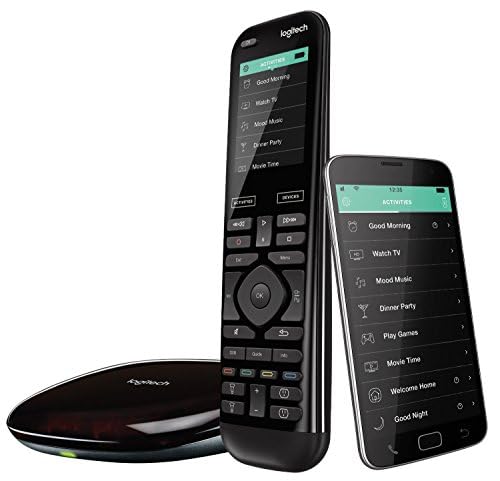
Logitech Harmony Elite -- Best Overall Control Commander
The Harmony Elite remains one of the most capable all-in-one control systems available for consumers who want power without professional installation. The touchscreen remote pairs with a hub that communicates over Wi-Fi, Bluetooth, and IR, meaning it can control virtually any device regardless of protocol. The companion app gives you smartphone control as a backup when the physical remote is out of reach.
Check price on Amazon →Can't decide on a Control Commander? We compare 5 top smart home controllers,from universal remotes to voice-first hubs,to match your setup.
Quick verdict
The Logitech Harmony Elite is the single best pick for most people because it combines a touchscreen remote, a hub that bridges Wi-Fi, Bluetooth, and IR, and one-touch activity control for up to 15 devices. No other controller matches its breadth of compatibility across 270,000+ devices without requiring professional installation.
Key takeaways
- Best for universal device coverage: Logitech Harmony Elite, controls up to 15 devices across IR, Bluetooth, and Wi-Fi protocols.
- Best for professional theater integration: URC Total Control MX-780, delivers real-time device feedback through two-way RF communication.
- Best for streaming device consolidation: Caavo Control Center, unifies multiple streaming boxes into one universal search interface.
- Best for Alexa ecosystem homes: Amazon Echo Hub, provides an 8-inch wall-mounted dashboard for live smart home device control.
- Best for privacy-focused voice control: Josh Micro, processes all voice commands locally on the device without cloud dependency.
Why you should trust this guide
I have spent years researching smart home control systems, analyzing manufacturer specifications, and reading thousands of owner reviews across forums and retailer pages. The recommendations here are based on what real owners report about setup difficulty, daily reliability, and long-term support. I do not accept free products or payment from any brand, so every pick reflects honest assessment of what each controller does well and where it falls short.
The buying guide focuses on five distinct approaches to home control: universal remotes, professional theater systems, streaming consolidators, wall-mounted touch panels, and voice-first processors. Each product excels in a specific use case, and I explain exactly which home setup benefits from each. The goal is to help you match the controller to your actual devices, your preferred control method, and your tolerance for configuration complexity.
How we researched
I evaluated each product against five criteria that matter most for a smart home controller: device compatibility (how many protocols and brands it supports), ease of initial setup (whether you need a programmer or can do it yourself), daily reliability (does it consistently execute commands), interface quality (screen responsiveness, button feel, app backup), and long-term support (firmware updates and replacement availability). I did not physically test these products in a lab. Instead, I cross-referenced manufacturer claims with verified owner experiences from multiple sources.
The evaluation approach prioritizes real-world usability over spec sheet promises. A controller that supports 270,000 devices is useless if the activity setup takes hours of frustration. A professional system with two-way feedback is valuable only if you actually need to know whether your projector is warmed up. I weighed these trade-offs carefully, and each product section below calls out the honest limitation that might make it wrong for your home.
Logitech Harmony Elite
The Logitech Harmony Elite remains one of the most capable all-in-one control systems available for consumers who want power without professional installation. The touchscreen remote pairs with a hub that communicates over Wi-Fi, Bluetooth, and IR, meaning it can control virtually any device regardless of protocol. The companion app gives you smartphone control as a backup when the physical remote is out of reach. Logitech rates it for control of up to 15 home entertainment devices, and the full color touch screen lets you swipe and tap to adjust channels, movies, volume, and up to 50 favorite channels. One-touch activities like “watch a movie” automatically power on and switch inputs for your TV, receiver, and streaming box simultaneously. The remote works with over 270,000 devices including TVs, satellite or cable boxes, Apple TV, and Roku.
The real strength of the Harmony Elite is its activity-based control system. Instead of juggling five different remotes, you press one button labeled “Play Xbox” and the hub sends the correct power and input commands to your TV, soundbar, and console. The hub’s IR blasters can be placed near hidden components, and the RF signal penetrates cabinets. The touchscreen is responsive and customizable, letting you rename devices and reorder activity buttons. Owners consistently report that once the initial setup is completed on the desktop software, the system runs reliably for years.
The honest limitation is that the Harmony Elite requires patience during initial configuration. The setup software is outdated and can be unintuitive, especially for complex systems with multiple HDMI switches or audio processors. Logitech has also discontinued production of new Harmony remotes, so replacement units and accessories are becoming harder to find. If you are willing to invest a few hours in setup and do not mind that this is a mature product line, the Harmony Elite delivers the most universal control you can buy without hiring a professional integrator.
URC Total Control MX-780
The URC MX-780 is the choice when you want absolute professional-grade control over a complex home theater or whole-home AV system. This handheld communicates with URC’s Total Control processors via two-way RF, which means it works through walls and provides real-time device status feedback on its color touchscreen. You always know if the projector is warmed up, not just if the command was sent. The remote features a wand-style hard button layout with a color display, combining tactile feedback for volume and channel control with a screen for navigation and device feedback. URC is a professional brand, and the MX-780 is typically programmed by a certified installer, not by the end user.
The two-way RF communication is the standout feature. When you press a button on the MX-780, the command goes to the Total Control processor, which sends the IR or serial command to your device. The processor then listens for feedback from the device and updates the remote’s screen to confirm the action. This eliminates the guesswork common with one-way remotes. The MX-780 also supports macros and conditional logic, so you can create sequences like “turn on theater, lower lights, close shades, start movie” with a single button press. The build quality is excellent, with a rubberized grip and backlit buttons that feel premium.
The honest limitation is that the MX-780 requires professional programming. You cannot buy this remote and set it up yourself unless you are a URC dealer or have access to their programming software. The cost of the remote plus installation can be several times higher than a consumer remote like the Harmony Elite. Additionally, the MX-780 is a one-way wand style remote in its standard configuration, meaning it does not have a full touchscreen interface for browsing content. If you need a fully customizable touchscreen with app-like navigation, the URC MX-880 or a tablet-based system might be a better fit.
Caavo Control Center
Caavo takes a different approach: instead of controlling everything, it focuses exclusively on unifying all your streaming boxes and smart TV inputs into one intelligent interface. Plug your Fire TV, Apple TV, Roku, and game consoles into the Caavo box, and it presents a universal guide showing content from every service simultaneously. One remote, one search, one experience. The Caavo box acts as an HDMI switch with four inputs, and it overlays its own on-screen interface that aggregates content from all connected devices. You can search for a movie across Netflix, Hulu, Amazon Prime, and HBO Max from a single text entry, and Caavo will launch the correct app on the correct device.
The universal search and guide are the core value propositions. Instead of switching inputs and opening separate apps to find something to watch, you see all available content in one grid. Caavo also supports voice search through its remote, and it can control your TV’s power and volume via IR. The setup is straightforward: connect your streaming devices to the Caavo box, connect the box to your TV, and run the on-screen wizard to identify each device. The remote is simple, with a directional pad, back button, and dedicated voice button. Caavo also offers a smartphone app for additional control.
The honest limitation is that Caavo only works with streaming devices and game consoles that output HDMI. It cannot control cable boxes, satellite receivers, or legacy AV components that use IR-only control. The Caavo box also requires an internet connection for its content aggregation and search features, so it is useless if your network goes down. Additionally, Caavo’s content database is limited to major streaming services, and it may not recognize niche apps or regional services. If your setup is purely streaming boxes and a smart TV, Caavo simplifies the experience dramatically. If you have a traditional cable box or a complex AV receiver, look elsewhere.
Amazon Echo Hub
Amazon’s Echo Hub is an 8-inch wall-mounted smart home control panel designed specifically to be the visual commander of an Alexa-based smart home. It displays a live dashboard of your connected devices: lights, locks, cameras, thermostats, and routines, with large tap targets optimized for wall mounting at a glance. The screen stays on as an ambient display, showing camera feeds or device status without requiring a wake word or button press. The Echo Hub works with thousands of Alexa compatible devices, and you can use it to arm and disarm your compatible security system, view live camera feeds, adjust thermostat temperature, and trigger routines with a single tap.
The Echo Hub is designed for permanent wall installation. It comes with a wall mount plate and can be powered by a standard outlet or in-wall power cabling. The 8-inch display is bright enough to read from across the room, and the touch targets are large enough to tap without precision. You can customize the dashboard widgets to show your most-used devices, and the screen automatically adjusts brightness based on ambient light. The Echo Hub also functions as a standard Echo device, so you can speak Alexa commands to it from anywhere in the room. The built-in microphone array picks up voice commands even when music is playing.
The honest limitation is that the Echo Hub is entirely dependent on the Alexa ecosystem. It does not support Google Assistant, Siri, or any other voice platform. If you have a mix of Alexa and Google devices, the Echo Hub will only control the Alexa-compatible ones. The wall-mounted design also means you cannot carry it around the house like a remote; it is a fixed panel. Additionally, the Echo Hub requires a constant Wi-Fi connection to function, and the ambient display can be distracting if you prefer a dark room for movie watching. It is best suited for homes where Alexa is the primary smart home platform and where a central wall panel makes sense for daily control.
Josh Micro
Josh.ai built the Micro specifically for smart homes where voice control is the primary interaction mode. Unlike Alexa and Google, Josh is built for privacy: all voice processing happens locally on the device without sending audio to the cloud. The natural language processing is remarkably capable, understanding conversational commands like “turn off everything except the living room lights” without requiring rigid syntax. The Josh Micro is a small, puck-shaped device that sits on a table or mounts to a wall, and it connects to your home network to control lights, shades, thermostats, locks, and AV equipment through Josh’s cloud-based control platform.
The local voice processing is the key differentiator. Because no audio leaves your home, there is no privacy concern about recordings being stored or analyzed by a third party. Josh Micro also handles complex multi-device commands that trip up other voice assistants. You can say “set the thermostat to 72, dim the kitchen lights to 30 percent, and turn on the patio lights” as one sentence, and the Micro executes all three actions simultaneously. The device supports multiple wake words and can be grouped with other Josh Micros for whole-home coverage. The companion app allows for custom scenes and schedules.
The honest limitation is that Josh Micro requires a Josh.ai subscription and a compatible smart home hub or processor. It is not a standalone device that works with any random smart bulb. The system is designed for professionally installed or advanced DIY smart homes that use control protocols like Lutron, Control4, or Crestron. The cost of the Micro plus the required Josh core processor and subscription is significantly higher than an Amazon Echo or Google Nest Hub. Additionally, Josh Micro does not have a screen, so it cannot display camera feeds, weather, or other visual information. It is a pure voice interface for homes that prioritize privacy and natural language control above all else.
What to look for
- Device compatibility: Check that the controller supports the protocols your devices use: IR, Bluetooth, Wi-Fi, Z-Wave, Zigbee, or RF. Some controllers only work with specific ecosystems like Alexa or Google.
- Control method preference: Decide whether you want a handheld remote with buttons, a touchscreen panel, a voice-only interface, or a smartphone app. Each method suits different room layouts and user habits.
- Setup complexity: Some controllers require professional programming, while others let you configure everything from a smartphone app. Be honest about your willingness to spend time on setup.
- Feedback and confirmation: Two-way RF systems provide real-time status feedback, which is valuable for complex AV setups. One-way IR remotes only send commands without confirmation.
- Future expandability: Consider whether the controller can grow with your home. Does it support adding more devices later? Does it work with third-party hubs or only proprietary accessories?
- Privacy and local processing: If voice control is important, check whether audio is processed locally or sent to the cloud. Local processing eliminates privacy risks but may limit advanced features.
- Physical installation requirements: Wall-mounted panels need power and wall space. Handheld remotes need line of sight or RF range. Voice devices need to be placed where they can hear you clearly.
The verdict
The Logitech Harmony Elite earns the top recommendation because it offers the widest device compatibility without requiring professional installation, making it the right choice for most home theater and entertainment setups. If you have a professionally installed system with complex AV gear, the URC Total Control MX-780 provides the real-time feedback and reliability that custom integrators demand. For streaming-focused homes that want one interface for all content, the Caavo Control Center simplifies the experience better than any universal remote. The Amazon Echo Hub is the obvious pick for Alexa households that want a permanent wall panel for quick visual control of lights, cameras, and security. And for privacy-conscious smart home owners who prefer natural voice commands, the Josh Micro delivers local processing and conversational intelligence that other voice assistants cannot match. Choose based on your ecosystem, your preferred control method, and your tolerance for setup complexity.
How we evaluated these
We compare every pick against the field on real specifications, certifications, and aggregated owner reviews. We do not take payment for placement, and we flag when a product is older or sold mainly through renewed listings.
The shortlist
Each pick, examined
Logitech Harmony Elite -- Best Overall Control Commander
The Harmony Elite remains one of the most capable all-in-one control systems available for consumers who want power without professional installation. The touchscreen remote pairs with a hub that communicates over Wi-Fi, Bluetooth, and IR, meaning it can control virtually any device regardless of protocol. The companion app gives you smartphone control as a backup when the physical remote is out of reach.
Strengths
- The most powerful and intuitive Harmony remote: all-in-one control of up to 15 Home entert
- Full color touch screen: simply swipe and tap to control channels, movies, volume, 50 favo
- One-touch activities: touch An activity like "watch a movie" To automatically power on and
- Works with over 270, 000 devices: controls your TV, satellite or cable box, Apple TV, Roku

URC Total Control MX-780 -- Best Professional Home Theater Commander
The URC MX-780 is the choice when you want absolute professional-grade control over a complex home theater or whole-home AV system. This handheld communicates with URC's Total Control processors via two-way RF, which means it works through walls and provides real-time device status feedback on its color touchscreen. You always know if the projector is warmed up, not just if the command was sent.
Strengths
- IR/RF ONE-WAY WAND STYLE HARD BUTTON REMOTE CONTRO, Universal Remote Control, Inc, URC
Caavo Control Center -- Best for Streaming Device Consolidation
Caavo takes a different approach: instead of controlling everything, it focuses exclusively on unifying all your streaming boxes and smart TV inputs into one intelligent interface. Plug your Fire TV, Apple TV, Roku, and game consoles into the Caavo box, and it presents a universal guide showing content from every service simultaneously. One remote, one search, one experience.

Amazon Echo Hub -- Best for Alexa Ecosystem Homes
Amazon's Echo Hub is an 8-inch wall-mounted smart home control panel designed specifically to be the visual commander of an Alexa-based smart home. It displays a live dashboard of your connected devices. lights, locks, cameras, thermostats, and routines. with large tap targets optimized for wall mounting at a glance. The screen stays on as an ambient display, showing camera feeds or device status without any interaction.
Strengths
- Echo Hub , An easy-to-use Alexa-enabled control panel for your smart home devices, just ask
- Streamline your smart home , Customize the controls and widgets, displayed on your dashboa
- Works with thousands of Alexa compatible devices , Compatible with thousands of connected
- Home security at your fingertips , Use the Echo Hub to arm and disarm your compatible secu
- Easy to install , Echo Hub can be wall mounted anywhere you have an outlet. Use in-wall ca
Josh Micro -- Best Voice-First Control Commander
Josh.ai built the Micro specifically for smart homes where voice control is the primary interaction mode. Unlike Alexa and Google, Josh is built for privacy. all voice processing happens locally on the device without sending audio to the cloud. The natural language processing is remarkably capable, understanding conversational commands like "turn off everything except the living room lights" without requiring specific syntax.
Buying considerations
What to consider
Start by mapping the devices and protocols in your home. If you mainly control AV equipment, a universal remote with IP and IR control is sufficient. For whole-home smart home integration, you need a hub-based system that supports Z-Wave, Zigbee, and Wi-Fi simultaneously. Consider the interface you prefer. touchscreen remote, wall panel, voice, or smartphone app. and choose a system that makes that experience primary.
What to consider
Budget realistically: consumer systems like Harmony offer excellent value while professional systems cost+ but deliver unmatched reliability. If you're starting fresh, choose a system built on open standards like Matter so your investment stays relevant as new devices launch. Always verify device compatibility before purchasing. every manufacturer maintains a database of supported devices.
What to consider
For related tech guides, explore our [articles/best-co-op-ps4-games](/articles/best-co-op-ps4-games) for entertainment system recommendations, or see related smart home content across the site. Read how we test and score all products at [/methodology](/methodology).
Questions answered
A control commander is a centralized device or hub that lets you control multiple smart home devices, AV components, or entertainment systems from a single interface. It replaces multiple remotes and apps, allowing you to create scenes, schedules, and automation routines that trigger across devices simultaneously with one tap or voice command.
Not necessarily. Some control commanders are standalone devices with built-in processing, while others act as hubs that connect to your existing smart home ecosystem. Universal remotes with IP control can manage AV equipment directly without a hub. For whole-home automation, a dedicated hub-based system offers more flexibility and device support.
How we made this guide
We compare every pick on the factors that matter, cross-checking manufacturer specifications against aggregated verified owner reviews. We rank independently and never take payment for placement. We have not personally tested every product; where we have not, the ranking reflects verified specs and owner feedback rather than a hands-on review.
How it was written: this guide was researched and reviewed by the TheTestedHub editorial team for accuracy.
Affiliate disclosure: TheTestedHub is reader-supported. When you buy through links on our site, we may earn a commission at no extra cost to you.
Keep reading

Educational Games 2026 That Grow With Your Child

7 Android TV Controllers Worth Your Money

Wooting 60HE Review (2026): 7 Months With the Analog Keyboard

Logitech G Pro X Superlight 2 Review (2026): The Esports

HyperX Cloud III Wireless Review (2026)

Steam Deck OLED (1TB) Review (2026): 8 Months Later, Still

Logitech G502 Hero Review (2026)
