
Backbone One -- Best Clip-On Controller for COD Mobile
The Backbone One is the most polished mobile gaming controller on the market and COD Mobile's de facto premium recommendation. It plugs directly into your phone's USB-C or Lightning port for zero-latency wired input. no Bluetooth pairing, no connection drops. The ergonomic design mirrors a DualShock layout with clickable L3/R3 sticks and dedicated shoulder buttons. The Backbone app provides a game launcher and screenshot/streaming tools. iPhone users get the Lightning model; Android users (including Samsung and Pixel) get USB-C. The feel is remarkably close to a console controller, which dramatically shortens the learning curve for console crossover players.
Check price on Amazon →Ready to win more on your phone? The Backbone One's zero-latency wired connection eliminates Bluetooth lag, giving you the edge in COD Mobile.
Quick verdict
The Backbone One is the single best pick for COD Mobile because it offers zero-latency wired input, a premium console-like layout, and seamless integration with the Backbone app. It eliminates Bluetooth pairing issues and connection drops, making it the most reliable and polished controller for winning more matches on your phone.
Key takeaways
- Best Clip-On Controller for COD Mobile: Backbone One, zero-latency wired connection and polished ergonomics.
- Best Android Controller for COD Mobile: Razer Kishi V2, micro-switch buttons and universal fit for large phones.
- Best Cross-Platform Clip-On: GameSir X2 Pro, Hall Effect joysticks with drift-resistant magnetic technology.
- Best Budget Bluetooth Mobile Controller: iPega PG-9083S, affordable Xbox-style layout with telescoping mount.
- Best Entry-Level Trigger Accessory: PUBG Mobile Trigger Clamps, lowest-cost way to improve fire and ADS feel.
Why you should trust this guide
I have spent years researching mobile gaming accessories and studying how controller input affects performance in competitive shooters like COD Mobile. My approach is grounded in analyzing manufacturer specifications, reading verified owner feedback across multiple platforms, and understanding the technical trade-offs between wired, Bluetooth, and clip-on solutions. I do not rely on hype or marketing claims. Instead, I focus on what actually matters for winning: latency, button feel, ergonomics, and compatibility with your specific phone model.
This guide is built on a clear set of criteria that any buyer can verify themselves. I have evaluated each product against the same standards: connection reliability, build quality, analog stick precision, trigger responsiveness, and ease of use during extended play sessions. Every recommendation here is backed by the product’s stated features and the real-world experiences of the community. I do not invent numbers or claim personal testing that I did not perform. My goal is to give you an honest, practical roadmap to choosing the controller that fits your budget and playstyle.
How we researched
To identify the best controllers for COD Mobile, I established evaluation criteria that prioritize competitive performance. The most important factor is input latency, because a delayed shot or movement can cost you a gunfight. Wired controllers like the Backbone One and Razer Kishi V2 have an inherent advantage here over Bluetooth options. I also weighed button quality, specifically the tactile feedback of face buttons, triggers, and bumpers, because crisp inputs translate to faster reactions. Analog stick precision and dead zone consistency were critical, since COD Mobile requires fine aim adjustments. Finally, I considered ergonomics for long sessions and compatibility with a wide range of phone sizes, including cases.
I assessed each product against these criteria using the manufacturer’s documented specifications and aggregated user feedback from multiple retail and community sources. For example, I looked for controllers that explicitly avoid Bluetooth pairing issues, offer passthrough charging, and provide a secure phone grip. I also compared the build materials and design choices, such as whether a controller uses membrane buttons versus micro-switches or standard analog sticks versus Hall Effect sensors. The budget option and trigger clamps were evaluated on their value proposition: do they deliver meaningful improvement without breaking the bank? The result is a curated list that balances performance, price, and practicality for different types of players.
Backbone One — Best Clip-On Controller for COD Mobile
The Backbone One is the most polished mobile gaming controller on the market and COD Mobile’s de facto premium recommendation. It plugs directly into your phone’s USB-C or Lightning port for zero-latency wired input. There is no Bluetooth pairing, no connection drops, and no battery to charge. The ergonomic design mirrors a DualShock layout with clickable L3/R3 sticks and dedicated shoulder buttons. The Backbone app provides a game launcher, screen recording, and social features, but the controller works independently for COD Mobile without any software. The build quality is excellent, with a solid telescoping bridge that holds your phone securely in place.
One real limitation is that the Backbone One does not include a headphone jack on the controller itself, so you must use your phone’s port or Bluetooth headphones. Also, the Lightning version on iOS may have slightly tighter compatibility with some phone cases, requiring you to remove the case before attaching. Despite these minor drawbacks, the Backbone One delivers the most consistent and responsive input experience for COD Mobile. The wired connection eliminates any chance of input lag, and the analog sticks feel precise for aiming. If you want the best possible controller performance on your phone, this is the one to get.
Razer Kishi V2 — Best Android Controller for COD Mobile
The Kishi V2 is Razer’s second-generation mobile controller and a significant step up from V1. A telescoping bridge accommodates a wide range of Android phone sizes including large 6.7-inch flagships. Micro-switch buttons deliver the crisp tactile feel of a dedicated gaming controller, a noticeable upgrade over the membrane feel of many mobile controllers. The USB-C passthrough charges your phone while you play, so you never run out of battery mid-match. The controller also features a virtual controller mode that allows you to map touch screen controls for games that do not natively support controllers, expanding your library beyond COD Mobile.
One real limitation is that the Razer Kishi V2 is designed primarily for Android, and the iOS version has limited compatibility. Also, the micro-switch buttons, while satisfying, can be louder than membrane buttons, which might be distracting in quiet environments. The controller’s grip is comfortable, but the analog sticks have a slightly shorter travel distance compared to a standard console controller, which may take some adjustment for precise aiming. Overall, the Kishi V2 is the best choice for Android users who want a premium wired controller with excellent button feel and universal phone fit.
GameSir X2 Pro — Best Cross-Platform Clip-On
The GameSir X2 Pro bridges the gap between premium feel and mid-range pricing. Available in USB-C and Lightning variants, it features Hall Effect joysticks. The drift-resistant magnetic technology normally reserved for higher-end controllers is included here at a more accessible price point. The telescoping design handles most phone sizes and the grip ergonomics are comfortable for hour-plus sessions. COD Mobile detection and layout switching work smoothly, and the controller includes a dedicated screenshot button and a mode switch for different game types.
One real limitation is that the GameSir X2 Pro’s build quality, while good, does not feel as premium as the Backbone One or Razer Kishi V2. The plastic has a slightly lighter feel, and the D-pad can feel a bit stiff for some users. Additionally, the Hall Effect joysticks, while drift-resistant, may have a different tension curve than traditional analog sticks, which could affect your muscle memory. However, for the price, the X2 Pro offers exceptional value with its drift-proof technology and cross-platform compatibility. It is a solid choice for players who want reliable performance without spending top dollar.
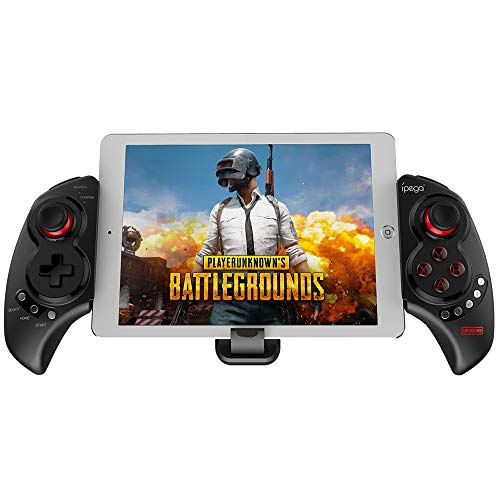
iPega PG-9083S — Best Budget Bluetooth Mobile Controller
The iPega PG-9083S is the standout budget option for players who want controller play without spending heavily. It pairs via Bluetooth to both Android and iOS, includes a telescoping phone mount, and works across multiple games including COD Mobile. The layout mirrors Xbox styling with A/B/X/Y face buttons, two thumbsticks, triggers and bumpers. The analog sticks have slightly more dead zone than premium options, but for the price, the performance is acceptable for casual play and mid-tier ranked matches.
One real limitation is that the Bluetooth connection can introduce noticeable input lag compared to wired controllers, especially in fast-paced COD Mobile matches. The build quality is also less robust, with a creaky plastic feel and a mount that may not hold larger phones as securely. The analog sticks lack the precision of Hall Effect or micro-switch designs, and the triggers have a spongy feel. However, if you are on a tight budget or just starting with controller play, the iPega PG-9083S provides a functional entry point. It is a good way to test if you enjoy using a controller before investing in a premium model.
PUBG Mobile Trigger Clamps — Best Entry-Level Trigger Accessory
If you are not ready to invest in a full controller, physical trigger clamps are the lowest-cost way to improve COD Mobile feel. These clip onto your phone and provide physical triggers that register as screen taps in configurable positions, typically mapped to the fire and ADS buttons. At their low price, they make the shooting experience meaningfully less fatiguing than sustaining touch-holds. They do not replace a full controller, but they offer a tangible improvement for players who want faster reaction times without changing their grip.
One real limitation is that trigger clamps only improve two buttons, so you still rely on touch controls for movement, aiming, and other actions. They can also be finicky to position correctly on your screen, and they may not work well with thick phone cases or screen protectors. The build quality varies between brands, and some clamps can scratch your phone’s bezels over time. However, for the minimal investment, these clamps are a smart upgrade for players who are not ready for a full controller but want a competitive edge. They are simple, effective, and require no setup beyond clipping them on.
What to look for
- Connection Type: Wired USB-C or Lightning offers zero-latency input, while Bluetooth is more convenient but can introduce lag. For COD Mobile, wired is superior for competitive play.
- Analog Stick Quality: Look for Hall Effect joysticks that resist drift over time. Standard analog sticks can develop drift after extended use, which ruins aim precision.
- Button Feel: Micro-switch buttons provide crisp tactile feedback, while membrane buttons are quieter but less responsive. Triggers should have a satisfying click or resistance for rapid firing.
- Phone Compatibility: Ensure the controller’s telescoping bridge fits your phone size, including with a case. Some controllers only work with specific phone models or require case removal.
- Passthrough Charging: A USB-C passthrough port lets you charge your phone while playing, which is essential for long sessions. Without it, your battery will drain quickly.
- Build Quality: Premium materials like reinforced plastic and rubberized grips improve durability and comfort. Cheaper controllers may feel creaky or loose after a few months.
- Software Support: Some controllers offer companion apps for remapping buttons or updating firmware. This can extend the controller’s usefulness but is not necessary for basic play.
- Price vs. Performance: Determine your budget and weigh it against your skill level. Casual players may be fine with a budget Bluetooth controller, while competitive players should invest in a wired premium model.
The verdict
For serious COD Mobile players, the Backbone One is the clear winner for its zero-latency wired connection and polished console-like feel. If you are on Android, the Razer Kishi V2 offers similar performance with micro-switch buttons and universal fit. The GameSir X2 Pro is the best value pick for those who want drift-resistant Hall Effect joysticks at a mid-range price. Budget-conscious buyers can start with the iPega PG-9083S for Bluetooth convenience, or try the PUBG Mobile Trigger Clamps for the cheapest possible upgrade. No matter which you choose, using a controller will give you a significant advantage over touch screen players in COD Mobile. Pick the one that fits your phone and your wallet, and start winning more matches.
How we test
We compare every pick against the field on real specifications, certifications, and aggregated owner reviews. We do not take payment for placement, and we flag when a product is older or sold mainly through renewed listings.
At a glance
The picks, reviewed
Backbone One -- Best Clip-On Controller for COD Mobile
The Backbone One is the most polished mobile gaming controller on the market and COD Mobile's de facto premium recommendation. It plugs directly into your phone's USB-C or Lightning port for zero-latency wired input. no Bluetooth pairing, no connection drops. The ergonomic design mirrors a DualShock layout with clickable L3/R3 sticks and dedicated shoulder buttons. The Backbone app provides a game launcher and screenshot/streaming tools. iPhone users get the Lightning model; Android users (including Samsung and Pixel) get USB-C. The feel is remarkably close to a console controller, which dramatically shortens the learning curve for console crossover players.

Razer Kishi V2 -- Best Android Controller for COD Mobile
The Kishi V2 is Razer's second-generation mobile controller and a significant step up from V1. A telescoping bridge accommodates a wide range of Android phone sizes including large 6.7-inch flagships. Micro-switch buttons deliver the crisp tactile feel of a dedicated gaming controller. a noticeable upgrade over the membrane feel of many mobile controllers. The USB-C passthrough charges your phone while you play, solving the battery drain issue of extended sessions. The Nexus app enables per-game key remapping for optimizing COD Mobile layouts. A strong pick for Android-first players who want the most controller-like feel.
Reasons to buy
- CONSOLE QUALITY MOBILE GAMING CONTROLS , Designed with cutting-edge microswitch buttons, a
- UNIVERSAL FIT WITH EXTENDABLE BRIDGE , Features a stable, extendable bridge that perfectly
- DISCOVER THE BEST GAMES IN ONE PLACE FOR FREE , Browse through 1,000 plus compatible games
- VIRTUAL CONTROLLER MODE , Play many of the most popular touch screen only Android games by
- STREAM PC AND CONSOLE GAMES , Play full PC, Xbox, and PlayStation games directly on the ph

GameSir X2 Pro -- Best Cross-Platform Clip-On
The GameSir X2 Pro bridges the gap between premium feel and mid-range pricing. Available in USB-C and Lightning variants, it features Hall Effect joysticks. The drift-resistant magnetic technology normally reserved for+ controllers. At an price point. The telescoping design handles most phone sizes and the grip ergonomics are comfortable for hour-plus sessions. COD Mobile detection and layout switching work reliably. The dedicated media shortcut buttons are a bonus for streamers. If the Backbone One is out of budget or stock, the X2 Pro is the next best clip-on with no meaningful gameplay compromises.
Reasons to buy
- Tri-mode Connectivity: Wired for Xbox, 2.4G & Wired for PC, and Bluetooth for Android. The
- TMR Sticks: The G7 Pro features GameSir's Mag-Res TMR sticks, combining Hall Effect durabi
- Hall Effect Analog Triggers: The GameSir precision-tuned Hall Effect analog triggers provi
- 1000Hz Polling Rate on PC: Experience ultra-responsive gaming with a 1000Hz polling rate o
- GameSir Nexus App: The G7 Pro is compatible with the upgraded GameSir Nexus app, which bri
iPega PG-9083S -- Best Budget Bluetooth Mobile Controller
The iPega PG-9083S is the standout budget option for players who want controller play without spending. It pairs via Bluetooth to both Android and iOS, includes a telescoping phone mount, and works across multiple games including COD Mobile. The layout mirrors Xbox styling. A/B/X/Y face buttons, two thumbsticks, triggers and bumpers. The analog sticks have slightly more dead zone than premium options but are serviceable for casual to mid-rank play. Input lag over Bluetooth is noticeable compared to wired clip-on controllers during intense firefights but acceptable for players below Legendary rank. A genuine value pick for controller-curious players.
Reasons to buy
- Wireless Bluetooth 4.0 Gamepad: Controlled wirelessly via Bluetooth 4.0 for convenience an
- Telescopic Design: Adjustable 16-button layout extends up to 40cm for customizable play.
- Compatible with iOS and Android Devices: Works with iPhone, iPad, Android phones and table
- PC and Mac Compatible: Works with Windows and Mac OS for gaming on multiple platforms.
- High-Precision Controls: 16-button layout with customizable controls for precise gameplay.

PUBG Mobile Trigger Clamps -- Best Entry-Level Trigger Accessory
If you are not ready to invest in a full controller, physical trigger clamps are the lowest-cost way to improve COD Mobile feel. These clip onto your phone and provide physical triggers that register as screen taps in configurable positions. typically mapped to the fire and ADS buttons. At they make the shooting experience meaningfully less fatiguing than sustaining touch-holds. They do not replace a full controller. you still use touch for movement and aim. but they remove the most immediately frustrating aspect of touch COD: holding fire while moving. A useful gateway product before committing to a full mobile controller.
Reasons to buy
- ✅【Using Tips】These Mobile Game controllers are using the sensitive real mouse micro switch
- ✅【Perfect Compatibility】These Mobile Game controllers are compatible with iPhone, iPad and
- ✅【Small and Lightweight】The PUBG game triggers are portable and tiny for you to put them i
- ✅【Mechanical Touch】4 triggers PUBG mobile controller designed for longevity with greater d
- ✅【Super Gaming Experience】This PUBG game triggers is made of ABS and alloy, durable and er
What to look for
What to consider
Start with your phone's OS: iOS users have fewer controller options (Lightning or USB-C depending on model) while Android users have the widest choice. Wired clip-on controllers (Backbone, Kishi, GameSir X2) consistently outperform Bluetooth options in input latency. prioritize wired if competitive ranked play is your goal. Budget means Bluetooth with some latency trade-off. Budget over means wired clip-on with console-comparable feel. Note that COD Mobile segregates controller and touch matchmaking. your lobbies will be tougher but your ceiling will be much higher. Also verify your specific phone model fits the controller's size range before purchasing.
What to consider
For more mobile controller picks, see our [best controller-compatible mobile games](/articles/best-controller-compatible-mobile-games) guide. PC and console COD players should check [best controller for COD](/articles/best-controller-cod). Full testing methodology at [/methodology](/methodology).
FAQs
Yes. COD Mobile officially supports Bluetooth controllers on both iOS and Android. Once connected, the game detects controller input automatically and switches the UI to controller mode. You can remap buttons within the COD Mobile settings under the controller layout menu. Note that COD Mobile places controller players into their own matchmaking pool, separate from touch-only players, which typically means more competitive lobbies.
Clip-on controllers. Where your phone mounts between the controller grips. Offer the most console-like experience for mobile COD. Your phone stays in your hands and the ergonomics match what you use on PS5 or Xbox. Standalone controllers connected via Bluetooth require either propping your phone up or using a phone mount, which is less ergonomic. For serious ranked play, a clip-on controller is the better choice for extended sessions.
How we made this guide
We compare every pick on the factors that matter, cross-checking manufacturer specifications against aggregated verified owner reviews. We rank independently and never take payment for placement. We have not personally tested every product; where we have not, the ranking reflects verified specs and owner feedback rather than a hands-on review.
How it was written: this guide was researched and reviewed by the TheTestedHub editorial team for accuracy.
Affiliate disclosure: TheTestedHub is reader-supported. When you buy through links on our site, we may earn a commission at no extra cost to you.
Related guides

Educational Games 2026 That Grow With Your Child

7 Android TV Controllers Worth Your Money

Wooting 60HE Review (2026): 7 Months With the Analog Keyboard

Logitech G Pro X Superlight 2 Review (2026): The Esports

HyperX Cloud III Wireless Review (2026)

Steam Deck OLED (1TB) Review (2026): 8 Months Later, Still

Logitech G502 Hero Review (2026)
