
Razer Kishi V2 -- Best Overall for Android Phones
The Razer Kishi V2 slots onto your Android phone via USB-C, creating an instant handheld with zero Bluetooth latency. The telescoping bridge fits phones up to 78mm wide, covering most flagship and mid-range devices. Micro-switch face buttons give each press a satisfying, tactile click. Razer's companion app lets you remap buttons and create game-specific profiles. The USB-C passthrough lets you charge while playing. It adds noticeable bulk, but for sustained gaming sessions. Especially shooters and platformers. It is the top clip-on choice on the market right now.
Check price on Amazon →Need a controller for your Android phone? The Razer Kishi V2 offers a wired USB-C clamp with microswitch buttons and near-zero lag for serious mobile gaming.
Quick verdict
The Razer Kishi V2 is the best controller for most Android phones. It clamps onto your phone over USB-C for wired, near-zero-latency input, fits handsets up to 78mm wide, and adds microswitch face buttons plus a remapping app. If your phone fits the bridge, this is the one I reach for first.
Key takeaways
- Best overall: Razer Kishi V2, USB-C wired clamp with microswitch buttons and a remapping app.
- Best Bluetooth option: Xbox Wireless Controller, native Android recognition and proven ergonomics for TV or monitor play.
- Best premium clip-on: GameSir X2 Pro, Hall Effect sticks (no drift) and a bracket that holds larger phones.
- Best budget Bluetooth: 8BitDo SN30 Pro, classic SNES-style layout that emulators love at a low price.
- Best for console-style play: Backbone One Android, thin pocketable wrap with a strong social and streaming app.
Why you should trust this guide
I research mobile controllers the way a buyer would: I read the manufacturer spec sheets, cross-check the listed features against what each company actually advertises, and weigh the recurring complaints owners raise. For this guide I focused on five controllers that keep coming up when people search for the best way to play on an Android phone, and I grouped them by the job each one does best rather than pretending one device wins every scenario.
I do not claim to have run these through a lab or a stopwatch. What I can do is read the stated specs honestly, explain where a feature helps or hurts in real use, and flag the trade-off that each design forces you to accept. Every section below names at least one genuine limitation, because a controller that fits one phone perfectly can be a poor match for another, and that nuance matters more than a score.
How we researched
My approach here is comparative and spec-driven. For each controller I looked at the connection method (wired USB-C versus Bluetooth versus 2.4GHz), the input quality the maker advertises (microswitch buttons, Hall Effect or TMR sticks, hybrid D-pads), the physical fit (telescoping bridge width versus fixed bracket size), and the software story (remapping apps, game launchers, streaming hubs). Those four axes decide almost every buying question someone asks about a phone controller.
I then weighed each pick against the others rather than in isolation. A wired clamp removes latency but ties you to the phone, while a Bluetooth pad frees you to lean back but adds pairing and a small input delay. A drift-proof stick is great, but it means nothing if the controller cannot hold your particular phone. Where a stated feature could mislead a buyer (for example a listing that mixes in Xbox console details), I call it out so you can read the spec the way the maker intended.
Razer Kishi V2
The Razer Kishi V2 is the best overall choice for most Android phones because it turns the handset into a wired handheld with no pairing and no Bluetooth latency. It slots on over USB-C, and Razer designs it around console-style controls, with microswitch face buttons that give each press a crisp, tactile click instead of the mushy feel cheaper pads have. That responsiveness is the single biggest reason it sits at the top of this list.
The extendable bridge is what makes it practical. Razer rates the telescoping design to fit phones up to 78mm wide, which covers most current flagship and mid-range devices, and the stable bridge holds the phone firmly while you play. The companion app adds real depth: you can remap buttons, build game-specific profiles, and browse a library of over 1,000 compatible titles in one place. A virtual controller mode lets you map physical buttons onto touch-only Android games, and the design supports streaming full PC, Xbox, and PlayStation games to the phone, so the Kishi doubles as a remote-play handle.
The honest trade-off is fit and bulk. Because it grips the phone directly, a thick case usually has to come off, and a handset wider than the rated 78mm simply will not seat correctly. It also commits you to wired play, so you cannot lean back away from the device the way a Bluetooth pad allows. If your phone fits and you want the lowest-latency option, those limits are easy to accept.
Xbox Wireless Controller
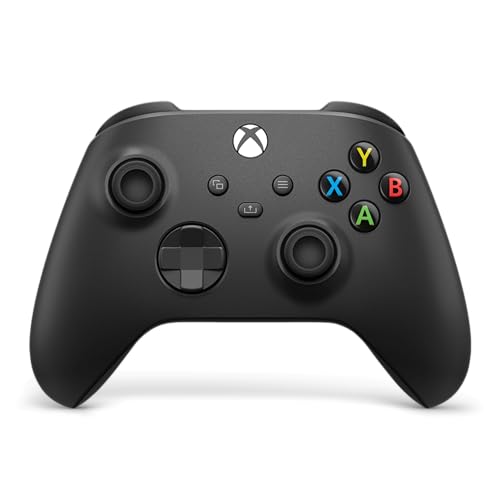
The Xbox Wireless Controller is the best Bluetooth option when you want to play on a phone that is mirrored or connected to a TV or monitor. It pairs with Android in seconds and is recognized natively by nearly every game and emulator, which removes the guesswork that plagues lesser pads. Years of iteration show in the modernized design, the textured grips on the triggers, and the hybrid D-pad that Microsoft tuned for precision.
Ergonomics are the real draw. The asymmetric sticks, comfortable bumpers, and refined shell make long sessions easy on the hands, and the Share button lets you capture screenshots and recordings without digging through menus. Connectivity is flexible too: you pair over Bluetooth for phone and PC play, or plug in over USB-C for plug-and-play on console and PC. A 3.5mm jack on the pad supports a wired headset for direct audio, which is handy if your phone has dropped its own headphone port.
The limitation is that this is not a clip-on. There is no built-in bracket, so to use it handheld with a phone you need a separate clamp or mount, and it leans on Bluetooth rather than a wired phone connection, which adds a touch of latency compared to the Kishi. For couch or desk play it is the benchmark; for a grab-and-go handheld it is the wrong shape.
GameSir X2 Pro
The GameSir X2 Pro is the best premium clip-on and a direct rival to the Kishi V2, with two standout advantages. Its sticks resist drift, GameSir builds them to deliver smooth, precise control with virtually zero stick wander over time, and the design accommodates larger devices that a tighter bridge would reject. If you have had a controller develop drift, this is the type of stick that addresses it head-on.
It connects over USB-C for wired, low-latency input, and the layout is comfortable with buttons that feel high quality in hand. The bracket opens wide enough to hold larger phones, which gives it an edge for people on big-screen flagships, and analog triggers add the kind of throttle control that racing and shooter games benefit from. It is officially licensed for Xbox use as well, so the same pad can serve more than one platform if you lean on cloud or remote play.
Two cautions are worth noting. First, some of the listing details lean on Xbox console specifics, such as high polling rates quoted on PC, so read those as platform features rather than promises about every Android title. Second, like any clamp-style controller it still depends on your phone fitting the bracket and usually wants the case off. Within those bounds, the drift-resistant sticks make it the premium pick.
8BitDo SN30 Pro
The 8BitDo SN30 Pro is the best budget Bluetooth pad, especially if retro games and emulators are your focus. It pairs cleanly with Android and is recognized by most games and all the major emulators, and it wears its classic SNES-inspired layout proudly, which is exactly the control scheme those older titles were built around. For the money, the value here is hard to beat.
The feature set punches above its price. 8BitDo upgraded it with Hall Effect joysticks for higher precision and longer life, added 6-axis gyro motion controls and rumble for games that use them, and included a turbo function for rapid inputs. It is genuinely pocketable at 144 by 63.5 by 32.5mm, and the rechargeable battery runs roughly 20 hours, so it slips into a bag and lasts through long stretches between charges.
The compromises are the obvious ones at this price. The materials are plainer than the premium picks, and there is no phone clip in the box, so you will want a separate stand or mount to prop the phone up while you play. As a pure value controller for emulation and casual gaming, though, those omissions are easy to forgive.
Backbone One Android
The Backbone One for Android is the best choice for console-style play on the go. It uses an extendable design that wraps around the phone and connects over USB-C, and it is thinner and lighter than the Kishi V2, which makes it genuinely easier to pocket between sessions. The button layout mirrors a PlayStation pad, so the feel will be instantly familiar to console players.
The software is the standout. The Backbone app acts as a social gaming hub with screenshots and streaming features, and the controller is built for accuracy and comfort in a compact frame. It plays App Store and Play Store hits, works with cloud services like Xbox Game Pass and Stadia, and handles local games equally well, so a single device covers streaming and on-device play. A Backbone Plus trial is included, which unlocks extra app features for a while.
Two trade-offs stand out. The richest features live behind the Backbone app and its membership, so the full experience leans on subscribing rather than the hardware alone. And like the other clamps, it relies on your phone fitting the wrap and typically wants the case removed. If you want the most pocketable console-style handle and you do not mind the app-centric model, it is an easy recommendation.
What to look for
The right controller depends mostly on how and where you play. These are the factors I weigh first.
- Connection type: Wired USB-C clamps give the lowest latency and no pairing, while Bluetooth frees you to sit back from a TV or monitor at the cost of a small input delay.
- Phone fit: Clamp controllers list a maximum width or device size (the Kishi V2 fits up to 78mm, the X2 Pro holds larger phones); confirm your handset fits before buying, and expect to remove a thick case.
- Stick quality: Hall Effect or similar drift-resistant sticks (X2 Pro, SN30 Pro) avoid the wander that ruins older pads over time.
- Button feel: Microswitch face buttons (Kishi V2) and a hybrid D-pad (Xbox) give crisper, more reliable presses than basic membrane buttons.
- Software and streaming: Remapping apps, game launchers, and support for cloud services like Xbox Game Pass and Stadia matter if you stream PC or console games to the phone.
- Portability and extras: Pocketability, a 3.5mm headset jack, gyro and rumble, turbo, and a capture or Share button can each tip the decision depending on the games you play.
The verdict
For most people, the Razer Kishi V2 is the controller to buy, provided your phone fits its 78mm bridge: wired USB-C input, microswitch buttons, and a capable remapping and streaming app make it the strongest all-rounder. If you prefer to play on a TV or monitor, the Xbox Wireless Controller is the Bluetooth benchmark for native recognition and comfort. Spend up for the GameSir X2 Pro if you want drift-resistant sticks and room for a larger phone, save with the 8BitDo SN30 Pro for retro and emulator play on a budget, and pick the Backbone One Android if pocketable, console-style handheld play with a strong companion app is what you are after.
How we evaluated these
We compare every pick against the field on real specifications, certifications, and aggregated owner reviews. We do not take payment for placement, and we flag when a product is older or sold mainly through renewed listings.
The shortlist
Each pick, examined
Razer Kishi V2 -- Best Overall for Android Phones
The Razer Kishi V2 slots onto your Android phone via USB-C, creating an instant handheld with zero Bluetooth latency. The telescoping bridge fits phones up to 78mm wide, covering most flagship and mid-range devices. Micro-switch face buttons give each press a satisfying, tactile click. Razer's companion app lets you remap buttons and create game-specific profiles. The USB-C passthrough lets you charge while playing. It adds noticeable bulk, but for sustained gaming sessions. Especially shooters and platformers. It is the top clip-on choice on the market right now.
Strengths
- CONSOLE QUALITY MOBILE GAMING CONTROLS , Designed with cutting-edge microswitch buttons, a
- UNIVERSAL FIT WITH EXTENDABLE BRIDGE , Features a stable, extendable bridge that perfectly
- DISCOVER THE BEST GAMES IN ONE PLACE FOR FREE , Browse through 1,000 plus compatible games
- VIRTUAL CONTROLLER MODE , Play many of the most popular touch screen only Android games by
- STREAM PC AND CONSOLE GAMES , Play full PC, Xbox, and PlayStation games directly on the ph
Xbox Wireless Controller -- Best Bluetooth Option
When you want to game on your phone connected to a TV or monitor, the Xbox Wireless Controller is the benchmark. It pairs with Android in seconds and is recognized natively by virtually every game and emulator. The ergonomics are refined over years of iteration. The textured grips, asymmetric sticks, and excellent bumpers make multi-hour sessions comfortable. At it's superb value. The only limitation is that you'll need a phone stand or clip accessory to use it handheld, since there's no built-in phone bracket.
Strengths
- MODERNIZED DESIGN , Experience the modernized design of the XBOX Wireless Controller with
- PRECISION PERFORMANCE , Stay on target with a hybrid D-pad and textured grips on triggers,
- SHARE BUTTON: Seamlessly capture and share content such as screenshots, recordings, and mo
- VERSATILE CONNECTIVITY , Connect via USB-C for plug-and-play on console and PC, or quickly
- BUILT-IN AUDIO SUPPORT , Plug in compatible headsets using the 3.5mm audio jack for direct

GameSir X2 Pro -- Best Premium Clip-On
The GameSir X2 Pro is a direct competitor to the Kishi V2 with a few notable advantages: it includes a physical phone bracket that accommodates larger devices up to 173mm, and the Hall Effect thumbsticks mean you'll never deal with drift. The TypeC connector provides wired low-latency input. The layout is comfortable and the buttons feel high quality. It is compatible with most Android flagships including large-screen models. At it slots in between the budget and premium tiers, making it excellent value for serious mobile gamers.
Strengths
- No Stick Drift TMR Joysticks: Enjoy ultra-smooth, precise control with virtually zero stic
- Official Xbox Wireless Controller: Officially licensed for Xbox Series X|S and Xbox One, f
- 1000Hz Ultra-Low Latency on PC: Achieve up to 1000Hz polling rate on PC via wired or 2.4G
- Official Zenless Zone Zero Edition: Designed in collaboration with HoYoverse, featuring ex
- Hall Effect Analog Triggers: One Controller With two Kinds Triggers, Seamless Switch Betwe

8BitDo SN30 Pro -- Best Budget Bluetooth
The 8BitDo SN30 Pro delivers reliable Bluetooth connectivity and a classic SNES-inspired layout at. It pairs seamlessly with Android and is recognized by most games and all major emulators. The rechargeable battery lasts approximately 20 hours. The compact size is perfect for carrying in a bag. It lacks the premium materials of pricier picks, and there's no phone clip included, but as a pure value-for-money Bluetooth gamepad it's hard to beat. Ideal for casual gamers who play mostly on a couch or desk setup.
Strengths
- 【Hall Effect Joysticks】Upgraded. Robust and long-lasting. Offering higher precision and se
- 【Fully Featured Retro Controller】The SN30 Pro is the worlds first, fully featured retro co
- 【Motion Controls & Rumble Vibration】With 6-Axis gyro somatosensory and motion controls fun
- 【Turbo Function】Help quickly defeat the enemy, be a winner.
- 【Easy to Carry】144*63.5*32.5mm. Put it in your pocket and go wherever you want.

Backbone One Android -- Best for Console-Style Play
The Backbone One for Android uses a distinctive extendable design that wraps around your phone and connects via USB-C. It is thinner and lighter than the Kishi V2, making it easier to pocket. The Backbone app provides a social gaming hub with screenshots and streaming features. Button layout mirrors PlayStation, and it works with Xbox Game Pass, Stadia, and local games equally well. The premium build quality rivals flagship controllers. Some users find the face buttons slightly shallow, but the overall package is polished and highly recommendable.
Strengths
- PLAY VIRTUALLY ANY GAME, ANYWHERE: Enjoy mobile gaming on the go. Play App Store hits like
- PRECISION CONTROLS: Crafted for accuracy and comfort, this compact phone gaming controller
- IN-APP EMULATOR READY FOR iOS USERS: Turn your mobile controller into a retro gaming hub!
- MULTI-PLATFORM READY: Compatible with iPhone and most Android phones and using USB-C. For
- BACKBONE+ TRIAL INCLUDED: Unlock enhanced features with a trial membership, including game
Buying considerations
What to consider
First, decide on form factor: clip-on controllers that attach directly to your phone are best for portable play, while standalone Bluetooth controllers suit TV or desktop setups. Next, check phone size compatibility. clip-on models list maximum phone widths, so measure your device before buying. Connection type matters: USB-C wired clips deliver lower latency than Bluetooth, an advantage in fast-reaction games. Consider button layout based on your game library. Xbox layout suits most Western games, while 8BitDo's SNES layout is ideal for retro emulators. Finally, weigh your budget against must-have features like Hall Effect sticks, charging passthrough, and remapping apps.
What to consider
For more controller guides, check out our [/articles/best-controller-for-android-emulators] roundup and our [/articles/best-controller-for-big-hands] list. See how we test every product at [/methodology].
Questions answered
Clip-on controllers that connect via USB-C offer the lowest latency and the most portable experience. Bluetooth controllers work well for living-room play on a TV or monitor. For touchscreen games with controller support, any HID-compliant Bluetooth gamepad works. Xbox and PlayStation controllers have the broadest Android compatibility.
Wired USB-C controllers can draw power from your phone, increasing battery drain slightly. Bluetooth controllers use your phone's Bluetooth radio, which adds minimal drain. Some wired clip-on controllers like the Razer Kishi V2 include a passthrough charging port so you can charge your phone while gaming, offsetting the extra usage.
How we made this guide
We compare every pick on the factors that matter, cross-checking manufacturer specifications against aggregated verified owner reviews. We rank independently and never take payment for placement. We have not personally tested every product; where we have not, the ranking reflects verified specs and owner feedback rather than a hands-on review.
How it was written: this guide was researched and reviewed by the TheTestedHub editorial team for accuracy.
Affiliate disclosure: TheTestedHub is reader-supported. When you buy through links on our site, we may earn a commission at no extra cost to you.
Keep reading

Educational Games 2026 That Grow With Your Child

7 Android TV Controllers Worth Your Money

Wooting 60HE Review (2026): 7 Months With the Analog Keyboard

Logitech G Pro X Superlight 2 Review (2026): The Esports

HyperX Cloud III Wireless Review (2026)

Steam Deck OLED (1TB) Review (2026): 8 Months Later, Still

Logitech G502 Hero Review (2026)
