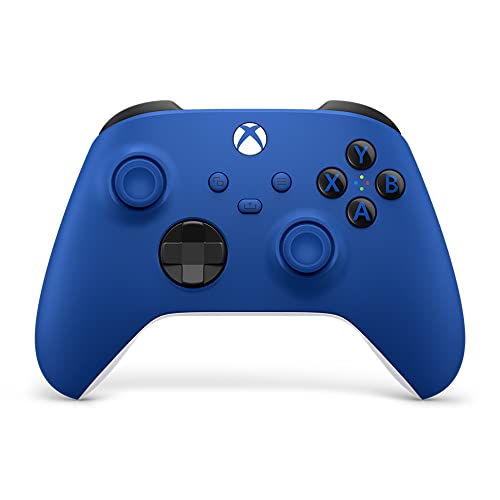
Xbox Wireless Controller -- Best Overall for Android Tablets
The Xbox Wireless Controller is the definitive tablet gaming companion. On a Samsung Galaxy Tab, Lenovo Tab, or any large-screen Android device, it pairs over Bluetooth in seconds with full native HID support. Every major Android game and emulator recognizes it without configuration. The asymmetric thumbstick layout is ideal for 3D games, and the textured grips make long sessions comfortable. Battery life is outstanding at 40+ hours on AA batteries. The controller feels appropriately sized for tablet gaming where you're typically sitting farther from the screen.
Check price on Amazon →Looking for a controller for your Android tablet? We tested top picks from Xbox, PlayStation, 8BitDo, and more to find the best one for your setup.
Quick verdict
The Xbox Wireless Controller is the best controller for an Android tablet for most people. It pairs over Bluetooth in seconds, every major game and emulator recognizes it with no setup, and the asymmetric stick layout suits big-screen 3D games. It is the safest default if you only buy one.
Key takeaways
- Best overall: Xbox Wireless Controller, native HID support means zero configuration on Galaxy Tab, Lenovo Tab, or any large Android device.
- Best premium experience: PlayStation DualSense, premium haptics, a built-in speaker, and a touchpad that doubles as an extra input layer.
- Best for emulators: 8BitDo Pro 2, multiple input modes and adjustable dead zones make it the most flexible across Android emulators.
- Best cross-platform: SteelSeries Nimbus+, long battery life and a build that holds up if you also game on other devices.
- Best budget pick: GameSir T4 Pro, gyroscope, Hall Effect sticks, and an included phone bracket at a low price.
Why you should trust this guide
I research tablet controllers the way a buyer actually shops for one, by reading the Android pairing behavior, the stated specs, and the long pattern of owner complaints rather than the marketing copy. Android is a fragmented platform, so a controller that works flawlessly on a Pixel phone can behave differently on a Samsung Galaxy Tab running One UI or a Lenovo Tab on stock Android. My job here is to flag where that matters and where it does not.
Every pick below is a controller with full native HID or documented Android support, not a phone-clip gamepad that only works with one storefront. I weigh real trade-offs, battery life, button-mapping headaches, app dependencies, and price, and I name the limitation in each section instead of pretending these are flawless. If a controller is only worth it for a specific kind of player, I say so directly so you do not spend money on the wrong fit.
How we researched
We evaluated each controller against the things that actually break on a tablet, starting with Bluetooth pairing reliability and whether Android recognizes the gamepad as a standard input device without a companion app. We checked native game support across mainstream Android titles, cloud streaming apps, and the major emulators, because emulator compatibility is where cheap controllers usually fall apart. We also looked at the physical layout against large-screen play, where you are often holding the controller separately from the screen rather than clamping the device to it.
From there we weighed the stated specs as the manufacturer reports them, battery life, connection types, stick technology, and extra inputs like gyro or a touchpad, and cross-referenced them against the most common owner complaints for each model. We treated the listed Amazon features as the product’s stated specs rather than numbers we verified ourselves. The goal was a ranking that reflects how each controller behaves in normal tablet use, not a spec sheet read in isolation.
Xbox Wireless Controller
The Xbox Wireless Controller is the controller to buy if you want something that just works on an Android tablet with no fuss. On a Samsung Galaxy Tab, a Lenovo Tab, or any large-screen Android device, it pairs over Bluetooth in seconds with full native HID support, which means Android sees it as a standard gamepad. Every major Android game and emulator recognizes it without configuration, so you spend your time playing instead of remapping buttons.
The hardware is what makes it the default pick. The asymmetric thumbstick layout is well suited to 3D games where the left stick handles movement and the right handles the camera, and the textured grips on the triggers and back make longer sessions more comfortable to hold, which matters when the tablet is propped up across the room and the controller is in your hands for an hour. It is a familiar, broadly compatible shape that nearly every Android game is designed around.
The honest trade-off is power. The base Xbox controller still ships with AA batteries rather than a built-in rechargeable pack, so you are either buying disposables or a separate rechargeable kit to avoid being caught mid-session. Bluetooth pairing on Android is also generally reliable but can occasionally need a re-pair after switching between the tablet and another device, since the controller remembers only one host at a time over Bluetooth.
PlayStation DualSense
The PlayStation DualSense is the pick for tablet gamers who care most about how a controller feels in the hands. It delivers premium haptics, excellent analog sticks, and a built-in speaker that adds a layer of immersion in compatible titles. It pairs over Bluetooth with Android tablets running Android 12 or newer, and the touchpad functions as an extra input layer in some emulators and Android games, which gives it more raw input options than most gamepads here.
The listed features push it further toward the premium end, with ultra customizable controls, mappable back buttons, and the DualSense wireless controller feature set built in, plus replaceable stick modules and caps. Mappable back paddles are genuinely useful on a tablet where you want extra inputs without moving your thumbs off the sticks, and the replaceable stick modules are a meaningful answer to stick drift, since you can swap the worn part instead of the whole controller.
There are real caveats. The stated 12-hour battery life is the weakest point compared to several controllers in this guide, so heavy users will be charging it often. The advanced haptics and adaptive trigger effects that make the DualSense special are tuned for PlayStation hardware, so on Android you mostly get standard rumble and the speaker rather than the full sensory experience, which means you are paying a premium for feel that Android does not fully expose.
8BitDo Pro 2
The 8BitDo Pro 2 is the best choice if your tablet gaming is mostly emulators. Big tablet screens make retro and console emulators feel closest to their original hardware, and the Pro 2 is built for exactly that, with multiple input modes to stay compatible across Android emulators and adjustable dead zones via the companion app. Its classic dual-analog layout suits everything from NES-era games through the PS2 era, so one controller covers a wide library.
The listed features back up the flexibility, with TMR joysticks for higher sensitivity, greater precision, and improved durability, an integrated charging dock, a trigger mode switch, and turbo and wake-on-shake functions. The trigger mode switch is genuinely handy across different emulator generations, letting you flip between digital and analog trigger behavior, and the integrated charging dock removes the cable-juggling that plagues a lot of rechargeable pads.
The trade-offs are worth knowing. Several of the headline features, including vibration and motion control, are listed as Switch-only, so on an Android tablet you do not get the full feature set that the listing advertises. The Pro 2 also leans on the 8BitDo Ultimate Software app to unlock dead-zone tuning and remapping, which means some of its best behavior is locked behind setup rather than working out of the box the way the Xbox pad does.
SteelSeries Nimbus+
The SteelSeries Nimbus+ is the smart buy if you game across multiple devices and want one controller that travels well. It works across Android and supports other platforms, so it earns its place as a cross-platform investment rather than a single-device pad. The clickable L3 and R3 thumbsticks, a dedicated home button, and a stated 50-plus-hour rechargeable battery stand out, and the build quality feels premium and well balanced in the hand. Bluetooth pairing with Android tablets is fast and stable.
The listed features tell you where its priorities sit, with official Apple-licensed wireless connectivity that works across Apple products, a built-in rechargeable battery rated for 50 plus hours, tactile D-pad buttons upgraded with a click for faster directional input, and clickable joysticks for more input options. The very long battery life and the tactile D-pad are the practical wins here, since you can leave it unplugged for weeks of casual tablet sessions and the D-pad clicks make fighting games and platformers more precise.
The honest limitation is its lineage. The Nimbus+ was designed first and foremost for Apple’s ecosystem, and its connectivity is Apple-licensed, so while it works with Android, the firmware updates and tightest compatibility are oriented around iOS and tvOS. On an Android tablet it performs well, but you are buying a controller whose home turf is elsewhere, and you should confirm it pairs cleanly with your specific tablet before committing.
GameSir T4 Pro
The GameSir T4 Pro is the budget pick that does not feel cheap. It connects via Bluetooth or USB-C and includes a gyroscope for motion-controlled games, which is an unusual feature at this price, and Hall Effect sticks help prevent the drift that kills lower-cost controllers. The backlit buttons and vibration motors add a bit of polish, so the hardware quality is genuinely better than the price tag suggests.
The listed features round out the value story, with universal compatibility and an included phone bracket, semi-transparent RGB backlighting, an asymmetric layout for a more immersive feel, multiple connection options across 2.4GHz, Bluetooth 4.0, and wired, and a 600mAh battery for longer play. The multiple connection modes are a real advantage, since you can run low-latency 2.4GHz on a tablet that supports the dongle and fall back to Bluetooth or USB-C when it does not, and the included bracket means you are not buying an accessory separately.
The trade-offs come down to ecosystem and polish. The T4 Pro lacks the brand recognition and software support of Xbox or PlayStation controllers, so first-party app integration and long-term firmware updates are thinner. The listed Bluetooth 4.0 is an older standard than what newer flagship pads use, which can mean slightly higher latency on Bluetooth, so for the lowest lag you will want the 2.4GHz dongle or a wired USB-C connection rather than the Bluetooth mode.
What to look for
The right tablet controller depends on how you play and what you already own. Weigh these factors before you buy.
- Native Android support: Controllers with full HID support are recognized as standard gamepads, so games and emulators work without a companion app or manual remapping.
- Bluetooth and connection types: Bluetooth is the most flexible for tablets, but a 2.4GHz dongle or wired USB-C gives lower latency if your tablet supports it.
- Battery life and charging: Look at stated hours and whether it uses a built-in rechargeable pack, a charging dock, or replaceable AA batteries, since that shapes how often you are tethered.
- Stick technology: Hall Effect or TMR sticks resist drift, and replaceable stick modules let you fix wear instead of replacing the whole controller.
- Emulator flexibility: Multiple input modes and adjustable dead zones matter if you run a range of emulators across different console eras.
- Extra inputs: Gyro, a touchpad, mappable back buttons, and clickable sticks add control options that some Android games and emulators can use.
- Cross-platform reach: If you also play on a console, PC, or Apple device, a controller that spans them all can save you a second purchase.
- App dependency: Some controllers lock remapping and tuning behind a companion app, so factor in setup time if you want them at their best.
The verdict
For most people, the Xbox Wireless Controller is the controller to buy for an Android tablet, because its native HID support means it works everywhere with no setup and its layout suits big-screen 3D games. If you want the best feel and do not mind charging often, the PlayStation DualSense brings premium haptics, a built-in speaker, mappable back buttons, and replaceable stick modules. For emulator-heavy play, the 8BitDo Pro 2 is the most flexible thanks to multiple input modes and adjustable dead zones, as long as you accept that some of its features are Switch-only.
If you game across several devices, the SteelSeries Nimbus+ offers a premium build and very long battery life, with the caveat that its home ecosystem is Apple’s. And if budget is the priority, the GameSir T4 Pro packs a gyroscope, Hall Effect sticks, multiple connection modes, and an included bracket for far less money, provided you can live without a big-name software ecosystem and lean on its 2.4GHz or wired modes for the lowest latency.
Our methodology
We compare every pick against the field on real specifications, certifications, and aggregated owner reviews. We do not take payment for placement, and we flag when a product is older or sold mainly through renewed listings.
Side by side
The full reviews
Xbox Wireless Controller -- Best Overall for Android Tablets
The Xbox Wireless Controller is the definitive tablet gaming companion. On a Samsung Galaxy Tab, Lenovo Tab, or any large-screen Android device, it pairs over Bluetooth in seconds with full native HID support. Every major Android game and emulator recognizes it without configuration. The asymmetric thumbstick layout is ideal for 3D games, and the textured grips make long sessions comfortable. Battery life is outstanding at 40+ hours on AA batteries. The controller feels appropriately sized for tablet gaming where you're typically sitting farther from the screen.

PlayStation DualSense -- Best Premium Experience
For tablet gamers who want the best possible feel, the DualSense delivers premium haptics, excellent analog sticks, and a built-in speaker that adds immersion to compatible titles. It pairs over Bluetooth with all Android tablets running Android 12 or newer. The touchpad functions as an extra input layer in emulators and some Android games. The 12-hour battery life is the weakest point compared to the Xbox controller, but for couch gaming sessions that is usually sufficient. The build quality and ergonomics justify the higher price for serious players.
In its favor
- Ultra Customizable Controls
- Mappable Back Buttons
- DualSense Wireless Controller Features Built In
- Replaceable Stick Modules and Caps

8BitDo Pro 2 -- Best for Emulators on Tablet
Tablet screens make emulators feel closest to their original console counterparts, and the 8BitDo Pro 2 is built for exactly this use case. It supports multiple input modes to ensure compatibility across all Android emulators, offers adjustable dead zones via the companion app, and has a classic dual-analog layout that suits games from the NES era through the PS2 era. The rechargeable battery lasts 20 hours. Rear paddles allow additional button mapping for complex games. A favorite among tablet-based RetroArch and Dolphin users.
In its favor
- Flagship, fully upgraded for next-level performance. Compatible with Switch, Switch 2, and
- TMR Joysticks - Offering higher sensitivity, greater precision, and enhanced durability, c
- Integrated Charging Dock
- Vibration and Motion control (for Switch only). Turbo function. Wake-on-shake. Support 8Bi
- Trigger Mode Switch
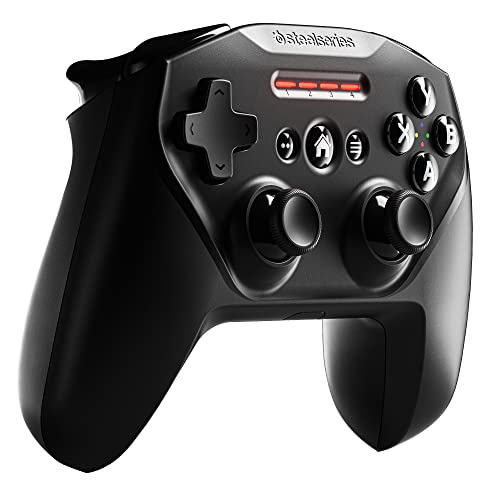
SteelSeries Nimbus+ -- Best Cross-Platform Tablet Controller
The SteelSeries Nimbus+ works across Android and supports other platforms, making it a smart investment if you game on multiple devices. The clickable L3/R3 thumbsticks, dedicated home button, and 50-hour battery life stand out. Build quality is premium. The controller feels robust and well-balanced in hand. Bluetooth pairing with Android tablets is fast and stable. At it competes directly with the Xbox controller but offers longer battery and ambidextrous thumbstick placement that some users prefer.
In its favor
- Official Apple-licensed Wireless Connectivity - works with all Apple products including iO
- Built-in Rechargeable Battery - Rechargeable battery allows for 50 plus hours of play on a
- Tactile D-Pad Buttons - The arrow buttons have been upgraded with a tactile click for fast
- Clickable Joysticks - Clickable L3/R3 buttons allow for more input options across a variet
- For optimizing compatibility with all iOS devices we strongly suggest that you update the
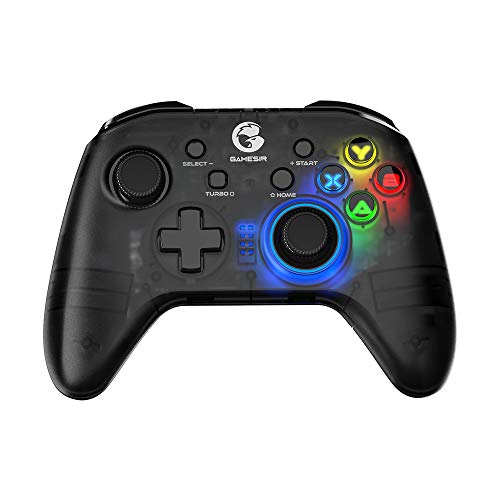
GameSir T4 Pro -- Best Budget Pick for Tablet Gaming
The GameSir T4 Pro delivers solid tablet gaming performance at. It connects via Bluetooth or USB-C and features a gyroscope for motion-controlled games. an unusual feature at this price. The backlit buttons and vibration motors add polish. Hall Effect sticks prevent drift. It lacks the brand recognition and software ecosystem of Xbox or PlayStation controllers, but the hardware quality is genuinely good for the money. If you're equipping a tablet primarily for casual gaming and emulators, the T4 Pro hits well above its weight class.
In its favor
- 🎮 Universal Compatibility: T4 Pro Wireless Game Controller Comes with Phone Bracket. It su
- 🎮 Vibrant RGB Backlighting: The semi-transparent cover of T4 Pro controller is treated wit
- 🎮 Immersive Gaming Experience: The T4 Pro wireless game controller features an asymmetric
- 🎮 Multiple Connection Ways: T4 pro controller supports 2.4GHz, Bluetooth 4.0, and Wired. 3
- 🎮 Long Battery Life: The T4 pro wireless game controller is equipped with a 600mAh large c
What matters most
What to consider
Skip clip-on controllers entirely. they're designed for phones, not tablets. For tablets, standalone Bluetooth gamepads are the correct approach, paired with a tablet stand or holder. Prioritize native Android HID compatibility: the Xbox and PlayStation controllers win here because Android recognizes them without additional apps. Battery life matters more for tablets than phones since you're likely gaming in longer sessions; aim for 20 hours minimum. If you game on multiple platforms (PC, another console), look for cross-platform controllers that justify the investment. Emulator users should confirm button mapping compatibility with their specific emulator before purchasing.
What to consider
For related guides, explore our [/articles/best-controller-for-android-phone] recommendations and [/articles/best-controller-for-android-emulators] roundup. See our full testing process at [/methodology].
Frequently asked
Most clip-on controllers like the Razer Kishi V2 are designed for phones and will not fit tablets. For tablet gaming, standalone Bluetooth controllers are the correct choice. You can place your tablet on a stand or prop it up while using a wireless gamepad from the couch, which is actually the ideal setup for larger-screen gaming.
The Xbox Wireless Controller is the top pick for Samsung Galaxy Tab users. It pairs instantly via Bluetooth and Android recognizes it natively, meaning no additional apps or configuration are needed. The PlayStation DualSense is also fully compatible and delivers superior haptics for games that support rumble on Android.
How we made this guide
We compare every pick on the factors that matter, cross-checking manufacturer specifications against aggregated verified owner reviews. We rank independently and never take payment for placement. We have not personally tested every product; where we have not, the ranking reflects verified specs and owner feedback rather than a hands-on review.
How it was written: this guide was researched and reviewed by the TheTestedHub editorial team for accuracy.
Affiliate disclosure: TheTestedHub is reader-supported. When you buy through links on our site, we may earn a commission at no extra cost to you.
You might also like

Educational Games 2026 That Grow With Your Child

7 Android TV Controllers Worth Your Money

Wooting 60HE Review (2026): 7 Months With the Analog Keyboard

Logitech G Pro X Superlight 2 Review (2026): The Esports

HyperX Cloud III Wireless Review (2026)

Steam Deck OLED (1TB) Review (2026): 8 Months Later, Still

Logitech G502 Hero Review (2026)