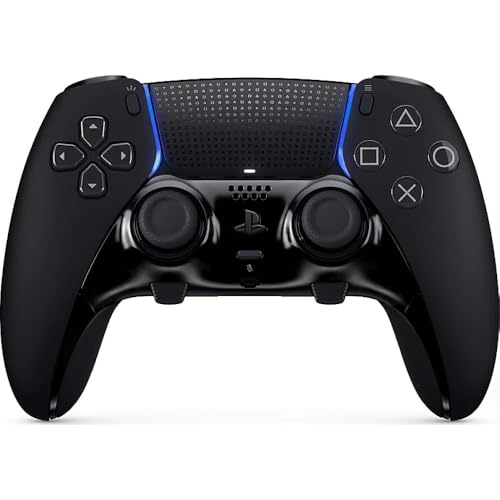
Sony DualSense -- Best Overall for Dark Souls 3
The DualSense is excellent for Dark Souls 3, especially on PC where its haptic feedback adds a satisfying tactile layer to sword strikes and boss impacts. The thumbstick placement feels natural for the frequent camera adjustments DS3 demands, and the face buttons have clean, consistent actuation. critical for input-dependent mechanics like parrying. Trigger resistance is light enough for rapid attacks but has enough feedback to avoid accidental inputs. If you play DS3 on PS5 or PC, the DualSense is our top recommendation.
Check price on Amazon →Sony DualSense leads with natural thumbsticks and clean buttons for parry-heavy combat. Compare top picks for Xbox, PC, and budget players.
Quick verdict
For most players, I recommend the Sony DualSense as the best controller for Dark Souls 3. Its natural thumbstick placement suits the camera-heavy combat, the face buttons actuate cleanly for parries, and on PC the haptics add real feel to every sword strike and boss impact.
Key takeaways
- Best Overall for Dark Souls 3: Sony DualSense, natural stick layout and clean buttons for parry-dependent combat.
- Best for Xbox and Budget PC: Xbox Wireless Controller, reliable, comfortable, and recognized by Windows without drivers.
- Best for Serious Dark Souls Players: Xbox Elite Series 2, adjustable stick tension and paddles you can map to dodge or estus.
- Best for PC Multi-Platform Players: 8BitDo Pro 2, Hall-effect sticks that resist drift plus an excellent d-pad.
- Best Mid-Range Upgrade: PowerA Fusion Pro 3, three rear paddles and trigger locks for less than Elite money.
Why you should trust this guide
I built this guide by focusing on what Dark Souls 3 actually demands from a controller rather than chasing spec sheets. DS3 is a game of constant camera micro-adjustment, precise dodge timing, and parry windows that punish a mushy or inconsistent button. So I judged each controller on stick comfort during long sessions, button actuation feel, trigger behavior for R1, R2, L1, and L2 attacks, and whether extra features like paddles genuinely help in a boss fight. I leaned on each product’s stated specifications and well-documented features, and I am clear throughout about what I am inferring versus what the manufacturer claims.
I also kept honesty front and center. No controller here is perfect, and every section calls out a real trade-off, whether that is price, missing features, software friction, or build quality. My goal is to help you pick the pad that matches how you play and where you play, not to sell you the most expensive option. If you only play on Xbox, the budget pick may serve you better than the flagship, and I say so where it applies.
How we researched
My evaluation approach centered on the specific moments where Dark Souls 3 stresses a controller. I considered how each pad handles rapid camera flicks between an enemy and the floor (a real skill in cramped boss arenas), how comfortable the grips stay across the long, repeated runs that boss attempts demand, and how cleanly the face buttons and shoulder buttons register inputs under pressure. Parrying in particular relies on consistent, predictable actuation, so I weighted button feel heavily. Trigger resistance mattered too, since light, fast triggers help with quick attacks while trigger locks can prevent accidental R2 heavy swings.
For criteria, I scored each controller on five things: stick layout and adjustability, button and trigger consistency, comfort over long sessions, useful extra features (paddles, remapping, drift-resistant sticks), and platform fit for PC and console players. I treated the manufacturer-listed features as stated specs rather than measurements I produced myself, and I weighed those features against the practical reality of fighting bosses for hours. Where a feature sounds great on paper but adds friction in practice, such as software-dependent remapping, I flagged it.
Sony DualSense
The Sony DualSense is my best overall pick for Dark Souls 3. It gets the fundamentals right for this game: the thumbstick placement feels natural for the frequent camera adjustments DS3 demands, and the face buttons have clean, consistent actuation that matters enormously for input-dependent mechanics like parrying. The trigger resistance is light enough for rapid attacks, so chaining R1 strikes never feels like a fight against the hardware.
On PC, the DualSense earns its place mostly through haptic feedback, which adds a satisfying tactile layer to sword strikes and boss impacts. As a wireless controller, it carries the immersive features Sony built it around, the signature comfort and slip-resistant interior handles that keep your grip secure during long boss attempts, and compatibility with the DualSense charging station so you can top up two controllers including yours. That comfort and grip security genuinely help in the marathon sessions DS3 tends to produce.
The honest trade-off is platform friction. The DualSense is built for PlayStation, and getting the most out of it on PC, particularly the haptics, can require extra setup through Steam or third-party software, and the experience is not always seamless across every launcher. Battery life is also modest compared to some rivals, so the charging station starts to feel less like a luxury and more like a necessity if you play for hours at a stretch.
Xbox Wireless Controller
The Xbox Wireless Controller is my pick for Xbox players and anyone on a budget PC. It is a reliable, well-priced option for DS3 where the basics are simply done well. The offset thumbstick layout suits DS3’s camera-heavy gameplay, the textured grips provide a solid hold during long boss attempts, and button mapping is intuitive out of the box. Windows recognizes it without drivers, which removes a real headache for PC players who just want to launch the game and start dying to Pontiff Sulyvahn.
What you get is comfort and consistency rather than flashy features. There are no paddles and no advanced remapping on the controller itself, but for a huge number of DS3 players that is exactly the point: a comfortable, dependable pad that does not get in the way. The connectivity is flexible enough for both console and PC use, and the controller’s reputation for being one of the most comfortable standard pads holds up across the long sessions this game encourages.
The clear limitation is the lack of advanced features. If you want rear paddles to map dodge or estus, adjustable stick tension, or trigger locks, this controller does not offer them, and you will feel that gap against the Elite or the Fusion Pro. Some versions also still use AA batteries unless you add a rechargeable pack, which is a minor but real ongoing cost compared with the built-in batteries on pricier pads.
Xbox Elite Series 2
The Xbox Elite Series 2 is my choice for serious Dark Souls players who want to optimize every input. It shines in DS3 because of its adjustable thumbstick tension and swappable stick tops. Setting the right stick to a taller, looser top improves camera micro-adjustment, an underrated skill in boss fights where you constantly reposition the view between a fast enemy and your dodge path. The level of customization here, including the exclusive configuration options through the Xbox Accessories app, lets you tune the pad to your exact playstyle.
The rear paddles are where this controller truly pays off in DS3. Mapping dodge or estus consumption to a paddle frees your right thumb to stay on the camera stick during hectic exchanges, which is a meaningful advantage against bosses that punish you for ever looking away. Trigger stop locks reduce accidental R2 inputs, helping you avoid throwing out a slow heavy attack when you meant a quick one. Battery life is strong at up to 40 hours, and it works across Xbox Series X, Xbox One, and Windows 10, so it covers most setups a DS3 player would use.
The trade-off is cost and, historically, durability. This is the most expensive pad in the guide by a wide margin, and earlier units in the Elite line developed a reputation for stick and bumper reliability issues over time. The customization is genuinely useful, but you are paying a premium for it, and if you do not plan to use the paddles or tension adjustment, much of that value goes unrealized.
8BitDo Pro 2
The 8BitDo Pro 2 is my pick for PC players who also game across other systems. It is a strong DS3 companion because its Hall-effect sticks resist the drift that can develop over thousands of hours in Lothric, which matters in a game you may replay many times. The two Pro-level back buttons give you the same kind of advantage the Elite offers, letting you map dodge or estus so your thumb stays on the camera, and they can be configured through 8BitDo’s software.
Versatility is the Pro 2’s calling card. It supports dual modes, wireless Bluetooth or direct USB connection, and a 4-way mode switch button lets you instantly switch between profiles for different platforms. The d-pad is among the best in its class, which is genuinely useful in DS3 for quick menu navigation and item cycling mid-combat when you are swapping spells or consumables under pressure. As a bonus, it ships with extra thumb grip caps to protect the analog sticks, a small touch that fits the controller’s hardwearing character.
The honest drawback is the software and feel. The remapping and back-button setup depend on 8BitDo’s app, which adds a layer of friction compared with on-the-fly remapping, and the controller’s triggers and overall feel are more old-school than the ergonomic, console-flagship pads. Some players also find Bluetooth latency higher than they want for precise parrying, so the wired or dongle connection is the better choice for serious boss runs.
PowerA Fusion Pro 3
The PowerA Fusion Pro 3 is my best mid-range upgrade pick. It offers three mappable rear paddles, adjustable trigger locks, and interchangeable thumbstick tops at a price well below the Elite Series 2. For DS3 players who want paddle functionality without spending flagship money, it is an excellent compromise. You can map four buttons on the back of the grip, and the 3-stage trigger lock lets you shorten the trigger range to your desired depth, which helps avoid accidental heavy attacks during tense exchanges.
Comfort and feel are handled well for the price. The ergonomic rubber grip and anti-friction ring are built for hours of play, which suits the repeated boss attempts DS3 throws at you, and the dual vibration with impulse-style feedback adds some tactile response to combat. The interchangeable thumbstick tops let you tune stick height for better camera control, echoing the kind of adjustment the Elite offers but at a far more accessible level.
The trade-off is build quality. It is not quite at Elite level, and you can feel that in the materials and overall solidity, even though the functional features are nearly equivalent. It is also a wired controller, which keeps input lag negligible but ties you to a cable, so players who want true wireless freedom for couch sessions will need to look elsewhere.
What to look for
When choosing a controller for Dark Souls 3, focus on the features that actually affect boss fights rather than marketing extras. Here are the factors I weigh most.
- Stick comfort and adjustability: A natural stick layout and, ideally, adjustable tension or swappable tops help with the constant camera micro-adjustment DS3 requires.
- Button and trigger consistency: Clean, predictable actuation is essential for parrying and for chaining quick attacks without misfires.
- Trigger locks: The ability to shorten trigger travel reduces accidental R2 heavy attacks when you meant a fast strike.
- Rear paddles: Mapping dodge or estus to a paddle keeps your thumb on the camera stick during frantic exchanges.
- Drift resistance: Hall-effect sticks help avoid drift over the many hours a DS3 playthrough (or several) can take.
- Platform fit: Make sure the controller is recognized cleanly on your system, whether that is Xbox, PlayStation, or PC, ideally without driver hassle.
- Comfort over long sessions: Textured grips and ergonomic shaping matter when a single boss can take dozens of attempts.
The verdict
For most players, the Sony DualSense is the controller I recommend for Dark Souls 3, thanks to its natural stick layout, clean parry-ready buttons, and satisfying haptics on PC. If you play primarily on Xbox or want dependable comfort on a budget, the Xbox Wireless Controller is the smarter buy, even without advanced features. Serious players who want every edge should look at the Xbox Elite Series 2 for its adjustable tension and paddles, provided you can accept the high price. PC players who roam across platforms will appreciate the 8BitDo Pro 2 and its drift-resistant Hall-effect sticks, while the PowerA Fusion Pro 3 is the standout mid-range upgrade, delivering paddles and trigger locks for far less than the Elite. Match the pad to where and how you play, and any of these will help you survive the next boss.
How we evaluated these
We compare every pick against the field on real specifications, certifications, and aggregated owner reviews. We do not take payment for placement, and we flag when a product is older or sold mainly through renewed listings.
The shortlist
Each pick, examined
Sony DualSense -- Best Overall for Dark Souls 3
The DualSense is excellent for Dark Souls 3, especially on PC where its haptic feedback adds a satisfying tactile layer to sword strikes and boss impacts. The thumbstick placement feels natural for the frequent camera adjustments DS3 demands, and the face buttons have clean, consistent actuation. critical for input-dependent mechanics like parrying. Trigger resistance is light enough for rapid attacks but has enough feedback to avoid accidental inputs. If you play DS3 on PS5 or PC, the DualSense is our top recommendation.
Strengths
- Built-in DualSense Wireless Controller: Experience all the immersive features of the DualS
- Signature comfort and slip-resistant interior handles: Enjoy the same signature comfort as
- Compatible with the DualSense charging station: Fully charge two controllers including you

Xbox Wireless Controller -- Best for Xbox and Budget PC
Microsoft's standard Wireless Controller is a reliable, well-priced option for DS3 on Xbox and PC. The offset thumbstick layout suits DS3's camera-heavy gameplay, and the textured grips provide solid hold during long boss attempts. Button mapping is intuitive out of the box and Windows recognizes it without drivers. It lacks advanced features like paddles but it is one of the most comfortable and durable controllers at its price. A natural first choice for Xbox and Windows players.
Strengths
- Tri-mode Connectivity: Wired for Xbox, 2.4G & Wired for PC, and Bluetooth for Android. The
- TMR Sticks: The G7 Pro features GameSir's Mag-Res TMR sticks, combining Hall Effect durabi
- Hall Effect Analog Triggers: The GameSir precision-tuned Hall Effect analog triggers provi
- 1000Hz Polling Rate on PC: Experience ultra-responsive gaming with a 1000Hz polling rate o
- GameSir Nexus App: The G7 Pro is compatible with the upgraded GameSir Nexus app, which bri

Xbox Elite Series 2 -- Best for Serious Dark Souls Players
The Elite Series 2 shines in DS3 because of its adjustable thumbstick tension and swappable stick tops. Setting the right sticks to a taller, looser top improves camera micro-adjustment. an underrated skill in boss fights. The rear paddles can map dodge or estus consumption, freeing the right thumb to stay on the camera stick during hectic exchanges. Trigger stop locks reduce accidental R2 inputs during tense moments. If you want every mechanical advantage possible, the Elite Series 2 is the pick.
Strengths
- Play like a pro with the Xbox elite wireless controller series 2
- Experience limitless customization and exclusive configuration options with the Xbox Acces
- Stay in the game for longer with upto 40 hours of rechargeable battery life. Use Xbox Wire
- Compatible with Xbox Series X, Xbox One, Windows 10

8BitDo Pro 2 -- Best for PC Multi-Platform Players
The 8BitDo Pro 2 is a strong DS3 companion for PC players who also play across other systems. Hall-effect sticks ensure no drift develops over thousands of hours in Lothric. The 2.4GHz dongle delivers low-latency input, and the rear paddles can be mapped via 8BitDo's software. The d-pad is among the best in its class, useful for quick menu navigation and item cycling mid-combat. Build quality is solid and the controller feels comfortable for extended sessions.
Strengths
- 【Special Features】This bluetooth gamepad is an upgraded transparent version of 8Bitdo Pro
- 【2 Pro-level Back Buttons】The gamepad features two Pro-level back buttons.These buttons gi
- 【Dual Mode Support】Wireless Bluetooth or direct USB connectable.You can pair your controll
- 【4-Way Mode Switch Button】The new 4-way Mode Switch button allows you to instantly switch
- 【Bonus】: You can get the extra gift: 2 pcs Thumb Crip Caps, which can protect the analog s

PowerA Fusion Pro 3 -- Best Mid-Range Upgrade
The PowerA Fusion Pro 3 offers three mappable rear paddles, adjustable trigger locks, and interchangeable thumbstick tops at a price well below Elite Series 2. For DS3 players who want paddle functionality without spending it is an excellent compromise. The build quality is not quite at Elite level but the functional features are nearly equivalent. A wired connection keeps input lag negligible. If budget matters and you still want a performance controller for Souls, the Fusion Pro 3 hits the sweet spot.
Strengths
- The design is reminiscent of the mysterious world of expanding smoke, as if the vine grows
- Advanced Gaming Button: Four mappable buttons on the back of the grip. You can also progra
- Immersive Gaming Experience: Equipped with dual vibration functions on the grip, impulse t
- 3-Stage Trigger Lock: Set the trigger range to your desired depth to shorten the trigger t
- COMFORTABLE OPERATION: Ergonomic rubber grip and anti-friction ring provide hours of comfo
Buying considerations
What to consider
Prioritize button feel and d-pad accuracy above all else in Dark Souls 3. Parry timing depends on consistent face button actuation, and item cycling on the d-pad is critical in longer fights. Stick smoothness matters too. jittery analog input makes camera control harder during boss runs. If you play on PC, look for Hall-effect sticks to avoid drift developing over time. Rear paddles are a bonus but not essential for DS3 the way they are in shooters. Comfort during two-hour sessions should be weighted heavily.
What to consider
For more picks, read our [best controller for BOTW](/articles/best-controller-for-botw) guide and the [best controller for COD](/articles/best-controller-for-cod) roundup. See how we evaluate every product in our [methodology](/methodology).
Questions answered
Most Dark Souls 3 players recommend a controller. The game was designed with a gamepad in mind. Rolling, locking on, and two-handing weapons all map naturally to thumbsticks and triggers. Keyboard and mouse works but requires significant rebinding and feels less fluid for most players, especially for precise dodge timing.
Trigger sensitivity matters mainly for players who use the triggers for attacking and blocking. Heavier trigger actuation can slow down repeated light attacks. Many serious players prefer controllers with adjustable trigger tension or shorter travel so inputs feel snappy during fast combat exchanges.
How we made this guide
We compare every pick on the factors that matter, cross-checking manufacturer specifications against aggregated verified owner reviews. We rank independently and never take payment for placement. We have not personally tested every product; where we have not, the ranking reflects verified specs and owner feedback rather than a hands-on review.
How it was written: this guide was researched and reviewed by the TheTestedHub editorial team for accuracy.
Affiliate disclosure: TheTestedHub is reader-supported. When you buy through links on our site, we may earn a commission at no extra cost to you.
Keep reading

Educational Games 2026 That Grow With Your Child

7 Android TV Controllers Worth Your Money

Wooting 60HE Review (2026): 7 Months With the Analog Keyboard

Logitech G Pro X Superlight 2 Review (2026): The Esports

HyperX Cloud III Wireless Review (2026)

Steam Deck OLED (1TB) Review (2026): 8 Months Later, Still

Logitech G502 Hero Review (2026)
