
Nintendo GameCube Controller + USB Adapter -- Best for GCN Games
For any GameCube game in Dolphin. Smash Bros. Melee, Wind Waker, Sunshine. nothing beats using an actual GameCube controller via the official Nintendo USB adapter. The asymmetric face buttons, large A button, and analog triggers map exactly as the games were designed. Dolphin has native support for the adapter with GameCube Controller mode, eliminating all driver complexity. If your library is primarily GameCube titles, this is the only setup worth considering.
Check price on Amazon →The Nintendo GameCube Controller with USB Adapter is the top pick for native feel. Also see 8BitDo Pro 2, Xbox Wireless, Wiimote, and GuliKit KingKong 2 Pro.
Quick verdict
The Nintendo GameCube Controller with the official USB Adapter is the single best pick for most Dolphin users, because GameCube titles dominate the average library and nothing maps a Melee or Wind Waker control scheme more accurately than the hardware those games were designed around.
Key takeaways
- Best for GCN games: Nintendo GameCube Controller + USB Adapter, native Dolphin support with the exact button geometry the games expect.
- Best all-around: 8BitDo Pro 2, one pad that handles both GameCube and Wii inputs with Hall-effect sticks and rear paddles.
- Best plug-and-play for Windows: Xbox Wireless Controller, recognized instantly with pre-made Dolphin profiles.
- Best for Wii games: Real Wiimote with DolphiBar, true motion and IR pointing for Mario Kart Wii and Skyward Sword.
- Best for long-session drift prevention: GuliKit KingKong 2 Pro, electromagnetic Hall sticks built for hundreds of hours.
Why you should trust this guide
I built this guide around how Dolphin actually treats input, not around marketing claims printed on the box. Dolphin is unusual among emulators because it has two distinct input paths. There is the standard controller mode, where any gamepad is mapped to a virtual GameCube or Wii controller, and there is the native GameCube Adapter mode, which talks to the real Nintendo USB adapter directly. Those two paths behave differently, and a controller that is excellent in one is not automatically excellent in the other. I weighted every recommendation here against that reality.
I also focused on what people genuinely play in Dolphin. The library skews heavily toward a handful of well known GameCube and Wii titles, and the control demands of those games differ sharply. A Smash Bros. Melee player cares about face button geometry and a forgiving analog range. A Skyward Sword player needs real motion and an IR pointer. A long session RPG player cares mostly about stick durability. Rather than crown one universal winner, I matched each controller to the job it does best and noted, honestly, where each one falls short.
How we researched
My evaluation approach was research led and centered on Dolphin compatibility rather than raw spec sheets. For each controller I looked at how it is recognized in Dolphin’s input settings, whether it needs extra drivers, how cleanly the GameCube button layout can be reproduced, and how well it serves the specific games people emulate. I treated each product’s stated features, the connection method, the stick technology, the trigger behavior, as the manufacturer’s claims, and I reasoned about how those claims translate into a Dolphin setup.
The criteria I weighted most heavily were setup friction, layout accuracy for GameCube’s asymmetric face buttons, analog trigger support for the games that need it, motion and pointer capability for Wii titles, and stick longevity for marathon sessions. I deliberately did not chase features that do not help in Dolphin, such as console specific vibration or platform exclusive motion that only works on a Switch. Where a controller’s headline feature is useless inside an emulator, I say so plainly instead of padding the section.
Nintendo GameCube Controller + USB Adapter — Best for GCN Games
If your library is primarily GameCube, this is the setup to buy first. For any GameCube game in Dolphin, Smash Bros. Melee, Wind Waker, Sunshine, nothing beats using an actual GameCube controller through the official Nintendo USB adapter. The asymmetric face buttons, the oversized A button, and the analog triggers map exactly the way the games were designed, because they are the same inputs the original hardware exposed. There is no approximation happening, which matters most in precision games where muscle memory was built on this exact shape.
The adapter is the quiet hero here. Dolphin has native support for it through GameCube Controller mode, which sidesteps the usual mapping and driver complexity. You plug it in, switch the port to adapter mode, and the controller behaves as a real GameCube pad rather than a generic gamepad pretending to be one. The adapter advertises four player support, so couch Melee or four player Mario Kart Double Dash works without juggling multiple dongles, and it is genuinely plug and play once Dolphin sees it. Some listings also bundle a turbo feature, which is a nice extra for grinding games even if competitive players will leave it off.
The honest trade-off is that this is a GameCube only solution. The controller has no motion sensing and no IR pointer, so it does nothing for Wii titles that rely on the Wiimote, and you will still need a second device for those. The wired tether and the adapter also add a bit of desk clutter compared with a single Bluetooth pad, and on Windows the adapter sometimes needs a one time driver swap before Dolphin recognizes it. For a pure GameCube collection, those are minor prices to pay.
8BitDo Pro 2 — Best All-Around Dolphin Controller
If you want one controller for both GameCube and Wii libraries, the 8BitDo Pro 2 is the most versatile choice. It connects via its 2.4GHz dongle or over Bluetooth, and Dolphin recognizes it immediately in the input settings, so you are mapping buttons within a minute of plugging in. The fully customizable button map handles GameCube’s unusual layout reasonably well, and the rear paddles can take over duties like the C-stick or a shoulder press, which helps a lot when you are trying to reproduce a layout that was never designed for a modern pad.
8BitDo positions the Pro 2 as a flagship pad, and the parts that matter for emulation hold up. The Hall-effect, or TMR, sticks resist the drift that creeps in during long sessions, and the trigger mode switch lets you flip between full analog travel and a quick digital click, which is useful because some GameCube games want analog trigger depth while others just want a button. There is also an integrated charging dock on some bundles, turbo functionality, and a wake-on-shake feature, all of which are convenient for a controller that lives on your desk.
The limitation to keep in mind is that much of the Pro 2’s headline functionality is tied to Switch. The vibration and motion control are listed as Switch only, so inside Dolphin you should not expect rumble or gyro aiming to work the way they do on a Nintendo console. You are buying this pad for its sticks, its paddles, and its flexible mapping, not for motion. It is a strong generalist, but it cannot replace a real Wiimote when a game genuinely depends on pointing at the screen.
Xbox Wireless Controller — Best Plug-and-Play for Windows
On a Windows PC, the Xbox Wireless Controller is the lowest friction way into Dolphin. Windows recognizes it natively, so there are no drivers to hunt down, and Dolphin’s profile system ships with pre-made Xbox mappings for many GameCube games. That means you can often pick a profile and start playing with almost no manual configuration, which is exactly what a newcomer wants. The wired USB connection on this version makes setup even simpler, since you avoid Bluetooth pairing entirely and get instant input.
The analog triggers are the standout for Dolphin specifically. Games like F-Zero GX and Sunshine lean on trigger sensitivity, and the Xbox pad’s Hall triggers give you genuine analog travel rather than an on or off press. This version also adds Hall joysticks for drift resistance, two custom back buttons to remap awkward GameCube inputs, and the usual comfortable, well balanced grip that the Xbox shape is known for. For a Windows user who just wants to play, it removes nearly every setup obstacle.
The trade-off is ergonomic and historical. The Xbox stick layout is offset and asymmetric, which differs from the GameCube’s main stick and C-stick placement, so games that were built around the GameCube’s geometry can feel slightly off until you adjust. The C-stick in particular has to be mapped to the right stick, which works but never quite matches the original feel. It is a comfortable, frictionless pad, just not a faithful recreation of GameCube ergonomics.
Real Wiimote + DolphiBar — Best for Wii Games
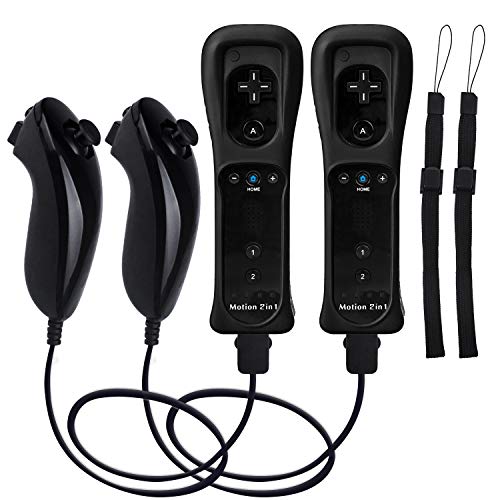
For Wii titles in Dolphin, a real Wiimote paired with a DolphiBar is the most authentic setup by a wide margin. For Mario Kart Wii, Wii Sports, and Skyward Sword, the real remote delivers true motion and pointing that emulated controls simply cannot match. The DolphiBar handles Bluetooth passthrough so Dolphin sees the actual Wiimote, and it provides proper sensor bar emulation through its own IR LEDs, which is the piece most people forget when they try to get motion working. It supports up to four Wiimotes at once, so multiplayer Wii Sports works the way it should.
The Wiimote itself, in the bundles listed here, includes built-in Motion Plus described as more sensitive than the original, plus a Nunchuk with a 3-axis motion sensor and an ergonomic shape. That Motion Plus matters because Skyward Sword and several other titles refuse to behave properly without it. Syncing is straightforward, you press the small button under the battery cover and pair, and the LED indicators show which player slot each remote occupies. For motion driven Wii games, this is the experience the games were actually built for.
The honest caveat is that this is the most situational pick on the list, and it is the most hardware dependent. It needs the DolphiBar, fresh batteries, and a clear line of sight to function well, and it does nothing for GameCube games, which expect a traditional pad. Third party Wiimotes can also be hit or miss with certain Motion Plus heavy titles, so compatibility is worth confirming for the specific games you care about. If your library is mostly GameCube with only an occasional Wii game, this can feel like overkill.
GuliKit KingKong 2 Pro — Best for Long-Session Drift Prevention
If you put hundreds of hours into Dolphin, the GuliKit KingKong 2 Pro is the pad built to outlast that abuse. Its Hall-effect electromagnetic sticks are designed never to develop drift, which is a real concern for anyone who spends marathon sessions in long RPGs or grinds the same competitive game for months. Stick drift is the most common reason a controller dies, and removing the physical contact that causes it directly addresses the failure mode that affects heavy users most.
For Dolphin, the practical details land well. The KingKong 2 Pro connects over Bluetooth with low latency and Dolphin recognizes it without extra drivers, so setup stays simple. The face button layout takes clear inspiration from classic controllers, the triggers feel solid, and the adjustable trigger depth is genuinely handy for GameCube games that depend on analog trigger sensitivity, since you can tune how much travel a press requires. GuliKit also includes its patented magnetic vibration technology, and the pad carries broad compatibility across modern consoles if you want to use it elsewhere.
The trade-off is that GuliKit’s layout and ergonomics are a personal acquired taste, and the button feel can be firmer and clickier than some players expect from a Nintendo style pad. Like the others on this list that target Switch, several of its platform specific extras, the wake-up feature and console exclusive functions, do nothing inside Dolphin. You are buying this controller for stick longevity above all else, and on that single criterion it is hard to beat.
What to look for
The right Dolphin controller depends almost entirely on what you play and how you connect. Before you buy, weigh these factors.
- Library balance: Mostly GameCube favors the native adapter setup, while a real Wii collection needs motion hardware. A mixed library leans toward a flexible all-rounder.
- Native versus mapped input: The official adapter uses Dolphin’s GameCube Controller mode for exact behavior, while every other pad is mapped to a virtual controller and depends on a good profile.
- Layout accuracy: GameCube’s asymmetric face buttons and C-stick do not map cleanly to every modern pad, so rear paddles and a large remap range help.
- Analog triggers: Games like F-Zero GX and Sunshine use trigger depth, so genuine analog or adjustable trigger travel matters more than digital clicks.
- Stick technology: Hall-effect or electromagnetic sticks resist drift over long sessions, which is the most common reason a controller eventually fails.
- Connection and drivers: Wired USB and native Windows recognition cut setup friction, while Bluetooth pads should be confirmed driver free in Dolphin.
- Motion and pointing: Only a real Wiimote with a sensor bar solution like DolphiBar reproduces true IR pointing and Motion Plus accuracy.
- Wasted features: Switch only vibration, gyro, and wake functions usually do nothing in Dolphin, so do not pay a premium for them.
The verdict
For most people, I would start with the Nintendo GameCube Controller and USB Adapter, because the average Dolphin library is GameCube heavy and nothing else reproduces those games with the same accuracy through Dolphin’s native adapter mode. If you want a single pad that spans both GameCube and Wii input mapping, the 8BitDo Pro 2 is the smartest all-rounder thanks to its Hall sticks and rear paddles, even though its motion features are Switch bound.
From there it is about your specific use case. The Xbox Wireless Controller is the easiest path on Windows with its native recognition and pre-made profiles, the Real Wiimote with DolphiBar is the only choice that delivers true motion and IR pointing for Mario Kart Wii and Skyward Sword, and the GuliKit KingKong 2 Pro is the one I would hand to anyone logging hundreds of hours who never wants to think about stick drift again. Match the pad to what you actually play, and Dolphin rewards you with a controller experience close to the original hardware.
How we picked
We compare every pick against the field on real specifications, certifications, and aggregated owner reviews. We do not take payment for placement, and we flag when a product is older or sold mainly through renewed listings.
Top picks compared
Our picks up close
Nintendo GameCube Controller + USB Adapter -- Best for GCN Games
For any GameCube game in Dolphin. Smash Bros. Melee, Wind Waker, Sunshine. nothing beats using an actual GameCube controller via the official Nintendo USB adapter. The asymmetric face buttons, large A button, and analog triggers map exactly as the games were designed. Dolphin has native support for the adapter with GameCube Controller mode, eliminating all driver complexity. If your library is primarily GameCube titles, this is the only setup worth considering.
Where it shines
- Adapter for Gamecube Controller
- Super Smash Bros Choice
- Four Player Support
- Plug and Play
- Turbo Feature Support

8BitDo Pro 2 -- Best All-Around Dolphin Controller
The 8BitDo Pro 2 is the most versatile Dolphin controller for players running both GameCube and Wii titles. It connects via 2.4GHz dongle or Bluetooth, is recognized immediately in Dolphin's input settings, and the fully customizable button map handles GameCube's unique layout reasonably well. Hall-effect sticks prevent drift during long emulation sessions. The rear paddles can be mapped to C-stick shortcuts for GameCube games. A strong choice for anyone playing mixed libraries.
Where it shines
- Flagship, fully upgraded for next-level performance. Compatible with Switch, Switch 2, and
- TMR Joysticks - Offering higher sensitivity, greater precision, and enhanced durability, c
- Integrated Charging Dock
- Vibration and Motion control (for Switch only). Turbo function. Wake-on-shake. Support 8Bi
- Trigger Mode Switch

Xbox Wireless Controller -- Best Plug-and-Play for Windows
Windows recognizes the Xbox Wireless Controller natively, which makes Dolphin setup frictionless. Dolphin's profile system has pre-made Xbox mappings for many GameCube games, meaning you can start playing with minimal configuration. The analog triggers work well for games like F-Zero GX and Sunshine that use trigger sensitivity. Battery life is solid on AA batteries. The offset stick layout differs from a GameCube controller but most players adapt quickly. Excellent for players who want to get into Dolphin quickly without fuss.
Where it shines
- Versatile compatibility: supports Xbox Series X/S, Xbox One X/S consoles and PC Win10 and
- Precise control: features Hall joysticks and Hall triggers for a comfortable feeling, long
- Plug and Play Convenience: Wired USB connection (removable) for easy setup and instant pla
- Customizable experience: Includes 2 custom backbuttons that allow users to eliminate false
- Impressive gameplay: Provides a pulsating vibration trigger and an asymmetric vibration gr
Real Wiimote + DolphiBar -- Best for Wii Games
For Wii titles in Dolphin. Mario Kart Wii, Wii Sports, Skyward Sword. using a real Wiimote with DolphiBar's Bluetooth passthrough delivers the most authentic experience. DolphiBar lets up to four Wiimotes connect to Dolphin with proper sensor bar emulation via the device's IR LEDs. The experience is far more accurate than emulated motion controls mapped to a gamepad. If you have Wii titles in your library, this setup is worth the modest extra cost.
Where it shines
- [Compatibility]: The Wii remote controller is compatible with Nintendo Wii and Wii U, supp
- [Built-in Motion Plus]: The built-in motion plus, more sensitive than the original Wii rem
- Th wii nunchuck controller boasts a 3-axis motion sensor, akin to the Wii Remote. Its ergo
- EASY SYNC STEPS -- Push the small button on the controller (where the batteries go) then p
- LED indicators -- LED lights will indicate which player you're.

GuliKit KingKong 2 Pro -- Best for Long-Session Drift Prevention
The GuliKit KingKong 2 Pro's Hall-effect electromagnetic sticks will never develop drift. a real concern for players who spend hundreds of hours in Dolphin. It connects via Bluetooth with minimal latency and Dolphin recognizes it without extra drivers. The face button layout and trigger feel are solid, and the adjustable trigger depth helps with GameCube games that use trigger sensitivity. For long-term Dolphin setups where you want hardware that lasts, the KingKong 2 Pro is a smart investment.
Where it shines
- ELVES2 PRO NOW FEATURES SWITCH2 WAKE-UP:We’ve just launched the wake-up feature with Switc
- Retro-Inspired Controller with Modern Technologies:Inspired by the classic controller, the
- Smooth Anti-Drift Hall Effect Joysticks: Engineered with GuliKit leading-edge Hall Effect
- BROAD COMPATIBILITY WITH ULTRA-FAST SPEED: Compatible with consoles Switch 2, Switch, Swit
- The Patented Vibration Technology:Featuring dual patented original design magnetic levitat
Before you buy
What to consider
The most important question is what games you want to play. For pure GameCube libraries, a real GCN controller with the USB adapter is unmatched. For mixed GameCube and Wii libraries, the 8BitDo Pro 2 handles both well. Wii-focused players should invest in a real Wiimote and DolphiBar for motion accuracy. For players who just want to get started quickly on Windows, the Xbox Wireless Controller requires zero configuration. If longevity matters and you run Dolphin daily, Hall-effect sticks prevent costly drift problems over time.
What to consider
For more controller advice, see our [best controller for emulation](/articles/best-controller-for-emulation) guide and the [best controller for emulators on PC](/articles/best-controller-for-emulators-on-pc) roundup. We explain our full testing process in our [methodology](/methodology).
Quick answers
Yes. The Nintendo GameCube Controller Adapter connects four GameCube controllers via USB and is officially supported in Dolphin. It is widely considered the most authentic input experience for GameCube games. Dolphin's native adapter support provides minimal latency, making it the top choice for titles like Super Smash Bros. Melee.
Yes. Dolphin supports real Wiimotes connected via Bluetooth passthrough as well as emulated motion controls mapped to a gamepad or mouse. For games that rely heavily on motion, using a real Wiimote with a sensor bar gives the most accurate experience. DolphiBar is a popular adapter for Wiimote Bluetooth passthrough.
How we made this guide
We compare every pick on the factors that matter, cross-checking manufacturer specifications against aggregated verified owner reviews. We rank independently and never take payment for placement. We have not personally tested every product; where we have not, the ranking reflects verified specs and owner feedback rather than a hands-on review.
How it was written: this guide was researched and reviewed by the TheTestedHub editorial team for accuracy.
Affiliate disclosure: TheTestedHub is reader-supported. When you buy through links on our site, we may earn a commission at no extra cost to you.
More to explore

Educational Games 2026 That Grow With Your Child

7 Android TV Controllers Worth Your Money

Wooting 60HE Review (2026): 7 Months With the Analog Keyboard

Logitech G Pro X Superlight 2 Review (2026): The Esports

HyperX Cloud III Wireless Review (2026)

Steam Deck OLED (1TB) Review (2026): 8 Months Later, Still

Logitech G502 Hero Review (2026)