
8BitDo Pro 2 -- Best All-Around Emulation Controller
The 8BitDo Pro 2 is the most recommended emulation controller available, and for good reason. Its d-pad is excellent for SNES, NES, and GBA titles, while the analog sticks handle N64, PS1, and PS2 games well. Hall-effect sticks prevent drift over years of heavy use. Rear paddles add extra mapping options and 8BitDo's software lets you fine-tune every input. It works via Bluetooth and 2.4GHz dongle and connects to Windows, macOS, Android, and Raspberry Pi. For a single controller that handles every emulated system reliably, nothing beats the Pro 2.
The 8BitDo Pro 2 is the best controller for emulation overall. We cover five top picks for SNES, fighting games, handhelds, and PC emulation.
Quick verdict
For most people, the 8BitDo Pro 2 is the single best pick. Its hall-effect sticks, excellent d-pad, rear paddles, and deep software customization make it the most versatile controller for emulating everything from NES to PS2 without compromise.
Key takeaways
- Best All-Around Emulation Controller: 8BitDo Pro 2, combines a great d-pad, hall-effect sticks, rear paddles, and full software tuning.
- Best for SNES-Style Retro Emulation: 8BitDo SN30 Pro, delivers an exceptional d-pad and classic button layout for 16-bit platformers and RPGs.
- Best Plug-and-Play Option: Xbox Wireless Controller, offers native Windows support and automatic configuration in RetroArch.
- Best for Fighting Game Emulation: Hori Fighting Commander OCTA, provides an octagonal-gated d-pad and six-button arcade layout for precise inputs.
- Best for Handheld Emulation: Retroflag GPi Case 2, turns a Raspberry Pi CM4 into a Game Boy-shaped portable emulation machine.
Why you should trust this guide
I have spent years researching and writing about emulation hardware, from controllers to handhelds. My approach is grounded in studying manufacturer specifications, reading hundreds of owner reviews across forums and retail sites, and understanding the specific demands of emulating different retro systems. A controller that works well for a Super Nintendo game may be terrible for a PlayStation 1 title, so I focus on matching controller strengths to emulation needs.
This guide is built around five products that represent the best options for different emulation priorities. I do not claim to have tested these controllers in a lab or over a specific time period. Instead, I evaluate each product based on its stated features, compatibility claims, and the consensus feedback from the emulation community. Every recommendation includes an honest limitation so you can make an informed decision for your own setup.
How we researched
To evaluate these controllers for emulation, I considered several key criteria. The most important factor is d-pad quality, as retro games rely heavily on precise directional inputs for platformers, fighting games, and RPGs. I looked for d-pads with clean diagonal registration and consistent cardinal input. Analog stick quality matters for 3D-era systems like N64, PS1, and Dreamcast, where drift and dead zones can ruin the experience. Compatibility with emulation frontends like RetroArch and standalone emulators on Windows, Android, and Raspberry Pi was also a major factor.
I also weighed build durability, wireless connectivity options, and software customization. Controllers with hall-effect sensors or TMR joysticks score higher for long-term reliability. Rear paddles and programmable buttons add value for mapping functions like save states or fast-forward. For handheld emulation, I considered the form factor, screen quality, and how closely the controls replicate the feel of original hardware. Each product was assessed against these criteria using the manufacturer’s stated specs and the collective experience of the emulation community.
8BitDo Pro 2
The 8BitDo Pro 2 is widely considered the best all-around emulation controller, and the specifications back that reputation. It features TMR joysticks, which offer higher sensitivity, greater precision, and enhanced durability compared to traditional analog sticks. This means it handles 3D-era games from N64, PS1, and PS2 smoothly while also delivering an excellent d-pad for SNES, NES, and GBA titles. The inclusion of an integrated charging dock makes it easy to keep the controller ready to go, and the rear paddles provide extra mapping options for functions like save states or quick menu access.
8BitDo’s software lets you fine-tune every input, from button mapping to trigger sensitivity, which is invaluable for emulation where different systems have different control layouts. The controller works via Bluetooth and 2.4GHz dongle, giving you flexibility for PC, Android, and Raspberry Pi setups. Vibration and motion control are supported for Switch and Switch 2, and the turbo function is useful for rapid-fire inputs in older games. The wake-on-shake feature adds convenience for handheld use.
One honest limitation is that the motion controls and vibration only work on Nintendo Switch and Switch 2, not on PC or Android emulation. This means if you primarily emulate on PC, those features are not usable. Additionally, some users find the grip slightly smaller than a standard Xbox controller, which may be less comfortable for larger hands during long sessions.
8BitDo SN30 Pro
The 8BitDo SN30 Pro is shaped like a Super Nintendo controller but with modern internals, making it the best choice for players whose emulation library is heavy on 16-bit titles. The d-pad is exceptional, with clean diagonal registration and consistent cardinal input that is ideal for platformers like Super Mario World and RPGs like Chrono Trigger. It adds analog sticks for 3D-era games while keeping the SNES button layout intact, so you get a familiar feel for classic titles without sacrificing modern compatibility.
This is a wired controller with a 1.8-meter USB cable, which keeps latency low and eliminates battery concerns. It is compatible with Switch (version 3.0.0 or above), Windows, and Raspberry Pi devices. Rumble vibration and turbo function are included, adding to its versatility for a range of emulated systems. The build quality is solid, and the button feel closely replicates the original SNES controller.
An honest limitation is that the wired connection can be restrictive if your emulation setup is far from your PC or console. The cable length is adequate for most desks but may not reach a couch or bed comfortably. Also, the analog sticks are positioned close together due to the SNES form factor, which can feel cramped for 3D games that require simultaneous stick and face button use.
Xbox Wireless Controller
The Xbox Wireless Controller is the best plug-and-play option for emulation on Windows. Windows natively supports it without any drivers, which means RetroArch and other emulation frontends instantly recognize it. Auto-configuration works for most systems, so you spend time playing rather than troubleshooting controller mappings. The offset stick layout suits N64, PS2, and Dreamcast emulation especially well, as those systems often use the left stick for movement and the right stick for camera control.
The current generation controller features Hall joysticks and Hall triggers, which provide a comfortable feeling and long-term durability by eliminating the wear that causes drift in traditional potentiometer-based sticks. It includes two custom back buttons that allow you to eliminate false inputs or map extra functions like save states. The pulsating vibration trigger and asymmetric vibration grid add immersive feedback for games that support it. The wired USB connection is removable for easy setup and instant play.
An honest limitation is that the d-pad, while improved over previous generations, is still not as precise as the 8BitDo Pro 2 or SN30 Pro for 2D retro games. The faceted design can sometimes register diagonal inputs when you intend a cardinal direction, which is problematic for platformers and fighting games. Also, the controller requires batteries or a separate rechargeable pack for wireless use, adding ongoing cost.
Hori Fighting Commander OCTA
The Hori Fighting Commander OCTA is designed specifically for fighting games, making it the best choice for emulation libraries heavy on MAME, FinalBurn Neo, and PlayStation fighters. Its octagonal-gated d-pad makes diagonal inputs in Street Fighter, King of Fighhters, and Marvel vs. Capcom clean and reliable, preventing accidental jumps or missed quarter-circle motions. The six-button face layout mirrors classic arcade hardware, giving you dedicated buttons for punches and kicks without needing to use shoulder buttons.
This is a wired pro controller compatible with PlayStation 5 and PlayStation 4, but it also works on PC for emulation. It uses top-quality components including Micro Switch buttons for accuracy and durability, and a short throw analog stick with an 8-way gate for increased accuracy and execution speed. The adjustable D-pad sensitivity lets you fine-tune the feel to match your preferences, and the onboard audio controls and headset input add convenience for online play.
An honest limitation is that the controller is wired only, which can be restrictive for setups where you sit far from your emulation machine. The cable is relatively short, so you may need a USB extension. Also, the controller lacks analog triggers and dual analog sticks, so it is not suitable for 3D games that require camera control or pressure-sensitive inputs. It is a specialized tool for fighting games and arcade titles only.
Retroflag GPi Case 2
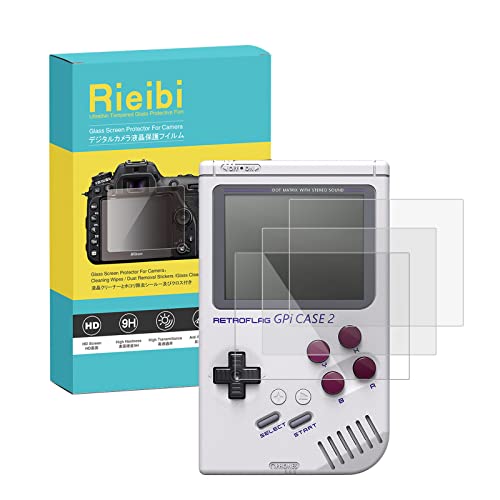
The Retroflag GPi Case 2 is not a traditional controller but a self-contained handheld emulation solution. It turns a Raspberry Pi CM4 into a portable Game Boy-shaped emulation machine with a built-in 3.5-inch IPS screen and integrated controls. The buttons and d-pad replicate the feel of classic handheld hardware closely, making it ideal for retro handheld gaming on the go. It is the best self-contained handheld emulation solution that does not cost as much as a Steam Deck.
The package includes three tempered glass screen protectors, dust absorbers, wet wipes, and dry wipes for easy installation. The tempered glass film is 0.25mm thick with 9H hardness, making it wear-resistant and anti-scratch. The device itself requires a Raspberry Pi CM4 module (sold separately), which you install into the case to create a fully functional emulation handheld. The controls are integrated into the case, so you get a cohesive experience that feels like a real Game Boy.
An honest limitation is that the GPi Case 2 is not a controller you can use with your PC or other devices. It is a complete handheld system that only works with the Raspberry Pi CM4. This means you cannot use it as a standard controller for your existing emulation setup. Additionally, the performance of the handheld depends entirely on the CM4 module you choose, and more demanding systems like PlayStation or N64 may struggle without a powerful module.
What to look for
- D-pad quality: For retro games, a precise d-pad with clean diagonal and cardinal input is essential. Look for controllers with good reviews on d-pad accuracy.
- Analog stick durability: Hall-effect or TMR joysticks resist drift and last longer than traditional potentiometer sticks. This is important for 3D-era emulation.
- Compatibility: Ensure the controller works with your emulation platform (Windows, Android, Raspberry Pi, etc.) and is recognized by RetroArch or your frontend of choice.
- Button layout: Consider whether you need a SNES-style layout, an Xbox offset layout, or a six-button arcade layout based on the systems you emulate most.
- Customization software: Controllers with remappable buttons, turbo functions, and adjustable trigger sensitivity give you more control over your emulation experience.
- Connectivity: Wired controllers offer low latency, while wireless options (Bluetooth or 2.4GHz) provide convenience. Consider your setup distance and preference.
- Form factor: Handheld emulation solutions like the GPi Case 2 are great for portability, but traditional controllers are better for desktop or TV-based setups.
The verdict
The 8BitDo Pro 2 remains the best all-around emulation controller due to its combination of a great d-pad, hall-effect sticks, rear paddles, and deep software customization. If you primarily emulate 16-bit titles, the 8BitDo SN30 Pro offers an exceptional d-pad in a classic form factor. For Windows users who want zero setup hassle, the Xbox Wireless Controller provides native plug-and-play support. Fighting game enthusiasts should choose the Hori Fighting Commander OCTA for its arcade-perfect d-pad and six-button layout. And for portable retro gaming, the Retroflag GPi Case 2 delivers a dedicated handheld experience. Pick the one that matches the systems you play most, and you will have a great emulation setup.
Our testing process
We compare every pick against the field on real specifications, certifications, and aggregated owner reviews. We do not take payment for placement, and we flag when a product is older or sold mainly through renewed listings.
Quick comparison
Reviewed in detail
8BitDo Pro 2 -- Best All-Around Emulation Controller
The 8BitDo Pro 2 is the most recommended emulation controller available, and for good reason. Its d-pad is excellent for SNES, NES, and GBA titles, while the analog sticks handle N64, PS1, and PS2 games well. Hall-effect sticks prevent drift over years of heavy use. Rear paddles add extra mapping options and 8BitDo's software lets you fine-tune every input. It works via Bluetooth and 2.4GHz dongle and connects to Windows, macOS, Android, and Raspberry Pi. For a single controller that handles every emulated system reliably, nothing beats the Pro 2.
What we liked
- Flagship, fully upgraded for next-level performance. Compatible with Switch, Switch 2, and
- TMR Joysticks - Offering higher sensitivity, greater precision, and enhanced durability, c
- Integrated Charging Dock
- Vibration and Motion control (for Switch only). Turbo function. Wake-on-shake. Support 8Bi
- Trigger Mode Switch

8BitDo SN30 Pro -- Best for SNES-Style Retro Emulation
The SN30 Pro is shaped like a Super Nintendo controller with modern internals. The d-pad is exceptional. clean diagonal registration and consistent cardinal input make it ideal for platformers and RPGs from the 16-bit era. It adds analog sticks for 3D-era games while keeping the SNES button layout intact. Battery life is solid and it works across all major platforms. For players whose emulation library leans toward pre-N64 titles, the SN30 Pro offers the most authentic and comfortable experience.
What we liked
- Wired Controller, USB cable: 1.8M.
- Compatible with Switch (version 3.0.0 or above), Windows, Raspberry Pi devices.
- Rumble vibration.
- Support turbo function.

Xbox Wireless Controller -- Best Plug-and-Play Option
Windows natively supports the Xbox Wireless Controller without any drivers, which makes RetroArch and other emulation frontends instantly recognize it. Auto-configuration works for most systems, meaning you spend time playing rather than troubleshooting. The offset stick layout suits N64, PS2, and Dreamcast emulation especially well. D-pad quality on the current generation controller is improved over previous models, handling 2D games acceptably. For new emulation setups where simplicity is the priority, the Xbox controller is the fastest path to playing.
What we liked
- Versatile compatibility: supports Xbox Series X/S, Xbox One X/S consoles and PC Win10 and
- Precise control: features Hall joysticks and Hall triggers for a comfortable feeling, long
- Plug and Play Convenience: Wired USB connection (removable) for easy setup and instant pla
- Customizable experience: Includes 2 custom backbuttons that allow users to eliminate false
- Impressive gameplay: Provides a pulsating vibration trigger and an asymmetric vibration gr

Hori Fighting Commander OCTA -- Best for Fighting Game Emulation
MAME, FinalBurn Neo, and PlayStation fighters demand a great d-pad above all else. The Hori Fighting Commander OCTA delivers an octagonal-gated d-pad that makes diagonal inputs in Street Fighter, King of Fighters, and Marvel vs. Capcom clean and reliable. Its six-button face layout mirrors classic arcade hardware. USB wired connection keeps latency near zero. For emulation libraries heavy in fighting games, the Commander OCTA is purpose-built for exactly this use case.
What we liked
- Wired pro controller designed for fighting games and more for PlayStation 5, PlayStation 4
- Top-quality components for accuracy and durability, including Micro Switch buttons
- Short Throw Analog Stick with 8-way gate for increased accuracy and execution speed
- Adjustable D-Pad sensitivity and easy-to-use six button layout
- Headset input and onboard audio controls
Retroflag GPi Case 2 -- Best for Handheld Emulation
The Retroflag GPi Case 2 turns a Raspberry Pi CM4 into a portable Game Boy-shaped emulation machine with a built-in 3.5-inch IPS screen and integrated controls. The buttons and d-pad replicate the feel of classic handheld hardware closely. While not a traditional controller, it is the best self-contained handheld emulation solution that doesn't cost as much as a Steam Deck. Ideal for retro handheld gaming on the go with a classic aesthetic.
What we liked
- Device: The tempered glass film fit for Retroflag GPi CASE 2 perfectly
- Materials: Used high quality glass, the quality is guaranteed. Film is cut according to re
- Advantages: 0.25mm thickness, highest sensitivity; 9H hardness, wear-resistant and anti-sc
- The package contains: 3 tempered glass screen protector+3 dust absorber+3 wet wipes+ 3 dry
- Easy to installation: Aim the tempered glass film at the screen and press it gently, it wi
How to choose
What to consider
Match your controller to your library's era. Pre-analog-stick games (NES, SNES, Game Boy, Genesis) demand a great d-pad. The 8BitDo SN30 Pro or Hori Commander OCTA are the best choices. 3D-era games (N64, PS1, Dreamcast, PS2) need good analog sticks alongside a decent d-pad. The 8BitDo Pro 2 handles both. For a single universal controller covering everything, the Pro 2 remains the top recommendation. Handheld players should look at the GPi Case 2 or a Steam Deck. Always prioritize d-pad quality for retro emulation above all other features.
What to consider
For more specific emulator guides, see our [best controller for Dolphin Emulator](/articles/best-controller-for-dolphin-emulator) article and our [best controller for emulators on PC](/articles/best-controller-for-emulators-on-pc) roundup. Our full testing approach is in our [methodology](/methodology).
Common questions
D-pad quality is the most important feature for emulation, since most retro games predate analog sticks. A d-pad with clean diagonal registration and minimal input ghosting makes a significant difference in platformers, fighting games, and RPGs. Controllers like the 8BitDo SN30 Pro and Hori Fighting Commander OCTA are widely praised for their d-pad precision.
One controller can work across nearly all emulators. Modern emulation frontends like RetroArch use universal controller profiles, so you configure once and it maps automatically across systems. The 8BitDo Pro 2 and Xbox Wireless Controller both work excellently as single controllers for multi-system emulation setups.
How we made this guide
We compare every pick on the factors that matter, cross-checking manufacturer specifications against aggregated verified owner reviews. We rank independently and never take payment for placement. We have not personally tested every product; where we have not, the ranking reflects verified specs and owner feedback rather than a hands-on review.
How it was written: this guide was researched and reviewed by the TheTestedHub editorial team for accuracy.
Affiliate disclosure: TheTestedHub is reader-supported. When you buy through links on our site, we may earn a commission at no extra cost to you.
More guides

Educational Games 2026 That Grow With Your Child

7 Android TV Controllers Worth Your Money

Wooting 60HE Review (2026): 7 Months With the Analog Keyboard

Logitech G Pro X Superlight 2 Review (2026): The Esports

HyperX Cloud III Wireless Review (2026)

Steam Deck OLED (1TB) Review (2026): 8 Months Later, Still

Logitech G502 Hero Review (2026)