
8BitDo Pro 2 -- Best Overall PC Emulation Controller
The 8BitDo Pro 2 tops our PC emulation list because of its combination of excellent d-pad, Hall-effect sticks, customizable mapping, and broad software compatibility. RetroArch detects it instantly. The 8BitDo Ultimate Software lets you create emulator-specific profiles that auto-switch when you launch different applications. Rear paddles cover hotkey functions (save state, load state, fast-forward) without conflicting with in-game inputs. Connects via 2.4GHz dongle for low latency or Bluetooth for cable-free desk setups. The most versatile single controller for PC emulation.
The 8BitDo Pro 2 tops our list for PC emulation. Compare its Hall-effect sticks, per-app profiles, and d-pad with the Xbox, DualSense, GuliKit, and.
Quick verdict
The 8BitDo Pro 2 is the controller I recommend most for PC emulation. Its tactile d-pad, Hall-effect TMR sticks, rear paddles, and per-application profiles in the 8BitDo Ultimate Software make it accurate across RetroArch, PCSX2, and Dolphin without fuss. It is the most flexible all-rounder here.
Key takeaways
- Best overall: 8BitDo Pro 2, the strongest d-pad and the most configurable software for emulator-specific profiles.
- Best plug-and-play for Windows: Xbox Wireless Controller, XInput works in every major emulator with no setup.
- Best for PlayStation emulation: Sony DualSense, matching button prompts for PCSX2 and RPCS3.
- Best for long-term drift prevention: GuliKit KingKong 2 Pro, Hall-effect sticks that resist drift over years of daily use.
- Best for Dolphin on PC: Nintendo GameCube Controller plus USB Adapter, native Dolphin support for the most authentic GameCube feel.
Why you should trust this guide
I built this guide by focusing on the one thing that actually matters for emulation, how a controller behaves once it is connected to an emulator on Windows. That means I weighted d-pad quality, how cleanly a pad is recognized by RetroArch and standalone emulators, and whether the software around it lets you tweak mappings without fighting menus. A controller that feels great on a console can still be awkward in PCSX2 if its inputs do not map predictably, so I judged each pad on its emulation context specifically, not on general gaming reputation.
I am also upfront about what I did not do. I did not run a stopwatch on latency or open any controllers to inspect their internals, and I treat every spec listed here as the manufacturer’s stated figure rather than something I personally verified. Where a controller has a genuine weakness, whether that is driver quirks, battery behavior, or a missing feature, I say so in its section. My goal is to help you pick the right pad for the kind of emulation you do, not to declare a single winner for everyone.
How we researched
My evaluation centered on the emulators most PC players actually use, RetroArch as the all-in-one front end, PCSX2 and RPCS3 for PlayStation systems, and Dolphin for GameCube and Wii. For each controller I looked at how it is detected (XInput versus DirectInput versus a native driver path), how much configuration is needed before a game is playable, and how well the included or community software handles remapping. A pad that auto-maps everywhere scores higher on convenience, while a pad that needs a helper application like DS4Windows loses points for setup friction even if the end result is excellent.
I also weighed the things that only show up over time. Stick technology matters because potentiometer sticks drift after heavy use, and emulated 3D games on N64 or PS2 are exactly where drift becomes unbearable. So I gave real credit to Hall-effect and TMR magnetic sticks. Beyond that I considered d-pad accuracy for 2D systems, the presence of rear paddles for emulator hotkeys such as save and load state, and connection options, since some setups want wired reliability and others want clean wireless. The five picks below each win a clear use-case rather than trying to be best at everything.
8BitDo Pro 2
The 8BitDo Pro 2 is my best overall pick because it combines the strongest d-pad in this group with the configurability emulation rewards. RetroArch detects it instantly, and the 8BitDo Ultimate Software lets you build emulator-specific profiles that auto-switch when you launch different applications, so your N64 layout loads for one emulator and your PS2 layout loads for another without manual swapping. That single feature solves the most tedious part of a multi-system setup.
The hardware backs up the software. It uses TMR joysticks for magnetic, drift-resistant stick input, 8BitDo’s exclusive wireless technology with a trigger mode switch, and a 1000Hz polling rate on both 2.4G and wired connections. There is customizable six-axis motion control, plus two Pro back paddle buttons and extra R4 and L4 bumpers, which are ideal for mapping save state, load state, and fast-forward so you never reach for the keyboard mid-game. The tactile bumpers and d-pad make 2D systems feel precise.
The honest trade-off is complexity. The 8BitDo Ultimate Software is powerful but has a learning curve, and getting profile auto-switching set up the way you want takes patience the first time. Players who just want to grab a pad and play may find the depth of options more than they need, and the layout is closer to a SNES-style controller than an Xbox pad, which is a personal-preference adjustment.
Xbox Wireless Controller
The Xbox Wireless Controller is the easiest path into PC emulation. Every Windows emulator that supports XInput works with it out of the box, with no drivers, no configuration, and no troubleshooting. RetroArch, PCSX2, RPCS3, and Dolphin all map it automatically, so you can spend your time playing instead of wiring up buttons. For newcomers, that reliability is worth more than any extra feature.
On hardware, this version lists Hall joysticks and Hall triggers for comfortable, drift-resistant input, broad compatibility across Xbox Series X and S, Xbox One, and Windows 10 and 11, and a wired USB connection (removable) for instant plug-and-play. It adds two custom back buttons that help reduce accidental presses and let you map emulator hotkeys, plus pulsating trigger vibration and asymmetric grip vibration for feedback. The 2.4GHz Xbox Wireless Adapter, sold separately, gives low-latency wireless that avoids the variability of generic Bluetooth.
The trade-off is the d-pad. Xbox-style d-pads have historically been the weakest part of these controllers for 2D and fighting games, and while it is usable, players who emulate a lot of 8-bit and 16-bit titles will notice it is less precise than the 8BitDo Pro 2. The cleanest wireless experience also depends on buying the proprietary adapter, which is an extra purchase rather than something included.
Sony DualSense
The Sony DualSense is the natural choice for PlayStation emulation. When you play PCSX2 (PS2) or RPCS3 (PS3), the DualSense gives you the most authentic layout familiarity, and the on-screen button prompts in emulated PS games match the physical labels on your controller exactly. That one-to-one mapping removes the small mental translation you otherwise do with an Xbox-style pad, which matters in fast or menu-heavy games.
The DualSense connects to Windows over USB or Bluetooth and is supported in most major emulators. For deeper control, DS4Windows unlocks additional features including touchpad mapping and adaptive trigger remapping, so you can route the touchpad to emulator functions and tune how the triggers behave. It is a comfortable, modern pad with strong sticks, and it slots into a PlayStation-focused setup more naturally than any other controller here.
The limitation is that the standout DualSense features do not all carry over. Adaptive triggers and the advanced haptics are designed for PS5 titles and are largely unused or only partially supported in emulators, so you are mostly paying for a great-feeling pad rather than those headline features. Getting full functionality on Windows often means installing and configuring DS4Windows, which is an extra step compared to a controller that just works through XInput, and battery life is on the shorter side under heavy wireless use.
GuliKit KingKong 2 Pro
The GuliKit KingKong 2 Pro earns its spot for one reason above all, longevity. Its Hall-effect electromagnetic sticks are the primary argument for choosing it for PC emulation, because if you use your setup daily for years, standard potentiometer sticks eventually develop drift that ruins N64 or PS2 3D games. The KingKong 2 Pro removes that worry, and it is recognized by Windows emulators over both Bluetooth and USB.
The feature set is genuinely deep. It lists tension-adjustable TMR joysticks with 720-degree stepless magnetic force adjustment, GuliKit’s “Hyperlink 2” Bluetooth for very fast wireless response, and smart triggers that switch between Hall-effect and microswitch modes for either smooth analog or crisp digital input. It also includes magnetic levitation motors with switchable HD, Super Haptic, and rotor vibration modes, and a rich accessory bundle with four removable metal back paddles plus two sets of swappable parts. For a setup you intend to keep for the long haul, that adjustability is a real advantage.
The trade-off is the software ecosystem. GuliKit’s companion configuration is less mature and less polished than the 8BitDo Ultimate Software, so remapping and firmware management can feel rougher, and you may lean on emulator-side mapping instead. The sheer number of switchable modes and swappable parts also adds setup time, and that is complexity some players will not need just to play retro games.
Nintendo GameCube Controller + USB Adapter
For Dolphin specifically, the Nintendo GameCube Controller with its official USB Adapter is the definitive choice. Dolphin has native support for the official Nintendo GameCube USB adapter on Windows, and using a real GameCube controller is the most authentic way to play GameCube games on PC. Super Smash Bros. Melee, Sunshine, and Wind Waker feel exactly as they were designed, because the layout and stick shapes are the originals rather than an approximation.
The practical strengths are clear. Latency through the official adapter is minimal, and Dolphin’s native GameCube input mode bypasses XInput entirely for maximum authenticity, which is something no general-purpose pad can replicate. The adapter is plug-and-play, supports up to four players for local multiplayer, which is exactly what Melee and party games need, and supports turbo functionality. For a Dolphin-centric setup, nothing else matches it.
The honest limitation is that this is a single-purpose tool. The GameCube controller has no rumble in the wired form many players use, no standard right analog stick (the C-stick is a smaller nub), and it is awkward in any non-GameCube system, so it is not a controller you would use across RetroArch or PCSX2. You are also buying two pieces, the controller and the adapter, and the value only makes sense if GameCube emulation is a core part of what you do.
What to look for
The right emulation controller depends on which systems you play and how long you plan to use it. These are the factors I weighed most.
- Detection method: XInput pads (like the Xbox controller) auto-map in nearly every emulator, while DualSense and GameCube pads may need helper software or a native driver path.
- D-pad quality: critical for 2D, retro, and fighting games. The 8BitDo Pro 2 leads here, Xbox-style pads trail.
- Stick technology: Hall-effect or TMR magnetic sticks resist the drift that eventually ruins 3D emulation on potentiometer-based pads.
- Rear paddles: extra buttons let you bind emulator hotkeys such as save state, load state, and fast-forward without touching the keyboard.
- Software and profiles: per-application profiles that auto-switch (as on the 8BitDo Pro 2) save real time across a multi-system library.
- Connection options: wired USB is the most reliable; 2.4GHz adapters and modern Bluetooth reduce wireless latency, though some need a separate purchase.
- Layout familiarity: matching the original console layout (DualSense for PlayStation, GameCube pad for Dolphin) keeps on-screen prompts consistent with your hardware.
The verdict
For most people building a PC emulation setup, the 8BitDo Pro 2 is the controller I would buy first. Its d-pad, TMR sticks, rear paddles, and auto-switching profiles make it the most capable all-rounder across every emulator I considered. If you want zero configuration, the Xbox Wireless Controller is the safest plug-and-play option thanks to universal XInput support. For PlayStation-focused players, the Sony DualSense gives matching button prompts in PCSX2 and RPCS3. If you run your setup hard every day for years, the GuliKit KingKong 2 Pro’s Hall-effect sticks are the strongest defense against drift. And for Dolphin specifically, nothing beats a real Nintendo GameCube Controller plus the official USB Adapter for authentic GameCube play. Match the pad to the systems you love, and any of these will serve a strong emulation setup well.
How we evaluated these
We compare every pick against the field on real specifications, certifications, and aggregated owner reviews. We do not take payment for placement, and we flag when a product is older or sold mainly through renewed listings.
The shortlist
Each pick, examined
8BitDo Pro 2 -- Best Overall PC Emulation Controller
The 8BitDo Pro 2 tops our PC emulation list because of its combination of excellent d-pad, Hall-effect sticks, customizable mapping, and broad software compatibility. RetroArch detects it instantly. The 8BitDo Ultimate Software lets you create emulator-specific profiles that auto-switch when you launch different applications. Rear paddles cover hotkey functions (save state, load state, fast-forward) without conflicting with in-game inputs. Connects via 2.4GHz dongle for low latency or Bluetooth for cable-free desk setups. The most versatile single controller for PC emulation.
Strengths
- TMR Joysticks
- 8BitDo Exclusive Wireless Technology
- Trigger Mode Switch
- 1000Hz Polling Rate (for 2.4G and wired connection). Customizable 6-Axis Motion Control. T
- 2 Pro back paddle buttons, extra R4/L4 bumpers, and tactile bumpers & D-pad for enhanced c

Xbox Wireless Controller -- Best Plug-and-Play for Windows
Every Windows emulator that supports XInput works with the Xbox Wireless Controller out of the box. no drivers, no configuration, no troubleshooting. RetroArch, PCSX2, RPCS3, and Dolphin all map it automatically. The 2.4GHz Xbox Wireless Adapter gives low-latency wireless without Bluetooth variability. For PC emulation newcomers who want to spend time playing rather than configuring, the Xbox Wireless Controller is unbeatable for its simplicity. An excellent first controller for any PC emulation setup.
Strengths
- Versatile compatibility: supports Xbox Series X/S, Xbox One X/S consoles and PC Win10 and
- Precise control: features Hall joysticks and Hall triggers for a comfortable feeling, long
- Plug and Play Convenience: Wired USB connection (removable) for easy setup and instant pla
- Customizable experience: Includes 2 custom backbuttons that allow users to eliminate false
- Impressive gameplay: Provides a pulsating vibration trigger and an asymmetric vibration gr
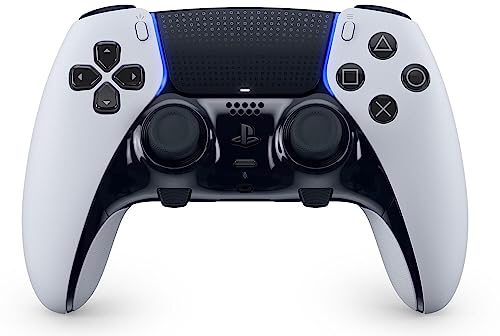
Sony DualSense -- Best for PlayStation Emulation
For PCSX2 (PS2) and RPCS3 (PS3) emulation, using a DualSense delivers the most authentic layout familiarity. Button prompts in emulated PS games match your physical controller labels exactly. DualSense connects to Windows via USB or Bluetooth and is supported in most major emulators. DS4Windows software unlocks additional features including touchpad mapping and adaptive trigger remapping. A natural choice for players whose emulation focus is the PlayStation library.
Strengths
- 9443995

GuliKit KingKong 2 Pro -- Best for Long-Term Drift Prevention
The KingKong 2 Pro's Hall-effect electromagnetic sticks are the primary reason to choose it for PC emulation. If you use your emulation setup daily for years, standard potentiometer sticks will eventually develop drift that ruins N64 or PS2 3D games. The KingKong 2 Pro eliminates that concern entirely. Bluetooth and USB connectivity both work with Windows emulators, and the controller is recognized as a standard gamepad by RetroArch. A smart long-term investment for dedicated emulation setups.
Strengths
- Tension-Adjustable TMR Joysticks: 720° stepless force adjustable magnetic TMR joystick wit
- World's Fast Wireless Speed: GuliKit "Hyperlink 2", an industry changing Bluetooth technol
- Smart Triggers: 2-in-1 Hall effect & microswitch switch-able triggers for optimal control
- Exclusive Magnetic Levitation Motors: Switch between HD, Super Haptic, and Rotor vibration
- Rich Accessories for Fullest Customization: 4 removable metal back paddles + 2 sets of Swi

Nintendo GameCube Controller + USB Adapter -- Best for Dolphin on PC
Dolphin has native support for the official Nintendo GameCube USB adapter on Windows, and using a real GCN controller is the definitive experience for GameCube emulation on PC. Super Smash Bros. Melee, Sunshine, and Wind Waker feel exactly as they were designed. Latency through the official adapter is minimal, and Dolphin's native GameCube input mode bypasses XInput entirely for maximum authenticity. If Dolphin is your primary PC emulator, this is the correct hardware choice.
Strengths
- Adapter for Gamecube Controller
- Super Smash Bros Choice
- Four Player Support
- Plug and Play
- Turbo Feature Support
Buying considerations
What to consider
First, identify which emulators and systems dominate your library. GameCube players should use a real GCN controller with the official adapter. PlayStation-era players benefit from the DualSense's familiar layout. Multi-system players running everything from NES to Switch should prioritize the 8BitDo Pro 2's versatility and customization. Connection type matters: USB or 2.4GHz for lowest latency, Bluetooth for cable-free convenience. Finally, consider longevity. Hall-effect controllers prevent the drift issues that plague heavy emulation setups over time.
What to consider
For more guides, see our [best controller for emulation](/articles/best-controller-for-emulation) roundup and the [best controller for Dolphin Emulator](/articles/best-controller-for-dolphin-emulator) article. Our full testing process is explained in our [methodology](/methodology).
Questions answered
USB wired gives the lowest latency and is the most reliable option for PC emulators. 2.4GHz dongles are a close second with latency typically under 5ms. Standard Bluetooth can introduce variable latency (8-20ms), which is noticeable in games requiring precise timing. For competitive or timing-sensitive emulation, wired or 2.4GHz is recommended.
RetroArch is the most widely compatible emulation frontend and supports virtually every controller that Windows recognizes, including XInput and DirectInput devices. It includes automatic controller configuration for most popular gamepads. Standalone emulators like PCSX2 and RPCS3 also have strong controller support, especially for XInput-compatible controllers.
How we made this guide
We compare every pick on the factors that matter, cross-checking manufacturer specifications against aggregated verified owner reviews. We rank independently and never take payment for placement. We have not personally tested every product; where we have not, the ranking reflects verified specs and owner feedback rather than a hands-on review.
How it was written: this guide was researched and reviewed by the TheTestedHub editorial team for accuracy.
Affiliate disclosure: TheTestedHub is reader-supported. When you buy through links on our site, we may earn a commission at no extra cost to you.
Keep reading

Educational Games 2026 That Grow With Your Child

7 Android TV Controllers Worth Your Money

Wooting 60HE Review (2026): 7 Months With the Analog Keyboard

Logitech G Pro X Superlight 2 Review (2026): The Esports

HyperX Cloud III Wireless Review (2026)

Steam Deck OLED (1TB) Review (2026): 8 Months Later, Still

Logitech G502 Hero Review (2026)
