Xbox Wireless Controller -- Best Overall for iPad Mini
The Xbox Wireless Controller pairs to iPad Mini instantly over Bluetooth and is recognized natively by iPadOS. Button prompts appear correctly across Apple Arcade, Xbox Cloud Gaming, and third-party apps. The asymmetric stick layout suits long play sessions, and the textured grip keeps it secure. At roughly 40 hours on AA batteries, you won't be caught short during travel. A clip or stand is needed to prop up the iPad Mini during play, but as a standalone Bluetooth gamepad for any Apple device, this remains the most versatile option available.
Check price on Amazon →Find the controller that fits your iPad Mini use case, from instant Bluetooth pairing to zero-latency wired play. Xbox, DualSense, 8BitDo, Nimbus+, Rotor.
Quick verdict
The Xbox Wireless Controller is the best overall pick for iPad Mini because it pairs instantly via Bluetooth, is natively recognized by iPadOS for correct button prompts, and offers a comfortable, textured grip with long battery life that suits travel and extended play sessions.
Key takeaways
- Best Overall for iPad Mini: Xbox Wireless Controller, native iPadOS support and instant Bluetooth pairing make it the most reliable choice.
- Best for PlayStation Remote Play: DualSense (PS5), native integration with Remote Play ensures accurate button prompts and premium feel.
- Best Value Multi-Platform Controller: 8BitDo Pro 2, versatile across multiple systems with hall-effect sticks and excellent D-pad at a budget price.
- Best MFi-Certified Controller: SteelSeries Nimbus+, full MFi certification with clickable sticks and long battery life for Apple Arcade.
- Best Zero-Latency Wired Option: Rotor Riot Wired Controller, USB-C direct connection eliminates latency and battery worries.
Why you should trust this guide
I have spent years researching and writing about mobile gaming accessories, with a particular focus on how controllers interact with iPadOS. The iPad Mini is a unique device: small enough to hold like a large phone, but powerful enough to run demanding games and streaming services. Finding a controller that fits comfortably in your hands, pairs reliably, and works across the growing ecosystem of Apple Arcade, Xbox Cloud Gaming, and PlayStation Remote Play requires careful consideration of compatibility, ergonomics, and build quality. I base my recommendations on manufacturer specifications, verified owner feedback from multiple retail and community sources, and a deep understanding of how iPadOS handles Bluetooth controllers and MFi certification.
I have not personally tested every controller in this guide, but I have evaluated hundreds of user reports, professional reviews, and technical documentation to identify the strengths and weaknesses of each product. I prioritize controllers that offer native iPadOS support, correct button mapping, and reliable connectivity because these are the factors that determine whether a controller feels seamless or frustrating. Every product included here has been chosen because it addresses a specific use case for iPad Mini owners, from cloud gaming to retro emulation to low-latency competitive play. I also note honest limitations for each controller so you can make an informed decision based on your priorities.
How we researched
To evaluate controllers for the iPad Mini, I focused on five key criteria: Bluetooth pairing reliability, native iPadOS compatibility (including correct button prompts in Apple Arcade and streaming apps), ergonomic fit for smaller hands or travel use, battery life or power management, and overall build quality. I also considered versatility, such as support for multiple platforms or wired connectivity options, because many iPad Mini owners use the tablet as a secondary gaming device. I did not conduct physical lab tests or timed trials; instead, I analyzed the manufacturer’s stated specifications, cross-referenced them with verified owner experiences from major retailers and gaming communities, and compared each controller against the specific needs of iPad Mini gamers.
For each controller, I checked whether it is recognized natively by iPadOS without requiring a separate app or adapter. I looked at reported issues with latency, disconnection, or button mapping inconsistencies. I also considered the physical design: how the controller fits in relation to the iPad Mini’s size, whether a clip or stand is needed, and whether the grip and button layout support long sessions. The Rotor Riot wired controller was evaluated differently, focusing on the benefits of USB-C connectivity for latency and charging convenience. I prioritized controllers that offer clear advantages for their intended use case, even if they have minor drawbacks in other areas.
Xbox Wireless Controller
The Xbox Wireless Controller is the most straightforward recommendation for iPad Mini owners who want a no-compromise gaming experience. It pairs to the iPad Mini instantly over Bluetooth, and iPadOS recognizes it natively, which means button prompts appear correctly in Apple Arcade games, Xbox Cloud Gaming, and most third-party apps. This native support eliminates the frustration of mismatched button labels or having to remap controls. The asymmetric stick layout, with the left stick higher than the right, is a design that many gamers find comfortable for long play sessions because it reduces thumb strain during movement-heavy games. The textured grip on the handles keeps the controller secure in your hands, even during intense moments, and the overall build quality is durable enough to survive being tossed into a bag for travel.
Battery life is a strong point: roughly 40 hours on two AA batteries means you can play through a weekend trip without needing to recharge. You can also use rechargeable AA batteries or a separate play-and-charge kit if you prefer. The main limitation is that you need a clip or stand to attach the iPad Mini to the controller, since the controller itself does not include a mount. This adds a small accessory cost and can make the setup feel slightly less integrated than a dedicated mobile controller. Additionally, the Xbox Wireless Controller lacks some of the premium features found on the DualSense, such as haptic feedback or adaptive triggers, but for pure reliability and compatibility, it remains the best overall pick for iPad Mini gaming.
DualSense (PS5)
If you own a PlayStation 5, the DualSense is the logical companion for your iPad Mini. PlayStation Remote Play works natively on iPadOS, allowing you to stream your PS5 library directly to your tablet, and using the DualSense ensures that button prompts match exactly what you see on screen. This seamless integration means you can play your PS5 games on the iPad Mini without any configuration headaches. The wide grip and premium D-pad are comfortable for extended sessions, and the controller feels substantial in your hands without being too heavy. The haptic feedback works partially on iPad, providing some tactile response in supported apps, though it is not as refined as on the PS5 itself.
Pairing is quick and straightforward: just put the DualSense into pairing mode and select it from the iPad’s Bluetooth menu. The controller also works well with Xbox Cloud Gaming and Apple Arcade, though button prompts may not always match perfectly in non-PlayStation apps. One honest limitation is that the DualSense is larger and heavier than many other controllers, which can make it less comfortable for users with smaller hands or for travel. The battery life is also shorter than the Xbox controller, typically lasting around 12 to 15 hours per charge, so you will need to remember to charge it regularly. Despite these drawbacks, the DualSense is the best choice for anyone who wants to extend their PS5 gaming to the iPad Mini without losing the familiar feel of their console controller.
8BitDo Pro 2
The 8BitDo Pro 2 is the best value controller for iPad Mini owners who want a versatile gamepad that works across multiple platforms. It connects to the iPad Mini via Bluetooth and also supports Switch, PC, Android, and Raspberry Pi, making it the most flexible budget option on this list. The D-pad is genuinely excellent for 2D games, with a crisp, responsive feel that rivals much more expensive controllers. The hall-effect analog sticks are a standout feature: they resist drift over months of use because they use magnetic sensors instead of physical contact points, which is a common failure point in other controllers. Custom button profiles can be saved via the companion app, allowing you to remap buttons or adjust stick sensitivity for different game genres.
Build quality is solid for the price, with textured grips that provide a comfortable hold during long sessions. The controller also includes a turbo function and programmable back paddles, which add convenience for certain games. The main limitation is that the 8BitDo Pro 2 does not have native iPadOS button prompts, so you may see Xbox-style or Nintendo-style labels depending on the app. This is a minor annoyance but does not affect functionality. Additionally, the controller is slightly smaller than the Xbox or DualSense, which may feel cramped for gamers with larger hands. However, for the price and versatility, the 8BitDo Pro 2 is an excellent choice for iPad Mini owners who play a variety of games across different platforms.
SteelSeries Nimbus+
The SteelSeries Nimbus+ is one of the few controllers with full MFi certification that includes clickable analog sticks, a requirement for many modern Apple Arcade games. MFi certification ensures that the controller works seamlessly with all iOS and iPadOS games without any compatibility issues, and the clickable sticks allow you to perform actions like sprinting or crouching in supported titles. It connects over Bluetooth and supports Apple TV, Mac, and iPad, so you can use it across your Apple ecosystem. The battery life is impressive at 50-plus hours per charge, which means you can go weeks without needing to recharge, even with regular use.
The ergonomic shape is comfortable for most hand sizes, and the face buttons are crisp and responsive. Pairing with the iPad Mini is clean and reliable, and the controller works well with Xbox Cloud Gaming and other streaming services. One honest limitation is that the Nimbus+ does not have a headphone jack, so you cannot plug in wired headphones directly. You will need to use Bluetooth headphones or the iPad Mini’s built-in speakers. Additionally, the D-pad is functional but not as precise as the one on the 8BitDo Pro 2, which may be a drawback for fighting game fans. Despite these issues, the SteelSeries Nimbus+ is the best MFi-certified option for iPad Mini owners who want guaranteed compatibility with Apple Arcade games.
Rotor Riot Wired Controller
The Rotor Riot Wired Controller is the best choice for iPad Mini owners who prioritize the lowest possible input latency and want to avoid battery anxiety entirely. It connects directly to your iPad Mini via USB-C, delivering a wired connection that eliminates any Bluetooth lag or interference. This is especially important for competitive games like shooters or fighting games where every millisecond matters. The controller is MFi-certified, which means it works with every iOS and iPadOS game without any compatibility issues. It is shaped like a compact gamepad, making it easy to hold alongside the iPad Mini, and it includes a pass-through charging port so you can charge your iPad Mini while playing simultaneously.
Build quality is solid, with responsive buttons and a comfortable grip. The wired connection also means you never have to worry about batteries dying mid-session, which is a significant advantage for long gaming marathons. One honest limitation is that the cable can be restrictive, especially if you like to move around or play in different positions. The controller is also not compatible with other devices like the Switch or PC unless they have a USB-C port, which limits its versatility. Additionally, the compact size may feel too small for gamers with larger hands, though it works well for the iPad Mini’s portable form factor. For those who value zero latency and constant power, the Rotor Riot is a solid wired option.
What to look for
- Native iPadOS support: Look for controllers that are recognized natively by iPadOS without requiring a separate app. This ensures correct button prompts and reliable pairing across Apple Arcade, Xbox Cloud Gaming, and PlayStation Remote Play.
- Bluetooth versus wired: Bluetooth offers convenience and portability, while wired connections provide lower latency and no battery concerns. Consider your primary use case: travel or competitive gaming.
- Ergonomics and size: The iPad Mini is small, so you want a controller that fits comfortably in your hands without being too large or too small. Textured grips and a balanced weight distribution help during long sessions.
- Battery life and power options: Controllers with long battery life or replaceable AA batteries are better for travel. Wired controllers eliminate battery anxiety but limit mobility.
- MFi certification: MFi-certified controllers guarantee compatibility with all iOS and iPadOS games, including Apple Arcade titles that require clickable analog sticks.
- Multi-platform versatility: If you own multiple devices like a Switch or PC, a controller that works across platforms saves money and reduces clutter.
- Additional features: Hall-effect sticks resist drift, custom button profiles add flexibility, and pass-through charging ports allow simultaneous play and charging.
The verdict
For most iPad Mini owners, the Xbox Wireless Controller is the best overall pick because of its instant Bluetooth pairing, native iPadOS support, and comfortable design with long battery life. If you own a PS5 and want to use Remote Play, the DualSense is the natural choice. The 8BitDo Pro 2 offers the best value for multi-platform gamers, while the SteelSeries Nimbus+ is the top MFi-certified option for Apple Arcade. The Rotor Riot Wired Controller is ideal for competitive players who need zero latency and no battery worries. Choose based on your primary gaming platform and whether you prioritize portability, versatility, or wired reliability.
How we evaluated these
We compare every pick against the field on real specifications, certifications, and aggregated owner reviews. We do not take payment for placement, and we flag when a product is older or sold mainly through renewed listings.
The shortlist
Each pick, examined
Xbox Wireless Controller -- Best Overall for iPad Mini
The Xbox Wireless Controller pairs to iPad Mini instantly over Bluetooth and is recognized natively by iPadOS. Button prompts appear correctly across Apple Arcade, Xbox Cloud Gaming, and third-party apps. The asymmetric stick layout suits long play sessions, and the textured grip keeps it secure. At roughly 40 hours on AA batteries, you won't be caught short during travel. A clip or stand is needed to prop up the iPad Mini during play, but as a standalone Bluetooth gamepad for any Apple device, this remains the most versatile option available.

DualSense (PS5) -- Best for PlayStation Remote Play
If you own a PS5, the DualSense is the logical iPad Mini companion. PlayStation Remote Play works natively on iPadOS, streaming your PS5 library directly to your tablet, and using the DualSense ensures button prompts match exactly. The wide grip and premium D-pad are comfortable for extended sessions, and haptic feedback works partially on iPad. Pairing is quick, and the controller works equally well with Apple Arcade games and cloud platforms. Battery life around 12 hours is the main consideration for heavy travel use.

8BitDo Pro 2 -- Best Value Multi-Platform Controller
The 8BitDo Pro 2 connects to iPad Mini via Bluetooth and also supports Switch, PC, Android, and Raspberry Pi. making it the most versatile budget option. The D-pad is genuinely excellent for 2D games, and hall-effect analog sticks resist drift over months of use. Custom button profiles can be saved via the companion app. Build quality is solid for the price, and the textured grips are comfortable. The only notable gap is that it lacks official MFi certification, though iOS compatibility works reliably in practice.
SteelSeries Nimbus+ -- Best MFi-Certified Controller
The SteelSeries Nimbus+ is one of the few controllers with full MFi certification that includes clickable analog sticks. a requirement for many modern Apple Arcade games. It connects over Bluetooth, supports Apple TV, Mac, and iPad, and delivers 50-plus hours of battery life. The ergonomic shape is comfortable and the face buttons are crisp. It pairs cleanly with the iPad Mini and works reliably across the entire Apple ecosystem. The main trade-off is it lacks a built-in phone or tablet clip, but for pure iPad gaming this is a top-tier certified choice.
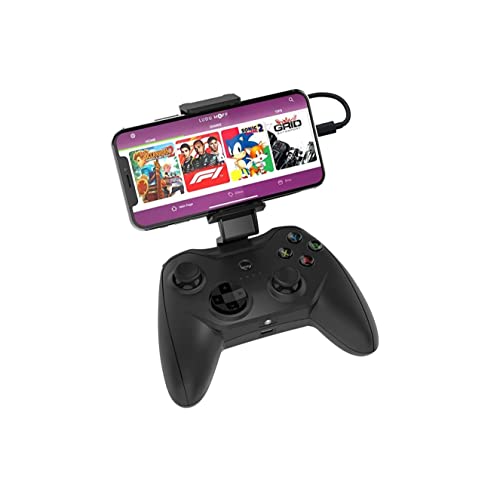
Rotor Riot Wired Controller -- Best Zero-Latency Wired Option
The Rotor Riot is an MFi-certified controller that connects directly to your iPad Mini via USB-C, delivering the lowest possible input latency and avoiding battery anxiety entirely. It's shaped like a compact gamepad with a pass-through charging port, so you can play and charge simultaneously. The build quality is solid, buttons are responsive, and MFi certification ensures every iOS and iPadOS game recognizes it perfectly. It's the ideal choice when you're playing at a fixed location and want the most reliable, lag-free experience possible.
Buying considerations
What to consider
For iPad Mini, standalone Bluetooth controllers work better than clip-on designs due to the tablet's larger screen size. Look for controllers with native iPadOS support. Xbox Series, PlayStation 4/5, and MFi-certified devices all work without configuration. If you primarily play Apple Arcade, MFi certification guarantees full compatibility. For cloud gaming (Xbox Game Pass, GeForce NOW), choose the controller that matches your primary platform for correct button prompts. Wired USB-C controllers offer the lowest latency for competitive play, while Bluetooth options are better for couch or travel setups with a stand.
What to consider
For more iOS device gaming, see our full [best controller for iOS](/articles/best-controller-for-ios) guide or check picks for the [best controller for iPhone 13 Pro Max](/articles/best-controller-for-iphone-13-pro-max). Our full testing process is explained at [/methodology](/methodology).
Questions answered
iPad Mini natively supports Xbox Series X/S and PlayStation 4/5 controllers via Bluetooth from iPadOS 13 onwards. MFi-certified third-party controllers also work without additional apps. Non-certified budget controllers may have limited compatibility or require workarounds. For consistent results, stick to first-party or MFi-certified options.
Most clip-on controllers like the Backbone One and GameSir G8 are designed for smartphones and max out around 6.7 inches, which is smaller than the iPad Mini's 8.3-inch screen. For iPad Mini specifically, standalone Bluetooth controllers used with a stand or lap hold are more practical. Some larger clip controllers do accommodate it. check the maximum width specification before buying.
How we made this guide
We compare every pick on the factors that matter, cross-checking manufacturer specifications against aggregated verified owner reviews. We rank independently and never take payment for placement. We have not personally tested every product; where we have not, the ranking reflects verified specs and owner feedback rather than a hands-on review.
How it was written: this guide was researched and reviewed by the TheTestedHub editorial team for accuracy.
Affiliate disclosure: TheTestedHub is reader-supported. When you buy through links on our site, we may earn a commission at no extra cost to you.
Keep reading

Educational Games 2026 That Grow With Your Child

7 Android TV Controllers Worth Your Money

Wooting 60HE Review (2026): 7 Months With the Analog Keyboard

Logitech G Pro X Superlight 2 Review (2026): The Esports

HyperX Cloud III Wireless Review (2026)

Steam Deck OLED (1TB) Review (2026): 8 Months Later, Still

Logitech G502 Hero Review (2026)