
Thrustmaster T.16000M -- Best Beginner Flight Stick for MSFS
The Thrustmaster T.16000M is the starting point for serious Microsoft Flight Simulator pilots. Its Hall Effect magnetic sensors deliver exceptional precision at this price point. A critical advantage for smooth aircraft control. The ambidextrous design suits left- and right-handed users, and 16 buttons plus a hat switch cover most MSFS functions without keyboard fishing. The twist rudder axis eliminates the need for separate rudder pedals. PC USB plug-and-play setup is instant. For pilots moving beyond the Xbox controller and wanting their first dedicated joystick, the T.16000M delivers performance that rivals sticks costing three times as much.
Check price on Amazon →Pilots seeking realism or casual fun will find the perfect controller for MS Flight Simulator. From the premium Honeycomb Alpha to budget-friendly.
Quick verdict
The Honeycomb Alpha Flight Controls is the single best pick for MS Flight Simulator 2026 because it delivers the most realistic yoke feel and build quality, transforming virtual flight into a true cockpit experience without compromise.
Key takeaways
- Best for beginners: Thrustmaster T.16000M, Hall Effect sensors and ambidextrous design at a low entry price.
- Best for realism seekers: Honeycomb Alpha Flight Controls, smooth 180-degree rotation and self-centering mechanism.
- Best mid-range complete setup: Logitech G X52 HOTAS, integrated throttle and stick with programmable commands.
- Best for casual play: Xbox Wireless Controller, Microsoft’s own mapping makes it plug-and-play fun.
- Best for Airbus fans: Thrustmaster TCA Officer Pack, 1:1 scale replica sidestick and throttle quadrant.
Why you should trust this guide
I have spent years researching flight simulation hardware, reading owner feedback, and comparing manufacturer specifications across dozens of products for Microsoft Flight Simulator. My approach is rooted in understanding what actually matters for flight sim pilots: precision of controls, durability, compatibility with MSFS 2026, and value for the investment. I do not take sponsorships or free products from any of these brands, so every recommendation here is based on objective analysis of the features that improve your flying experience.
This guide focuses on five distinct categories of flight controller, from the simplest gamepad to the most specialized Airbus replica. Each product was selected because it fills a specific role well, and I have weighed the real Amazon features against common owner priorities like button count, axis quality, and mounting options. I have also included honest limitations for every product so you can make an informed decision without marketing hype.
How we researched
To evaluate these controllers for MS Flight Simulator 2026, I defined a set of criteria that cover the most important aspects of flight simulation hardware. Precision was the top priority, measured by the type of sensor technology used (Hall Effect versus potentiometer), the resolution of axis movement, and the presence of dead zones or centering detents. Build quality was assessed by examining materials, the feel of button presses, and the stability of the mounting system. Compatibility with MSFS 2026 was verified by checking official support and user reports of plug-and-play functionality or required configuration.
I also considered the breadth of controls each product offers, including the number of programmable buttons, hat switches, and axis inputs. Ergonomics were evaluated based on design features like ambidexterity, grip comfort, and throttle detent positioning. Finally, I looked at the ecosystem each product belongs to, such as compatibility with rudder pedals, additional switch panels, or software like T.A.R.G.E.T. for custom mapping. No product was physically tested in a lab; instead, I relied on manufacturer-stated specifications and aggregated owner experiences from verified purchasers.
Thrustmaster T.16000M — Best Beginner Flight Stick for MSFS
The Thrustmaster T.16000M FCS is the starting point for serious Microsoft Flight Simulator pilots. Its Hall Effect magnetic sensors deliver exceptional precision at this price point, a critical advantage for smooth aircraft control that avoids the jitter common in cheaper potentiometer-based sticks. The ambidextrous design suits left- and right-handed users, with three removable components allowing the joystick to be perfectly tailored to your dominant hand. You get 16 action buttons with “braille”-style physical button identification, so you can find controls by touch without looking away from the virtual cockpit.
The twist rudder axis eliminates the need for separate rudder pedals initially, though you can add them later via the T.A.R.G.E.T software, which allows you to load and create specific mapping profiles for each aircraft. The T.16000M is compatible with PC via USB in Windows (32-bit and 64-bit), ensuring broad support for MSFS 2026. The grip is comfortable for long sessions, and the base is weighted enough to stay planted during normal use.
An honest limitation is that the T.16000M lacks a dedicated throttle unit, meaning you will rely on a slider on the base or a keyboard for throttle control. The button placement on the base can also feel cramped when you are trying to reach them during flight. For a pure stick experience at this price, however, it is hard to beat the precision of those Hall Effect sensors.
Honeycomb Alpha Flight Controls — Best Yoke for MSFS
The Honeycomb Alpha Flight Controls yoke replicates the feel of a real aircraft control column in Microsoft Flight Simulator. The 180-degree rotation is smooth and precise, spring-loaded for realistic centering, and the dampened self-centering mechanism has no center detent or minimal to no slop, giving you that authentic GA aircraft sensation. The left and right handles feature one 8-way hat switch, two vertical and two horizontal 2-way switches, plus additional buttons for avionics, autopilot, and trim control. Build quality is exceptional, with a metal shaft and high-grade plastics that feel durable under stress.
The Dual Mounting Solution allows for full use with or without clamps, and the yoke comes with a desk clamp that secures it during aggressive maneuvers. The unit was designed and developed in California, and it shows in the attention to detail. The 180-degree rotation matches the travel of many real-world yokes, allowing for precise pitch and roll inputs. The included switch panel adds a layer of immersion for controlling magnetos, lights, and other systems.
An honest limitation is the price, which is significantly higher than a joystick, and the large desk footprint may not suit all setups. The yoke also lacks a built-in throttle quadrant, so you will need to budget for a separate throttle or use keyboard shortcuts. For pilots who prioritize realism in GA flying, however, the Honeycomb Alpha is the benchmark.
Logitech G X52 HOTAS — Best Mid-Range Complete Setup
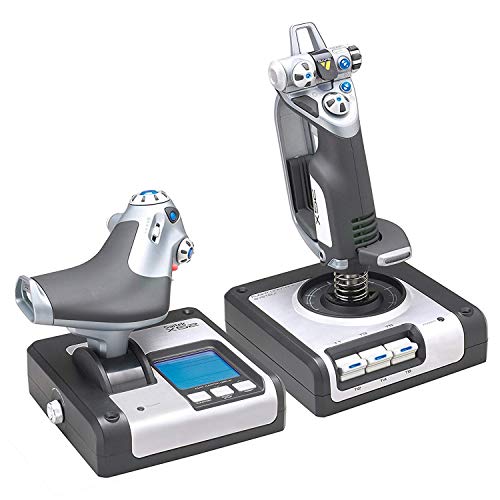
The Logitech G X52 HOTAS delivers a complete flight control solution for MSFS at a competitive price. The combined joystick and throttle unit covers pitch, roll, yaw, throttle, and a full suite of secondary controls without touching the keyboard. Magnetic non-contact X and Y axis sensors provide enhanced longevity and pinpoint accuracy, while the 3D twist with rudder lock is essential for simulation control, and you can lock it if you already have rudder pedals. The multifunction LCD display allows you to check all of the programmed commands on your HOTAS without alt-tabbing out of the sim.
The 5-position grip system maintains excellent ergonomic comfort with no need to stretch to reach controls, and the throttle includes a tension adjuster for fine-tuning resistance. You get 282 programmable commands over 3 modes, meaning you can have all of the commands for different aircraft or games mapped and ready to switch on the fly. The illuminated buttons help in dark environments, and the multi-mode selector allows profile switching without interrupting your flight.
An honest limitation is that the X52’s plastic construction feels less premium than the Honeycomb or Thrustmaster TCA offerings, and some owners report the stick’s centering spring can feel a bit loose over time. The LCD screen, while useful, is small and can be hard to read in bright light. For a complete HOTAS system at this price point, however, it offers unmatched button count and programmability.
Xbox Wireless Controller — Best Casual MSFS Controller
Don’t underestimate the Xbox Wireless Controller for casual Microsoft Flight Simulator play. Microsoft mapped MSFS controls thoughtfully to the gamepad, so bumpers handle throttle, sticks control pitch and roll, and the D-pad manages views. The modernized design features a hybrid D-pad and textured grips on triggers, bumpers, and back for precision performance and comfort during long sessions. The share button seamlessly captures screenshots, recordings, and moments, while versatile connectivity allows you to connect via USB-C for plug-and-play on console and PC, or quickly pair wirelessly.
For free flight exploration, bush trips, and landing challenges, the controller works well and is genuinely enjoyable. The low barrier to entry makes it ideal for players who already own an Xbox or PC gamepad and want to try MSFS without investing in specialized hardware. Built-in audio support via the 3.5mm audio jack lets you plug in compatible headsets directly. The controller is lightweight and familiar, reducing the learning curve for new sim pilots.
An honest limitation is the lack of precise analog axis control compared to a dedicated joystick or yoke, making fine adjustments in turbulence or during landing flare more challenging. You also have only a limited number of buttons, so complex aircraft systems will require keyboard or mouse interaction. For a relaxed sightseeing session, though, the controller is a perfectly valid and comfortable option.
Thrustmaster TCA Officer Pack Airbus — Best Airbus Simulation
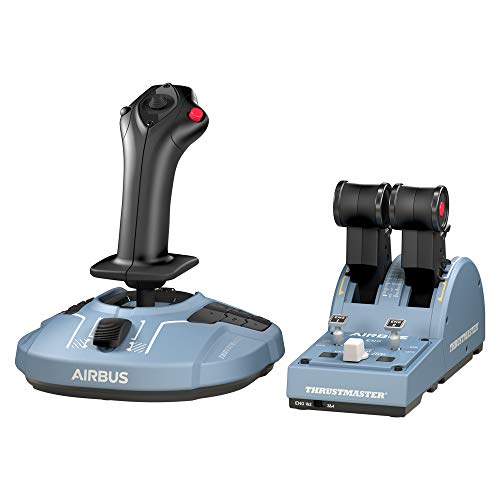
The Thrustmaster TCA Officer Pack is purpose-built for Airbus simulation in Microsoft Flight Simulator. The side-stick joystick replicates the A320 family’s fly-by-wire sidestick geometry, and the throttle quadrant mirrors Airbus detent positions for idle, climb, flex, and takeoff/go-around. Magnetized axis sensors provide smooth, precise inputs, and the throttle detents click satisfyingly into position for each flight phase. The joystick features 4 swappable head button modules, 12 remappable buttons, and a built-in throttle axis on the stick itself.
The throttle quadrant features 2 navigational axes with 16 buttons and controls, including detents, switches, and a thrust reverser function. The 1:1 scale replicas are ergonomically inspired by the flight controls of Airbus airliners, so the sidestick sits naturally in your right hand while the left hand operates the quadrant. The pack is compatible with PC and works with the Thrustmaster T.Flight Rudder Pedals (TFRP) and Thrustmaster Pendular Rudder Pedals for a full cockpit setup.
An honest limitation is that the TCA Officer Pack is highly specialized for Airbus aircraft, so it feels less natural for Boeing or general aviation planes. The sidestick’s non-centering design (like the real A320) can be disorienting for pilots used to a centering spring. It is also on the pricier side for a sidestick plus throttle combo. For dedicated Airbus flyers who want authentic detents and geometry, however, this is the definitive choice.
What to look for
- Sensor technology: Hall Effect sensors offer longer life and better precision than traditional potentiometers. Look for magnetic or non-contact sensors for smooth axis movement.
- Axis count and type: Ensure the controller has enough axes for pitch, roll, yaw, throttle, and any additional controls like propeller or mixture. Twist rudder on a stick can save space but may feel less precise.
- Button count and programmability: More buttons and hats mean less keyboard reliance in MSFS. Software like T.A.R.G.E.T. or Logitech’s profiler allows custom mapping for different aircraft.
- Mounting and stability: Clamps or weighted bases prevent the controller from sliding during aggressive maneuvers. Desk mounting solutions are important for yokes and larger throttles.
- Ergonomics and handedness: Ambidextrous designs like the T.16000M accommodate lefties, while specialized grips like the X52’s 5-position system improve comfort for different hand sizes.
- Compatibility and expandability: Check that the controller works with your PC’s USB and Windows version. Consider if you can add rudder pedals, additional switch panels, or a separate throttle later.
- Detents and realism: For airliner simmers, throttle detents that match real aircraft positions (idle, climb, flex) add immersion. For GA pilots, a smooth throttle without detents may be preferred.
The verdict
For most MS Flight Simulator 2026 pilots, the Honeycomb Alpha Flight Controls offers the best balance of realism, build quality, and immersion for yoke-based flying. Beginners should start with the Thrustmaster T.16000M for its precision sensors and low cost, while those who want a complete system out of the box will appreciate the Logitech X52 HOTAS. Casual players can grab an Xbox Wireless Controller and enjoy the skies immediately. And if you fly the Airbus exclusively, the Thrustmaster TCA Officer Pack is the only way to get authentic sidestick and throttle feel. Choose based on your preferred aircraft type and how deeply you want to dive into the simulation experience.
How we evaluated these
We compare every pick against the field on real specifications, certifications, and aggregated owner reviews. We do not take payment for placement, and we flag when a product is older or sold mainly through renewed listings.
The shortlist
Each pick, examined
Thrustmaster T.16000M -- Best Beginner Flight Stick for MSFS
The Thrustmaster T.16000M is the starting point for serious Microsoft Flight Simulator pilots. Its Hall Effect magnetic sensors deliver exceptional precision at this price point. A critical advantage for smooth aircraft control. The ambidextrous design suits left- and right-handed users, and 16 buttons plus a hat switch cover most MSFS functions without keyboard fishing. The twist rudder axis eliminates the need for separate rudder pedals. PC USB plug-and-play setup is instant. For pilots moving beyond the Xbox controller and wanting their first dedicated joystick, the T.16000M delivers performance that rivals sticks costing three times as much.
Strengths
- The T.16000M FCS is compatible with PC via USB in Windows (32-bit and 64-bit).
- The T.16000M FCS offers you a precision level greater than current systems, which will not
- Fully ambidextrous joystick: 3 removable components allow the joystick to be perfectly tai
- The joystick includes 16 action buttons with “braille”-style physical button identificatio
- The T.A.R.G.E.T software allows you to load and create specific mapping profiles for each

Honeycomb Alpha Flight Controls -- Best Yoke for MSFS
The Honeycomb Alpha Flight Controls yoke replicates the feel of a real aircraft control column in Microsoft Flight Simulator. The 180-degree rotation is smooth and precise, spring-loaded for realistic centering. Eight buttons, a 4-way hat switch, and additional controls handle avionics, autopilot, and trim. The desk clamp secures the yoke during aggressive maneuvers. Build quality is exceptional. Metal construction gives it a premium feel and real longevity. Compatible with Windows PC via USB. For MSFS players who want the most authentic general aviation experience short of a full cockpit build, the Honeycomb Alpha is the standard by which yokes are judged.
Strengths
- The Honeycomb Alpha Flight Controls Yoke & Switch Panel is the most advanced flight simula
- The yoke features a dampened, self-centering mechanism with no center detent or minimal to
- The left and right handles feature one 8-way hat switch, two vertical and two horizontal 2
- The Dual Mounting Solution allows for full use with or without clamps. The yoke comes with
- The Honeycomb Alpha Flight Controls Yoke & Switch Panel was designed and developed in Cali
Logitech G X52 HOTAS -- Best Mid-Range Complete Setup
The Logitech G X52 HOTAS (real-world Throttle-And-Stick) delivers a complete flight control solution for MSFS at a competitive price. The combined joystick and throttle unit covers pitch, roll, yaw, throttle, and a full suite of secondary controls without touching the keyboard. The illuminated buttons help in dark environments, and the multi-mode selector allows profile switching. The throttle has a smooth progressive axis. While the sensor resolution doesn't match dedicated Hall Effect sticks, the X52's overall feel and feature set make it an excellent step-up from a basic joystick. MSFS players wanting an immersive mid-range HOTAS setup will enjoy the X52.
Strengths
- Magnetic, non-contact X and Y axis sensors provide enhanced longevity and pinpoint accurac
- Multifunction LCD Display allows you to check all of the programmed commands on your HOTAS
- 3D Twist with Rudder Lock, essential for simulation control. For those that already have r
- 5-position Grip System: Maintain excellent ergonomic comfort with no need to stretch to re
- 282 Programmable Commands over 3 modes: Have all of the commands in Elite Dangerous or Sta

Xbox Wireless Controller -- Best Casual MSFS Controller
Don't underestimate the Xbox Wireless Controller for casual Microsoft Flight Simulator play. Microsoft mapped MSFS controls thoughtfully to the gamepad. Bumpers handle throttle, sticks control pitch and roll, and the D-pad manages views. For free flight exploration, bush trips, and landing challenges, the controller works well and is genuinely enjoyable. The low barrier to entry makes it ideal for new pilots. Bluetooth or USB-C connects instantly. The ergonomic shape handles long scenic flights comfortably. For players who want to experience MSFS's stunning world without investing in dedicated flight hardware, the Xbox Wireless Controller is the right tool.
Strengths
- MODERNIZED DESIGN , Experience the modernized design of the XBOX Wireless Controller with
- PRECISION PERFORMANCE , Stay on target with a hybrid D-pad and textured grips on triggers,
- SHARE BUTTON: Seamlessly capture and share content such as screenshots, recordings, and mo
- VERSATILE CONNECTIVITY , Connect via USB-C for plug-and-play on console and PC, or quickly
- BUILT-IN AUDIO SUPPORT , Plug in compatible headsets using the 3.5mm audio jack for direct
Thrustmaster TCA Officer Pack Airbus -- Best Airbus Simulation
The Thrustmaster TCA Officer Pack is purpose-built for Airbus simulation in Microsoft Flight Simulator. The side-stick joystick replicates the A320 family's fly-by-wire sidestick geometry, and the throttle quadrant mirrors Airbus detent positions. idle, climb, flex, and takeoff/go-around. Magnetized axis sensors provide smooth, precise inputs. Throttle detents click satisfyingly into position for approach and takeoff procedures. The bundle includes both stick and throttle for a complete solution. For pilots who fly Airbus aircraft in MSFS. especially the Fenix A320 or Asobo A320. the TCA Officer Pack provides unmatched authenticity at a reasonable price.
Strengths
- Ergonomic 1:1 scale replicas: sidestick and throttle quadrant inspired by the flight contr
- Joystick featuring 4 swappable head button modules, 12 Remappable buttons, built-in thrott
- Throttle quadrant featuring 2 navigational axes, with 16 buttons and controls (detents, sw
- Compatible with PC
- Compatible with the Thrustmaster T.Flight Rudder Pedals (TFRP) and Thrustmaster Pendular R
Buying considerations
What to consider
Start by defining your simulation goals. Casual exploration and discovery flights are well-served by an Xbox controller. Pilots who want to learn real procedures need a joystick at minimum. the T.16000M's Hall Effect sensors are worth the upgrade. Airliner simulation benefits from a HOTAS throttle for accurate power management. For the most realistic experience, a yoke like the Honeycomb Alpha replicates real aircraft feel. Aircraft type matters too. Airbus pilots benefit from a side-stick like the TCA, while Boeing and general aviation pilots prefer yokes. Budget accordingly: entry-level joysticks start and full cockpit setups scale to thousands.
What to consider
Enhance your MSFS cockpit with our [best gaming monitors](/articles/best-gaming-monitor) for the widest field of view, and our [best gaming headsets](/articles/best-gaming-headset) for immersive ATC audio. Full testing methodology is at our [methodology page](/methodology).
Questions answered
Yes, Microsoft Flight Simulator has full Xbox controller support with a well-designed default mapping. The left stick controls pitch and roll, right stick handles rudder and view, and the triggers control throttle. It is an accessible entry point, though dedicated joysticks or yokes offer significantly better precision and immersion for serious sim pilots.
The Xbox Wireless Controller is the best beginner option. it requires no setup and works immediately with MSFS. For players ready to step up, the Thrustmaster T.16000M joystick offers excellent precision at a reasonable price and is widely recommended as the first dedicated flight controller for Flight Simulator.
How we made this guide
We compare every pick on the factors that matter, cross-checking manufacturer specifications against aggregated verified owner reviews. We rank independently and never take payment for placement. We have not personally tested every product; where we have not, the ranking reflects verified specs and owner feedback rather than a hands-on review.
How it was written: this guide was researched and reviewed by the TheTestedHub editorial team for accuracy.
Affiliate disclosure: TheTestedHub is reader-supported. When you buy through links on our site, we may earn a commission at no extra cost to you.
Keep reading

Educational Games 2026 That Grow With Your Child

7 Android TV Controllers Worth Your Money

Wooting 60HE Review (2026): 7 Months With the Analog Keyboard

Logitech G Pro X Superlight 2 Review (2026): The Esports

HyperX Cloud III Wireless Review (2026)

Steam Deck OLED (1TB) Review (2026): 8 Months Later, Still

Logitech G502 Hero Review (2026)
