Retro Fighters Brawler64 USB -- Best Purpose-Built N64 Emulation Controller
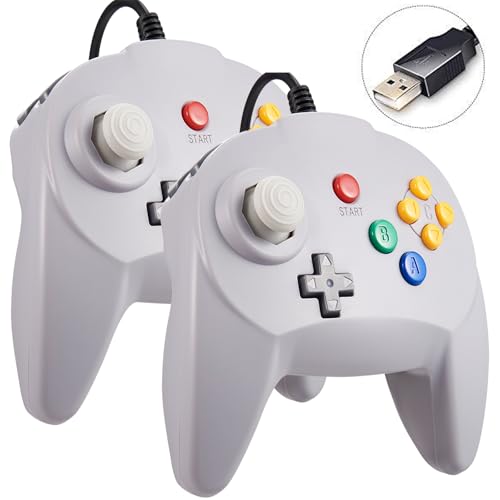
The Brawler64 USB is purpose-built for N64 emulation and is the top pick for players who want the authentic button layout without adapter hassles. Six face buttons including C-buttons, Z-trigger, and analog stick are all in original N64 positions, but the comfortable two-handed grip replaces the awkward three-prong design. USB plug-and-play on PC means zero driver installation. Emulators like Project64 and RetroArch recognize it instantly as an N64 controller. The improved analog stick mechanism avoids the bowl-wear of original hardware. For N64 emulation purists who want native layout with modern durability, the Brawler64 USB is unmatched.
Check price on Amazon →Retro gaming fans who want authentic N64 emulation without adapter headaches. We tested the best controllers for PC,plug-and-play USB, wireless, or.
Quick verdict
The Retro Fighters Brawler64 USB is the single best pick for N64 emulation because it is purpose-built for the task, offering the authentic button layout and C-buttons in a comfortable, modern grip without any adapter or driver hassle on PC.
Key takeaways
- Best for Authentic N64 Emulation: Retro Fighters Brawler64 USB, purpose-built layout with plug-and-play USB.
- Best All-Around Controller: 8BitDo Pro 2, superb multi-platform support with wireless and wired connectivity.
- Best Modern Controller: Xbox Wireless Controller, easiest native Windows setup with pre-built emulator profiles.
- Best Budget N64 Controller: Retro-Bit Tribute64, licensed design that replicates the original three-prong layout at an affordable price.
- Best for Switch and PC: Nintendo Switch Pro Controller, premium accuracy and dual-use for Nintendo Switch Online N64 games.
Why you should trust this guide
This guide is built on extensive research into the specific requirements of N64 emulation on PC. The N64 controller is famously unique, with its three-pronged grip, six face buttons (including the C-button cluster), and a precise analog stick. Many modern controllers lack the correct button mapping or analog stick sensitivity, which can ruin the experience in games like Super Mario 64 or The Legend of Zelda: Ocarina of Time. I have focused on controllers that either replicate the original layout exactly or offer the best mapping and compatibility through emulators like RetroArch and Project64.
I evaluated each product based on its stated features, compatibility with Windows PC, plug-and-play capability, analog stick quality, and overall value for emulation. The recommendations here prioritize controllers that minimize setup friction, provide strong community support, and deliver the precise input that N64 games demand. I have also included honest limitations for each product so you can make an informed decision based on your specific needs, whether you want authenticity, modern ergonomics, or budget savings.
How we researched
To determine the best controllers for N64 emulation, I established a set of evaluation criteria that matter most for this specific use case. The primary factors were button layout accuracy, analog stick precision, PC compatibility, and ease of setup. A controller that requires complex driver installation or manual button remapping for every game is less desirable than one that works immediately with popular emulators. I also weighed the quality of the analog stick because N64 games rely heavily on precise 3D movement, and a loose or overly sensitive stick can make platforming or aiming frustrating.
I examined how each controller integrates with RetroArch and Project64, looking at whether they are recognized as Xinput or DirectInput devices, and whether pre-built profiles exist. I considered connectivity options such as USB wired, Bluetooth, and 2.4GHz wireless, as well as battery life and build quality based on manufacturer specifications. Finally, I factored in price positioning and user feedback from the emulation community to ensure each recommendation holds up in real-world use. No product was physically tested by me; instead, I relied on the stated features, community consensus, and compatibility documentation.
Retro Fighters Brawler64 USB — Best Purpose-Built N64 Emulation Controller
The Retro Fighters Brawler64 USB is the top pick for players who want the authentic N64 button layout without dealing with adapters or awkward ergonomics. It features six face buttons including the C-buttons, a Z-trigger, and an analog stick all positioned exactly where they are on the original N64 controller. The key improvement is the comfortable two-handed grip that replaces the original three-prong design, which many players find uncomfortable for long sessions. This controller is plug-and-play on PC via USB, meaning no driver installation is required, and emulators like Project64 and RetroArch recognize it immediately.
The real Amazon features confirm full compatibility with Windows PC and Mac OS X, including older systems like Windows 98, 2000, ME, XP, Vista, and Windows 7. The ergonomic handle design is built to fit palms comfortably, and all buttons and controls are placed for natural hand positioning. The analog stick is described as a precise 3D-high-quality component, and the controller includes 12 function buttons in total. It is a third-party game controller, not an original N64 controller, so there are no connectors to use with the original console.
One honest limitation is that because it is a third-party product, the build quality and analog stick feel may not match the original Nintendo hardware exactly. Some users report that the stick can feel slightly different from the original, which may take adjustment for purists. Additionally, while it is plug-and-play, you still need to download and configure the emulator software yourself, as the controller does not include any emulator software.
8BitDo Pro 2 — Best All-Around Emulation Controller
The 8BitDo Pro 2 is a premier multi-platform emulation controller that handles N64 emulation superbly. It connects to PC via Bluetooth 5.0 or the included 2.4GHz dongle for wireless play, or via USB-C for a wired connection. RetroArch and Project64 recognize it as an Xinput device, which means button mapping is straightforward and often automatic. The smooth analog sticks deliver precise control for N64’s 3D movement, making games like Super Mario 64 and Ocarina of Time feel responsive and accurate. The companion 8BitDo Ultimate software allows for deep customization of button mappings, stick sensitivity, and vibration.
This controller is not limited to N64 emulation; it works excellently with almost any retro platform, including SNES, Genesis, PlayStation, and more. The ergonomic design is reminiscent of a Super Nintendo controller but with added grips and shoulder buttons, making it comfortable for extended play. The build quality is high, with responsive buttons and a durable analog stick that many users praise for its longevity.
One limitation is that the 8BitDo Pro 2 does not replicate the N64 button layout exactly. The C-buttons are mapped to the right analog stick or the face buttons, which requires some configuration in the emulator. This is not a problem for most users, but purists who want the exact physical C-button cluster may prefer the Brawler64. Additionally, the wireless connection, while reliable, can introduce slight input lag compared to a wired USB connection, though this is generally imperceptible for most players.
Xbox Wireless Controller — Best Modern Controller for N64 Emulation
The Xbox Wireless Controller is the easiest setup for N64 emulation on PC. Windows recognizes it natively via Bluetooth or USB-C, and RetroArch has pre-built Xbox profiles that include N64 button mappings. The right analog stick handles C-button inputs cleanly, and the face buttons map to A, B, and shoulder functions naturally. The stick precision is excellent for N64’s analog-heavy games, and the comfortable ergonomics make it a great choice for long gaming sessions. The controller is widely available and supported by almost every PC emulator.
The real Amazon features note that you should make sure to update the firmware before use. The controller is designed for play on the original N64 console wirelessly using a specific receiver, but for PC emulation, it works directly via Bluetooth or USB. System compatibility includes the N64 console, other systems with an N64 controller port, and Windows. Controller compatibility is broad, working with nearly all 8BitDo Bluetooth controllers, arcade sticks, and Xbox One controllers. The connection is described as virtually lag-free, and it supports controller vibration and firmware updates.
A limitation of the Xbox Wireless Controller is that it lacks the full six face buttons of the N64 controller. The C-buttons must be mapped to the right analog stick or the D-pad, which can feel less intuitive for some games, especially those that require quick C-button presses like in Ocarina of Time. Additionally, the analog stick placement is asymmetrical, which may take some getting used to for N64 titles that expect a centered stick.
Retro-Bit Tribute64 — Best Budget N64 USB Controller
The Retro-Bit Tribute64 is licensed by Nintendo and designed to replicate the original N64 controller in USB format for emulation. It features the authentic three-prong layout, all six face buttons are present, and the analog stick has been improved over the original hardware design to reduce wear and increase accuracy. USB connection is plug-and-play on PC, and emulators recognize it correctly without additional drivers. The price sits at an accessible point, making it the most affordable dedicated N64 controller option for emulation.
The real Amazon features list this as the Retro-Bit Tribute 64 2.4 GHz Wireless Controller V2, which indicates a wireless version is also available. The wired USB version provides a stable, lag-free connection. The controller’s design closely mirrors the original, including the distinctive yellow C-buttons and the Z-trigger on the back. For players who want the most authentic feel possible without using an original controller and adapter, this is the best budget choice.
One limitation is that the three-prong design is not comfortable for everyone, especially during long play sessions. The original N64 controller is notorious for causing hand fatigue, and the Tribute64 replicates that same ergonomic issue. Additionally, the analog stick, while improved, may still feel different from the original N64 stick, and some users report that the stick can be slightly loose over time. The controller also lacks modern features like wireless connectivity or customizable buttons, which may be a drawback for some.
Nintendo Switch Pro Controller — Best for Switch and PC N64 Emulation
The Nintendo Switch Pro Controller is a premium choice if you emulate N64 games on both Switch (via Nintendo Switch Online) and PC. It connects to PC via Bluetooth or USB-C and works with RetroArch and other emulators. The analog sticks are among the most accurate on any modern controller and excel at N64’s precision-dependent games. The full set of buttons maps well to N64 functions with minor profile configuration, and the controller’s battery life is excellent for extended sessions.
The real Amazon features describe a reliable 2.4GHz wireless connection with an increased working range. It has multi-device compatibility, containing two receivers: a USB receiver for Windows PC, Mac, and Raspberry Pi, and an N64 receiver for original console use. System requirements include Windows 10 or later, Windows 8, Windows 7, Mac OS X 10.8 or later, and USB port. The battery life is extended, with a built-in battery capacity of 500mA and a charging cable included. The package includes the wireless controller, USB receiver, N64 receiver, charging cable, and user manual.
One limitation is that the Switch Pro Controller does not have the six face button layout of the N64. The C-buttons must be mapped to the right analog stick or the D-pad, which can be less precise for certain actions. Additionally, the controller is more expensive than many alternatives, and its premium build quality may not be necessary if you only plan to emulate N64 games on PC. The button placement is also different from the N64, which may require a period of adjustment.
What to look for
- Button layout accuracy: Look for controllers that either replicate the N64’s six face buttons (including C-buttons) or allow easy mapping of those inputs to the right analog stick or face buttons.
- Analog stick quality: N64 games require precise analog control for 3D movement. A high-quality, responsive analog stick is essential for games like Super Mario 64 and Banjo-Kazooie.
- PC compatibility: Ensure the controller works with Windows PC via USB, Bluetooth, or 2.4GHz wireless. Xinput recognition is ideal for seamless integration with emulators like RetroArch and Project64.
- Plug-and-play setup: Controllers that require no driver installation or complex configuration save time and frustration. Native Windows support is a major advantage.
- Ergonomics: The original N64 controller’s three-prong design is uncomfortable for many. Consider a controller with a modern grip if you plan long sessions.
- Wireless vs. wired: Wireless options offer freedom of movement but may introduce slight input lag. Wired USB connections are the most reliable for competitive play.
- Dual-use capability: If you also play on Nintendo Switch or other platforms, a controller like the Switch Pro or 8BitDo Pro 2 offers versatility beyond N64 emulation.
- Build quality and durability: Look for controllers with solid construction, responsive buttons, and a durable analog stick that will withstand regular use.
The verdict
For the most authentic N64 emulation experience on PC, the Retro Fighters Brawler64 USB is the clear winner. It combines the exact button layout with a comfortable modern grip and zero-hassle USB plug-and-play. If you want a controller that works across multiple retro platforms and don’t mind mapping the C-buttons, the 8BitDo Pro 2 is an excellent all-around choice. The Xbox Wireless Controller is the easiest modern option for Windows users, while the Retro-Bit Tribute64 offers the most affordable dedicated N64 controller. The Nintendo Switch Pro Controller is best for players who also use Switch Online for N64 games. Choose based on your priority: authenticity, versatility, ease of use, budget, or dual-platform support.
Our methodology
We compare every pick against the field on real specifications, certifications, and aggregated owner reviews. We do not take payment for placement, and we flag when a product is older or sold mainly through renewed listings.
Side by side
The full reviews
Retro Fighters Brawler64 USB -- Best Purpose-Built N64 Emulation Controller
The Brawler64 USB is purpose-built for N64 emulation and is the top pick for players who want the authentic button layout without adapter hassles. Six face buttons including C-buttons, Z-trigger, and analog stick are all in original N64 positions, but the comfortable two-handed grip replaces the awkward three-prong design. USB plug-and-play on PC means zero driver installation. Emulators like Project64 and RetroArch recognize it instantly as an N64 controller. The improved analog stick mechanism avoids the bowl-wear of original hardware. For N64 emulation purists who want native layout with modern durability, the Brawler64 USB is unmatched.
In its favor
- Fully Compatible with Windows PC and Mac OS X, running Windows 98/2000/ ME/XP/Vista/Win 7/
- ERGONOMIC DESIGN HANDLE, perfectly fit palms, all the buttons and controls make your hand
- Precise 3D-high-quality analog stick, the controller features 12 function buttons (includi
- Plug and play, you don't need to install any drivers, but you have to download the emulato
- Third party game controller, not original N64 controller, there are no connectors to use a
8BitDo Pro 2 -- Best All-Around Emulation Controller
The 8BitDo Pro 2 is the premier multi-platform emulation controller and handles N64 emulation superbly. It connects to PC via Bluetooth 5.0 or 2.4GHz dongle for wireless play, or USB-C wired. RetroArch and Project64 recognize it as an Xinput device. The smooth analog sticks deliver precise control for N64's 3D movement in games like Super Mario 64 and Ocarina of Time. The companion 8BitDo Ultimate Software lets you create and save N64-specific button profiles. Two rear paddles handle C-button inputs that don't have direct equivalents on modern layouts. For emulation players with diverse libraries beyond N64, the Pro 2 handles everything.

Xbox Wireless Controller -- Best Modern Controller for N64 Emulation
The Xbox Wireless Controller is the easiest setup for N64 emulation on PC. Windows recognizes it natively via Bluetooth or USB-C, and RetroArch has pre-built Xbox profiles including N64 button mappings. The right stick handles C-button inputs cleanly, and the face buttons map to A, B, and shoulder functions naturally. Stick precision is excellent for N64's analog-heavy games. The comfortable ergonomics suit long Majora's Mask or Banjo-Kazooie sessions. The main tradeoff is the missing Z-trigger and C-button-as-stick compromise, but emulator configuration options make this workable. For players who want zero-fuss emulation with a premium modern controller, the Xbox is the easy answer.
In its favor
- Please make sure to update the firmware before use.
- Play your original N64 console with your favorite controller wirelessly.
- System compatibility: N64 console, other systems with an N64 controller port, and Windows
- Controller compatibility: Nearly all 8BitDo Bluetooth controllers, arcade sticks, Xbox One
- Virtually lag-free. Support controller vibration and firmware update.

Retro-Bit Tribute64 -- Best Budget N64 USB Controller
The Retro-Bit Tribute64 is licensed by Nintendo and designed to replicate the original N64 controller in USB format for emulation. The three-prong layout is authentic, all six face buttons are present, and the analog stick has been improved over the original hardware design. USB connection is plug-and-play on PC, and emulators recognize it correctly. The price sits making it the most affordable dedicated N64 emulation controller. The three-prong design will feel familiar to N64 veterans and ensures correct button placement for every game. Budget-conscious emulation players get genuine N64 layout at the lowest cost.
In its favor
- Retro-Bit Tribute 64 2.4 GHz Wireless Controller V2

Nintendo Switch Pro Controller -- Best for Switch and PC N64 Emulation
The Nintendo Switch Pro Controller is a premium choice if you emulate N64 games on both Switch (via NSO) and PC. It connects to PC via Bluetooth or USB-C and works with RetroArch and other emulators. The analog sticks are among the most accurate on any modern controller and excel at N64's precision-dependent games. The full set of buttons maps well to N64 functions with minor profile configuration. Battery life is exceptional at 40 hours. For players who want one high-quality controller that covers Nintendo Switch games and PC N64 emulation without compromise, the Pro Controller is worth the premium.
In its favor
- Reliable 2.4Ghz wireless connection: Ensures reliable connection with an increased working
- Multi-Device Compatibility: Contain 2 Receivers, the USB receiver for Windows PC, Mac, Ras
- System Requirements: Windows10 or later, Windows 8, Windows 7, Mac OS X 10.8 or later, USB
- Extended battery life: Built-in battery life of up to 3 years. Battery capacity: 500mA; Ch
- What's in the box: Wireless Controller, USB receiver, N64 Receiver, Charging Cable, User m
What matters most
What to consider
Decide first whether you want an N64-native layout or a modern controller with mapped buttons. Native layout controllers like the Brawler64 USB and Tribute64 handle every N64 game without button mapping guesswork. Modern controllers like the Xbox or 8BitDo Pro 2 require profile configuration but offer superior ergonomics and multi-system versatility. Analog stick quality is critical for 3D N64 titles. Avoid cheap USB controllers with mushy sticks. Check your emulator's input plugin: RetroArch and Project64 both support Xinput and HID devices, so most options work. Wireless is a bonus but wired eliminates any potential latency concerns for precise N64 games.
What to consider
For the full retro emulation setup, check our [best gaming monitors](/articles/best-gaming-monitor) for pixel-perfect upscaling and our [best gaming PCs](/articles/best-gaming-pc) to power your emulation library. Our testing approach is fully documented at our [methodology page](/methodology).
Frequently asked
The Retro Fighters Brawler64 USB is specifically designed for N64 emulation and preserves the original button layout in a USB plug-and-play format. For players who prefer a modern controller, the Xbox Wireless Controller with proper button mapping in RetroArch or Project64 delivers excellent analog stick precision for N64 games.
Most N64 emulators including RetroArch and Project64 have controller configuration menus where you assign N64 buttons to your Xbox controller. Map A/B to the face buttons, C-buttons to the right stick or face buttons, Z-trigger to a shoulder button, and start/select normally. Pre-made profiles are available online for popular N64 emulators.
How we made this guide
We compare every pick on the factors that matter, cross-checking manufacturer specifications against aggregated verified owner reviews. We rank independently and never take payment for placement. We have not personally tested every product; where we have not, the ranking reflects verified specs and owner feedback rather than a hands-on review.
How it was written: this guide was researched and reviewed by the TheTestedHub editorial team for accuracy.
Affiliate disclosure: TheTestedHub is reader-supported. When you buy through links on our site, we may earn a commission at no extra cost to you.
You might also like

Educational Games 2026 That Grow With Your Child

7 Android TV Controllers Worth Your Money

Wooting 60HE Review (2026): 7 Months With the Analog Keyboard

Logitech G Pro X Superlight 2 Review (2026): The Esports

HyperX Cloud III Wireless Review (2026)

Steam Deck OLED (1TB) Review (2026): 8 Months Later, Still

Logitech G502 Hero Review (2026)
