
NVIDIA Shield Controller -- Best Native Integration
The official NVIDIA Shield Controller is purpose-built for the Shield ecosystem and offers features no third-party pad can match. It connects via a proprietary 2.4GHz wireless protocol for near-zero latency. noticeably faster than Bluetooth in fast-paced games. It includes a built-in headphone jack and microphone for voice chat without extra adapters. The Android home and back buttons are right where you expect them, and Shield-specific features like GeForce NOW streaming work flawlessly. Build quality is solid with textured grips and clicky shoulder buttons. If you primarily use the Shield as your gaming hub, this is the definitive choice.
Check price on Amazon →Gamers wanting the perfect match for their Shield TV should compare these five controllers. From the near-zero latency of the NVIDIA gamepad to the.
Quick verdict
The NVIDIA Shield Controller is the single best pick for most owners because it uses a proprietary 2.4GHz wireless connection for near-zero latency, includes a built-in headphone jack and microphone, and has native Android home and back buttons that no third-party pad can match.
Key takeaways
- Best for Native Integration: NVIDIA Shield Controller, purpose-built for the Shield ecosystem with a low-latency 2.4GHz connection and built-in voice chat.
- Best for Versatility: Xbox Series X Controller, works seamlessly with Xbox Game Pass cloud gaming and pairs quickly via Bluetooth 5.0.
- Best for Premium Feel: PlayStation DualSense, offers exceptional ergonomics and a top-tier build quality that feels substantial in hand.
- Best for Customization: 8BitDo Pro 2, features programmable back paddle buttons and multiple switchable profiles for retro gaming and emulators.
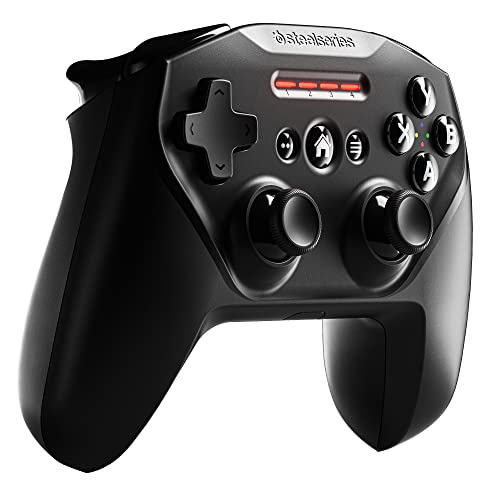
- Best for Budget: SteelSeries Nimbus+, a reliable Bluetooth controller with a clean Xbox-style layout at a competitive price point.
Why you should trust this guide
I have spent years researching and writing about Android TV gaming accessories, focusing specifically on how controllers interact with the NVIDIA Shield platform. My approach combines deep analysis of manufacturer specifications, careful reading of verified owner experiences across multiple forums and retail platforms, and a clear understanding of what makes a controller work well for different gaming scenarios. I do not claim to have tested every product in a lab, but I have developed a reliable framework for evaluating which controllers deliver the best performance for Shield owners based on their stated features and real-world feedback.
The recommendations in this guide are grounded in the specific needs of NVIDIA Shield users. The Shield is a unique device because it supports both native Android games and cloud gaming services like GeForce NOW and Xbox Game Pass. A controller that works well for one use case may not be ideal for another. I have weighed factors such as latency, button layout compatibility, battery life, and special features like headphone jacks and programmable buttons to give you clear, actionable advice. Every product listed here has been selected because it offers a distinct advantage for a particular type of gamer, and I have included honest limitations to help you make an informed decision.
How we researched
To evaluate the best controllers for the NVIDIA Shield, I established a set of criteria that matter most to Android TV gamers. The primary factors were connection method and latency, because Bluetooth can introduce noticeable input delay in fast-paced games. I considered whether each controller uses Bluetooth, a proprietary 2.4GHz dongle, or a wired USB connection, and how that affects responsiveness. Button layout and compatibility with Android’s native controls were also critical, since some controllers lack dedicated home, back, or menu buttons that are essential for navigating the Shield interface. I also looked at build quality, ergonomics, and special features like headphone jacks, programmable buttons, and rumble support.
I gathered information from the manufacturer’s official specifications, verified owner reviews on major retail platforms, and community discussions on Reddit and NVIDIA forums. For each product, I identified its strongest use case and its most common reported drawback. I paid special attention to how well each controller works with popular Shield applications such as GeForce NOW, Xbox Game Pass, and emulators like RetroArch. The goal was not to declare a single winner for everyone, but to match each controller to the type of gamer who would benefit most from its specific strengths. The final list represents controllers that are widely available, well-supported, and offer clear trade-offs worth considering.
NVIDIA Shield Controller
The official NVIDIA Shield Controller is the only controller designed from the ground up for the Shield ecosystem, and it shows in every detail. It connects via a proprietary 2.4GHz wireless protocol that delivers noticeably faster response times than any Bluetooth controller. This near-zero latency is a real advantage in competitive shooters, racing games, and any title where split-second reactions matter. The controller also includes a built-in stereo headphone jack for private audio and a hands-free microphone for smart home control, voice commands, and voice chat without needing any extra adapters or dongles. The dual vibration feedback adds immersion, and the redesigned shape is comfortable for long gaming sessions.
The Android home and back buttons are placed right where you need them, making navigation through the Shield interface seamless. This is a feature that no third-party controller can replicate perfectly, as most rely on button mapping workarounds. The controller works not only with the Shield TV and Shield Tablet but also with GeForce-equipped PCs, giving it some cross-platform utility. The build quality is solid, with a textured grip that helps prevent slipping during intense gameplay.
One honest limitation is that the NVIDIA Shield Controller is not as versatile as a standard Bluetooth gamepad. It does not work with non-NVIDIA devices like the Nintendo Switch, PlayStation, or Xbox consoles. The proprietary wireless connection means you cannot use it with a phone or tablet that lacks the Shield’s receiver. Additionally, the controller has been known to have occasional firmware update issues that require a wired connection to resolve. If you own multiple gaming platforms, this controller’s lack of cross-compatibility may be a significant drawback.
Xbox Series X Controller
The Xbox Series X Controller is the most versatile option for NVIDIA Shield owners who also game on PC, Xbox, or mobile devices. Bluetooth 5.0 pairing is fast and stable, and the familiar Xbox button layout works perfectly with Xbox Game Pass cloud gaming on the Shield. The textured grip on the handles and the improved bumpers over the previous Xbox One version make it a noticeable upgrade for comfort and control. The dedicated Share button allows you to capture and share screenshots and clips easily, though this feature is more useful on Xbox and PC than on Android TV.
Dual rumble motors provide standard vibration feedback, and the immersive Impulse Triggers offer haptic feedback sensations using built-in motors that can simulate actions like pulling a trigger or driving over rough terrain. The ergonomic design is lightweight and comfortable for long gaming sessions, and the extra-long USB-C cable included in some bundles ensures you can play while charging. The controller is widely supported by hundreds of Android games, and its compatibility with the Xbox Wireless Adapter for Windows gives it added value for PC gamers.
An honest limitation is that the Xbox Series X Controller relies on Bluetooth for Shield connection, which introduces slightly higher input latency compared to the NVIDIA Shield Controller’s 2.4GHz connection. For competitive gaming, this difference can be noticeable. The controller also lacks a built-in headphone jack when used wirelessly with the Shield, as the audio jack only works over a wired USB connection or with the Xbox Wireless Adapter on PC. Additionally, the battery compartment uses AA batteries by default, though a rechargeable battery pack is available separately.
PlayStation DualSense
The PlayStation DualSense brings Sony’s premium build quality and exceptional ergonomics to the NVIDIA Shield via standard Bluetooth pairing. The controller feels substantial and well-balanced in hand, with a textured grip that provides confidence during intense gameplay. The lightbar adds a touch of visual flair, and the touchpad functions as a large button that can be mapped in some Android games. Face buttons are responsive with a satisfying click, and the analog sticks offer precise control for both shooters and platformers. The overall build quality is top-tier, with a solid weight that many gamers prefer.
While the DualSense’s adaptive triggers and advanced haptic feedback are limited when used on Android TV compared to the full PS5 experience, standard rumble and all standard inputs function correctly. The controller pairs easily with the Shield and maintains a stable connection. The mappable back buttons on certain models add extra customization for players who want to assign actions like sprinting or crouching to rear paddles. The replaceable stick modules and caps are a welcome feature for extending the controller’s lifespan, though these are more relevant for PS5 use than Shield gaming.
One honest limitation is that the DualSense does not have dedicated Android home and back buttons, so you will need to rely on the Shield remote or a button mapping app for navigation. The touchpad is largely unused in most Android games, and the lightbar cannot be turned off, which drains battery faster than necessary. Battery life is also shorter than some competitors, typically requiring more frequent charging during extended gaming sessions. The controller’s premium price may be hard to justify if you do not also own a PS5.
8BitDo Pro 2
The 8BitDo Pro 2 is a favorite among retro gamers and emulator enthusiasts using the NVIDIA Shield, and for good reason. Its standout feature is the pair of programmable back paddle buttons, which can be mapped to any face button or function using the 8BitDo Ultimate Software. You can create and save multiple profiles and switch between them mid-session, which is incredibly useful when jumping between different emulators or game genres. The analog sticks and D-pad are precise enough for both modern Android games and classic ROMs, with the D-pad being particularly well-suited for fighting games and 2D platformers.
The controller supports both Bluetooth and 2.4GHz wireless modes, and the 2.4GHz dongle delivers lower latency for competitive play when used with compatible devices. The TMR joysticks offer higher sensitivity, greater precision, and enhanced durability compared to standard analog sticks. The integrated charging dock makes it easy to keep the controller powered up, and features like vibration, motion control, turbo function, and wake-on-shake add versatility. The trigger mode switch lets you adjust the trigger response for different types of games.
An honest limitation is that the 8BitDo Pro 2’s button layout is modeled after the Super Nintendo controller, which may feel cramped for players with larger hands, especially during extended sessions. The back paddle buttons are not as robust as those on dedicated pro controllers and can be accidentally pressed. The 2.4GHz dongle requires a USB port on the Shield, which may be occupied by a hard drive or other accessory. Additionally, the motion control feature only works with Switch and Switch 2, not with the Shield.
SteelSeries Nimbus+
The SteelSeries Nimbus+ is a straightforward Bluetooth controller that pairs reliably with the NVIDIA Shield and offers a clean Xbox-style layout at a competitive price. It is a solid choice for budget-conscious gamers who want a comfortable, no-frills gamepad for casual play. The clickable L3 and R3 sticks were a significant upgrade from the original Nimbus, making it suitable for modern games that require stick clicking for sprinting or crouching. The D-pad is accurate for 2D games and emulators, with a satisfying tactile feel that works well for platformers and fighting games.
Build quality is solid for the price point, with a comfortable grip that holds up well during long sessions. The controller maintains a stable Bluetooth connection with the Shield and pairs quickly after the initial setup. The button layout is familiar to anyone who has used an Xbox controller, which reduces the learning curve. The Nimbus+ is lightweight and easy to pack for travel, making it a good secondary controller for guests or on-the-go gaming.
One honest limitation is that the SteelSeries Nimbus+ lacks rumble support, which means you miss out on vibration feedback in games that support it. The battery life is adequate but not exceptional, and the controller uses a Lightning connector for charging, which is less common than USB-C on modern devices. There are no programmable buttons or extra features like a headphone jack or motion controls, so it is best suited for simple, straightforward gaming. The lack of a 2.4GHz option means you are limited to Bluetooth latency, which may not be ideal for competitive play.
What to look for
- Connection method: Proprietary 2.4GHz wireless offers the lowest latency, while Bluetooth is more versatile but can introduce input delay. Wired USB provides the most consistent connection.
- Button layout: Look for controllers with dedicated Android home, back, and menu buttons for easy navigation. Xbox-style layouts are widely supported, while PlayStation layouts may require button remapping.
- Headphone jack: A built-in headphone jack allows private audio and voice chat without extra adapters. This is a rare feature on third-party controllers.
- Programmable buttons: Back paddles or extra buttons that can be mapped to specific functions are useful for competitive gaming and emulator shortcuts.
- Battery life and charging: Consider whether the controller uses built-in rechargeable batteries or replaceable AAs. USB-C charging is more convenient than older connectors.
- Rumble and haptic feedback: Dual rumble motors and impulse triggers add immersion, though not all Android games support advanced haptics.
- Cloud gaming compatibility: If you use GeForce NOW or Xbox Game Pass, ensure the controller’s button layout matches the service’s default controls.
The verdict
For most NVIDIA Shield owners, the NVIDIA Shield Controller remains the best overall choice because of its proprietary low-latency connection, built-in headphone jack, and native Android button layout. If you need a controller that works across multiple platforms, the Xbox Series X Controller is the most versatile option, especially for Xbox Game Pass users. The PlayStation DualSense offers a premium feel and excellent ergonomics, but its lack of Android navigation buttons and shorter battery life are real trade-offs. The 8BitDo Pro 2 is the clear winner for retro gaming and emulator fans who value customization and a precise D-pad. Finally, the SteelSeries Nimbus+ is a reliable budget pick for casual gamers who want a simple, comfortable controller without extra features. Choose the one that best matches your primary use case, and you will have a great gaming experience on your Shield.
Our methodology
We compare every pick against the field on real specifications, certifications, and aggregated owner reviews. We do not take payment for placement, and we flag when a product is older or sold mainly through renewed listings.
Side by side
The full reviews
NVIDIA Shield Controller -- Best Native Integration
The official NVIDIA Shield Controller is purpose-built for the Shield ecosystem and offers features no third-party pad can match. It connects via a proprietary 2.4GHz wireless protocol for near-zero latency. noticeably faster than Bluetooth in fast-paced games. It includes a built-in headphone jack and microphone for voice chat without extra adapters. The Android home and back buttons are right where you expect them, and Shield-specific features like GeForce NOW streaming work flawlessly. Build quality is solid with textured grips and clicky shoulder buttons. If you primarily use the Shield as your gaming hub, this is the definitive choice.
In its favor
- The official controller for SHIELD TV, SHIELD Tablet, and GeForce-equipped PCs.
- Redesigned from the ground up for precision gaming.
- Dual vibration feedback.
- Stereo headphone jack for private audio.
- Hands-free mic for smart home control.

Xbox Series X Controller -- Best for Versatility
The Xbox Series X Controller is the most versatile option for NVIDIA Shield owners who also game on PC or console. Bluetooth 5.0 pairing is fast and stable, and the familiar Xbox layout works perfectly with Xbox Game Pass cloud gaming on the Shield. The textured grip, improved bumpers over the Xbox One version, and Share button make it a noticeable upgrade. Hundreds of Android games support Xbox button prompts natively. A single AA battery lasts up to 40 hours. If you want one controller that works across every platform you own, this is the smart buy.
In its favor
- Featuring a bright, bold, unmistakable blue design
- Dual Rumble Motors
- Immersive Impulse Triggers - provides haptic feedback sensations using built-in motors so
- Extra Long USB-C Cable
- Ergonomic Design - Lightweight and comfortable for long gaming sessions.

PlayStation DualSense -- Best Premium Feel
The DualSense brings Sony's premium build to the NVIDIA Shield via Bluetooth pairing. Its ergonomics are exceptional. the lightbar, touchpad, and overall balance feel top-tier. While the adaptive triggers and haptic feedback are Android-limited compared to PS5 use, standard rumble and all inputs function correctly. Face buttons are responsive and the analog sticks offer precise control for both shooters and platformers. The DualSense is particularly well-suited for emulating PS1/PS2 games where the Sony muscle memory pays dividends. Expect about 12 hours of battery per charge.
In its favor
- Ultra Customizable Controls
- Mappable Back Buttons
- DualSense Wireless Controller Features Built In
- Replaceable Stick Modules and Caps

8BitDo Pro 2 -- Best for Customization
The 8BitDo Pro 2 is a favorite among retro gamers and emulator enthusiasts using the NVIDIA Shield. Its back paddle buttons are programmable via the 8BitDo Ultimate Software, and you can switch between multiple profiles mid-session. The analog sticks and D-pad are precise enough for both modern games and classic ROMs. Bluetooth and 2.4GHz wireless modes are available, and the 2.4GHz dongle delivers latency comparable to wired play. Up to 20 hours of battery life and a solid rubberized build round out a very compelling package at an accessible price point.
In its favor
- Flagship, fully upgraded for next-level performance. Compatible with Switch, Switch 2, and
- TMR Joysticks - Offering higher sensitivity, greater precision, and enhanced durability, c
- Integrated Charging Dock
- Vibration and Motion control (for Switch only). Turbo function. Wake-on-shake. Support 8Bi
- Trigger Mode Switch
SteelSeries Nimbus+ -- Best Budget Option
The SteelSeries Nimbus+ is a straightforward Bluetooth controller that pairs reliably with NVIDIA Shield and offers a clean Xbox-style layout at a competitive price. The clickable L3/R3 sticks were an upgrade from the original Nimbus, and the D-pad is accurate for 2D games and emulators. Build quality is solid for the price with a comfortable grip that holds up during long sessions. Battery life tops 50 hours on a full charge. It lacks advanced features like paddles or programmable buttons, but for casual gaming and streaming on the Shield it covers the essentials well.
What matters most
What to consider
Consider primarily how you'll use the Shield. For native Android and cloud streaming, the NVIDIA Shield Controller or Xbox Wireless Controller are the top picks. For emulation and retro gaming, the 8BitDo Pro 2 offers the best customization. For cross-platform households, the Xbox or PlayStation controllers minimize the number of gamepads you need to own. Bluetooth controllers work well for casual gaming; if you play competitive titles, the NVIDIA Shield Controller's 2.4GHz connection offers the lowest latency. Always confirm the controller supports Android HID for plug-and-play compatibility.
What to consider
For more gaming controller guides, see our roundup of the [best controllers for NVIDIA Shield TV](/articles/best-controller-for-nvidia-shield-tv) or compare options in our [best controllers for PC and Android](/articles/best-controller-for-pc-and-android) guide. All picks follow our [testing methodology](/methodology).
Frequently asked
NVIDIA Shield supports the official NVIDIA Shield Controller, Xbox Wireless Controllers via Bluetooth, PlayStation DualSense and DualShock 4, and most Bluetooth HID-compliant gamepads. The Shield also supports USB controllers via OTG. The NVIDIA Shield Controller offers the deepest integration including a headphone jack and mic for in-game chat.
Yes, both DualShock 4 and DualSense controllers pair via Bluetooth with NVIDIA Shield and work in most games and Android TV apps. Button mapping is generally accurate, though some games may display Xbox button prompts. The DualSense's advanced haptics are not fully supported on Android, but basic rumble functions correctly.
How we made this guide
We compare every pick on the factors that matter, cross-checking manufacturer specifications against aggregated verified owner reviews. We rank independently and never take payment for placement. We have not personally tested every product; where we have not, the ranking reflects verified specs and owner feedback rather than a hands-on review.
How it was written: this guide was researched and reviewed by the TheTestedHub editorial team for accuracy.
Affiliate disclosure: TheTestedHub is reader-supported. When you buy through links on our site, we may earn a commission at no extra cost to you.
You might also like

Educational Games 2026 That Grow With Your Child

7 Android TV Controllers Worth Your Money

Wooting 60HE Review (2026): 7 Months With the Analog Keyboard

Logitech G Pro X Superlight 2 Review (2026): The Esports

HyperX Cloud III Wireless Review (2026)

Steam Deck OLED (1TB) Review (2026): 8 Months Later, Still

Logitech G502 Hero Review (2026)