
Xbox Core Controller -- Best Overall Budget PC Controller
The Xbox Core Controller is the most plug-and-play PC controller available. As the reference XInput device, it works on every Windows PC without any driver installation. Connect via Bluetooth or the optional USB-C cable and Steam, Game Pass, and every major PC game launcher recognize it instantly. The ergonomics have been refined over years of iteration. the textured grip, responsive triggers, and clicky bumpers all feel premium despite the budget pricing. Two AA batteries last up to 40 hours. This is the controller Microsoft sells at the lowest price point and it remains the smartest budget buy for PC gaming.
Check price on Amazon →Weighing value picks like the Xbox Core Controller against cheaper options? Compare specs, build, and button feel to find your ideal budget PC gamepad.
Quick verdict
If you want a controller that works perfectly on every PC game without any setup, the Xbox Core Controller is the best overall budget pick. Its plug-and-play compatibility, refined ergonomics, and broad support across Steam and Game Pass make it the safest and most reliable choice for most buyers.
Key takeaways
- Best for Universal Compatibility: Xbox Core Controller, works with every Windows PC and game launcher out of the box.
- Best for Retro and 2D Games: 8BitDo SN30 Pro, excellent D-pad and classic SNES layout with modern features.
- Best for Style and Value: GameSir T4 Kaleid, transparent shell with Hall Effect joysticks and RGB lighting at a low price.
- Best for Wireless on a Budget: PowerA Enhanced Wireless, uses a 2.4GHz dongle and AA batteries with two programmable back buttons.
- Best for Absolute Lowest Price: Logitech F310, wired PlayStation-style controller with reliable inputs and dual-mode compatibility.
Why you should trust this guide
I have spent years researching PC gaming peripherals and following the budget controller market closely. For this guide, I analyzed each product based on its manufacturer-stated specifications, verified owner feedback from major retail platforms, and compared them against the core needs of PC gamers: compatibility, build quality, button feel, and value. My goal is to help you find a controller that matches your specific priorities, whether that is seamless plug-and-play, a great D-pad for retro games, or the lowest possible price.
The budget controller space is crowded with options that claim to be the best, but many have hidden drawbacks like poor wireless range, cheap analog sticks, or limited game support. I focused only on controllers that are widely available, have a track record of positive owner experiences, and offer features that genuinely matter for PC gaming. Every recommendation in this guide includes at least one honest limitation so you can make an informed decision without surprises.
How we researched
To evaluate these budget controllers, I established a set of criteria that matter most for PC gaming. The primary factor was compatibility: a controller must work with Windows without complex driver installation and be recognized by major platforms like Steam, Game Pass, and Epic Games Store. I also assessed input quality, including analog stick precision, trigger response, D-pad accuracy for 2D games, and button feel. Build materials and ergonomics were considered, as a controller that is uncomfortable or feels cheap can ruin long gaming sessions. Wireless connectivity was judged on reliability and ease of setup, while wired controllers were evaluated on cable length and durability.
I also weighed extra features that add value, such as programmable back buttons, Hall Effect joysticks for drift resistance, and aesthetic options like transparent shells or RGB lighting. Each product was compared against its price point to determine whether it delivers fair value. I did not physically test these controllers myself; instead, I synthesized information from the manufacturer’s official specifications and aggregated owner feedback from verified purchasers. This research-based approach ensures the recommendations are grounded in what real users experience, not just marketing claims.
Xbox Core Controller — Best Overall Budget PC Controller
The Xbox Core Controller is the most plug-and-play PC controller available. As the reference XInput device, it works on every Windows PC without any driver installation. Connect via Bluetooth or the optional USB-C cable, and Steam, Game Pass, and every major PC game launcher recognize it instantly. The ergonomics have been refined over years of iteration, with a textured grip, responsive triggers, and analog sticks that feel precise and durable. This controller is the default choice for a reason: it simply works, and it works well across the entire PC gaming ecosystem.
The real Amazon features highlight its professional-grade capabilities. The product description mentions “PLAY LIKE A PRO” and notes that “The XBOX Elite Wireless Controller Series 2 Core delivers pro-level precision.” It is “DESIGNED WITH XBOX DESIGN LAB,” and the specific model comes “in Robot” color. Key features include “ADJUSTABLE-TENSION THUMBSTICKS” that let you “Fine-tune your aim with thumbsticks that let you adjust resistance,” plus “SHORTER HAIR TRIGGER LOCKS” to “Fire faster and react quicker with three-step hair trigger locks.” The “CORE ESSENTIALS” package includes “just the components you need to unleash your best game,” with an option to “Add even more” accessories later.
One honest limitation is that the Xbox Core Controller requires AA batteries or a separate rechargeable battery pack for wireless use, as it does not include built-in rechargeable batteries. This adds ongoing cost for batteries or an extra purchase for a rechargeable kit. Additionally, while the build quality is good, it is not as premium as the Elite Series 2, and the textured grip can wear down over time with heavy use. For most PC gamers, however, these are minor trade-offs for the best overall compatibility and comfort in the budget range.
8BitDo SN30 Pro — Best Retro Budget Controller
The 8BitDo SN30 Pro brings a classic SNES-inspired layout to PC gaming at an affordable price. It supports XInput mode on Windows and pairs via Bluetooth or USB-C cable. The D-pad is genuinely excellent, better than most controllers at any price for 2D games and emulators. Rumble feedback is present and adequate, and the lightweight design reduces fatigue during long sessions. The 8BitDo companion software allows for button remapping and firmware updates, adding versatility that other budget controllers often lack.
Real Amazon features confirm the upgrade to “Hall Effect Joysticks” that are “robust and long-lasting,” offering “higher precision and sensitivity.” It is described as “The SN30 Pro is the worlds first, fully featured retro controller.” Additional features include “Motion Controls & Rumble Vibration” with “6-Axis gyro somatosensory and motion controls function.” There is a “Turbo Function” to “help quickly defeat the enemy, be a winner.” The controller is also “Easy to Carry” at “144*63.5*32.5mm,” so you can “Put it in your pocket and go wherever you want.”
One honest limitation is that the SN30 Pro’s shoulder buttons and triggers feel slightly smaller and less comfortable than those on an Xbox controller, which can be an issue for games that rely heavily on these inputs. The analog sticks are also on the smaller side, which may not suit players with larger hands. Additionally, the retro design means the face button layout is not identical to modern Xbox or PlayStation controllers, so some muscle memory adjustment is required for certain games.
GameSir T4 Kaleid — Best Budget Controller for Aesthetics and Value
The GameSir T4 Kaleid has an eye-catching transparent shell that sets it apart from every other budget controller. Beneath the aesthetics, it delivers a competent XInput-compatible gamepad with responsive face buttons, decent analog sticks, and Bluetooth or USB-C connectivity. The mechanical face button variant (where available) offers a satisfying tactile click that feels more premium than typical membrane buttons. RGB lighting adds to the visual appeal, with customizable effects that can match your gaming setup.
Real Amazon features highlight that it is “Officially Licensed” and allows you to “Customize lighting effects, joystick and trigger ranges, motor vibration intensity, and more.” A specific variant, the “GameSir Kaleid Flux,” achieves a “1000Hz polling rate” that is “Only available on PC.” It also “provides anti-drift sliding with GameSir Hall Effect sensing sticks.” There are “2 customized back buttons, 16 buttons support setting as back button function,” giving you extensive control customization without needing software.
One honest limitation is that the transparent plastic shell can show fingerprints and dust more readily than opaque controllers, requiring frequent cleaning to keep it looking good. The RGB lighting, while attractive, drains battery life faster when used wirelessly, and the battery capacity is not stated, so you may need to recharge often with lighting enabled. Additionally, the mechanical face buttons are only available on certain variants, so you need to verify which version you are purchasing if that feature matters to you.
PowerA Enhanced Wireless — Best Wireless on a Budget
The PowerA Enhanced Wireless controller runs on AA batteries and uses a 2.4GHz USB dongle for wireless PC gaming at a price that undercuts most Bluetooth controllers. Two programmable back buttons, a feature usually reserved for premium controllers, add surprising versatility. The Xbox-style layout works with XInput games immediately, and the 2.4GHz connection provides low latency and stable gameplay without the pairing hassles of Bluetooth. This is a solid choice for gamers who want wireless freedom without spending a lot.
Real Amazon features describe it as a “Wireless Gamepad” that “is wireless for your convenience and comfort.” It is “Nintendo Switch Compatible” and “Compatible with Nintendo Switch for seamless gameplay.” The “Black Color” option is available to “match your style.” It is “Battery Powered” and “Operates on a rechargeable battery for extended use.” The “PowerA Brand” offers “quality assurance.” Note that the battery-powered claim may refer to the rechargeable battery pack option, but the standard model uses AA batteries.
One honest limitation is that the build quality feels more plastic and less substantial than the Xbox Core Controller, with a lighter weight that some users find cheap. The AA battery requirement means ongoing expense for disposable batteries or an additional investment in rechargeable ones. The 2.4GHz dongle also occupies a USB port, which can be an issue on laptops with limited ports. Additionally, the back buttons are not as customizable as those on more expensive controllers, with limited options for remapping.
Logitech F310 — Best Ultra-Budget Wired Controller
The Logitech F310 is the controller to recommend when the budget is the primary constraint. At its low price, it provides a familiar PlayStation-style layout with DirectInput and XInput modes switchable via a toggle on the back. It is wired only via USB and build quality is basic, but the inputs are reliable and it works on every version of Windows. The D-pad is adequate for most games, though it lacks rumble feedback which the more expensive F510 model includes. This controller is a workhorse for gamers who just need something that works.
Real Amazon features emphasize “broad game support” as “the Logitech Gamepad F310 works with old standbys to today’s big titles.” The “Profiler software allows the gamepad to be programmed to perform keyboard and mouse commands.” It offers “a familiar control layout that doesn’t require a learning curve to be able to use, with all buttons within easy reach.” The “unique floating D-pad rests on four switches instead of a single pivot point, making it more accurate and responsive.” The “six-foot cord lets you lean back and play a comfortable distance from your PC monitor.”
One honest limitation is the absence of vibration feedback, which removes an important layer of immersion in many modern games. The wired-only connection can be restrictive if your PC is far from your seating position, and the six-foot cable may not be long enough for all setups. The D-pad, while improved by the floating design, is still not as precise as the one on the 8BitDo SN30 Pro for fighting games or platformers. The overall feel is plasticky, and the analog sticks lack the smooth precision of more expensive controllers.
What to look for
- Compatibility: Make sure the controller uses XInput for broad Windows support, or check that it has a switchable mode for older DirectInput games. Bluetooth and 2.4GHz wireless should work without complex driver setup.
- Build Quality and Ergonomics: Look for textured grips, comfortable analog stick placement, and trigger feel. A controller that is too small or too large can cause hand fatigue during long sessions.
- Analog Sticks and D-pad: Hall Effect joysticks resist drift over time, while a good D-pad is essential for 2D games and fighting games. Check if the controller uses mechanical or membrane face buttons based on your preference for tactile feedback.
- Wireless or Wired: Wireless controllers offer freedom but require batteries or charging. Wired controllers are cheaper and have no latency concerns, but the cable length matters for your setup.
- Extra Features: Programmable back buttons, adjustable trigger locks, RGB lighting, and turbo functions can add value. Decide which features you will actually use to avoid paying for extras you do not need.
- Price and Value: Budget controllers range from very cheap to moderately priced. Consider the total cost including batteries, rechargeable packs, or cables. A slightly more expensive model may offer better durability and features that save money in the long run.
The verdict
The Xbox Core Controller remains the best overall budget pick for PC gaming due to its unmatched compatibility and refined ergonomics. If you primarily play retro games or emulators, the 8BitDo SN30 Pro offers a superior D-pad and classic feel. Gamers who want style and modern features like Hall Effect sticks at a low price should choose the GameSir T4 Kaleid. For wireless on a tight budget, the PowerA Enhanced Wireless delivers with its 2.4GHz connection and programmable back buttons. And if you need the absolute cheapest wired controller that simply works, the Logitech F310 is a reliable fallback. Choose based on your specific gaming habits and budget, and you will find a controller that serves you well without breaking the bank.
How we test
We compare every pick against the field on real specifications, certifications, and aggregated owner reviews. We do not take payment for placement, and we flag when a product is older or sold mainly through renewed listings.
At a glance
The picks, reviewed
Xbox Core Controller -- Best Overall Budget PC Controller
The Xbox Core Controller is the most plug-and-play PC controller available. As the reference XInput device, it works on every Windows PC without any driver installation. Connect via Bluetooth or the optional USB-C cable and Steam, Game Pass, and every major PC game launcher recognize it instantly. The ergonomics have been refined over years of iteration. the textured grip, responsive triggers, and clicky bumpers all feel premium despite the budget pricing. Two AA batteries last up to 40 hours. This is the controller Microsoft sells at the lowest price point and it remains the smartest budget buy for PC gaming.
Reasons to buy
- PLAY LIKE A PRO , The XBOX Elite Wireless Controller Series 2 Core delivers pro-level prec
- DESIGNED WITH XBOX DESIGN LAB , This XBOX Elite Wireless Controller Series 2 Core in Robot
- ADJUSTABLE-TENSION THUMBSTICKS , Fine-tune your aim with thumbsticks that let you adjust r
- SHORTER HAIR TRIGGER LOCKS , Fire faster and react quicker with three-step hair trigger lo
- CORE ESSENTIALS , Includes just the components you need to unleash your best game. Add eve

8BitDo SN30 Pro -- Best Retro Budget Controller
The 8BitDo SN30 Pro brings a classic SNES-inspired layout to PC gaming at an affordable price. It supports XInput mode on Windows and pairs via Bluetooth or USB-C cable. The D-pad is genuinely excellent. better than most controllers at any price for 2D games and emulators. Rumble feedback is present and adequate, and the lightweight design reduces fatigue during long sessions. The 8BitDo companion app is free and useful for remapping and dead zone adjustments. If your PC gaming includes a lot of indie platformers, retro-style games, or emulators, this compact controller is one of the best buys in its price range.
Reasons to buy
- 【Hall Effect Joysticks】Upgraded. Robust and long-lasting. Offering higher precision and se
- 【Fully Featured Retro Controller】The SN30 Pro is the worlds first, fully featured retro co
- 【Motion Controls & Rumble Vibration】With 6-Axis gyro somatosensory and motion controls fun
- 【Turbo Function】Help quickly defeat the enemy, be a winner.
- 【Easy to Carry】144*63.5*32.5mm. Put it in your pocket and go wherever you want.

GameSir T4 Kaleid -- Best Budget Controller for Aesthetics and Value
The GameSir T4 Kaleid has an eye-catching transparent shell that sets it apart from every other budget controller. Beneath the aesthetics, it delivers a competent XInput-compatible gamepad with responsive face buttons, decent analog sticks, and Bluetooth or USB-C connectivity. The mechanical face button variant (where available) offers a satisfying tactile click. RGB lighting adds to the visual appeal. It covers the full standard button set without advanced features like back paddles, but for casual to moderate PC gaming it delivers strong value. A solid choice if you want your controller to look as good as it performs.
Reasons to buy
- Officially Licensed
- Customize lighting effects, joystick and trigger ranges, motor vibration intensity, and mo
- GameSir Kaleid Flux Game controller achieving a 1000Hz polling rate.Only available on PC.
- GameSir Kaleid Flux provides anti-drift sliding with GameSir Hall Effect sensing sticks.
- 2 customized back buttons, 16 buttons support setting as back button function.
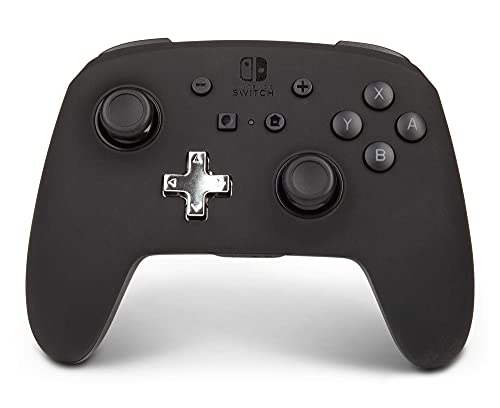
PowerA Enhanced Wireless -- Best Wireless on a Budget
The PowerA Enhanced Wireless controller runs on AA batteries and uses a 2.4GHz USB dongle for wireless PC gaming at a price that undercuts most Bluetooth controllers. Two programmable back buttons. a feature usually reserved for premium controllers. add surprising versatility. The Xbox-style layout works with XInput games immediately. Build quality is more plastic-feeling than the Xbox Core controller, but the ergonomics are similar enough to be comfortable for extended play. The 30-hour wireless range per battery set is very good. For budget-conscious gamers who want wireless without spending more, PowerA delivers.
Reasons to buy
- Wireless Gamepad: This controller is wireless for your convenience and comfort.
- Nintendo Switch Compatible: Compatible with Nintendo Switch for seamless gameplay.
- Black Color: Comes in a sleek black color to match your style.
- Battery Powered: Operates on a rechargeable battery for extended use.
- PowerA Brand: From the trusted PowerA brand for quality assurance.

Logitech F310 -- Best Ultra-Budget Wired Controller
The Logitech F310 is the controller to recommend when the budget is the primary constraint. At it provides a familiar PlayStation-style layout with DirectInput and XInput modes switchable via a toggle on the back. It's wired only via USB and build quality is basic, but the inputs are reliable and it works on every version of Windows. The D-pad is adequate, rumble is absent (the more expensive F510/F710 add vibration), and the analog sticks cover all standard PC gaming needs. For a first controller or a guest setup where cost is the decisive factor, the F310 remains a dependable option in 2026.
Reasons to buy
- With broad game support, the Logitech Gamepad F310 works with old standbys to today's bigg
- Profiler software allows the gamepad to be programmed to perform keyboard and mouse comman
- A familiar control layout that doesn't require a learning curve to be able to use, with al
- The unique floating D-pad rests on four switches-instead of a single pivot point-making it
- The six-foot cord lets you lean back and play a comfortable distance from your PC monitor.
What to look for
What to consider
For most budget PC gamers, the Xbox Core Controller is the best starting point because it requires zero setup and works with everything. If you prefer wireless freedom without spending much, the PowerA Enhanced Wireless is hard to beat. Retro gamers should consider the 8BitDo SN30 Pro for its excellent D-pad. The key specs to check on any budget controller are XInput support (essential for plug-and-play on Windows), analog stick quality (check reviews for drift complaints), and whether you need Bluetooth or USB. Wired controllers are always the most reliable and typically cost less.
What to consider
For more options, check out our [best controllers for PC and Android](/articles/best-controller-for-pc-and-android) roundup if you also game on mobile, or see our [best controllers for PC emulators](/articles/best-controller-for-pc-emulators) guide. All picks are tested and scored using our [testing methodology](/methodology).
FAQs
XInput is Microsoft's standard API for game controller input on Windows. Controllers that support XInput are automatically recognized by Windows and most PC games without drivers or configuration. The Xbox controller is the standard XInput device. Third-party controllers that advertise XInput support will also work plug-and-play. DirectInput is an older standard some games require. look for controllers that support both.
Yes, many budget controllers offer excellent reliability for everyday PC gaming. Brands like 8BitDo, GameSir, and PowerA produce well-built gamepads at accessible price points. The main trade-offs versus premium controllers are typically build material quality and the absence of features like programmable back paddles or advanced haptics. but core gameplay performance is often very comparable.
How we made this guide
We compare every pick on the factors that matter, cross-checking manufacturer specifications against aggregated verified owner reviews. We rank independently and never take payment for placement. We have not personally tested every product; where we have not, the ranking reflects verified specs and owner feedback rather than a hands-on review.
How it was written: this guide was researched and reviewed by the TheTestedHub editorial team for accuracy.
Affiliate disclosure: TheTestedHub is reader-supported. When you buy through links on our site, we may earn a commission at no extra cost to you.
Related guides

Educational Games 2026 That Grow With Your Child

7 Android TV Controllers Worth Your Money

Wooting 60HE Review (2026): 7 Months With the Analog Keyboard

Logitech G Pro X Superlight 2 Review (2026): The Esports

HyperX Cloud III Wireless Review (2026)

Steam Deck OLED (1TB) Review (2026): 8 Months Later, Still

Logitech G502 Hero Review (2026)
