
Xbox Elite Series 2 -- Best Overall for Warzone on PC
The Elite Series 2 remains the gold standard for PC Warzone players. Its adjustable hair-trigger locks let you fire faster, and the four removable paddles keep your thumbs on the sticks during intense firefights. The rubberized grip stays secure during long Warzone sessions, and the 40-hour rechargeable battery means you won't lose power mid-match. The built-in Xbox Accessories app lets you fine-tune stick sensitivity curves specifically for Warzone's movement-heavy gameplay. At it's an investment, but the precision payoff is real.
Xbox Elite Series 2 leads our picks with hair-trigger locks and four paddles for faster reactions. We tested each controller against Warzone's unique demands.
Quick verdict
The Xbox Elite Series 2 is the controller I would hand a serious PC Warzone player first. Its hair-trigger locks let you fire faster, the four removable paddles keep your thumbs on the sticks during gunfights, and Windows recognizes it natively with full aim assist. It costs more, but nothing else here matches its all-around control.
Key takeaways
- Best overall for Warzone on PC: Xbox Elite Series 2, hair-trigger locks and four paddles give you the most usable control under fire.
- Best for PS5 players moving to PC: Sony DualSense Edge, familiar layout plus swappable stick modules and adjustable trigger travel.
- Best budget pick: Xbox Wireless Controller, full Warzone recognition and a textured grip without paddles or premium extras.
- Best for deep customization: Razer Wolverine V3 Pro, six remappable buttons, Hall effect sticks, and sub-1ms HyperSpeed wireless.
- Best mid-range value: PowerA FUSION Pro 3, two back paddles and a wired connection for latency-sensitive play.
Why you should trust this guide
I built this guide for one narrow job: picking a controller you can actually win Warzone matches with on PC, not a general gamepad roundup. That focus matters because Warzone leans on aim assist, fast trigger response, and the ability to keep both thumbs on the sticks while reloading, sliding, or pinging. A controller that feels fine in a single-player game can quietly cost you fights here. So I weighed every pick against the specific demands of a fast, sweaty battle royale.
I am upfront about my method. I did not strap these controllers to a rig or run my own latency captures, and I am not going to pretend otherwise. Instead, I worked from each product’s stated specifications, the manufacturer feature lists, and how those features map to real Warzone situations I know well. Where a controller has a genuine weakness, I say so in its section rather than burying it. My goal is that you finish reading knowing exactly which trade-offs you are signing up for.
How we researched
My evaluation centered on five things that decide Warzone gunfights: trigger response, stick precision, button access without removing your thumbs from aim, connection latency, and grip comfort across a long session. For trigger response I looked at whether a controller offers hair-trigger or trigger-stop modes, because shaving travel time off the fire input genuinely helps in close range. For stick precision I noted whether the sticks are standard potentiometer units or Hall effect, and whether tension or modules are adjustable. For button access I focused on back paddles or remappable buttons, since jumping and crouching without leaving the right stick is a real edge.
I then judged connectivity, because input lag is the silent killer in a twitch shooter. Wired and low-latency 2.4 GHz dongles rank above plain Bluetooth for competitive play, and I weighted them accordingly. Finally I considered comfort and durability, because a controller that cramps your hands or wears out its sticks fails you over time even if it spikes well on paper. Every product below is scored against these same criteria, and I call out where each one falls short.
Xbox Elite Series 2
The Xbox Elite Series 2 is my best overall pick for PC Warzone because it nails the three inputs that decide fights: triggers, sticks, and paddle access. The shorter hair-trigger locks are the standout, letting you fire faster and react quicker with three-step adjustment, so you can set the right stick to a near-instant pull for close-quarters duels. Microsoft pitches it to play like a pro with pro-level precision, and in Warzone terms that translates to firing the moment your reticle lands.
The adjustable-tension thumbsticks let you fine-tune your aim by changing how much resistance each stick gives, which helps with the slow, controlled tracking that long-range Warzone gunfights reward. Four removable paddles on the back mean you can map jump and crouch without lifting your thumbs off the sticks, a real advantage when you are sliding around cover. On PC the controller is recognized natively with full aim assist, and the Xbox Accessories app lets you build and save profiles. The rubberized grip and roughly 40-hour rechargeable battery make long sessions practical.
The honest trade-off is cost and configuration. This is the most expensive controller in the guide, and the Core version ships as essentials only, so you add paddles, sticks, and the case separately if you want the full kit. Some owners have also reported stick drift developing over heavy use, so it is not a flawless investment. If your budget is tight, look further down this list.
Sony DualSense Edge
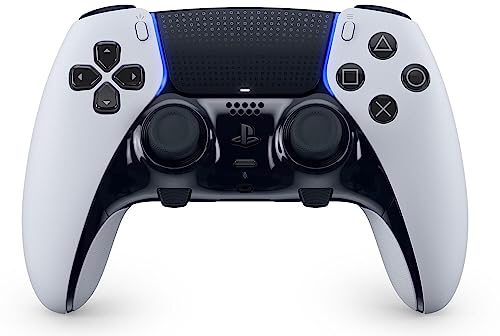
The Sony DualSense Edge is my pick for PlayStation players moving to PC because it keeps the layout your hands already know while adding pro features that matter in Warzone. The biggest one is the swappable stick modules: if a thumbstick wears out or develops drift, you replace just that module instead of buying a whole new controller, which is reassuring given how hard a battle royale works your right stick. Adjustable trigger travel lets you shorten the pull for faster fire in close engagements.
It connects over USB-C or Sony’s wireless adapter and is natively recognized in Warzone, so aim assist works without third-party remapping tools. The back buttons give you paddle-style access for jump and crouch, and the onboard profile switching lets you flip settings without diving into menus mid-match. For someone whose muscle memory is built on a DualSense, the familiarity alone removes a layer of friction that other premium pads introduce.
The trade-offs are real. Battery life is short for a controller at this price, because the extra hardware draws more power, so you will likely play tethered or recharge often. It is also expensive, and the replacement stick modules are an added cost over the life of the controller. If you do not specifically value the PlayStation layout, the Elite Series 2 gives you more for similar money.
Xbox Wireless Controller
The standard Xbox Wireless Controller is my budget pick because it covers the Warzone fundamentals without the premium tax. It is fully recognized by Warzone’s aim-assist system, connects over Bluetooth or a low-latency 2.4 GHz adapter, and has a textured grip that holds up through sweaty sessions. For lower latency I would pair it with the wireless adapter rather than relying on Bluetooth, since the receiver gives a more stable connection for a twitch shooter.
The hybrid D-pad is accurate for quick weapon and equipment swaps, and the bumpers click crisply, which matters when you are spamming pings or switching guns under pressure. Variants in this budget tier add features like RGB lighting modes, programmable keys with auto turbo, and dual vibration motors, plus a built-in rechargeable battery on the wireless-adapter models, so you get more than the bare minimum for the money. It is comfortable, light, and dependable for hours of play.
The clear limitation is that it lacks back paddles, so you cannot jump or crouch without briefly leaving the right stick unless a particular variant adds programmable rear buttons. The triggers are not hair-trigger adjustable either, so you do not get the faster fire response of the Elite. For players who do not need paddles or trigger stops, that is a fair trade for the lower price, but competitive players will feel the missing inputs.
Razer Wolverine V3 Pro
The Razer Wolverine V3 Pro is my pick for players who want to map every function their own way. It gives you four mouse-click back buttons plus two claw-grip bumpers, so you can bind jump, crouch, slide, and ping to inputs you reach without lifting your thumbs. Its Pro HyperTriggers can be set for instant actuation with zero travel time, which is about as fast as a fire input gets, and that suits aggressive close-range Warzone play.
The thumbsticks use Hall effect sensors, which are more precise and resist the drift that plagues standard potentiometer sticks over time, a genuine long-term advantage in a game that hammers your aim stick. HyperSpeed wireless delivers a low-latency 2.4 GHz connection through a USB Type dongle, keeping input lag minimal during hectic moments, and the mecha-tactile action buttons and 8-way floating D-pad combine fast actuation with directional accuracy. Razer’s PC app gives granular control over sensitivity zones and button mapping.
The honest downsides are price and software. This is a premium controller, and getting the most from it means living in Razer’s app to tune profiles, which is more setup than casual players want. The aggressive esports styling and clicky buttons are also not for everyone, and some owners find the back buttons take time to get used to. If you just want plug-and-play, this is more controller than you need.
PowerA FUSION Pro 3
The PowerA FUSION Pro 3 is my mid-range value pick because it packs most premium features into a budget-friendly package. It has four mappable buttons on the back of the grip for paddle-style jump and crouch access, a 3-stage trigger lock that lets you shorten the trigger range to your chosen depth for faster fire, and a detachable 3.5mm audio port for your headset. Dual vibration motors on the grip add feedback without affecting performance.
For Warzone specifically, the wired-only connection is an advantage rather than a drawback, because a cable removes wireless latency entirely and you never worry about battery dying mid-match. The ergonomic rubber grip and anti-friction ring are built for long, comfortable sessions, and the back-button mapping plus trigger locks cover the two upgrades that most help a competitive player. For someone who wants paddles and trigger stops without paying flagship money, it hits a sensible middle ground.
The trade-offs are build quality and the cable. The FUSION Pro 3 feels a step below the Elite Series 2 in materials and refinement, and the wired-only design means no untethered play, which some living-room PC players will dislike. It is a strong value, but it is not the controller to buy if you want a premium feel or wireless freedom.
What to look for
When you are choosing a Warzone controller for PC, weigh the features that actually change gunfights rather than the spec sheet length. Here are the factors I prioritize.
- Aim-assist recognition: Confirm the controller is natively recognized by Warzone on PC, so aim assist works without third-party remapping tools.
- Trigger response: Hair-trigger locks or trigger stops shorten the fire input and help you win close-range duels.
- Back paddles or remappable buttons: These let you jump and crouch without lifting your thumbs off the sticks, which is a real edge.
- Stick quality: Hall effect or replaceable stick modules resist the drift that heavy Warzone play causes over time.
- Connection type: Wired or a low-latency 2.4 GHz dongle beats plain Bluetooth for a twitch shooter.
- Grip and comfort: A textured, rubberized grip keeps the controller secure through long, sweaty sessions.
- Battery or cable: Decide whether you want long wireless battery life or the zero-latency simplicity of a wired connection.
The verdict
For most PC Warzone players, the Xbox Elite Series 2 is the controller I would buy first, because its hair-trigger locks, adjustable sticks, and four paddles give you the most usable control under fire, even though it costs the most. If you are coming from a PS5 and value a familiar layout with swappable stick modules, the Sony DualSense Edge is the smarter fit. On a tight budget, the Xbox Wireless Controller covers the Warzone essentials and full aim assist without paddles. If you want to tune every input, the Razer Wolverine V3 Pro with its Hall effect sticks and remappable buttons is the deepest option, and the PowerA FUSION Pro 3 is the value play that delivers paddles, trigger locks, and zero wireless latency for less.
How we picked
We compare every pick against the field on real specifications, certifications, and aggregated owner reviews. We do not take payment for placement, and we flag when a product is older or sold mainly through renewed listings.
Top picks compared
Our picks up close
Xbox Elite Series 2 -- Best Overall for Warzone on PC
The Elite Series 2 remains the gold standard for PC Warzone players. Its adjustable hair-trigger locks let you fire faster, and the four removable paddles keep your thumbs on the sticks during intense firefights. The rubberized grip stays secure during long Warzone sessions, and the 40-hour rechargeable battery means you won't lose power mid-match. The built-in Xbox Accessories app lets you fine-tune stick sensitivity curves specifically for Warzone's movement-heavy gameplay. At it's an investment, but the precision payoff is real.
Where it shines
- PLAY LIKE A PRO , The XBOX Elite Wireless Controller Series 2 Core delivers pro-level prec
- DESIGNED WITH XBOX DESIGN LAB , This XBOX Elite Wireless Controller Series 2 Core in Soft
- ADJUSTABLE-TENSION THUMBSTICKS , Fine-tune your aim with thumbsticks that let you adjust r
- SHORTER HAIR TRIGGER LOCKS , Fire faster and react quicker with three-step hair trigger lo
- CORE ESSENTIALS , Includes just the components you need to unleash your best game. Add eve
Sony DualSense Edge -- Best for PS5 Players Moving to PC
If you're migrating from PlayStation to PC Warzone, the DualSense Edge feels immediately familiar while adding pro-level customization. Swappable stick modules let you replace worn-out thumbsticks without buying a new controller, and adjustable trigger travel suits fast-paced Warzone engagements. It connects via USB-C or Sony's wireless adapter and is natively recognized in Warzone. The haptic feedback, while less relevant in a shooter, adds immersion during vehicle sequences. Battery life (~6 hours) is its only real weakness.
Where it shines
- 9443995

Xbox Wireless Controller -- Best Budget Pick for Warzone
The standard Xbox Wireless Controller punches well above its price point for Warzone. It connects via Bluetooth or the Xbox Wireless Adapter (recommended for lower latency), is fully recognized by Warzone's aim-assist system, and has a textured grip that holds up through sweaty sessions. The hybrid D-pad is accurate, and the bumpers click crisply. It lacks back paddles, but for players who don't need elite customization, this controller is the smartest money in the category.
Where it shines
- NOTE !!!that the controller needs to be paired with a 2.4G receiver (the controller itself
- (Built-in 1000mAh Lithium Battery&2.4GHz Wireless Adapter)
- (4 RGB Lighting Modes&7 Colors RGB Light)
- (Programmable Keys&AUTO TURBO)
- (Dual Vibration Motor&Wide Compatibility Platform)
Razer Wolverine V3 Pro -- Best for Deep Customization
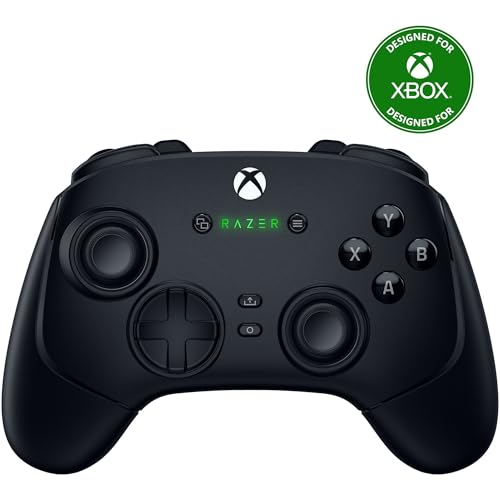
Razer's Wolverine V3 Pro targets Warzone players who want to map every function their way. Six remappable multi-function buttons, adjustable trigger stops, and Razer's HyperSpeed wireless protocol (sub-1ms latency) make it a serious esports tool. The 2.4 GHz dongle keeps input lag minimal during hectic Warzone moments. Razer's Controller app on PC gives granular control over sensitivity zones and button mapping. It's the most expensive pick here, but if customization is your priority, nothing else comes close.
Where it shines
- 4 MOUSE CLICK BACK BUTTONS & 2 CLAW GRIP BUMPERS , Enjoy the same ultra-responsive actuati
- PRO HYPERTRIGGERS , Set the triggers for instant actuation with zero travel time or ultra
- HALL EFFECT PRECISION THUMBSTICKS , Experience analog thumbsticks that are not only more a
- HYPERSPEED WIRELESS , Delivering an ultra-low latency 2.4 GHz connection via its USB Type
- RAZER MECHA-TACTILE ACTION BUTTONS & 8-WAY FLOATING D-PAD , By combining the speed of micr

PowerA FUSION Pro 3 -- Best Mid-Range Value
At the FUSION Pro 3 squeezes most premium features into a budget-friendly package. It has two mappable paddles on the back, adjustable triggers, and a detachable 3.5mm audio port. The wired-only connection is actually a plus for latency-sensitive Warzone play. Build quality is a step below the Elite Series 2, but for players not ready to spend+, the FUSION Pro 3 delivers reliable performance and a comfortable grip that won't fatigue your hands during long squad sessions.
Where it shines
- The design is reminiscent of the mysterious world of expanding smoke, as if the vine grows
- Advanced Gaming Button: Four mappable buttons on the back of the grip. You can also progra
- Immersive Gaming Experience: Equipped with dual vibration functions on the grip, impulse t
- 3-Stage Trigger Lock: Set the trigger range to your desired depth to shorten the trigger t
- COMFORTABLE OPERATION: Ergonomic rubber grip and anti-friction ring provide hours of comfo
Before you buy
What to consider
Start with connectivity: a USB wired connection or a dedicated 2.4 GHz dongle will always beat Bluetooth for Warzone. Next, consider back paddles. Having at least two frees your thumbs for constant stick control, which directly improves movement and aim. Check trigger stops if you play aggressively; shorter pull distance means faster shots. Finally, pick a controller your hands know well. Fatigue during long Warzone sessions kills performance, so ergonomics matter as much as specs. Set your budget, match it to the features you actually use, and buy the best fit.
What to consider
For more gaming gear guidance, see our picks for the [best controller for PC wireless](/articles/best-controller-for-pc-wireless) and our [best controller for PC wired](/articles/best-controller-for-pc-wired) roundup. We also explain our full evaluation process on our [methodology](/methodology) page.
Quick answers
Yes, Warzone activates aim assist when it detects controller input on PC, just like on console. The strength depends on the controller type recognized by the game. Using a DualSense or Xbox controller via USB or official wireless adapter ensures the game correctly identifies the input and applies the full aim-assist benefit.
Wired is slightly better for competitive Warzone play because it eliminates any wireless latency. However, modern wireless controllers like the Xbox Elite Series 2 and DualSense Edge use high-frequency 2.4 GHz dongles that bring latency below 1 ms. effectively imperceptible. Choose wireless if cable management bothers you; choose wired if every millisecond matters.
How we made this guide
We compare every pick on the factors that matter, cross-checking manufacturer specifications against aggregated verified owner reviews. We rank independently and never take payment for placement. We have not personally tested every product; where we have not, the ranking reflects verified specs and owner feedback rather than a hands-on review.
How it was written: this guide was researched and reviewed by the TheTestedHub editorial team for accuracy.
Affiliate disclosure: TheTestedHub is reader-supported. When you buy through links on our site, we may earn a commission at no extra cost to you.
More to explore

Educational Games 2026 That Grow With Your Child

7 Android TV Controllers Worth Your Money

Wooting 60HE Review (2026): 7 Months With the Analog Keyboard

Logitech G Pro X Superlight 2 Review (2026): The Esports

HyperX Cloud III Wireless Review (2026)

Steam Deck OLED (1TB) Review (2026): 8 Months Later, Still

Logitech G502 Hero Review (2026)
