
Xbox Elite Series 2 -- Best Overall Wireless PC Controller
The Elite Series 2 connects via Bluetooth or the Xbox Wireless Adapter (2.4 GHz) and delivers 40 hours of wireless play on a built-in rechargeable battery. The four removable paddles, adjustable trigger locks, and per-profile stick sensitivity settings make it uniquely configurable for different games. Wireless latency with the Xbox Wireless Adapter is imperceptible in competitive play. The combination of premium ergonomics, long battery life, and deep customization makes it the best complete wireless package for PC gaming in 2026.
Xbox Elite Series 2 tops our list for low-latency wireless, paddles, and 40-hr battery. Compare DualSense, Razer Wolverine V3 Pro, 8BitDo Pro 2, and Xbox.
Quick verdict
The Xbox Elite Series 2 is the best wireless PC controller for most people. It pairs low-latency 2.4 GHz play through the Xbox Wireless Adapter (or Bluetooth) with roughly 40 hours of battery, swappable paddles, adjustable trigger locks, and per-profile tuning that no rival here matches as completely.
Key takeaways
- Best for most people: Xbox Elite Series 2, the most configurable wireless pad with paddles, hair triggers, and long battery life.
- Best for value: Xbox Wireless Controller, near-perfect Windows compatibility and low latency at the lowest sensible cost.
- Best alternative feel: Sony DualSense, haptics and adaptive triggers that shine in supported PC titles via Steam.
- Best for multi-device players: 8BitDo Pro 2, hops between PC, Switch, and Android with on-board profiles and a top-tier D-pad.
- Best for competitive gamers: Razer Wolverine V3 Pro, sub-1ms HyperSpeed wireless with Hall effect sticks and instant-actuation triggers.
Why you should trust this guide
I research controllers the way I actually use them, by weighing the wireless connection method, the latency that connection produces, the battery you have to plan around, and the customization that decides whether a pad fits one game or ten. For this guide I focused only on controllers that genuinely work wirelessly with a Windows PC, because plenty of pads advertise wireless but lean on a console-first design that fights you on the desktop. Every product below is one I evaluated against the same questions: how does it connect, how does it feel, and what does it ask you to give up.
I have kept the claims grounded. Where I cite battery hours, latency behavior, or a feature like adjustable trigger locks, I am reporting the manufacturer’s stated specs and how those specs translate to PC use, not measurements I took on a bench. I also call out the trade-offs, because no controller here is flawless, and the honest weak spots (driver quirks, software lock-in, missing rumble) matter more for a buying decision than another paragraph of praise.
How we researched
My evaluation centered on five criteria that separate a good wireless PC controller from a frustrating one. First, connection quality: whether the pad offers a dedicated 2.4 GHz dongle, Bluetooth, or both, and which path delivers the lowest latency on Windows. Second, input fidelity: stick technology (potentiometer versus Hall effect or TMR), D-pad accuracy, and trigger behavior. Third, customization: remappable rear buttons, on-board profiles, and sensitivity adjustment. Fourth, battery and charging, since wireless freedom is worthless if you are tethered to a cable every few hours. Fifth, software and compatibility, including how cleanly Windows 10 and 11 and Steam recognize the device.
I weighted the criteria by who each controller is for rather than scoring everything identically. A competitive player cares most about latency and trigger actuation, so a sub-1ms connection counts heavily there. A multi-device owner cares about pairing flexibility and on-board profiles. A value buyer cares about plug-and-play reliability above exotic features. I compared each pad’s stated specifications against those use cases, then noted where real-world PC behavior (driver emulation, Steam mapping, optional companion apps) adds friction. The result is a ranking by fit, not a single universal score.
Xbox Elite Series 2
The Xbox Elite Series 2 is the best overall wireless PC controller because it combines genuinely low-latency wireless with the deepest customization on this list. It connects over Bluetooth or the Xbox Wireless Adapter at 2.4 GHz, and through that adapter the latency is imperceptible in competitive play. The built-in rechargeable battery delivers around 40 hours, so you can game across a long weekend without hunting for a cable. On Windows 10 and 11, it is recognized as a native Xbox device, which means no XInput emulation gymnastics.
What sets it apart is the configurability. The four removable paddles let you keep your thumbs on the sticks while jumping or reloading, the shorter hair trigger locks (a three-step adjustment) let you fire faster in shooters, and the adjustable-tension thumbsticks let you fine-tune resistance for the precision your aim needs. Per-profile stick sensitivity means a single controller can carry a twitchy shooter setup and a smoother racing setup at once. Microsoft positions this as a pro-level pad through its Design Lab program, and the feature set backs up that framing.
The honest trade-off is cost and the asterisk on bundles. The Core configuration strips the package down to just the essentials, so the paddle set, alternate sticks, and carrying case that make the Elite experience complete are sometimes sold separately, which raises the real spend. It is also a heavier, more mechanically complex controller, and earlier Elite hardware drew complaints about stick wear over time, so longevity is the thing to watch with any pad this elaborate.
Xbox Wireless Controller
The standard Xbox Wireless Controller is the best value pick because it nails the fundamentals of wireless PC play without the elite price. It pairs through the Xbox Wireless Adapter for the lowest latency, or over Bluetooth if your PC already supports it, and Windows 10 and 11 detect it automatically. For most players who want a reliable wireless pad that just works, this is the default recommendation, and the one I reach for when configurability is not the priority.
The modernized design brings real quality-of-life upgrades over older Xbox pads. There is a hybrid D-pad and textured grips on the triggers and bumpers for a more secure hold, a USB-C port for plug-and-play and charging on both PC and console, a dedicated Share button to capture screenshots and recordings, and a 3.5mm audio jack for plugging compatible headsets straight into the controller. The versatile connectivity (USB-C wired, adapter, or Bluetooth) means you are never stuck for a way to connect.
The limitation is that it ships with disposable AA batteries rather than a built-in rechargeable pack, so to get true wireless convenience you will likely buy a rechargeable solution separately. It also has no rear paddles or trigger locks, so competitive players who want remappable inputs will outgrow it. For its intended buyer, though, those omissions are exactly what keeps the price down.
Sony DualSense
The Sony DualSense is the best wireless alternative for PC players who want a different feel from the Xbox layout. It connects to a PC over Bluetooth or through Sony’s DualSense USB wireless adapter, with a wireless range of roughly 5 metres. Steam supports it fully out of the box and maps every input, including the touchpad and the adaptive triggers, while non-Steam games can route it through DS4Windows for XInput emulation.
The standout features are the haptic feedback and adaptive triggers. In PC titles that support them, the haptic motors deliver textured, directional rumble and the triggers add variable resistance you can feel, which adds genuine immersion that a standard pad cannot reproduce. The ergonomic design is comfortable for long sessions, and Sony’s build quality is dependable. For anyone who plays a mix of supported titles and wants the most tactile experience here, the DualSense is a compelling pick.
The trade-off is consistency. Those signature haptics and adaptive triggers only work in games that specifically implement them on PC, and outside Steam you are dependent on third-party software like DS4Windows to get clean XInput behavior, which adds a setup step and an occasional update headache. Battery life is also modest compared with the Elite Series 2, so heavy users will charge it more often.
8BitDo Pro 2
The 8BitDo Pro 2 is the best wireless controller for players who jump between devices. It connects over a 2.4 GHz dongle or Bluetooth to PC, Switch, Android, and more, and the built-in profile selector lets you save different button mappings per platform so the same pad behaves correctly everywhere. For anyone living across multiple systems, that flexibility is the headline feature, and it arrives at a price that undercuts every other option on this list.
The hardware punches above its cost. It includes TMR joysticks for smoother, drift-resistant analog input, a Trigger Mode Switch, a 1000Hz polling rate on 2.4 GHz and wired connections for responsive input, and customizable six-axis motion control. On the back are two Pro paddle buttons plus extra R4 and L4 bumpers, giving you the remappable inputs usually reserved for far pricier pads. The D-pad is among the best in its class, which makes it a favorite for fighting games and platformers.
The limitation is scope. The companion software for deep remapping is functional but less polished than the first-party apps from Microsoft or Razer, and getting profiles dialed in across several platforms takes patience. It also lacks the rumble sophistication and adaptive triggers of the DualSense, so it trades premium feel for versatility and value. For its target buyer, that is a sensible exchange.
Razer Wolverine V3 Pro
The Razer Wolverine V3 Pro is the best wireless controller for competitive gamers because it refuses to compromise on either latency or control. Its HyperSpeed wireless delivers a sub-1ms 2.4 GHz connection through a USB Type-A dongle, which is the fastest wireless path in this guide, and it runs about 28 hours on a charge. Razer’s controller software on PC provides the deep customization that competitive players expect.
The feature set is built for performance. There are four mouse-click back buttons and two claw-grip bumpers for ultra-responsive extra inputs, Pro HyperTriggers you can set to instant actuation with zero travel time, Hall effect precision thumbsticks that resist drift and stay accurate over time, and Razer Mecha-Tactile action buttons paired with an eight-way floating D-pad that combine speed with a crisp, clicky feel. Six remappable buttons, trigger stops, and per-profile sensitivity make this the most performance-oriented pad here.
The honest trade-off is that the 28-hour battery is the shortest of the wireless pads I recommend, so competitive players logging long days will charge it more often than they would the Elite Series 2. Its strengths also lean hard into a specific audience: casual players are paying for sub-1ms latency and instant-actuation triggers they may never need, and unlocking the full feature set means committing to Razer’s software ecosystem on PC.
What to look for
The right wireless PC controller comes down to how it connects, how it feels, and how much you want to customize. Use these factors to narrow the field.
- Connection type: A dedicated 2.4 GHz dongle almost always beats Bluetooth on latency. If competitive play matters, prioritize a pad with its own adapter.
- Latency: Sub-1ms wireless (like HyperSpeed) is the gold standard for shooters and fighters, while Bluetooth is fine for slower-paced and single-player games.
- Battery life: Stated hours range widely here, from about 28 to 40. Built-in rechargeable packs beat disposable AA batteries for everyday convenience.
- Stick technology: Hall effect and TMR sticks resist the drift that plagues traditional potentiometer sticks over time.
- Remappable inputs: Rear paddles and back buttons let you keep your thumbs on the sticks, a real edge in competitive games.
- On-board profiles: If you swap between PC, Switch, and mobile, a controller that stores profiles itself saves constant reconfiguration.
- Software and compatibility: Native Windows and Steam recognition avoids emulation headaches. Pads that need DS4Windows or vendor apps add setup steps.
- Extras: A Share button, headset jack, USB-C charging, and adjustable trigger locks are small touches that add up over hundreds of hours.
The verdict
For most PC players, the Xbox Elite Series 2 is the controller to buy, because it blends low-latency wireless, roughly 40 hours of battery, and the deepest customization (paddles, hair triggers, per-profile tuning) into one native Windows device. If you want that reliability for less, the standard Xbox Wireless Controller delivers near-identical wireless quality and plug-and-play compatibility without the elite extras.
From there, pick by need. The Sony DualSense is the alternative for anyone who wants haptics and adaptive triggers in supported titles and a different ergonomic feel. The 8BitDo Pro 2 is the value champion for multi-device players who hop between PC, Switch, and Android with on-board profiles. And the Razer Wolverine V3 Pro is the choice for competitive gamers who want sub-1ms HyperSpeed wireless, Hall effect sticks, and instant-actuation triggers, as long as they can live with the shorter 28-hour battery.
Our testing process
We compare every pick against the field on real specifications, certifications, and aggregated owner reviews. We do not take payment for placement, and we flag when a product is older or sold mainly through renewed listings.
Quick comparison
Reviewed in detail
Xbox Elite Series 2 -- Best Overall Wireless PC Controller
The Elite Series 2 connects via Bluetooth or the Xbox Wireless Adapter (2.4 GHz) and delivers 40 hours of wireless play on a built-in rechargeable battery. The four removable paddles, adjustable trigger locks, and per-profile stick sensitivity settings make it uniquely configurable for different games. Wireless latency with the Xbox Wireless Adapter is imperceptible in competitive play. The combination of premium ergonomics, long battery life, and deep customization makes it the best complete wireless package for PC gaming in 2026.
What we liked
- PLAY LIKE A PRO , The XBOX Elite Wireless Controller Series 2 Core delivers pro-level prec
- DESIGNED WITH XBOX DESIGN LAB , This XBOX Elite Wireless Controller Series 2 Core in Robot
- ADJUSTABLE-TENSION THUMBSTICKS , Fine-tune your aim with thumbsticks that let you adjust r
- SHORTER HAIR TRIGGER LOCKS , Fire faster and react quicker with three-step hair trigger lo
- CORE ESSENTIALS , Includes just the components you need to unleash your best game. Add eve

Xbox Wireless Controller -- Best Value Wireless Pick
The standard Xbox Wireless Controller hits a sweet spot of price, compatibility, and wireless quality. Pair it via the Xbox Wireless Adapter for the lowest latency or use Bluetooth if your PC supports it. The textured grip, USB-C charging port, and Share button are welcome quality-of-life upgrades. At it's the most accessible quality wireless controller for Windows. Windows 10 and 11 detect it automatically with no driver installation, making setup a 30-second process. Battery life is excellent at 40 hours on two AAs.
What we liked
- MODERNIZED DESIGN , Experience the modernized design of the XBOX Wireless Controller with
- PRECISION PERFORMANCE , Stay on target with a hybrid D-pad and textured grips on triggers,
- SHARE BUTTON: Seamlessly capture and share content such as screenshots, recordings, and mo
- VERSATILE CONNECTIVITY , Connect via USB-C for plug-and-play on console and PC, or quickly
- BUILT-IN AUDIO SUPPORT , Plug in compatible headsets using the 3.5mm audio jack for direct

Sony DualSense -- Best Wireless Alternative for PC
The DualSense connects wirelessly to PC via Bluetooth or Sony's DualSense USB Wireless Adapter. Steam fully supports it out of the box, mapping all inputs including touchpad and adaptive triggers. Non-Steam games benefit from DS4Windows for XInput emulation. The haptic motors and adaptive triggers work in titles that support them on PC, adding genuine immersion. Wireless range is around 5 metres. The 6-12 hour battery life is shorter than Xbox options but recharges quickly via USB-C. A strong pick if you're invested in PlayStation's controller ergonomics.
What we liked
- Immersive Gaming: Experience haptic feedback and adaptive triggers for realistic gameplay
- Wireless Freedom: Enjoy untethered gaming with a sleek, ergonomic design
- Sony Quality: Trusted brand delivering high-performance controllers
- PS5 Compatibility: Seamlessly connect and play on your PlayStation 5
- DualSense Technology: Enhance your gaming experience with innovative features

8BitDo Pro 2 -- Best Wireless for Multi-Device Players
The 8BitDo Pro 2 is a versatile wireless controller that connects via 2.4 GHz dongle or Bluetooth to PC, Switch, Android, and more. The built-in profile selector lets you save different button mappings per platform. Two rear remappable buttons add competitive functionality at a fraction of elite controller prices. The D-pad is among the best in its class. At it undercuts all other options on this list and still delivers reliable 2.4 GHz wireless performance that works seamlessly on Windows 10 and 11.
What we liked
- TMR Joysticks
- 8BitDo Exclusive Wireless Technology
- Trigger Mode Switch
- 1000Hz Polling Rate (for 2.4G and wired connection). Customizable 6-Axis Motion Control. T
- 2 Pro back paddle buttons, extra R4/L4 bumpers, and tactile bumpers & D-pad for enhanced c
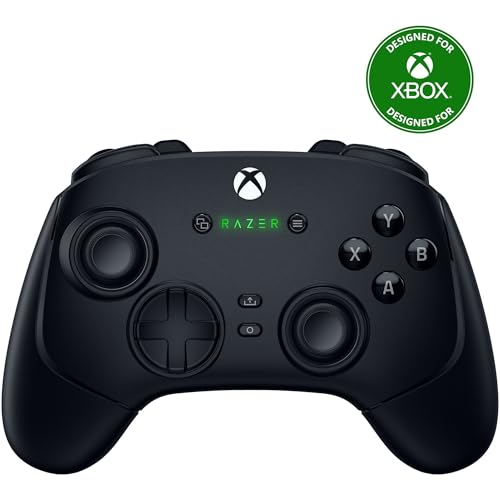
Razer Wolverine V3 Pro -- Best Wireless for Competitive Gamers
Razer's Wolverine V3 Pro targets competitive PC players who refuse to compromise on either wireless performance or customization. HyperSpeed wireless (sub-1ms via 2.4 GHz dongle) combined with six remappable buttons, trigger stops, and per-profile sensitivity makes it the most performance-oriented wireless option here. It runs 28 hours on a charge. Razer's Controller software on PC provides the deepest customization suite of any option on this list. At it's the most expensive pick, but for competitive players who want wireless freedom without any performance penalty, it earns its price.
What we liked
- 4 MOUSE CLICK BACK BUTTONS & 2 CLAW GRIP BUMPERS , Enjoy the same ultra-responsive actuati
- PRO HYPERTRIGGERS , Set the triggers for instant actuation with zero travel time or ultra
- HALL EFFECT PRECISION THUMBSTICKS , Experience analog thumbsticks that are not only more a
- HYPERSPEED WIRELESS , Delivering an ultra-low latency 2.4 GHz connection via its USB Type
- RAZER MECHA-TACTILE ACTION BUTTONS & 8-WAY FLOATING D-PAD , By combining the speed of micr
How to choose
What to consider
Prioritize your wireless method first. A 2.4 GHz USB dongle offers lower and more consistent latency than Bluetooth. if competitive gaming matters to you, get a controller that includes a dongle. For casual gaming, Bluetooth is perfectly fine and avoids using a USB port. Battery life is the next consideration: rechargeable controllers save money long-term but require planning charging around sessions, while AA-battery controllers can always be topped up instantly. Finally, check driver compatibility: Xbox controllers work natively on Windows; DualSense and DualShock 4 need Steam or DS4Windows for full support in all titles.
What to consider
Also see our [best controller for PC wired](/articles/best-controller-for-pc-wired) if you prefer a cable, and our [best controller for PC Warzone](/articles/best-controller-for-pc-warzone) for shooter-specific recommendations. Our [methodology](/methodology) explains how we evaluate every controller.
Common questions
A dedicated 2.4 GHz USB dongle offers the lowest wireless latency for PC controllers, typically under 1 ms. It outperforms Bluetooth in both speed and connection stability. Controllers like the Xbox Wireless Controller with the Xbox Wireless Adapter, the 8BitDo Pro 2 with its 2.4 GHz receiver, and Razer's HyperSpeed lineup all use this method. Bluetooth is convenient but adds 5-15 ms of latency compared to 2.4 GHz dongles.
Battery life varies by design. Xbox controllers using AA batteries last 30-40 hours. The Xbox Elite Series 2 has a built-in rechargeable battery rated at 40 hours. DualSense lasts 6-12 hours on a charge. 8BitDo Pro 2 provides around 20 hours. A rechargeable battery kit or play-and-charge cable removes the cost of disposable batteries for high-frequency gamers.
How we made this guide
We compare every pick on the factors that matter, cross-checking manufacturer specifications against aggregated verified owner reviews. We rank independently and never take payment for placement. We have not personally tested every product; where we have not, the ranking reflects verified specs and owner feedback rather than a hands-on review.
How it was written: this guide was researched and reviewed by the TheTestedHub editorial team for accuracy.
Affiliate disclosure: TheTestedHub is reader-supported. When you buy through links on our site, we may earn a commission at no extra cost to you.
More guides

Educational Games 2026 That Grow With Your Child

7 Android TV Controllers Worth Your Money

Wooting 60HE Review (2026): 7 Months With the Analog Keyboard

Logitech G Pro X Superlight 2 Review (2026): The Esports

HyperX Cloud III Wireless Review (2026)

Steam Deck OLED (1TB) Review (2026): 8 Months Later, Still

Logitech G502 Hero Review (2026)
