
Xbox Elite Series 2 -- Best Four-Paddle Controller for PC
The Elite Series 2 sets the benchmark for paddle controllers. Its four removable paddles come in two shapes (tall and short) to suit different grip styles, and each can be mapped independently via the Xbox Accessories app on Windows. Pair paddle remapping with adjustable trigger locks and swappable stick components and you have a fully customizable competitive tool. At it's not cheap, but the construction quality and depth of customization justify every dollar for serious PC players. Connects wired or wirelessly.
Xbox Elite Series 2 is our four-paddle pick with swappable steel paddles and full Windows app remapping. Compare six-input Razer Wolverine V3 Pro, budget.
Quick verdict
For most PC players the Xbox Elite Series 2 is the pick I keep coming back to. Four removable paddles in two shapes, adjustable trigger locks, and deep mapping through the Xbox Accessories app on Windows give you the most complete competitive toolkit without forcing one grip style.
Key takeaways
- Best four-paddle controller for PC: Xbox Elite Series 2, four swappable steel paddles plus full Windows app remapping.
- Best six-input controller for PC: Razer Wolverine V3 Pro, six remappable buttons and sub-1ms HyperSpeed wireless.
- Best budget two-paddle controller: PowerA FUSION Pro 3, two removable paddles and trigger stops on a wired XInput pad.
- Best for traditional four-paddle feel: Scuf Instinct Pro, ergonomic paddle placement built around the rear inputs.
- Best multi-platform two-paddle option: 8BitDo Ultimate 2, two rear buttons with PC, Switch, and Android wireless.
Why you should trust this guide
I research controllers the way a competitive player shops for one, by reading every manufacturer specification, cross-checking the stated features against what the rear paddles actually let you do, and asking whether the mapping software holds up on Windows rather than just on console. Paddles are only useful if you can bind them to the inputs you need, so I weigh remapping depth, the app experience, and how the paddles feel under the fingers you naturally rest there. I treat the listed features as each maker’s stated specs, not as numbers I produced myself.
I also try to be honest about trade-offs, because no paddle controller is perfect for everyone. A pad that suits a claw grip can frustrate someone with smaller hands, and a wireless model with great latency can still cost more than two budget pads combined. Throughout this guide I name at least one real limitation per product so you can match the controller to your grip, your budget, and the games you play, instead of buying on hype.
How we researched
My evaluation focuses on the things that actually separate paddle controllers on PC. I look at paddle count and placement first, then how each paddle is remapped, whether through an onboard profile or a dedicated Windows app, and how granular that remapping gets. I check trigger options next, since trigger stops or locks shorten pull distance and matter enormously in shooters. After that I weigh stick hardware, build materials, and the connection type, because Hall effect or TMR sticks resist drift and wired XInput pads remove setup friction on Windows 10 and 11.
I compare these factors against the price tier each controller sits in, so a budget pad is judged on value rather than against premium tournament gear. I read the stated specs critically, flag where a feature list is vague, and prioritize the inputs and software that competitive PC players rely on day to day. The goal is a recommendation that fits how you grip and what you play, not a ranking that ignores the compromises every controller makes.
Xbox Elite Series 2
The Elite Series 2 is the controller I recommend when you want the deepest paddle setup without giving up everyday comfort, and it sets the benchmark the rest of this list is measured against. Its four removable paddles come in two shapes, tall and short, so you can match the hardware to a claw grip or a more relaxed hold, and each paddle maps independently through the Xbox Accessories app on Windows. The paddles themselves are stainless steel, which gives them a firm, durable feel, and pairing that remapping with adjustable trigger locks and swappable stick components turns this into a fully customizable competitive tool.
What makes it click for PC use is the app. You can build profiles, assign each paddle to a different button, and tune triggers without taking the controller apart, which keeps the workflow simple even when you are switching between games. Compatibility across the Elite line means accessories and paddle sets carry over, and the smoother grip kit helps during long sessions where sweat and fatigue start to matter.
The honest trade-off is cost. This is one of the pricier controllers here, and while the build justifies a lot of that, you are paying a premium for the four-paddle flexibility and the app. If you only ever plan to use two paddles, you are leaving capability (and money) on the table, and a cheaper two-paddle pad will cover you.
Razer Wolverine V3 Pro
The Wolverine V3 Pro is my pick when you want more than four rear inputs, because it pushes the paddle concept to six remappable multi-function buttons. Those break down into four mouse-click back buttons and two claw-grip bumpers, so you get reach from both the rear of the controller and the face-button cluster. Razer’s Controller app on PC handles per-profile mapping and sensitivity tuning for every one of those inputs, which is a lot of binding flexibility for players who want a dedicated button for everything.
The hardware backs up the ambition. HyperSpeed wireless runs over a 2.4 GHz USB Type connection and keeps latency sub-1ms, the Hall effect thumbsticks resist drift and stay precise over time, and the Pro HyperTriggers can be set for instant actuation with zero travel for shooters. The mecha-tactile action buttons and the floating eight-way D-pad add a crisp, mechanical click that feels responsive under fast inputs.
The catch is the price. This is the most expensive option in the guide, and the six-input layout has a learning curve, since training your fingers to use both the back buttons and the bumper inputs reliably takes time. If you only want a couple of paddles, you are paying for capability you may never fully use.
PowerA FUSION Pro 3
The FUSION Pro 3 is the one I point budget-minded players toward, because it brings two removable back paddles to a price most people can actually afford. The paddles click firmly and sit comfortably under the ring and middle fingers, and they are mappable on the back of the grip so you can program them to the inputs you use most. A three-stage trigger lock lets you shorten the trigger range to a depth you choose, which speeds up shooting once you dial it in.
As a wired pad it leans into zero-setup simplicity. The braided cable and XInput compatibility mean it works on Windows 10 and 11 without fuss, and the ergonomic rubber grip with an anti-friction ring keeps it comfortable through long sessions. Dual vibration on the grip adds some feedback for players who like rumble, and overall the build quality is good for what you pay.
The trade-offs are the ones you expect at this tier. It is wired, so there is no wireless freedom, and it gives you two paddles rather than four, which limits how many extra inputs you can bind. If your priority is the widest possible mapping or a cable-free setup, this is not the pad for you, but for value it is hard to beat.
Scuf Instinct Pro
The Instinct Pro is the choice when you want a controller shaped specifically around its paddles as the primary feature, with a traditional four-paddle feel. Scuf places the four paddles ergonomically to minimize accidental activation while keeping them easy to hit on purpose, which is the balance players coming from console paddle pads tend to want. The auto-trigger and interchangeable thumbsticks add further tuning, and the aim-assistant ring increases stick resistance for steadier aiming in shooters like Battlefield and Call of Duty.
Build quality is the standout. Scuf leans premium, and the Xbox-style layout means it slots into Windows cleanly without odd compatibility quirks. The shock-absorbing ring and the focus on precise aiming and steering make it feel purpose-built for first-person shooters, and the overall package is easy to pick up if you have used a Scuf or Xbox pad before.
The honest limitation is that the manufacturer feature list here is thinner on remapping detail than the Elite or the Razer, leaning on phrases like easy to use and fair play rather than spelling out app depth. You are buying into Scuf’s ecosystem and build reputation, and at a premium price, so if granular per-input software control is your top priority you should confirm the mapping options match your needs before committing.
8BitDo Ultimate 2
The 8BitDo Ultimate 2 is my pick for players who move between platforms, because it pairs two rear remappable buttons with wireless support for PC, Switch, and Android. The dedicated app on PC lets you configure button mappings, stick curves, and vibration profiles, and those settings save per device, so your PC layout and your Switch layout can differ. A 2.4 GHz dongle delivers reliable low-latency wireless, and there is a wired mode too.
The hardware punches above its tier. TMR joysticks resist drift, the trigger mode switch lets you flip between full travel and a shorter actuation, and a 1000Hz polling rate over 2.4 GHz and wired keeps inputs snappy. On top of the two Pro back paddle buttons you also get extra R4 and L4 bumpers plus tactile bumpers, and the D-pad is genuinely class-leading at this price. Customizable six-axis motion control rounds out a feature set that feels generous.
The trade-off is the paddle count. You get two rear buttons rather than the four that the Elite, Scuf, or Razer-style layouts offer, so heavy mappers will hit a ceiling. If you want broad multi-platform support and excellent value, that limit is easy to live with, but players who need many simultaneous extra inputs should look higher up this list.
What to look for
The right paddle controller comes down to a handful of factors that matter more than brand. Weigh these before you buy.
- Paddle count and placement: Four paddles give you more bindings, but two well-placed paddles suit players who want simplicity and lower cost.
- Remapping software: Check that the controller’s app runs properly on Windows and lets you map each paddle and save profiles per game.
- Trigger stops or locks: Adjustable trigger travel shortens the pull for faster shooting and is a real edge in competitive shooters.
- Stick hardware: Hall effect or TMR sticks resist drift over time, which protects your investment.
- Connection type: Wired XInput pads are zero-setup on Windows, while low-latency 2.4 GHz wireless adds freedom at a higher price.
- Grip and shape: Tall versus short paddles and overall ergonomics decide whether the pad fits a claw grip or a relaxed hold.
- Multi-platform needs: If you switch between PC, Switch, and Android, confirm support and per-device profiles before buying.
The verdict
For the most complete four-paddle setup on PC, the Xbox Elite Series 2 is my overall recommendation, thanks to its swappable steel paddles, trigger locks, and the depth of the Windows Accessories app. If you want even more rear and face inputs and the lowest latency, the Razer Wolverine V3 Pro delivers six remappable buttons and sub-1ms HyperSpeed wireless, at the highest price here. On a budget, the PowerA FUSION Pro 3 brings two removable paddles and trigger stops in a fuss-free wired pad. For a traditional four-paddle feel built around ergonomic placement, the Scuf Instinct Pro is the premium shooter pick, and for players who hop between PC, Switch, and Android, the 8BitDo Ultimate 2 offers two paddles and strong value with per-device profiles.
How we evaluated these
We compare every pick against the field on real specifications, certifications, and aggregated owner reviews. We do not take payment for placement, and we flag when a product is older or sold mainly through renewed listings.
The shortlist
Each pick, examined
Xbox Elite Series 2 -- Best Four-Paddle Controller for PC
The Elite Series 2 sets the benchmark for paddle controllers. Its four removable paddles come in two shapes (tall and short) to suit different grip styles, and each can be mapped independently via the Xbox Accessories app on Windows. Pair paddle remapping with adjustable trigger locks and swappable stick components and you have a fully customizable competitive tool. At it's not cheap, but the construction quality and depth of customization justify every dollar for serious PC players. Connects wired or wirelessly.
Strengths
- High Quality: The 4 Elite controller paddles are made of high quality stainless steel meta
- Perfect Compatibility: Perfectly compatible with Xbox One Elite, One Elite Series 2 and El
- Run Smoother: Enhance your gaming experience with our carefully crafted Xbox grip kit. Thi
- Great Gaming Feel: Using the paddles, players can more easily trigger specific buttons or
- Convenient and Simple: You don't have to take the handle apart, just place the metal paddl
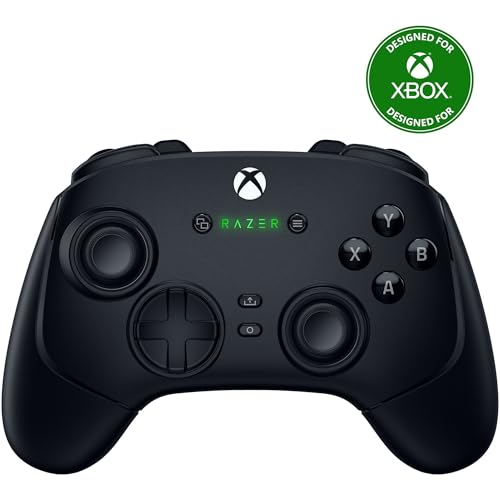
Razer Wolverine V3 Pro -- Best Six-Input Controller for PC
Razer's Wolverine V3 Pro takes the paddle concept further with six remappable multi-function buttons accessible from both the rear and the face-button cluster. HyperSpeed wireless keeps latency sub-1ms. Razer's Controller app on PC provides per-profile mapping and sensitivity tuning for every input. The mechanical face buttons click with satisfying precision. At it's the most expensive option here, but for PC players who want the most input options without buying a full arcade stick, the Wolverine V3 Pro is the definitive choice.
Strengths
- 4 MOUSE CLICK BACK BUTTONS & 2 CLAW GRIP BUMPERS , Enjoy the same ultra-responsive actuati
- PRO HYPERTRIGGERS , Set the triggers for instant actuation with zero travel time or ultra
- HALL EFFECT PRECISION THUMBSTICKS , Experience analog thumbsticks that are not only more a
- HYPERSPEED WIRELESS , Delivering an ultra-low latency 2.4 GHz connection via its USB Type
- RAZER MECHA-TACTILE ACTION BUTTONS & 8-WAY FLOATING D-PAD , By combining the speed of micr

PowerA FUSION Pro 3 -- Best Budget Two-Paddle Controller
At the FUSION Pro 3 brings two removable back paddles to a price point most players can afford. The paddles click firmly and are comfortable to operate with ring and middle fingers. Trigger stop switches let you shorten pull distance for faster shooting. The 3-metre braided cable and XInput compatibility make it a zero-setup wired option on Windows 10 and 11. Build quality is good for the price. the grip panels feel premium and the buttons are crisp. The best bang-for-paddle-buck option on this list.
Strengths
- The design is reminiscent of the mysterious world of expanding smoke, as if the vine grows
- Advanced Gaming Button: Four mappable buttons on the back of the grip. You can also progra
- Immersive Gaming Experience: Equipped with dual vibration functions on the grip, impulse t
- 3-Stage Trigger Lock: Set the trigger range to your desired depth to shorten the trigger t
- COMFORTABLE OPERATION: Ergonomic rubber grip and anti-friction ring provide hours of comfo

Scuf Instinct Pro -- Best for Traditional Four-Paddle Feel
Scuf's Instinct Pro is the choice for players who want a controller shaped specifically around back paddles as a primary feature. Four paddles are ergonomically placed to minimize accidental activation while remaining easy to hit intentionally. The auto-trigger and interchangeable thumbsticks add further tuning options. Scuf's build quality is premium and the Xbox-style layout ensures full Windows compatibility. At it competes directly with the Elite Series 2. choose Scuf if you prefer its narrower paddle placement, choose Elite if you want swappable components.
Strengths
- Perfect for first person shooter games like Battlefield and Call of Duty.
- Effective shock absorber: Aim Assistant Ring increases your analog stick's resistance whic
- Precise aiming and steering.
- Easy to use
- Fair play

8BitDo Ultimate 2 -- Best Multi-Platform Two-Paddle Option
The 8BitDo Ultimate 2 pairs two rear remappable buttons with multi-platform wireless support (PC, Switch, Android) for. The dedicated app on PC lets you configure button mappings, stick curves, and vibration profiles saved per device. The 2.4 GHz dongle delivers reliable low-latency wireless. The D-pad is class-leading at this price and the overall build quality exceeds expectations. For players who move between a Windows PC and Nintendo Switch and want paddle functionality on both, a strong 2 is a uniquely versatile option.
Strengths
- TMR Joysticks
- 8BitDo Exclusive Wireless Technology
- Trigger Mode Switch
- 1000Hz Polling Rate (for 2.4G and wired connection). Customizable 6-Axis Motion Control. T
- 2 Pro back paddle buttons, extra R4/L4 bumpers, and tactile bumpers & D-pad for enhanced c
Buying considerations
What to consider
Decide on paddle count first. Two paddles handle the most essential competitive mappings (jump and crouch/interact) and cost less. Four paddles offer complete freedom for mapping any face button to your fingers. Six paddles are for enthusiasts who max out four. Next, consider how paddles attach: removable paddles on the Elite Series 2 let you change their shape or remove them entirely, while fixed paddles on budget options are slightly less flexible. Finally, check whether a companion app is included. Software remapping is far more flexible than hardware-only mapping switches and lets you save per-game profiles.
What to consider
For competitive shooter use cases, read our [best controller for PC Warzone](/articles/best-controller-for-pc-warzone) guide. For cable-free setups, see [best controller for PC wireless](/articles/best-controller-for-pc-wireless). Our evaluation process is explained on the [methodology](/methodology) page.
Questions answered
Back paddles are extra buttons on the rear of the controller operated by your middle or ring fingers. They let you execute actions. jump, crouch, reload, interact. without lifting your thumb off either analog stick. In fast-paced games like shooters or battle royales, keeping both sticks active at all times gives you a measurable advantage in movement and aim tracking.
Two paddles (one per hand) cover the most important competitive functions for the majority of players. Four paddles allow full button remapping for extremely action-heavy games. Six paddles, found on controllers like the Razer Wolverine V3 Pro, are for specialists who want maximum flexibility. Start with two paddles. Most players find that sufficient. And only go higher if you exhaust your available mappings.
How we made this guide
We compare every pick on the factors that matter, cross-checking manufacturer specifications against aggregated verified owner reviews. We rank independently and never take payment for placement. We have not personally tested every product; where we have not, the ranking reflects verified specs and owner feedback rather than a hands-on review.
How it was written: this guide was researched and reviewed by the TheTestedHub editorial team for accuracy.
Affiliate disclosure: TheTestedHub is reader-supported. When you buy through links on our site, we may earn a commission at no extra cost to you.
Keep reading

Educational Games 2026 That Grow With Your Child

7 Android TV Controllers Worth Your Money

Wooting 60HE Review (2026): 7 Months With the Analog Keyboard

Logitech G Pro X Superlight 2 Review (2026): The Esports

HyperX Cloud III Wireless Review (2026)

Steam Deck OLED (1TB) Review (2026): 8 Months Later, Still

Logitech G502 Hero Review (2026)
