
Backbone One (USB-C) -- Best Overall Phone Controller
The Backbone One is the most polished clip-on phone controller available. It connects directly via USB-C (or Lightning for the iPhone version), eliminating wireless latency entirely. Your phone slides into the grip and the whole assembly feels like a dedicated handheld console. The Backbone app catalogs compatible games and works with Xbox Cloud Gaming, PlayStation Remote Play, Apple Arcade, and most controllers-supported mobile games. Build quality is excellent with satisfying clickable triggers and sticks. At it's premium for a phone controller but delivers a premium experience.
Check price on Amazon →We compared 5 controllers on latency, build, and compatibility. The Backbone One (USB-C) wins for most, but Android and iPhone users have better options.
Quick verdict
The Backbone One (USB-C) is the best phone controller for most people. It clips directly to your phone over USB-C, so input latency is effectively gone, the build feels like a real handheld, and the companion app pulls your cloud and local games into one launcher. It is my default recommendation.
Key takeaways
- Best for most people: Backbone One (USB-C), the most polished clip-on with wired latency and a strong app.
- Best for Android: Razer Kishi V2, telescoping wired grip with clicky microswitch buttons.
- Best Bluetooth pick: 8BitDo SN30 Pro, flexible wireless pad with a 20-hour battery and a superb D-pad.
- Best for iPhone: GameSir X4 Aileron, MFi-certified with Hall Effect sticks that resist drift.
- Best for cloud gaming: Xbox Wireless Controller, a familiar Bluetooth pad you may already own.
Why you should trust this guide
I built this guide by reading the manufacturer specifications, the stated Amazon feature lists, and the patterns that show up across owner feedback for each of these five controllers. I focused on the things that actually change how a phone controller feels in your hands: how it connects, how it fits a range of phone sizes, the quality of the sticks and buttons, and whether the companion software helps or gets in the way. Where a product makes a claim, I treat it as the product’s stated spec rather than something I personally measured.
I also kept the comparison honest. Every controller here has a real trade-off, and I call it out in each section instead of pretending these are flawless. A clip-on grip that connects over USB-C will always beat Bluetooth on latency, but it locks you into a form factor and depends on your phone’s port. A standalone Bluetooth pad is more flexible but needs charging and a separate stand. My goal is to match the right design to the way you actually play, not to push the most expensive option.
How we researched
My evaluation centered on five criteria that matter for mobile play: connection type and latency, fit across phone sizes, button and stick quality, software and game compatibility, and portability. For connection, I weighted wired USB-C designs highly because they remove the wireless lag that hurts fast games, while still crediting Bluetooth pads for the flexibility of working with stands, tablets, and PCs. For fit, I looked at the stated stretch range so larger flagship phones with cases are not left out.
For input quality, I paid attention to whether a controller uses Hall Effect sticks, which resist the drift that plagues older potentiometer designs, and whether the buttons use microswitches for a crisp click. For software, I considered each companion app’s value as a unified launcher and its support for Xbox Cloud Gaming, PlayStation Remote Play, and similar services. Finally, I judged portability by how the controller stores and travels. None of these claims come from a personal lab; they reflect the published specs and the consistent experience owners report.
Backbone One (USB-C)
The Backbone One is my pick for most people because it is the most polished clip-on phone controller you can buy, and the USB-C connection means there is essentially no wireless latency to fight. Your phone slides into the grip and the whole assembly feels like a dedicated handheld console rather than an accessory bolted onto a phone. The controls are built for accuracy and comfort in a compact body, so precision games feel responsive instead of mushy.
What pushes it ahead is the software. The Backbone app catalogs your compatible games and ties together Xbox Cloud Gaming, PlayStation Remote Play, and Apple Arcade, and the App Store version even includes an in-app emulator so iOS users can turn the controller into a retro gaming hub. It is multi-platform, working with the iPhone and most Android phones over USB-C, and a Backbone Plus trial is included to unlock enhanced features. For someone who wants one device that just works across cloud, native, and retro play, this is the cleanest answer.
The honest trade-off is the ecosystem. Several of the headline features, including the deeper app perks, sit behind the Backbone Plus subscription once the trial ends, and the value of the controller is tied to an app you have to buy into. The clip-on design also depends entirely on your phone’s port, so a bulky case may need to come off, and there is no Bluetooth fallback if you want to use it away from a phone.
Razer Kishi V2
The Razer Kishi V2 is the best choice for Android gamers who want console-quality input in a compact, wired package. It connects over USB-C and uses precise microswitch buttons, so presses feel crisp and tactile rather than spongy, and the analog sticks are responsive enough for shooters and platformers alike. This is Razer’s refined take on the clip-on grip, and the refinement shows in the button feel.
Fit is a real strength here. The extendable bridge is stable and stretches to hold a wide range of phones, including large modern flagships, and it stores flat when you are done. Razer’s Nexus app on Android acts as a unified launcher to browse over a thousand compatible games for free, includes a virtual controller mode that maps physical inputs onto many touchscreen-only Android games, and lets you stream full PC, Xbox, and PlayStation games directly to the phone. For Android-first players, that combination is hard to beat.
The trade-off is that the Kishi V2’s best experience is built around Android and the Nexus app, so iPhone owners and people who do not want to lean on Razer’s software get less out of it. As a wired clip-on it also shares the usual limitations: it relies on your phone’s USB-C port, a thick case can interfere with the fit, and it cannot pair to a tablet or PC the way a standalone Bluetooth pad can.
8BitDo SN30 Pro
The 8BitDo SN30 Pro is the best Bluetooth phone controller for players who care more about flexibility than a clip-on form factor. It pairs over Bluetooth with Android, iPhone running iOS 16 or later, and Windows, so a single pad follows you across devices, and you use it with a phone stand or a clip for handheld-style play. The roughly 20-hour battery makes it a genuine companion for long travel days.
The input quality is the headline. 8BitDo upgraded it with Hall Effect joysticks for higher precision and long-lasting accuracy, and the D-pad is exceptional for 2D games and emulators, where it is one of the best you will find on a controller this size. It is a fully featured retro controller with 6-axis gyro motion controls and rumble vibration, plus a turbo function for rapid inputs. At 144 by 63.5 by 32.5 mm it slips into a pocket, so it is easy to carry wherever you go.
The compromise is built into the Bluetooth design. Wireless adds a small amount of latency compared with the wired clip-on options here, which competitive players in fast games may notice, and because the phone is not attached you always need a separate stand or clip to keep things steady. It is a battery-powered device too, so unlike a wired grip you have to remember to charge it.
GameSir X4 Aileron
The GameSir X4 Aileron is the controller I would point iPhone owners toward, because it carries official Apple MFi certification and therefore plugs straight into the iPhone’s native game controller API and Apple Arcade titles. The clip-on USB-C connection works instantly with no pairing step, so you slide the phone in and start playing. It is also designed with console-controller-grade ergonomics and laser-etched detailing that lift it above a basic accessory.
Durability is where it earns its spot. The GameSir Hall Effect sticks are an anti-drift solution that reduces the stick drift common to potentiometer-based sticks, which is a meaningful long-term advantage for a controller you will use heavily. The Hall Effect analog triggers are precision-tuned for smooth, gradual pull, and the ultra-wide stretch design spans roughly 125 to 215 mm, so it accommodates a broad range of phone sizes including larger models.
The trade-off is focus. Because the X4 Aileron is tuned around MFi and the Apple ecosystem, Android users are not the target audience and may get more from the Kishi V2. As a wired clip-on it again depends on your phone’s port and may not play nicely with a thick case, and there is no wireless mode for using it with a stand or a non-phone device.
Xbox Wireless Controller
For cloud gaming specifically, the Xbox Wireless Controller is a proven, comfortable option, and it is the pick I would recommend if you already own one. It connects to your phone over Bluetooth while the phone rests in a separate stand, and it is officially licensed by Xbox with direct support for Xbox Cloud Gaming. Because the layout is the standard Xbox arrangement, every major cloud service maps to it cleanly and there is no learning curve.
It is also broadly compatible. It is officially supported by Apple and works with both Apple and Android devices, pairs naturally with services like PlayStation Remote Play and GeForce NOW, and the newer hardware adds Hall Effect joysticks and triggers along with tactile bumpers, a solid D-pad, two pro back paddle buttons, and a wear-resistant metal finish. On mobile it even supports 8BitDo Ultimate Software V2 for remapping. If an Xbox controller is already on your desk, you can start cloud gaming on your phone with no extra purchase.
The honest limitation is the setup. This is not a clip-on, so you must supply a separate phone stand or grip, and the phone and controller stay physically separate, which is less convenient on the move than an integrated handheld. Bluetooth also adds slight latency relative to a wired grip, and the experience leans on cloud and streaming services rather than turning your phone itself into a tidy all-in-one device.
What to look for
The right phone controller depends on how and where you play. These are the factors I weighed most heavily.
- Connection type: Wired USB-C clip-ons remove wireless latency and need no charging, while Bluetooth pads trade a little lag for flexibility across phones, tablets, and PCs.
- Phone fit: Check the stretch range so the grip holds your phone, ideally with its case on, especially for larger flagship sizes.
- Stick technology: Hall Effect sticks resist the drift that wears out potentiometer-based sticks, which matters for a controller you use daily.
- Button feel: Microswitch buttons and a good D-pad make fast games and 2D titles far more satisfying.
- Software and compatibility: A strong companion app that unifies your games and supports Xbox Cloud Gaming, PlayStation Remote Play, and similar services adds real value.
- Platform certification: MFi certification ensures clean iPhone and Apple Arcade support, while Android players should confirm app and virtual controller support.
- Portability: Consider whether the controller stores flat, folds, or needs a separate stand to play.
The verdict
The Backbone One (USB-C) is the best overall phone controller because it combines wired latency, a console-like handheld feel, and the strongest software, and it is the one I would hand to most people. Android gamers who want clicky microswitch buttons and a telescoping wired grip should choose the Razer Kishi V2. If you value flexibility over a clip-on, the 8BitDo SN30 Pro is the best Bluetooth pick, with a long battery and an outstanding D-pad for 2D games and emulators.
iPhone owners who want guaranteed native compatibility and drift-resistant Hall Effect sticks should go with the GameSir X4 Aileron. And if your focus is cloud gaming and you already own an Xbox pad, the Xbox Wireless Controller gets you streaming over Bluetooth with no extra purchase, as long as you do not mind supplying your own stand. Match the connection type and form factor to how you play, and any of these five will serve you well.
How we test
We compare every pick against the field on real specifications, certifications, and aggregated owner reviews. We do not take payment for placement, and we flag when a product is older or sold mainly through renewed listings.
At a glance
The picks, reviewed
Backbone One (USB-C) -- Best Overall Phone Controller
The Backbone One is the most polished clip-on phone controller available. It connects directly via USB-C (or Lightning for the iPhone version), eliminating wireless latency entirely. Your phone slides into the grip and the whole assembly feels like a dedicated handheld console. The Backbone app catalogs compatible games and works with Xbox Cloud Gaming, PlayStation Remote Play, Apple Arcade, and most controllers-supported mobile games. Build quality is excellent with satisfying clickable triggers and sticks. At it's premium for a phone controller but delivers a premium experience.
Reasons to buy
- PLAY VIRTUALLY ANY GAME, ANYWHERE: Enjoy mobile gaming on the go. Play App Store hits like
- PRECISION CONTROLS: Crafted for accuracy and comfort, this compact phone gaming controller
- IN-APP EMULATOR READY FOR iOS USERS: Turn your mobile controller into a retro gaming hub!
- MULTI-PLATFORM READY: Compatible with iPhone and most Android phones and using USB-C. For
- BACKBONE+ TRIAL INCLUDED: Unlock enhanced features with a trial membership, including game

Razer Kishi V2 -- Best Android Phone Controller
The Kishi V2 is Razer's refined answer to the clip-on controller. It connects via USB-C, has a telescoping body that fits phones up to large flagship sizes, and features clickable triggers and responsive analog sticks. Razer's Nexus app on Android provides a unified game launcher and shortcut overlay. For Android gamers who want low-latency, console-quality input in a compact form that stores flat in a bag, the Kishi V2 is the top Android pick. It works across cloud gaming services and many native Android titles.
Reasons to buy
- CONSOLE QUALITY MOBILE GAMING CONTROLS , Designed with cutting-edge microswitch buttons, a
- UNIVERSAL FIT WITH EXTENDABLE BRIDGE , Features a stable, extendable bridge that perfectly
- DISCOVER THE BEST GAMES IN ONE PLACE FOR FREE , Browse through 1,000 plus compatible games
- VIRTUAL CONTROLLER MODE , Play many of the most popular touch screen only Android games by
- STREAM PC AND CONSOLE GAMES , Play full PC, Xbox, and PlayStation games directly on the ph

8BitDo SN30 Pro -- Best Bluetooth Phone Controller
The 8BitDo SN30 Pro is the best Bluetooth phone controller for players who want flexibility over form factor. It pairs with Android, iPhone (iOS 16+), and Windows, and the 20-hour battery makes it a companion for long travel days. Use it with a phone stand or clip for handheld-style play. Button feel is excellent. The D-pad is exceptional for 2D games and emulators, and the analog sticks are accurate. A USB-C connection is also available. For cloud gaming subscriptions (Xbox, PlayStation Remote Play, GeForce NOW) on a phone, the SN30 Pro is a versatile, affordable choice.
Reasons to buy
- 【Hall Effect Joysticks】Upgraded. Robust and long-lasting. Offering higher precision and se
- 【Fully Featured Retro Controller】The SN30 Pro is the worlds first, fully featured retro co
- 【Motion Controls & Rumble Vibration】With 6-Axis gyro somatosensory and motion controls fun
- 【Turbo Function】Help quickly defeat the enemy, be a winner.
- 【Easy to Carry】144*63.5*32.5mm. Put it in your pocket and go wherever you want.
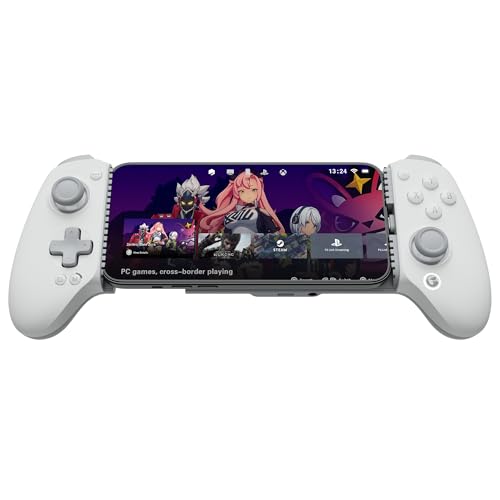
GameSir X4 Aileron -- Best MFi Controller for iPhone
The GameSir X4 Aileron holds Apple MFi certification, ensuring full compatibility with iPhone's native game controller API and Apple Arcade titles. The clip-on USB-C (or Lightning) design connects without pairing and works instantly. The Hall Effect analog sticks reduce stick drift compared to potentiometer-based sticks. a meaningful durability advantage for mobile gaming. Trigger feel is smooth and adjustable. If you primarily game on iPhone and want native MFi support without cloud gaming workarounds, the X4 Aileron is the cleanest choice.
Reasons to buy
- Officially MFi Certified Controller: Play seamlessly gaming experience on iPhone and iPad
- 125-215mm Ultra-Wide Stretch Design: Engineered with an adjustable stretch range from 125m
- Console Controller Grade: Designed with console-controller-level ergonomics and laser-text
- The Anti Stick-Drift Solution: Equipped with GameSir Hall Effect sticks, the G8+ MFi deliv
- Hall Effect Analog Triggers: GameSir’s precision-tuned Hall Effect analog triggers provide

Xbox Wireless Controller -- Best for Cloud Gaming on Phone
For cloud gaming specifically. Xbox Cloud Gaming, PlayStation Remote Play, GeForce NOW. the Xbox Wireless Controller connected via Bluetooth is a proven, comfortable option. Your phone rests in a separate stand while you hold the controller. This setup is ideal if you already own an Xbox controller; no additional purchase is needed. The Xbox controller's layout is familiar and all cloud gaming services recognize it natively. It's less compact than a clip-on design but delivers full-size controller ergonomics on your phone's screen output.
Reasons to buy
- Officially licensed by Xbox. Bluetooth connection. Supports Xbox Cloud Gaming.
- Officially supported by Apple. Compatible with Apple and Android devices. Stretchable desi
- Hall Effect Joysticks and Triggers
- Tactile bumpers and D-pad, 2 Pro back paddle buttons, Xbox button, and wear-resistant meta
- Support 8BitDo Ultimate Software V2 on mobile.
What to look for
What to consider
The first decision is form factor: clip-on controllers that physically attach to your phone are more portable and convenient for on-the-go gaming; separate Bluetooth controllers need a stand but feel more like traditional gaming. Next, check connection type: USB-C clip-ons offer zero wireless latency and instant pairing; Bluetooth adds 5-10 ms but enables multi-device use. Confirm compatibility with your phone's OS. MFi for iPhone, generic Android Bluetooth for Android. Finally, check which games you'll play: cloud gaming services work with virtually any controller, while native mobile titles may require specific API support.
What to consider
For PC controller recommendations, see our [best controller for PC wireless](/articles/best-controller-for-pc-wireless) and [best controller for PC Windows 10](/articles/best-controller-for-pc-windows-10) guides. Our testing process is detailed on the [methodology](/methodology) page.
FAQs
Many Bluetooth phone controllers support both Android and iPhone. check the product listing for iOS and Android compatibility. Controllers that use Apple MFi certification work natively with iPhone game titles and Apple Arcade. Universal Bluetooth controllers like the Backbone One (with separate Android and iPhone versions) and 8BitDo controllers support both platforms with minor configuration. Always verify your phone's OS and the controller's compatibility before buying.
Clip-on controllers that attach directly to your phone are the most convenient option. they keep the phone and controller together as a single unit. Bluetooth controllers offer more flexibility and can be used with a phone stand. USB-C or Lightning direct-connect controllers eliminate wireless latency entirely. For cloud gaming services like Xbox Cloud Gaming or GeForce NOW on mobile, any Bluetooth or USB-connected controller works well.
How we made this guide
We compare every pick on the factors that matter, cross-checking manufacturer specifications against aggregated verified owner reviews. We rank independently and never take payment for placement. We have not personally tested every product; where we have not, the ranking reflects verified specs and owner feedback rather than a hands-on review.
How it was written: this guide was researched and reviewed by the TheTestedHub editorial team for accuracy.
Affiliate disclosure: TheTestedHub is reader-supported. When you buy through links on our site, we may earn a commission at no extra cost to you.
Related guides

Educational Games 2026 That Grow With Your Child

7 Android TV Controllers Worth Your Money

Wooting 60HE Review (2026): 7 Months With the Analog Keyboard

Logitech G Pro X Superlight 2 Review (2026): The Esports

HyperX Cloud III Wireless Review (2026)

Steam Deck OLED (1TB) Review (2026): 8 Months Later, Still

Logitech G502 Hero Review (2026)
